
Appearing on Google Street View can significantly boost visibility for businesses, tourist attractions, or unique properties. When users explore an area virtually, a clear 360-degree view of your location builds trust, enhances credibility, and improves local search performance. While Google typically captures imagery through its own vehicles or aerial methods, not all locations are automatically included. Fortunately, there are proactive steps you can take to ensure your property appears in high-quality, interactive format on Street View.
This guide walks through the entire process—from eligibility checks to publishing—so you can successfully get your location featured with professional results that align with Google’s standards.
1. Determine Your Eligibility and Goals
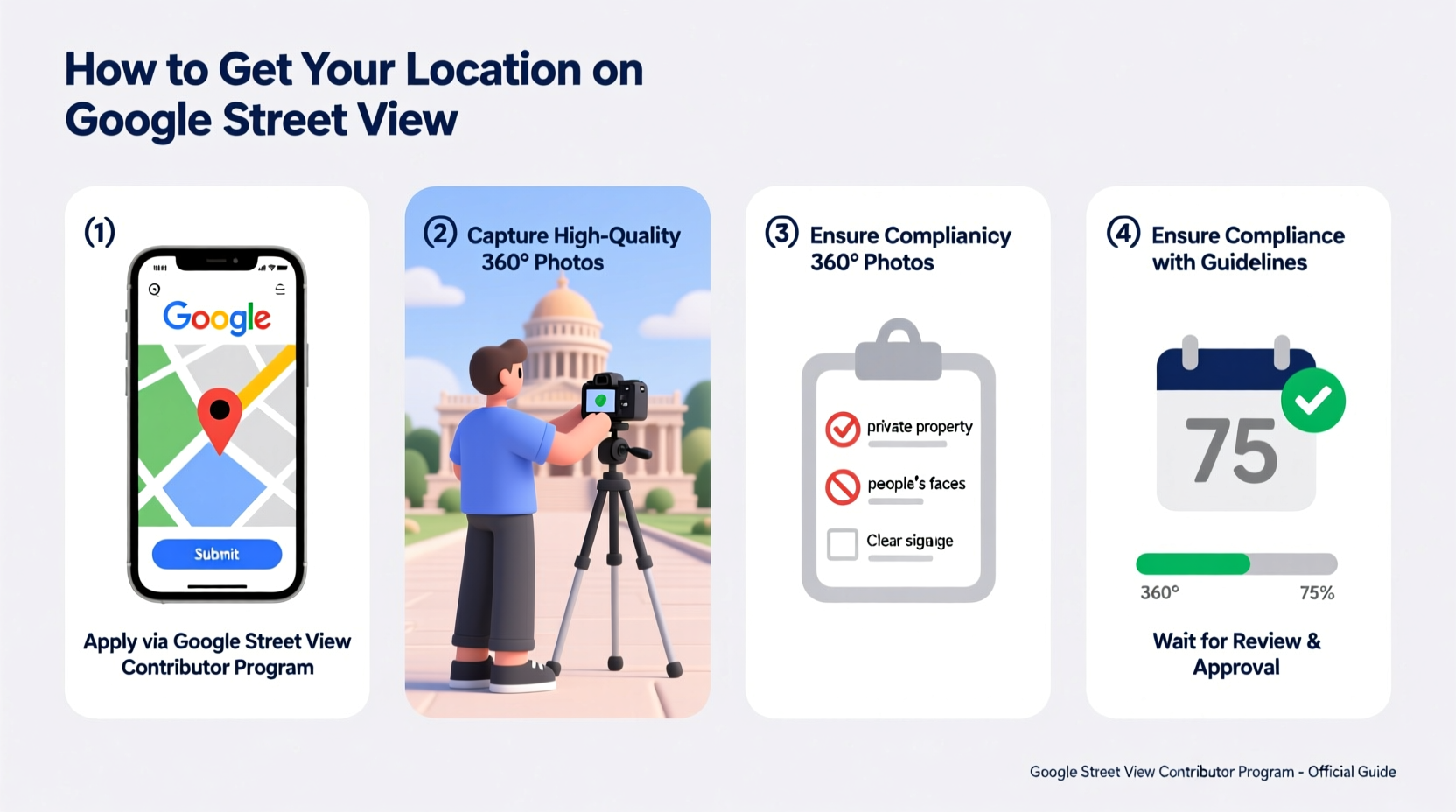
Before investing time and resources, confirm whether your location qualifies for Street View inclusion. Google accepts submissions from:
- Businesses (restaurants, retail stores, salons)
- Tourist attractions (museums, parks, historic sites)
- Hotels, resorts, and vacation rentals
- Real estate listings (with interior tours)
- Educational institutions and medical facilities
Note: Private residences generally aren’t eligible unless they’re part of a tour-based business like a heritage home or boutique B&B.
2. Choose the Right Capture Method
Google supports multiple ways to add imagery. The method you choose depends on control, budget, and technical capability.
Option A: Hire a Google Trusted Photographer
These professionals are certified by Google to capture 360-degree photos using approved equipment. They upload directly to Google, ensuring fast publication and compliance with quality standards.
Option B: DIY with a 360-Degree Camera
If you own a compatible camera (e.g., Ricoh Theta X, Insta360 ONE RS), you can self-capture and upload via Google Maps Studio. This route saves money but requires attention to detail.
Option C: Request Google to Visit (Limited Availability)
While Google no longer accepts direct public requests for car-based imaging, they use algorithms to determine coverage gaps. You can indirectly influence this by keeping your Google Business Profile updated and frequently used.
“Partnering with a Trusted Photographer ensures your visuals meet Google’s technical thresholds—avoiding rejection due to stitching errors or poor lighting.” — David Lin, Google Maps Content Specialist
3. Prepare Your Location for Imaging
First impressions matter. Whether captured by a pro or yourself, your space should look clean, organized, and inviting.
| Area | Do | Don't |
|---|---|---|
| Entrance & Exterior | Clean windows, trim landscaping, open doors | Leave trash bins visible or pathways blocked |
| Interior Spaces | Turn on lights, declutter surfaces, stage key areas | Display personal items or unfinished renovations |
| Staff & Customers | Have employees ready in uniform if desired | Allow random guests to walk through shots |
For indoor spaces, plan a logical walkthrough path. Start at the entrance, move through main rooms, and end at notable features (e.g., a rooftop patio or exhibition hall). Clear walkways and charge devices beforehand to avoid interruptions.
4. Capture and Upload Your Street View Tour
Follow this timeline to publish your tour efficiently:
- Week 1: Book a Trusted Photographer or prepare your 360 camera. Test shots indoors and outdoors to check exposure and stitching.
- Day of Shoot: Open curtains, turn on ambient lighting, and ensure quiet conditions. Capture overlapping images every 5–10 feet for smooth navigation.
- Post-Capture: If self-uploading, stitch photos using software like PTGui or Kolor Autopano, then export in equirectangular format (JPEG, under 50MB).
- Upload: Go to Google Maps Studio, select “Add a photo tour,” and follow prompts to tag locations and sequence images.
- Verification: Google reviews submissions within 3–7 days. Approved tours appear on Google Maps, Search, and Street View.
5. Real Example: How a Boutique Hotel Got Featured
The Willow Creek Inn, a small mountain lodge in Colorado, wanted to stand out among regional competitors. Despite having strong reviews, their online presence lacked visual depth. The owner hired a Google Trusted Photographer to capture both exterior views and guest suites.
The team scheduled the shoot during mid-morning for optimal sunlight. Rooms were staged with fresh linens, lit fireplaces, and steaming coffee to evoke warmth. After uploading, the tour was live within five days. Within two months, the property saw a 40% increase in direct booking inquiries and higher engagement on Google Reviews.
Their success came not just from being on Street View—but from presenting an emotionally compelling experience before guests ever arrived.
Essential Checklist Before Publishing
Use this checklist to ensure your submission meets Google’s standards and maximizes impact:
- ✅ Confirm your Google Business Profile is claimed and verified
- ✅ Choose a capture method (Trusted Photographer or DIY with compatible gear)
- ✅ Clean and stage all areas to be photographed
- ✅ Capture high-resolution 360 images with consistent overlap
- ✅ Ensure no logos, screens, or mirrors display outdated/incorrect info
- ✅ Upload through Google Maps Studio with accurate location tags
- ✅ Monitor email for Google’s approval notice (check spam folder)
- ✅ Share the published tour on your website and social channels
Frequently Asked Questions
How long does it take for my tour to go live on Street View?
After upload, Google typically processes and publishes tours within 3 to 7 business days. Delays may occur if images fail automated quality checks (e.g., blurry frames, incorrect formatting).
Can I update or replace my Street View tour later?
Yes. You can upload new imagery at any time. Google will review the update and replace the old version once approved. This is useful after renovations or seasonal changes.
Is there a cost to appear on Google Street View?
Uploading and hosting tours on Google Maps is free. However, hiring a Trusted Photographer usually costs between $250 and $800, depending on property size and complexity.
Final Steps and Ongoing Visibility
Getting your location on Street View isn’t a one-time task—it’s part of a broader digital presence strategy. Once live, encourage customers to leave reviews mentioning the virtual tour. Share the link in email signatures, on your website, and in local advertising.
Monitor insights through Google Business Profile to see how many users view your tour and whether it correlates with increased calls or visits. Over time, consider seasonal updates to keep the experience current.
“Virtual tours have become the new front door. For many customers, your Street View experience is their first interaction with your business.” — Lena Patel, Digital Marketing Strategist for Local Tourism Boards
Take Action Today
Your location deserves to be seen in full context—not just as a pin on a map, but as a real, welcoming space. Whether you run a café, gallery, or retreat center, a Street View presence bridges the gap between curiosity and confidence. By following these steps, you’re not just adding imagery—you’re building trust, improving discoverability, and giving potential visitors a reason to choose you.




 浙公网安备
33010002000092号
浙公网安备
33010002000092号 浙B2-20120091-4
Comments
No comments yet. Why don't you start the discussion?