
The Megir digital analog watch blends classic design with modern functionality, offering a hybrid display that shows both traditional clock hands and an integrated digital screen. While elegant in appearance, its multifunctional features—such as stopwatch, alarm, countdown timer, and dual time zones—can seem overwhelming at first. With the right approach, however, you can master your watch quickly and use it to streamline your daily routine.
This comprehensive guide walks you through every essential function of your Megir digital analog watch, from basic time reading to advanced settings, ensuring you get the most out of your wearable tool.
Understanding the Watch Layout and Buttons
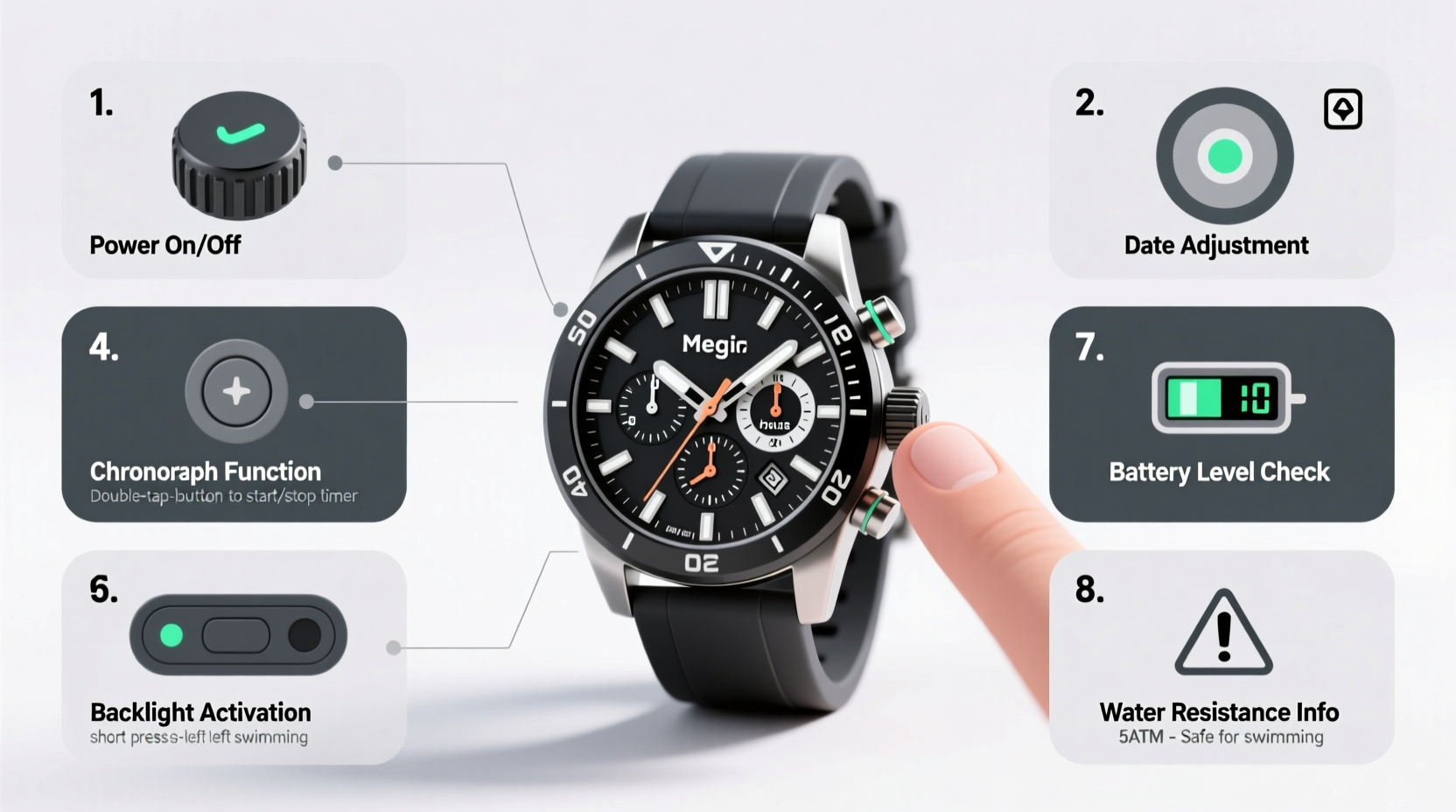
Before diving into functions, familiarize yourself with the physical layout. Most Megir digital analog models feature three or four buttons labeled “A,” “B,” “C,” and sometimes “D” around the watch case. Each button serves multiple roles depending on the mode you're in. Here's a standard configuration:
| Button | Primary Function | Secondary Functions |
|---|---|---|
| A (Top-left) | Mode Selection | Switch between Time, Alarm, Stopwatch, Timer |
| B (Top-right) | Start/Stop or Confirm | Start stopwatch, confirm settings |
| C (Bottom-left) | Reset or Light | Reset stopwatch, toggle backlight |
| D (Bottom-right) | Adjust/Set | Adjust values during setup |
The analog hands show hours and minutes, while the digital sub-dial typically displays seconds, date, day, or active mode indicators like alarm status or stopwatch results.
Step-by-Step: Setting the Time and Date
Accurate timekeeping starts with proper setup. Follow these steps to set your Megir watch correctly:
- Enter Time Mode: Press Button A until the digital display reads “TIME” or shows the current hour blinking.
- Enter Edit Mode: Hold Button B for 2–3 seconds until the hour digits begin to flash.
- Adjust Hour: Press Button D to cycle forward through the hours. Note: Some models require holding D to speed up scrolling.
- Confirm and Move to Minutes: Press Button B again to lock the hour and move to minute adjustment.
- Set Minutes: Use Button D to adjust minutes. Press B to confirm.
- Set Date and Day (if applicable): Continue pressing B to reach date/day fields. Adjust with D and confirm with B.
- Exit Setup: Press A to return to normal time display.
Ensure your 12/24-hour format matches your preference. To change it, enter time mode, hold B until “12H” or “24H” appears, then press D to toggle. Confirm with B.
Using Core Functions: Alarm, Stopwatch, and Timer
Your Megir watch is more than a timepiece—it’s a personal assistant on your wrist. Master these key functions to boost productivity and punctuality.
Setting the Alarm
- Press Button A until “ALM” or bell icon appears.
- Hold Button B to make the hour flash.
- Use Button D to set desired wake-up hour.
- Press B to confirm and adjust minutes.
- Press A to save and exit.
To turn the alarm on or off, press Button B while in ALM mode—the digital display will show “ON” or “OFF.” You can set multiple alarms on some models by repeating the process after switching alarm slots.
Using the Stopwatch
- Navigate to “CHR” (Chronograph) mode using Button A.
- Press Button B to start timing.
- Press B again to pause; press C to reset to zero.
- After stopping, press D to store lap times if supported.
The stopwatch typically measures up to 59 minutes and 59.99 seconds with centisecond precision.
Activating the Countdown Timer
- Press A until “CNT” or “TMR” appears.
- Hold B to enter setting mode.
- Use D to set minutes, then seconds.
- Press B to confirm.
- Press B again to start the countdown.
When the timer ends, the watch beeps for 10–15 seconds. Press any button to stop the alert.
Real-World Example: Maximizing Your Morning Routine
Consider Sarah, a project manager who struggled with morning delays. After receiving her Megir digital analog watch, she programmed two alarms: one at 6:30 AM for waking up, another at 7:15 AM for leaving home. She used the stopwatch to track her shower time and reduce it from 15 to 9 minutes, saving time daily. The backlight feature helped her check the time in low-light conditions without turning on room lights and disturbing her partner.
Within a week, Sarah improved her punctuality and began her days more calmly. Her watch became a silent productivity partner—not just telling time, but shaping it.
“Hybrid watches like the Megir model bridge aesthetics and utility. When users understand how to leverage both analog readability and digital precision, they gain real-time control over their schedules.” — James Lin, Wearable Technology Analyst
Troubleshooting Common Issues
Even well-designed watches can present minor challenges. Here are frequent problems and solutions:
| Issue | Possible Cause | Solution |
|---|---|---|
| Buttons not responding | Watch in sleep mode or water exposure | Press all buttons for 3 seconds to reset; dry thoroughly if wet |
| Time drifting | Battery low or initial calibration needed | Replace battery every 1–2 years; recalibrate after replacement |
| Alarm not sounding | Alarm turned off or silent mode enabled | Check ALM display and ensure “ON” is visible |
| Backlight not working | Function disabled or battery depletion | Press C (or A+C together) to activate; test after charging or battery change |
Frequently Asked Questions
Can I swim with my Megir digital analog watch?
Most Megir hybrid watches are water-resistant up to 3 ATM (30 meters), meaning they can handle splashes and rain but not swimming or showering. Always verify the specific model’s rating before water exposure.
How do I turn on the backlight?
Press Button C (or sometimes A + C together) to activate the LED light. It typically stays on for 3–5 seconds. Avoid excessive use to preserve battery life.
Why does the second hand jump in 4-second intervals?
This is normal in certain modes (like stopwatch or timer preparation). Return to regular time mode by pressing A until the second hand resumes smooth sweeping motion.
Essential Care Checklist
To keep your Megir watch functioning optimally, follow this maintenance checklist:
- ✅ Wipe the case and band weekly with a soft, dry cloth
- ✅ Check battery level annually or when timekeeping becomes erratic
- ✅ Avoid extreme temperatures (above 60°C or below -10°C)
- ✅ Keep away from strong magnetic fields (e.g., speakers, phones)
- ✅ Test alarm and timer functions monthly
- ✅ Store in a cool, dry place when not in use
Conclusion: Make Time Work for You
Your Megir digital analog watch is designed to serve both form and function. By mastering its interface and features, you transform it from a stylish accessory into a practical tool for managing your day with precision. Whether you're tracking fitness intervals, staying on schedule with alarms, or simply appreciating the seamless blend of analog elegance and digital intelligence, your watch empowers you to stay ahead—literally and figuratively.




 浙公网安备
33010002000092号
浙公网安备
33010002000092号 浙B2-20120091-4
Comments
No comments yet. Why don't you start the discussion?