
In recent years, standing desks have surged in popularity as a solution to the well-documented health risks of prolonged sitting. Office workers, remote professionals, and even students are swapping traditional seated setups for adjustable-height workstations in hopes of improving posture, reducing back pain, and boosting energy. But as with any major shift in daily routine, the reality is more nuanced than the marketing suggests. While standing desks can support better spinal alignment and reduce strain from slouching, improper use may lead to new musculoskeletal problems—especially in the lower back, hips, and legs.
The key lies not in simply standing more, but in how you stand, how long you do it, and how well your workstation supports natural body mechanics. This article explores the evidence behind standing desks and posture, identifies common pitfalls, and provides actionable strategies to make standing work both sustainable and beneficial.
The Posture Problem with Sitting
Sedentary behavior has been linked to a host of health concerns, including cardiovascular disease, metabolic syndrome, and chronic back pain. One of the most immediate effects of prolonged sitting is poor posture. When seated for hours, many people adopt a forward head position, rounded shoulders, and a slouched lower back—postural patterns that place excessive stress on the spine’s lumbar region.
Dr. Karen Jacobs, clinical professor at Boston University and occupational therapist, explains:
“Sitting for extended periods, especially without lumbar support, leads to weakened core muscles and tight hip flexors. Over time, this alters spinal alignment and increases the risk of disc degeneration.” — Dr. Karen Jacobs, Occupational Therapist & Ergonomics Specialist
This postural deterioration contributes to what’s commonly known as “tech neck” and lower back strain. Standing desks emerged as a countermeasure, promising to realign the spine by encouraging upright positioning and engaging stabilizing muscles.
How Standing Desks Can Improve Posture
When used correctly, standing desks promote a more neutral spine alignment. Standing naturally encourages the head to stay over the shoulders and the pelvis to maintain a balanced tilt, reducing the forward slump often seen in seated positions.
Benefits include:
- Reduced lumbar pressure: Standing distributes weight more evenly across the spine compared to sitting, which compresses the discs in the lower back.
- Activation of core and gluteal muscles: Maintaining balance while standing engages postural muscles that tend to go dormant during long sitting sessions.
- Improved circulation: Better blood flow reduces fatigue and helps maintain alertness throughout the day.
- Encouragement of movement: Standing setups make it easier to shift weight, stretch, or take short walking breaks.
A 2020 study published in Applied Ergonomics found that participants who alternated between sitting and standing every 30 minutes reported significantly less upper back and neck discomfort after four weeks compared to those who remained seated all day.
Potential Risks: How Standing Desks Can Cause New Back Issues
Despite their benefits, standing desks aren’t a universal fix. In fact, improper use can introduce new sources of discomfort—particularly in the lower back, knees, and feet. The issue isn’t standing itself, but sustained static standing without proper ergonomics.
Common problems include:
- Lower back strain: Locking the knees or arching the back while standing shifts the center of gravity, increasing lumbar load.
- Leg and foot pain: Prolonged standing on hard surfaces can lead to plantar fasciitis or varicose veins.
- Muscle fatigue: Unaccustomed muscles (like calves and lower back) may tire quickly, leading to compensatory slouching or leaning.
- Uneven weight distribution: Leaning on one leg or shifting posture unconsciously creates imbalances over time.
One case study followed Sarah, a 34-year-old graphic designer who transitioned to a full-time standing desk after experiencing chronic lower back pain from sitting. Initially, she felt relief. However, within six weeks, she developed sharp pain in her right lower back and discomfort in her left heel. Upon evaluation by a physical therapist, it was determined that Sarah had been standing for up to five hours straight each day, wearing flat shoes on a hardwood floor, and failing to adjust her monitor height. Her posture had improved in the upper body, but her pelvis tilted anteriorly due to fatigue, causing new lumbar strain.
Her recovery plan included structured sit-stand intervals, anti-fatigue mat usage, and corrective exercises—highlighting the importance of holistic implementation.
Ergonomic Best Practices for Standing Desks
To maximize the benefits of a standing desk while minimizing risks, follow these evidence-based guidelines:
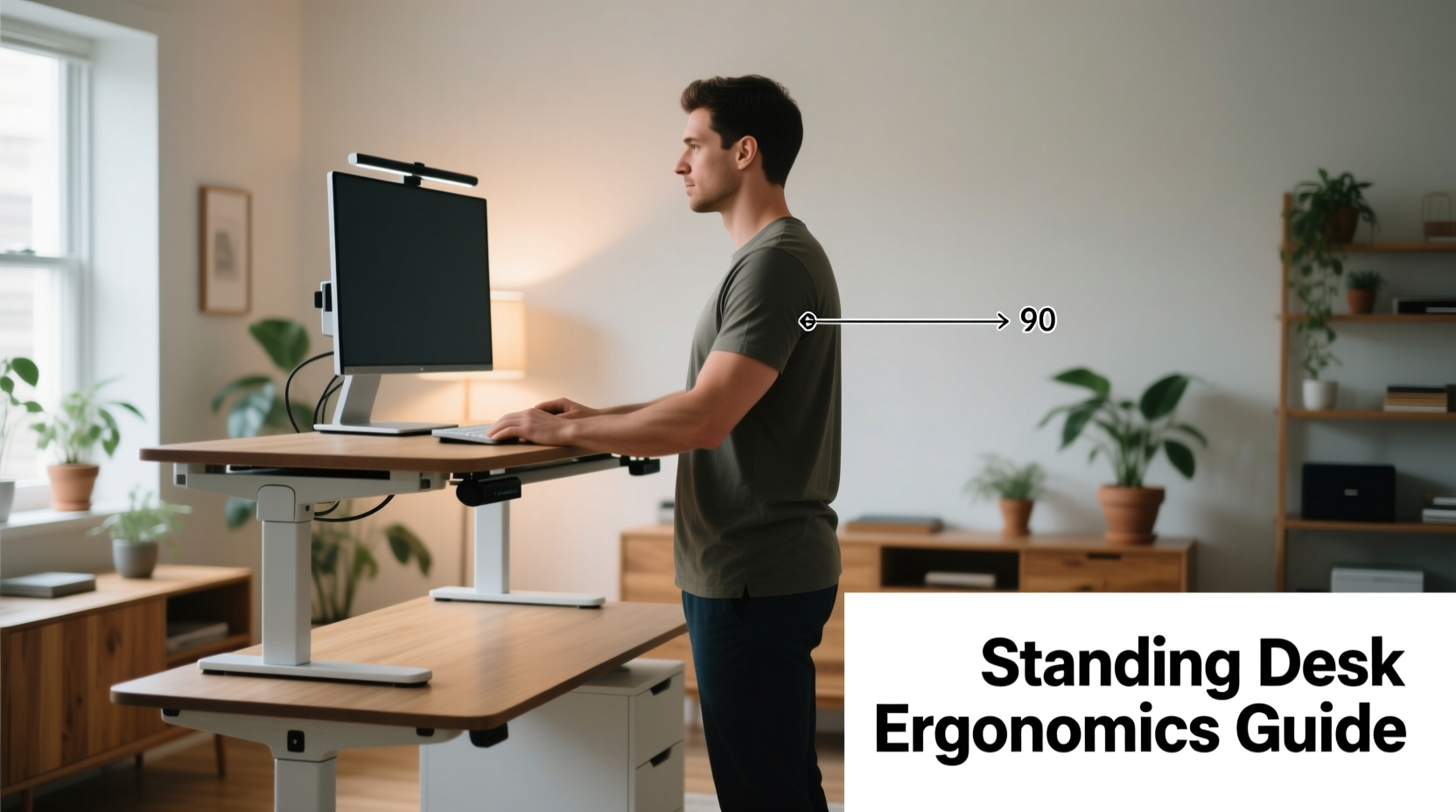
- Adjust desk height properly: Your elbows should be at a 90-degree angle when typing, with wrists straight and forearms parallel to the floor.
- Position your monitor at eye level: The top of the screen should be at or slightly below eye level, about an arm’s length away.
- Stand with neutral posture: Keep your head aligned over your shoulders, shoulders relaxed, spine in natural curves, knees slightly bent, and weight evenly distributed.
- Use an anti-fatigue mat: These mats encourage subtle muscle engagement and reduce pressure on joints.
- Wear supportive footwear: Avoid going barefoot or wearing flimsy flats. Cushioned, low-heeled shoes help absorb impact.
- Introduce movement: Shift your stance, perform micro-stretches, or use a small footrest to alternate leg elevation.
| Ergonomic Factor | Do | Don't |
|---|---|---|
| Desk Height | Elbows at 90°, wrists neutral | Too high (shoulders hunched) or too low (reaching down) |
| Monitor Position | Top at or below eye level, arm’s length away | On desk surface, forcing downward gaze |
| Footwear | Supportive shoes with cushioning | Barefoot or flip-flops |
| Floor Surface | Anti-fatigue mat | Hard tile or concrete without padding |
| Standing Duration | Alternate every 30–45 minutes | Stand continuously for >2 hours |
Step-by-Step Guide to Transitioning to a Standing Desk
Adopting a standing desk should be a gradual process to allow your body to adapt. Follow this timeline:
- Week 1: Begin with 15–20 minutes per day. Use a timer to track standing intervals. Focus on form and comfort.
- Week 2: Increase to 30–45 minutes total, split into two sessions. Add a footrest or mat if not already using one.
- Week 3: Aim for two 30-minute standing blocks. Incorporate light stretches between sessions (e.g., calf raises, shoulder rolls).
- Week 4: Establish a rhythm of 30 minutes standing, 30 minutes sitting. Adjust based on energy and comfort levels.
- Ongoing: Listen to your body. If you feel pain (not mild fatigue), reduce standing time and reassess your setup.
FAQ: Common Questions About Standing Desks and Posture
Can standing all day worsen my lower back pain?
Yes, if done improperly. Continuous standing without breaks, poor footwear, or incorrect desk height can increase pressure on the lumbar spine. The goal is dynamic posture—not static standing. Alternating with sitting and incorporating movement is essential.
How long should I stand at my desk each day?
There’s no one-size-fits-all answer, but research suggests alternating 30–45 minutes of standing with equal sitting time is optimal for most people. Total standing duration should generally not exceed two hours without significant breaks or movement.
Do I need a special mat or shoes for a standing desk?
An anti-fatigue mat is highly recommended—it reduces joint stress and encourages micro-movements that improve circulation. Supportive footwear (even indoor sneakers or orthopedic slippers) makes a noticeable difference, especially on hard floors.
Checklist: Setting Up a Healthy Standing Workstation
- ✅ Adjust desk so elbows are at 90 degrees when typing
- ✅ Position monitor so the top line is at eye level
- ✅ Use an anti-fatigue mat under your feet
- ✅ Wear supportive, cushioned shoes
- ✅ Set a timer to alternate sitting and standing every 30–45 minutes
- ✅ Keep a footrest or small stool to shift leg position
- ✅ Practice neutral posture: ears over shoulders, shoulders over hips
- ✅ Incorporate light stretches hourly (neck rolls, torso twists, calf raises)
“The ideal workstation isn’t fully sitting or fully standing—it’s one that promotes movement and variability throughout the day.” — Dr. Peter Frahm, Industrial Ergonomist, Cornell University
Conclusion: Finding Balance for Long-Term Spinal Health
Standing desks are not a magic solution, nor are they inherently harmful. Their impact on posture depends entirely on how they’re used. When integrated thoughtfully—with attention to ergonomics, timing, and individual physiology—they can play a valuable role in reducing the negative effects of sedentary work life. However, replacing eight hours of sitting with eight hours of standing simply trades one set of problems for another.
The future of healthy work isn’t about choosing between sitting and standing—it’s about embracing movement as a constant. Whether you use a standing desk or not, the goal is to break stillness regularly, support natural spinal alignment, and listen to your body’s signals.




 浙公网安备
33010002000092号
浙公网安备
33010002000092号 浙B2-20120091-4
Comments
No comments yet. Why don't you start the discussion?