
In an age where digital work dominates daily life, repetitive strain injuries—especially wrist pain—are increasingly common among office workers, remote employees, and creatives who spend hours at a computer. One solution that’s gained traction in recent years is the vertical mouse. Marketed as a more ergonomic alternative to traditional flat mice, these devices promise reduced strain, improved posture, and long-term comfort. But do they actually deliver on these claims? Or are they just another trendy gadget with exaggerated benefits?
This article dives into the biomechanics of wrist movement, examines clinical research, compares user experiences, and evaluates whether switching to a vertical mouse can genuinely help prevent or alleviate wrist pain.
The Anatomy of Wrist Pain
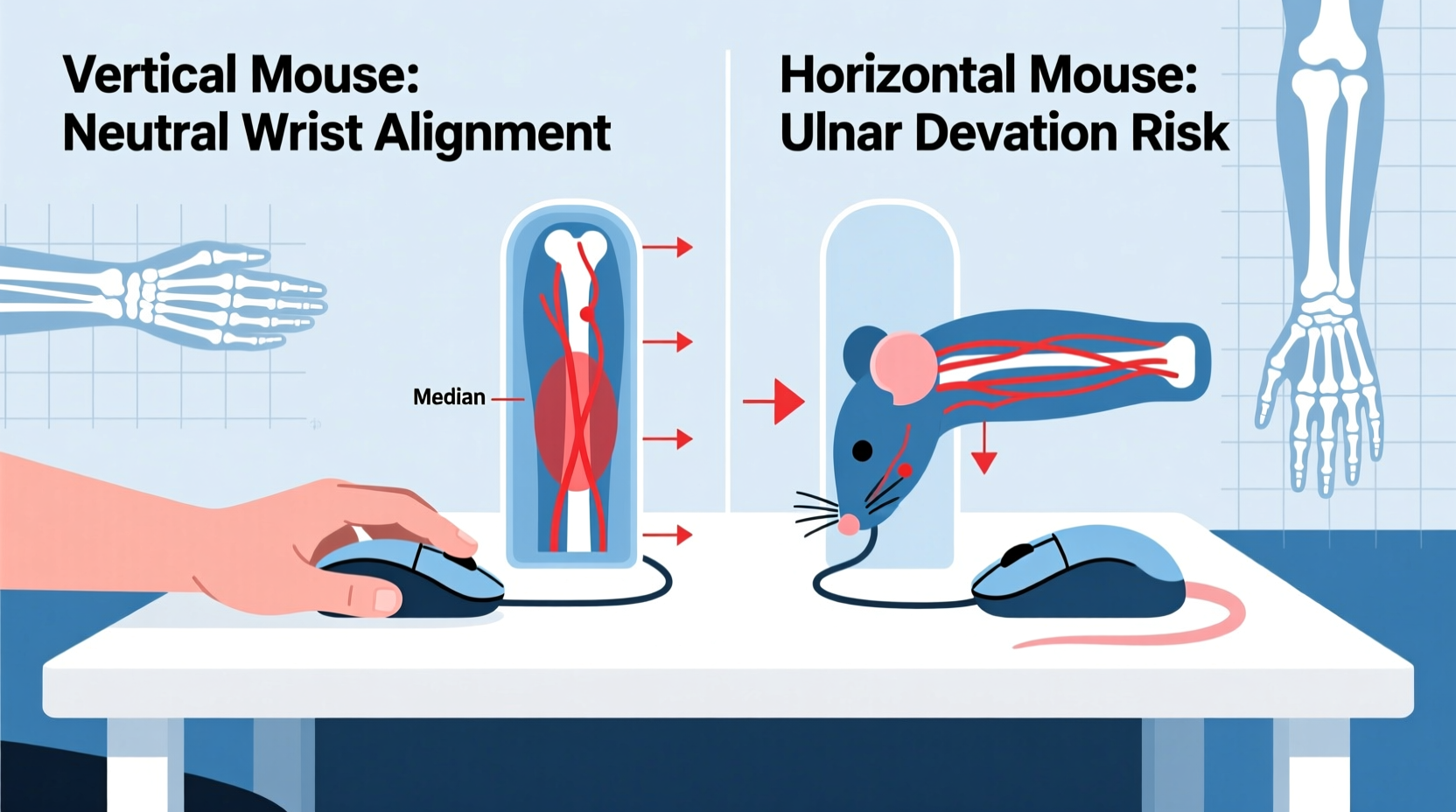
Wrist pain from computer use typically stems from prolonged unnatural positioning of the hand and forearm. The primary culprit is ulnar deviation—the inward bending of the wrist toward the little finger—combined with forearm pronation, where the palm faces downward, as when using a standard horizontal mouse.
When you grip a conventional mouse, your forearm rotates internally, placing stress on tendons, ligaments, and nerves running through the carpal tunnel. Over time, this repetitive strain can lead to conditions like:
- Carpal Tunnel Syndrome (CTS)
- Tendonitis
- Repetitive Strain Injury (RSI)
- Cubital Tunnel Syndrome
A 2021 study published in the *Journal of Occupational Rehabilitation* found that prolonged forearm pronation significantly increases pressure on the median nerve—key in CTS development. The researchers concluded that reducing pronation could lower the risk of nerve compression by up to 35%.
“Traditional mouse designs force users into a ‘handshake’ position that’s biomechanically inefficient. A vertical orientation brings the arm closer to its natural alignment.” — Dr. Lena Torres, Ergonomics Researcher, University of Michigan
How Vertical Mice Work: The Science Behind the Design
Vertical mice are engineered to keep the hand in a neutral “handshake” position—except it’s not a handshake with someone else, but rather a natural mid-rotation state between full palm-down and palm-up. This position reduces forearm pronation by approximately 50–60%, according to data from the Cornell University Ergonomics Lab.
Instead of lying flat, the vertical mouse stands upright, so your hand rests with the thumb on top and fingers curled around the side. This alignment promotes:
- Reduced ulnar deviation
- Lower muscle activation in the forearm
- Better blood circulation due to relaxed grip
- Decreased pressure on the carpal tunnel
Electromyography (EMG) studies show that muscle activity in the flexor digitorum (forearm muscles responsible for finger movement) drops by 15–25% when using a vertical mouse compared to a standard one. Lower muscle effort means less fatigue over extended use.
Comparing Mouse Types: Features and Trade-offs
| Mouse Type | Ergonomic Benefit | Potential Drawback | Best For |
|---|---|---|---|
| Standard Horizontal | Familiar design, widely available | High forearm pronation, ulnar deviation | Casual users, short sessions |
| Vertical Mouse | Reduces pronation, neutral wrist alignment | Learning curve, limited button customization | Users with wrist pain, long workdays |
| Trackball | Minimal hand movement, stationary base | Finger strain, cleaning required | People with limited desk space |
| Pen Mouse | Natural grip, low wrist extension | Steep learning curve, niche availability | Digital artists, precise tasks |
| Split/Adjustable Mouse | Customizable angle and spread | Expensive, bulky | Advanced ergonomic setups |
While vertical mice score high on ergonomic theory, their effectiveness depends heavily on proper setup and consistent usage. Simply swapping devices without adjusting posture or taking breaks may yield minimal results.
Real-World Experience: A Case Study
Jamie R., a 34-year-old graphic designer, began experiencing sharp pain along her right wrist after transitioning to full-time remote work. She used a standard optical mouse for 8–10 hours daily and noticed numbness in her index and middle fingers by mid-afternoon.
After consulting a physical therapist, Jamie was advised to try a vertical mouse. She chose a mid-range model with adjustable DPI and a contoured grip. The first week was challenging—her hand felt awkward, and she frequently missed clicks. However, by day 10, the discomfort had noticeably decreased.
Within three weeks, Jamie reported a 70% reduction in wrist pain and no longer experienced nighttime tingling. She also adjusted her chair height and started using a padded wrist rest. “It wasn’t just the mouse,” she said. “But changing to vertical was the turning point.”
Her experience aligns with broader trends: many users report initial discomfort followed by significant improvement after a two- to four-week adaptation period.
Step-by-Step Guide to Transitioning to a Vertical Mouse
Moving to a vertical mouse isn’t just about plugging in a new device. To maximize benefits and minimize frustration, follow this structured approach:
- Choose the Right Model: Look for one with adjustable DPI, a comfortable grip size, and ambidextrous or right/left-specific design depending on your dominant hand.
- Set Up Your Workspace: Position your monitor at eye level, elbows at 90 degrees, and the mouse close to your body to avoid reaching.
- Start Slowly: Use the vertical mouse for 1–2 hours per day initially. Alternate with your old mouse to build muscle memory.
- Focus on Form: Keep your forearm supported, shoulders relaxed, and avoid gripping tightly. Let the mouse guide your hand, not the other way around.
- Monitor Symptoms: Track any changes in pain, fatigue, or dexterity. Note improvements weekly.
- Commit Fully After 3 Weeks: By this point, most users adapt. If pain worsens, consult a healthcare provider.
Expert Recommendations and Limitations
While vertical mice are praised for their ergonomic advantages, experts caution against viewing them as a universal fix.
“A vertical mouse can be a powerful tool in injury prevention, but it’s only one piece of the puzzle. Posture, break frequency, and overall workstation layout matter just as much.” — Dr. Aaron Kim, Occupational Therapist and Ergonomics Consultant
Some limitations include:
- Gaming and Precision Tasks: Many vertical models lack the responsiveness and button layout needed for fast-paced games or detailed photo editing.
- Size Variability: Not all hands fit standard vertical designs. People with smaller or larger hands may struggle with comfort.
- Portability: Their taller profile makes them harder to carry than slim wireless mice.
- Cost: Quality vertical mice range from $60–$120, which may be prohibitive for some users.
Additionally, individuals with existing nerve damage or advanced CTS should seek medical advice before relying solely on ergonomic tools.
Checklist: Is a Vertical Mouse Right for You?
Before making the switch, assess your needs with this checklist:
- ✅ Do you spend more than 4 hours a day using a mouse?
- ✅ Have you experienced wrist, forearm, or hand pain during or after computer use?
- ✅ Are you willing to invest 2–4 weeks adapting to a new hand position?
- ✅ Can you adjust your desk and chair to support proper ergonomics?
- ✅ Are you open to combining the mouse with stretching exercises and regular breaks?
If you answered “yes” to most of these, a vertical mouse is likely worth trying. If not, consider starting with simpler fixes like improving chair height or using wrist supports.
Frequently Asked Questions
Can a vertical mouse cure carpal tunnel syndrome?
No single device can cure carpal tunnel syndrome. However, a vertical mouse can reduce contributing factors like forearm pronation and wrist deviation. It may help manage symptoms and prevent progression, especially when combined with medical treatment, splinting, and physical therapy.
How long does it take to get used to a vertical mouse?
Most users adapt within 10 to 21 days. Initial discomfort is normal as muscles adjust to a new position. Consistent daily use, proper setup, and patience are key. If pain increases beyond two weeks, discontinue use and consult a professional.
Are vertical mice good for left-handed users?
Yes, though options are more limited. Several brands—including Logitech and Evoluent—offer left-handed vertical mice. Symmetrical models can sometimes work for left-handers, but dedicated designs provide better thumb placement and button access.
Conclusion: A Smart Move for Long-Term Comfort
Vertical mouse designs are not a magic bullet, but they represent a meaningful advancement in ergonomic computing. By aligning the hand and forearm closer to a natural, neutral position, they reduce biomechanical stress that contributes to wrist pain and repetitive strain injuries.
The evidence—from clinical studies to real-world testimonials—suggests that for many users, especially those already experiencing discomfort, switching to a vertical mouse can lead to noticeable improvements in comfort and function. However, success depends on more than just the device itself. Proper workspace setup, mindful usage habits, and a willingness to adapt are equally important.
If you’ve been battling wrist pain or want to prevent it before it starts, a vertical mouse is a practical, science-backed investment. Don’t expect instant perfection—give yourself time to adjust. Your hands, wrists, and long-term health will thank you.




 浙公网安备
33010002000092号
浙公网安备
33010002000092号 浙B2-20120091-4
Comments
No comments yet. Why don't you start the discussion?