
Sitting has become an unavoidable part of modern life. Whether at a desk, in a car, or on the couch, most adults spend six to ten hours a day seated. For many, this routine leads to persistent back pain—a nagging ache that starts subtly but can grow into chronic discomfort. While occasional soreness might seem normal, consistent back pain while sitting is not something to ignore. It’s often a sign of poor posture, muscle imbalance, or underlying spinal stress. The good news: most causes are preventable and reversible with simple adjustments.
Why Sitting Causes Back Pain
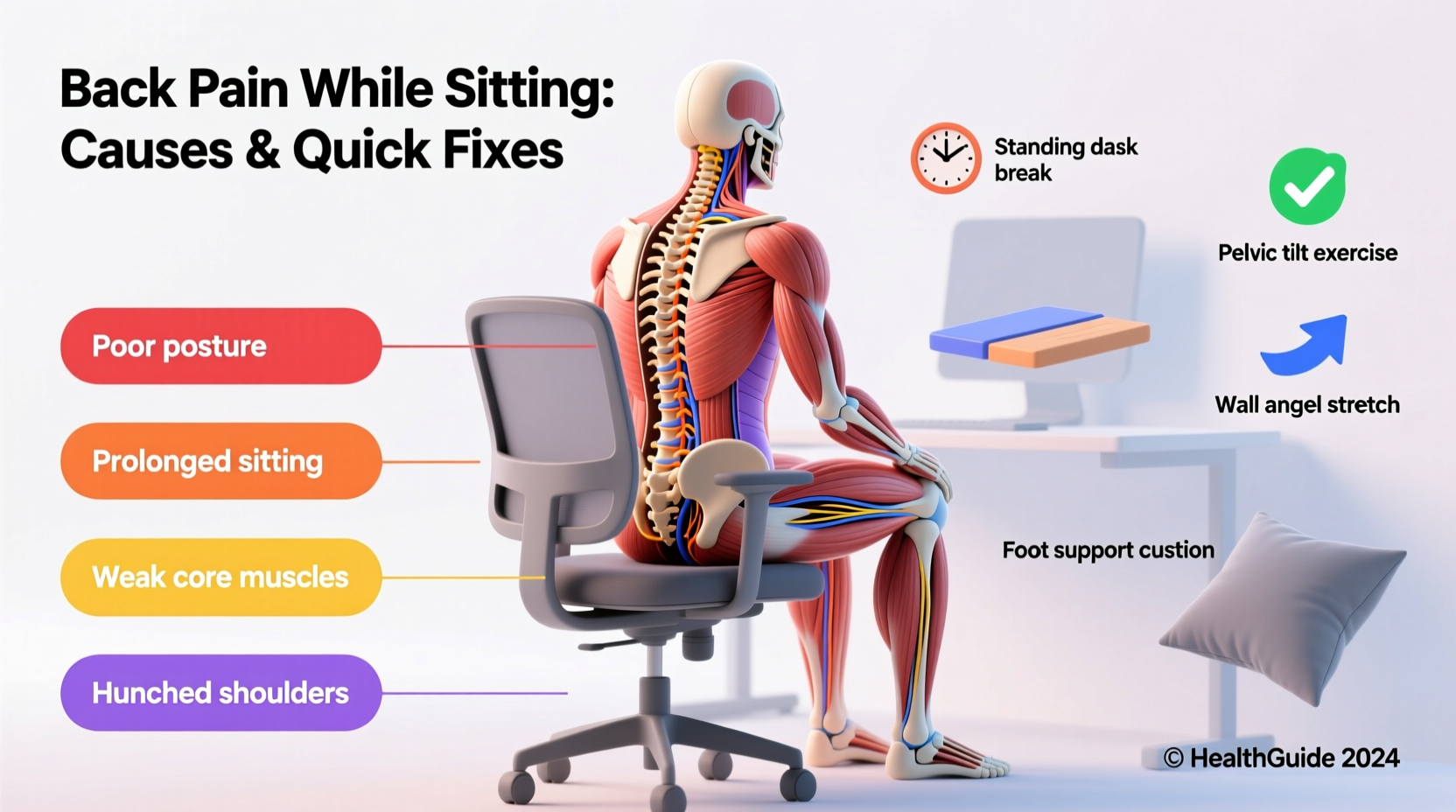
The human spine evolved for movement, not prolonged stillness. When you sit, especially in a slouched or unsupported position, the natural curves of your spine begin to flatten. This shift places uneven pressure on the vertebrae, discs, and surrounding muscles. Over time, these forces accumulate, leading to strain and inflammation.
The lumbar region—the lower back—is particularly vulnerable. In a seated posture, the pelvis tends to tilt backward, reducing the natural inward curve (lordosis) of the lower spine. This flattening increases disc pressure by up to 40% compared to standing, according to research from the *Spine Journal*. Without adequate support, the muscles in the lower back overwork to stabilize the spine, eventually fatiguing and causing pain.
Additionally, sitting compresses the hip flexors and weakens the glutes—muscles critical for pelvic alignment. Tight hips pull the pelvis forward, exacerbating spinal misalignment. Meanwhile, weakened glutes fail to support proper posture, creating a cycle of dysfunction.
Common Causes of Sitting-Related Back Pain
Not all back pain stems from the same source. Identifying the root cause helps determine the right solution. Below are the most frequent contributors:
- Poor Posture: Slouching, hunching forward, or craning the neck strains ligaments and discs.
- Inadequate Chair Support: Chairs without lumbar support force the spine into unnatural positions.
- Incorrect Desk Setup: Monitors too low or keyboards too far encourage forward leaning.
- Muscle Imbalances: Weak core, tight hamstrings, or underactive glutes disrupt spinal stability.
- Disc Degeneration: Age-related wear can make discs less resilient to compression.
- Prolonged Static Positioning: Remaining still for long periods reduces blood flow and increases stiffness.
“Sitting is more stressful to the spine than standing. The key isn’t avoiding sitting altogether—it’s how you sit and how often you interrupt it.” — Dr. Stuart McGill, Spine Biomechanics Researcher, University of Waterloo
Quick Fixes You Can Try Today
You don’t need expensive equipment or medical intervention to start relieving back pain. These practical, immediate strategies can reduce discomfort within days:
1. Adjust Your Chair Height and Position
Your feet should rest flat on the floor with knees at or slightly below hip level. If your chair is too high, use a footrest. Ensure your hips are slightly higher than your knees to maintain a slight forward pelvic tilt, which supports the lumbar curve.
2. Use Lumbar Support
A rolled-up towel or a small cushion placed at the base of your spine can restore the natural lumbar curve. Many ergonomic chairs have built-in adjustable lumbar support—use it. If using a backpack or purse as makeshift support, ensure it doesn’t push you forward.
3. Sit on an Active Seating Surface
Consider switching to a kneeling chair or a stability ball for short periods. These promote micro-movements that engage core muscles and improve posture awareness. However, avoid using them for more than 30–45 minutes at a time to prevent new strains.
4. Align Your Monitor at Eye Level
Position the top of your screen at or just below eye level, about an arm’s length away. This prevents neck strain and discourages slouching. Use books or monitor stands if needed.
5. Keep Arms and Shoulders Relaxed
Your elbows should be close to your body, bent at 90–110 degrees. Keyboard and mouse should be within easy reach so you’re not stretching or elevating your shoulders.
Ergonomic Do’s and Don’ts at Your Desk
| Do | Don't |
|---|---|
| Keep your back supported with lumbar cushion | Sit without any lower back support |
| Position monitor at eye level | Bend your neck down to view the screen |
| Take a break every 30–60 minutes | Work for hours without moving |
| Use an external keyboard and mouse with a laptop | Type on a laptop with it on your lap |
| Keep wrists neutral while typing | Rest wrists on sharp edges or elevated surfaces |
Step-by-Step Guide to a Pain-Free Sitting Routine
Follow this daily sequence to reset your posture and minimize strain:
- Set Up Your Workspace (5 min): Adjust chair height, place lumbar support, align monitor, and position keyboard.
- Warm-Up Stretches (3 min): Perform seated pelvic tilts, shoulder rolls, and chin tucks to activate postural muscles.
- Work in 50-Minute Blocks: Focus for 50 minutes, then take a 10-minute break.
- Break Activities (10 min): Stand, walk, stretch hips, or perform gentle back extensions.
- End-of-Day Reset (7 min): Stretch hip flexors, do cat-cow movements, and foam roll lower back if possible.
This rhythm keeps tissues hydrated, muscles engaged, and joints mobile—critical for preventing stiffness and pain.
Mini Case Study: Recovering From Chronic Office Pain
Mark, a 38-year-old software developer, experienced daily lower back pain after transitioning to remote work. His home office consisted of a dining chair and a laptop on a stack of books. After six months, the pain radiated into his hips, affecting sleep and focus.
He consulted a physical therapist who identified three main issues: no lumbar support, a screen too low, and prolonged sitting without breaks. Mark implemented changes: he bought an ergonomic chair, raised his laptop with a stand, added a footrest, and set hourly movement alarms.
Within two weeks, his pain decreased by 70%. By week four, he was pain-free during work hours. Follow-up assessments showed improved pelvic alignment and reduced muscle tension. Mark now advocates for workplace ergonomics among his team.
Essential Exercises to Counteract Sitting Damage
Static sitting weakens some muscles and tightens others. Incorporate these exercises daily to rebalance your body:
- Pelvic Tilts: Lie on your back, knees bent. Gently press your lower back into the floor, then release. 10 reps, 2 sets. Strengthens deep core stabilizers.
- Glute Bridges: Same starting position. Lift hips toward ceiling, squeezing glutes. Hold 3 seconds. 12 reps. Activates underused glutes.
- Knee-to-Chest Stretch: Pull one knee to chest while keeping the other foot flat. Hold 30 seconds per side. Releases lower back tension.
- Seated Forward Bend: Sit with legs extended. Hinge at hips to reach toes. Keeps hamstrings flexible, reducing pelvic pull.
- Thoracic Spine Rotations: Sit upright, cross arms over chest. Rotate gently side to side. Improves upper back mobility often lost from hunching.
When to See a Professional
While most sitting-related back pain improves with lifestyle changes, certain symptoms require medical evaluation:
- Pain that radiates down the leg (possible sciatica)
- Numbness, tingling, or weakness in legs
- Pain that worsens at night or doesn’t improve after 2–3 weeks
- Limited mobility or difficulty standing
A physical therapist can assess movement patterns, prescribe targeted exercises, and correct biomechanical imbalances. In some cases, imaging or specialist referral may be necessary.
Frequently Asked Questions
Can sitting too much cause permanent back damage?
Chronic poor sitting habits can accelerate disc degeneration and lead to long-term postural issues. However, the spine is highly adaptable. With consistent corrective measures—even years into a sedentary job—many people reverse damage and restore function.
Is standing better than sitting for back pain?
Standing isn’t inherently better. Prolonged standing can also cause back, hip, and foot pain. The ideal approach is alternating between sitting, standing, and moving throughout the day. Use a sit-stand desk if available, but prioritize posture and movement variety over static positions.
What’s the best type of chair for lower back pain?
The best chair offers adjustable lumbar support, seat depth, armrests, and recline tension. Look for models with dynamic support that moves with your spine. Brands like Herman Miller, Steelcase, and Haworth are clinically tested for ergonomic benefits. However, even a basic chair with added lumbar support and proper setup can significantly reduce pain.
Checklist: Create a Back-Friendly Sitting Environment
Use this checklist to optimize your workspace and reduce back strain:
- ✅ Chair height adjusted so feet are flat on floor
- ✅ Lumbar support in place and properly positioned
- ✅ Monitor at eye level and arm’s length away
- ✅ Keyboard and mouse within easy reach
- ✅ Elbows bent at 90–110 degrees
- ✅ No slouching or forward head posture
- ✅ Movement break scheduled every 30–60 minutes
- ✅ Daily stretching or strengthening routine in place
Conclusion: Take Control of Your Back Health
Back pain while sitting is common, but it’s not inevitable. The spine thrives on movement, variation, and proper alignment—not endurance. By understanding the mechanics of seated posture and making small, consistent adjustments, you can eliminate discomfort and protect your long-term spinal health.
Start today. Reassess your chair, adjust your screen, add a lumbar roll, and commit to moving every hour. These steps cost little but yield significant returns in comfort, productivity, and well-being. Your back carries you through life—give it the support it deserves.




 浙公网安备
33010002000092号
浙公网安备
33010002000092号 浙B2-20120091-4
Comments
No comments yet. Why don't you start the discussion?