
Essential oil diffusers have become a staple in modern homes, praised for their ability to enhance mood, purify the air, and create a calming atmosphere. However, as their popularity grows, so do concerns about potential side effects—particularly whether they can harm nearby electronics. With many people placing diffusers on desks, nightstands, or entertainment units surrounded by sensitive devices like laptops, smartphones, and speakers, it’s crucial to understand the risks and how to mitigate them.
The short answer is: yes, under certain conditions, essential oil diffusers can potentially damage electronics. The risk isn’t from the oils themselves directly corroding circuits, but rather from the combination of moisture, oil residue, and prolonged exposure in close proximity. Ultrasonic diffusers, which use water and vibrations to create a fine mist, are the most common culprits due to the high humidity they introduce into the air. This article explores the science behind the risk, identifies vulnerable devices, and provides practical guidance on safe placement and usage.
How Essential Oil Diffusers Work and Why They Pose a Risk
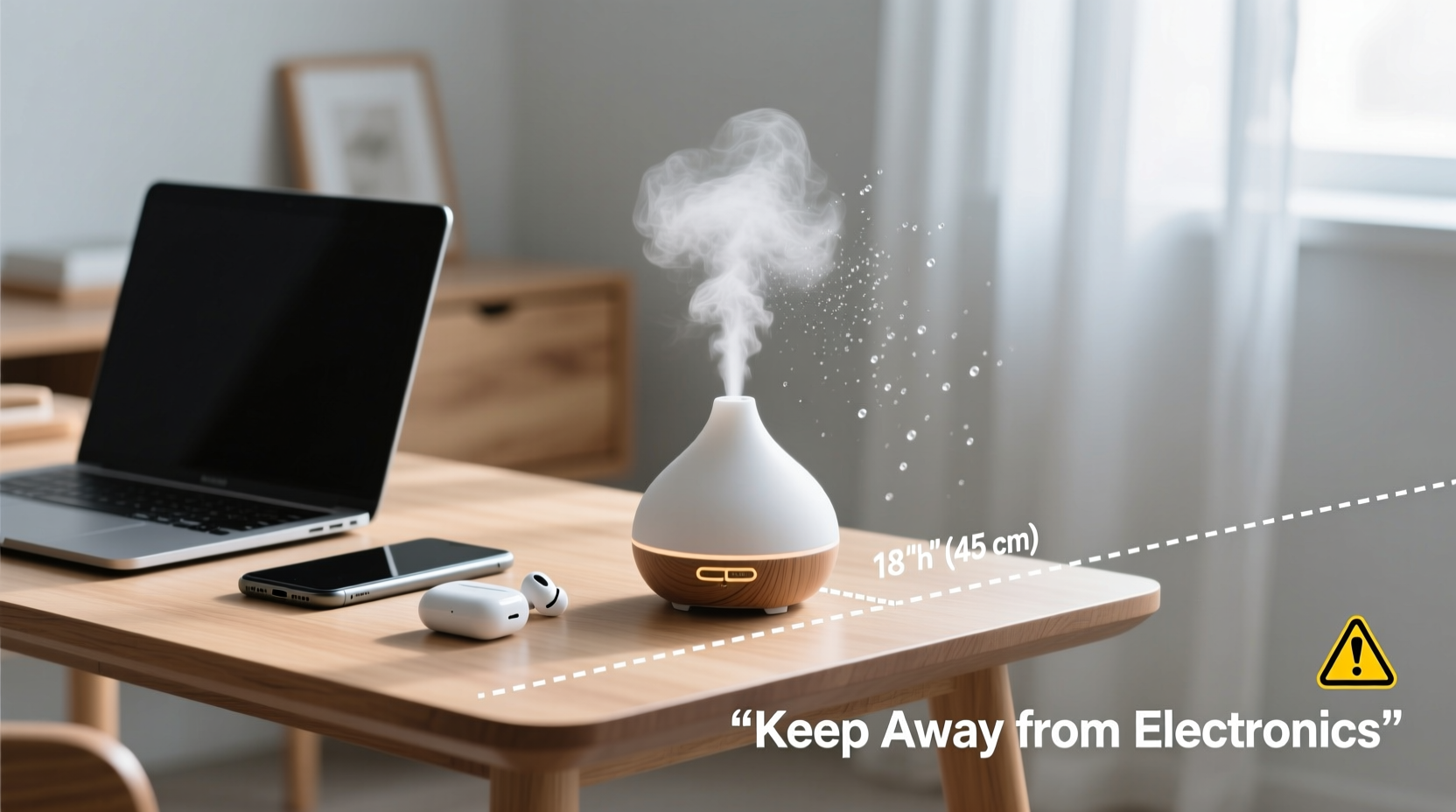
Most household essential oil diffusers are ultrasonic models. These devices use a small vibrating plate submerged in a mixture of water and essential oils to produce a cool, fine mist that disperses into the air. While effective for aromatherapy, this mist carries microscopic droplets of both water and oil compounds. Over time, these particles can settle on surfaces—including electronic equipment—leading to several potential issues:
- Moisture buildup: Excess humidity near electronics can lead to condensation inside devices, increasing the risk of short circuits or corrosion over time.
- Oily residue accumulation: Essential oils are hydrophobic and can leave behind a thin film on screens, keyboards, and vents. This residue may attract dust and interfere with heat dissipation.
- Clogged ventilation systems: Devices like laptops and gaming consoles rely on airflow to stay cool. Oily mist settling in cooling fans or vents can reduce efficiency and lead to overheating.
While one-off or occasional use is unlikely to cause immediate damage, consistent exposure—especially in poorly ventilated rooms—can accelerate wear and tear on sensitive components.
“Any device that generates mist introduces moisture into the environment. In enclosed spaces, that can elevate humidity levels enough to affect electronics, especially if they’re not sealed against environmental exposure.” — Dr. Alan Reyes, Environmental Engineer and Indoor Air Quality Specialist
Which Electronics Are Most at Risk?
Not all electronics are equally vulnerable. Devices with open ventilation, exposed circuitry, or frequent user interaction are more likely to suffer from diffuser-related exposure. Below is a breakdown of common household electronics and their susceptibility:
| Device | Risk Level | Why It’s Vulnerable |
|---|---|---|
| Laptops & Desktops | High | Ventilation fans and keyboards can trap mist and residue, leading to overheating or sticky keys. |
| Smartphones & Tablets | Moderate | Screens and charging ports can accumulate oily film; prolonged exposure may degrade coatings. |
| Speakers & Audio Equipment | Moderate | Fabric speaker covers can absorb oils; internal drivers may be affected by humidity. |
| Televisions & Monitors | Low to Moderate | Screen surfaces may develop haze; rear vents can collect dust mixed with oil residue. |
| Gaming Consoles | High | Designed for heavy ventilation; oil buildup in fans can impair cooling performance. |
| Printers & Scanners | Moderate | Paper feed mechanisms and optical sensors can be compromised by sticky residues. |
It's important to note that while modern electronics are built with some degree of environmental protection, they are not waterproof or oil-resistant. Manufacturers typically assume normal indoor humidity (30–50%) and clean air conditions—not continuous exposure to aromatic mists.
Safe Placement Guidelines for Essential Oil Diffusers
Preventing damage starts with strategic placement. Where you set up your diffuser can make the difference between enjoying its benefits and risking costly repairs. Follow these best practices to minimize risk:
- Keep at least 3–4 feet away from electronics: Maintain a safe buffer zone between the diffuser and any powered devices. This reduces direct mist exposure and allows air circulation to disperse particles before they settle.
- Avoid placing on shared surfaces: Don’t put the diffuser on the same desk, shelf, or table as computers, routers, or sound systems. Use a separate side table or corner.
- Elevate off the floor but below eye level: Place the diffuser on a low table or stand where mist disperses evenly without rising directly into monitor vents or falling onto keyboards.
- Use in well-ventilated rooms: Good airflow helps dilute the concentration of oil particles and prevents humidity from accumulating. Open a door or window periodically during extended use.
- Avoid bedrooms with bedside electronics: Many people run diffusers overnight next to phones or tablets. Instead, place the unit across the room or use a timer to shut it off after 30–60 minutes.
Step-by-Step Guide to Safe Diffuser Use Around Electronics
To ensure long-term safety for both your health and your devices, follow this simple routine every time you use your diffuser:
- Assess the Room Layout: Identify all nearby electronics. Note any devices with visible vents, fans, or touchscreens within a 5-foot radius.
- Choose a Central, Open Location: Pick a spot away from furniture edges and electronic clusters—ideally in the middle of a room or near a wall with no devices mounted.
- Check Humidity Levels: Use a hygrometer to measure current humidity. If it’s already above 50%, delay diffusing or limit runtime.
- Set a Timer: Run the diffuser for no more than 30–60 minutes at a time, especially in small or enclosed spaces.
- Monitor for Residue: After several uses, inspect nearby surfaces for a greasy film. Wipe down electronics gently with a microfiber cloth if needed.
- Clean the Diffuser Regularly: Mineral buildup and old oil residue inside the tank can affect mist quality and increase particle dispersion. Rinse the unit weekly with water and vinegar.
- Turn Off When Unattended: Never leave a diffuser running overnight or when leaving the house, especially near sensitive equipment.
Real-World Example: A Home Office Incident
Consider the case of Mark T., a freelance designer who placed his ultrasonic diffuser directly on his desk, just 18 inches from his MacBook Pro and external monitor. He used it daily for 2–3 hours while working, believing the lavender mist helped him focus. After three months, he noticed his laptop fan was louder than usual and the keyboard felt slightly sticky. Upon inspection, a technician found a thin layer of oily residue coating the internal fan blades and key switches—likely from accumulated diffuser mist drawn in through the side vents. Cleaning restored partial function, but the thermal efficiency never fully recovered.
Mark switched to using the diffuser in a separate lounge area and now limits sessions to 45 minutes with breaks. His devices have stabilized, and he reports no further issues. His experience highlights how seemingly minor habits can have tangible consequences when repeated over time.
Do’s and Don’ts: Quick Safety Checklist
To help you remember key precautions, here’s a concise checklist summarizing safe diffuser practices around electronics:
| Do’s | Don’ts |
|---|---|
| Place the diffuser at least 3–4 feet from electronics | Put the diffuser on the same surface as your computer or TV |
| Use a timer to limit diffusion sessions | Run the diffuser continuously for hours near devices |
| Diffuse in well-ventilated areas | Use in small, closed rooms like closets or bathrooms with electronics |
| Clean the diffuser weekly to prevent clogs | Ignore mineral buildup or cloudy water in the tank |
| Wipe down nearby surfaces monthly | Assume the mist is harmless because it’s “natural” |
Frequently Asked Questions
Can essential oil diffusers damage Wi-Fi routers or modems?
Yes, though rare. Routers generate heat and rely on passive cooling through vents. Over time, oil-laden mist can coat internal components and attract dust, reducing heat dissipation and potentially causing overheating. Keep diffusers at least 4 feet away and avoid placing them directly above or below networking equipment.
Are nebulizing diffusers safer than ultrasonic ones?
Nebulizing diffusers don’t use water and produce a drier mist, which means less humidity. However, they release a higher concentration of pure essential oil particles, which can leave behind more noticeable residue. While they pose less moisture risk, they still require careful placement away from screens and vents.
Is it safe to use a diffuser in a server room or home office with multiple devices?
Generally not recommended. Server rooms and tech-heavy offices maintain strict environmental controls. Introducing moisture and volatile organic compounds (VOCs) from essential oils can disrupt temperature regulation and air quality standards. For wellness benefits, consider personal inhalers or scent jewelry instead.
Protect Your Devices Without Sacrificing Aromatherapy Benefits
You don’t have to give up your diffuser to protect your electronics. With mindful placement, controlled usage, and regular maintenance, you can enjoy the therapeutic advantages of essential oils while minimizing risk. The key is balance: treat your diffuser like any other appliance that alters the indoor environment—respect its output and plan accordingly.
Modern life blends technology and wellness seamlessly, but that integration requires awareness. Just as you wouldn’t place a humidifier directly on your laptop, you shouldn’t assume an essential oil diffuser is completely benign. By applying the principles outlined here—distance, duration control, ventilation, and cleanliness—you preserve both your mental well-being and your digital investments.




 浙公网安备
33010002000092号
浙公网安备
33010002000092号 浙B2-20120091-4
Comments
No comments yet. Why don't you start the discussion?