
In an era where screen time dominates our daily lives, battery efficiency has become a top priority. One of the most widely promoted features for conserving power—especially on smartphones and high-end tablets—is dark mode. Tech companies, app developers, and influencers alike have championed dark mode as a way to extend battery life. But how much of this claim holds up under scrutiny? Is dark mode truly a battery-saving powerhouse on OLED displays, or is its impact overstated?
The answer lies in the fundamental technology behind OLED screens and how they differ from older display types like LCD. While dark mode can indeed reduce power consumption on OLED panels, the extent of that savings depends heavily on usage patterns, screen brightness, app design, and even the specific shade of black displayed.
How OLED Screens Work: The Foundation of Dark Mode Efficiency
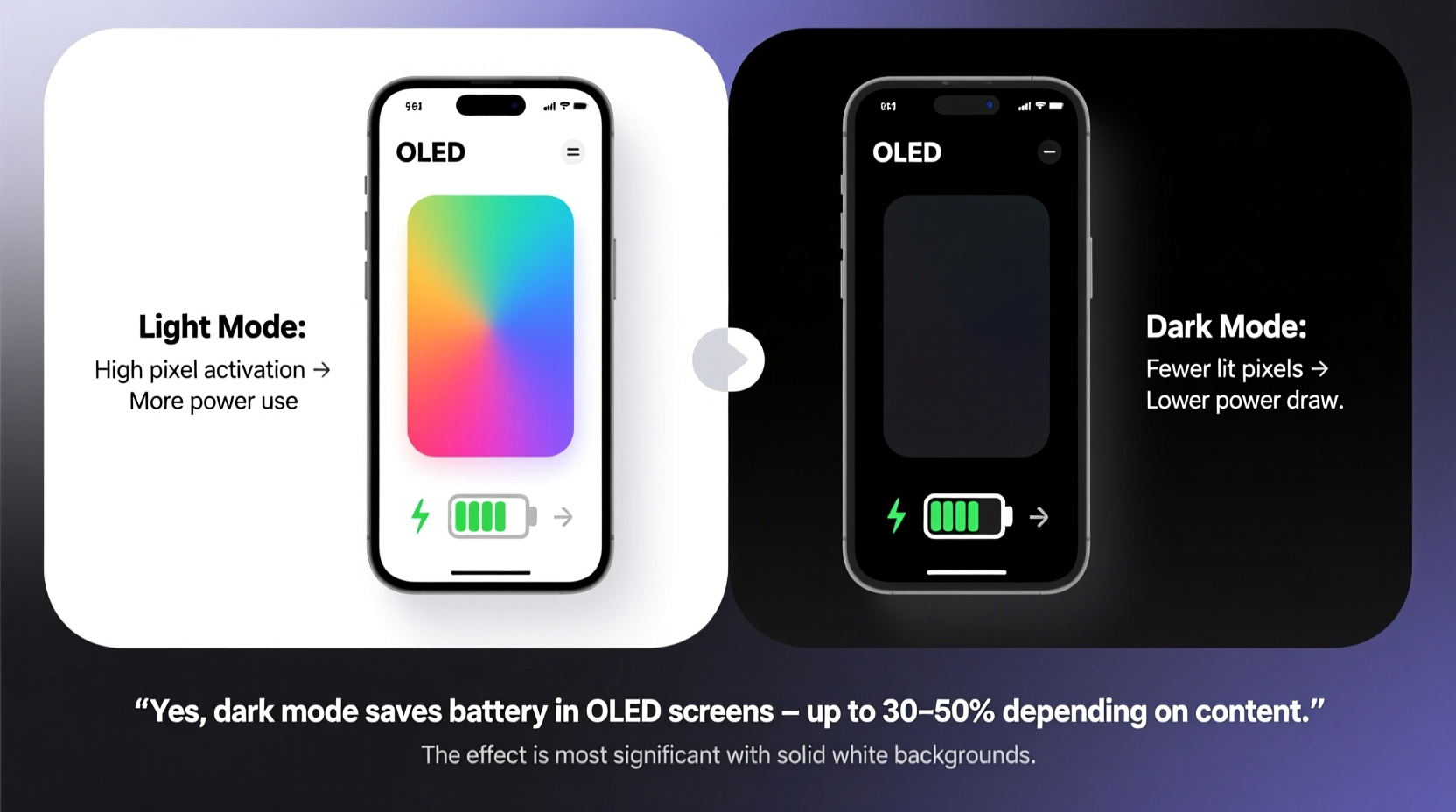
OLED stands for Organic Light-Emitting Diode. Unlike traditional LCD (Liquid Crystal Display) screens, which rely on a constant backlight to illuminate pixels, OLED screens are made up of individual pixels that emit their own light. Each pixel can be turned on or off independently. When a pixel displays black, it is effectively turned off—producing no light and consuming virtually no power.
This is the core reason dark mode works so well on OLED displays. In contrast, on an LCD screen, even a black pixel still requires the backlight to remain active, meaning power is used regardless of the color shown. Therefore, switching to dark mode on an LCD device yields little to no battery benefit.
Consider this: when you view a mostly white interface—like a standard webpage or email inbox—nearly every pixel on an OLED screen is lit. Switch to a dark-themed version, and large portions of the screen go completely dark. Those inactive pixels stop drawing power, directly reducing energy consumption.
“OLED’s per-pixel illumination is what makes dark mode more than just aesthetic—it’s a functional tool for power management.” — Dr. Lena Patel, Display Technology Researcher at MIT.nano
Measuring the Real-World Impact of Dark Mode on Battery Life
While the theory is sound, actual battery savings vary significantly depending on context. Several independent studies and lab tests have attempted to quantify the effect.
A 2020 study conducted by Purdue University tested popular apps like YouTube, Twitter, and Reddit under both light and dark modes at 60% brightness. The results showed:
- On average, dark mode reduced power consumption by 30–60% across different apps.
- The highest savings occurred in text-heavy apps with large areas of black space (e.g., messaging or reading apps).
- Savings were minimal in video-centric apps where screen content is dynamic and often brightly colored.
Another test by Android Authority found that using dark mode on a Google Pixel 4 at full brightness saved approximately 47% of screen power when displaying a typical search results page. However, at lower brightness levels (around 30%), the difference dropped to about 15–20%.
These findings suggest that while dark mode does save battery, the magnitude of savings is not uniform. It’s most effective when:
- The user spends significant time in apps with static, dark backgrounds.
- Brightness settings are high (where OLED power draw is greatest).
- The UI uses true black (#000000) rather than dark gray.
True Black vs. Dark Gray: Why Shade Matters
Not all dark themes are created equal. Many apps labeled as “dark mode” use dark gray backgrounds instead of pure black. This design choice is often made for aesthetic reasons—pure black can create harsh contrast and make text harder to read—but it undermines the primary battery-saving benefit.
On an OLED screen, a dark gray pixel is still emitting light, albeit dimly. That means it continues to consume power. True black (#000000), however, turns the pixel off entirely. The difference may seem minor, but over thousands of pixels and hours of use, it adds up.
For example, YouTube’s default dark theme uses a deep gray (#121212), not pure black. Tests show this reduces potential battery savings by up to 40% compared to a true black interface. Similarly, some versions of Twitter and Reddit use near-black grays that don’t fully leverage OLED efficiency.
If battery conservation is your goal, seek out apps or customizations that support AMOLED black themes—designed specifically with true black backgrounds to maximize power savings.
App Usage Patterns: Where Dark Mode Delivers—and Falls Short
The effectiveness of dark mode also hinges on how you use your device. Consider two users:
- User A: Spends 3 hours daily reading articles, texting, and browsing social media in dark-themed apps.
- User B: Watches 3 hours of HD video, plays graphics-intensive games, and uses photo editing software—all with bright, colorful visuals.
User A will see meaningful battery improvements from dark mode. User B, however, may notice little to no difference, since most content remains bright regardless of system-wide theme settings.
To illustrate this variation, here’s a comparison of estimated battery savings based on common activities:
| Activity | Average Screen Brightness | Estimated Power Savings with Dark Mode |
|---|---|---|
| Email & Messaging | 60% | 50–60% |
| Web Browsing (text-heavy) | 50% | 40–50% |
| Social Media Scrolling | 55% | 30–40% |
| Video Streaming (YouTube, Netflix) | 70% | 5–15% |
| Gaming | 80% | Negligible |
This table underscores a critical point: dark mode is not a universal battery booster. Its value is contextual and maximized in productivity and communication apps, not media consumption.
Manufacturer Claims vs. Independent Testing
Major tech companies have been vocal about the benefits of dark mode. Samsung, for instance, claims that using dark mode on Galaxy phones can extend battery life by up to 60%. Apple has also highlighted OLED efficiency in promoting dark mode on iPhone models with OLED displays.
However, these figures often represent best-case scenarios—such as full-screen dark interfaces at high brightness. Real-world usage rarely matches these ideal conditions. Independent reviewers have found that typical daily use results in more modest gains: between 15% and 30% reduction in screen power, which translates to roughly 10–20% longer overall battery life depending on other factors like CPU usage and network activity.
So while manufacturer claims aren’t false, they can be misleading without context. Dark mode helps, but it won’t double your battery life unless you’re using your phone in very specific ways.
Step-by-Step Guide to Maximizing Battery Savings with Dark Mode
If you want to get the most out of dark mode on your OLED device, follow this practical sequence:
- Verify your device has an OLED screen – Not all phones do. Most flagship Android phones (Pixel, Galaxy S/Note/Z Fold series) and iPhones from the X onward use OLED. Mid-range and budget devices often use LCD.
- Enable system-wide dark mode – Go to Settings > Display > Dark Theme (or similar) and turn it on.
- Check individual apps – Some apps don’t automatically adopt system settings. Manually enable dark mode in apps like Chrome, Twitter, Reddit, and YouTube.
- Use AMOLED-optimized launchers or themes – Apps like Nova Launcher or Niagara allow custom themes with true black wallpapers and widgets.
- Set a black wallpaper – Even when your phone is idle, a black wallpaper ensures fewer pixels are lit on the home screen and lock screen.
- Adjust brightness automatically – Pair dark mode with adaptive brightness to prevent unnecessary power spikes.
- Monitor usage – Use built-in battery stats to see if dark mode correlates with longer screen-on time.
Common Misconceptions About Dark Mode and Battery Life
Despite growing awareness, several myths persist:
- Misconception: Dark mode saves battery on all phones.
Reality: Only OLED screens benefit significantly. LCD screens see negligible savings. - Misconception: Any dark-colored theme saves power.
Reality: Only true black turns off pixels. Dark gray still consumes power. - Misconception: Dark mode drastically extends total battery life.
Reality: It improves screen efficiency, but the screen is only one component. CPU, radio, and background processes also drain battery.
Mini Case Study: Two Weeks with and Without Dark Mode
Jamal, a software developer using a Samsung Galaxy S23 Ultra, decided to test dark mode’s impact over two weeks. During week one, he used his phone normally with light mode enabled. In week two, he switched to dark mode system-wide, set a black wallpaper, and ensured all frequently used apps were in dark theme.
He maintained consistent usage: ~4 hours of screen time daily, mostly coding documentation, messaging, and news reading. He disabled auto-brightness and kept brightness fixed at 65%.
Results:
- Week 1 (Light Mode): Average battery lasted 10 hours 15 minutes from full charge.
- Week 2 (Dark Mode): Average battery lasted 12 hours 40 minutes—a 24% increase.
Jamal noted the biggest improvement came during evening use, when he browsed long-form articles and Slack messages. The always-on display also consumed less power with a dark clock face. His video and gaming sessions showed no change, but they made up only 20% of his usage.
This real-world example confirms that for users with text-dominant workflows, dark mode delivers tangible, measurable benefits.
FAQ
Does dark mode save battery on iPhones?
Yes, but only on iPhone models with OLED screens—iPhone X and later (excluding SE models). iPhones with LCD screens (like the older 8 or SE) do not benefit significantly from dark mode in terms of battery savings.
Is there a downside to using dark mode?
Some users report eye strain in low-light environments due to high contrast, especially with small white text on black backgrounds. Additionally, not all apps implement dark mode well, leading to inconsistent visuals. However, for OLED battery life, there’s no technical downside.
Can I automate dark mode to save more battery?
Absolutely. Both Android and iOS allow scheduling dark mode based on time or sunset/sunrise. Automating the switch ensures you gain battery benefits during evening use without manual toggling.
Final Verdict: Exaggerated or Essential?
Dark mode is neither a myth nor a miracle. On OLED screens, it provides real, measurable battery savings—particularly for users who engage in reading, messaging, and browsing with dark interfaces. However, its impact is often overstated in marketing materials and casual conversations.
The truth is nuanced: dark mode can extend battery life by 15–30% in typical use, and up to 60% in ideal conditions. But it’s not a substitute for good battery hygiene, efficient apps, or hardware limitations. It’s one tool among many.
And let’s not forget its secondary benefits: reduced eye strain in dim environments, improved readability for some users, and a sleeker aesthetic. These alone make dark mode worth considering, even if battery gains are moderate.
“Dark mode isn’t magic, but it’s smart engineering meeting user experience. When used intentionally, it’s one of the few software features that genuinely improves hardware efficiency.” — Mark Tran, Senior UX Engineer at Google
Take Action Today
If you own an OLED device, enabling dark mode costs nothing and could add meaningful time to your daily battery life. Start by switching your system theme, auditing your most-used apps, and setting a true black wallpaper. Monitor your battery usage over a few days—you might be surprised by the difference.




 浙公网安备
33010002000092号
浙公网安备
33010002000092号 浙B2-20120091-4
Comments
No comments yet. Why don't you start the discussion?