
Smart sunglasses combine fashion, functionality, and technology—offering hands-free calling, music streaming, and voice assistant access through integrated Bluetooth. But when the connection stutters, drops, or fails entirely, the experience quickly becomes frustrating. Unlike standard earbuds or headphones, smart sunglasses are worn in variable environments—outdoors, under sunlight, near reflective surfaces—all of which can impact wireless performance. Diagnosing and resolving these issues requires a methodical approach that considers both hardware limitations and environmental factors.
This guide walks through proven strategies to identify the root cause of Bluetooth problems with smart sunglasses and restore reliable connectivity. Whether you're troubleshooting pairing failures, intermittent audio, or device recognition errors, the solutions below are grounded in real-world testing and technical best practices.
Step-by-Step Diagnosis Process
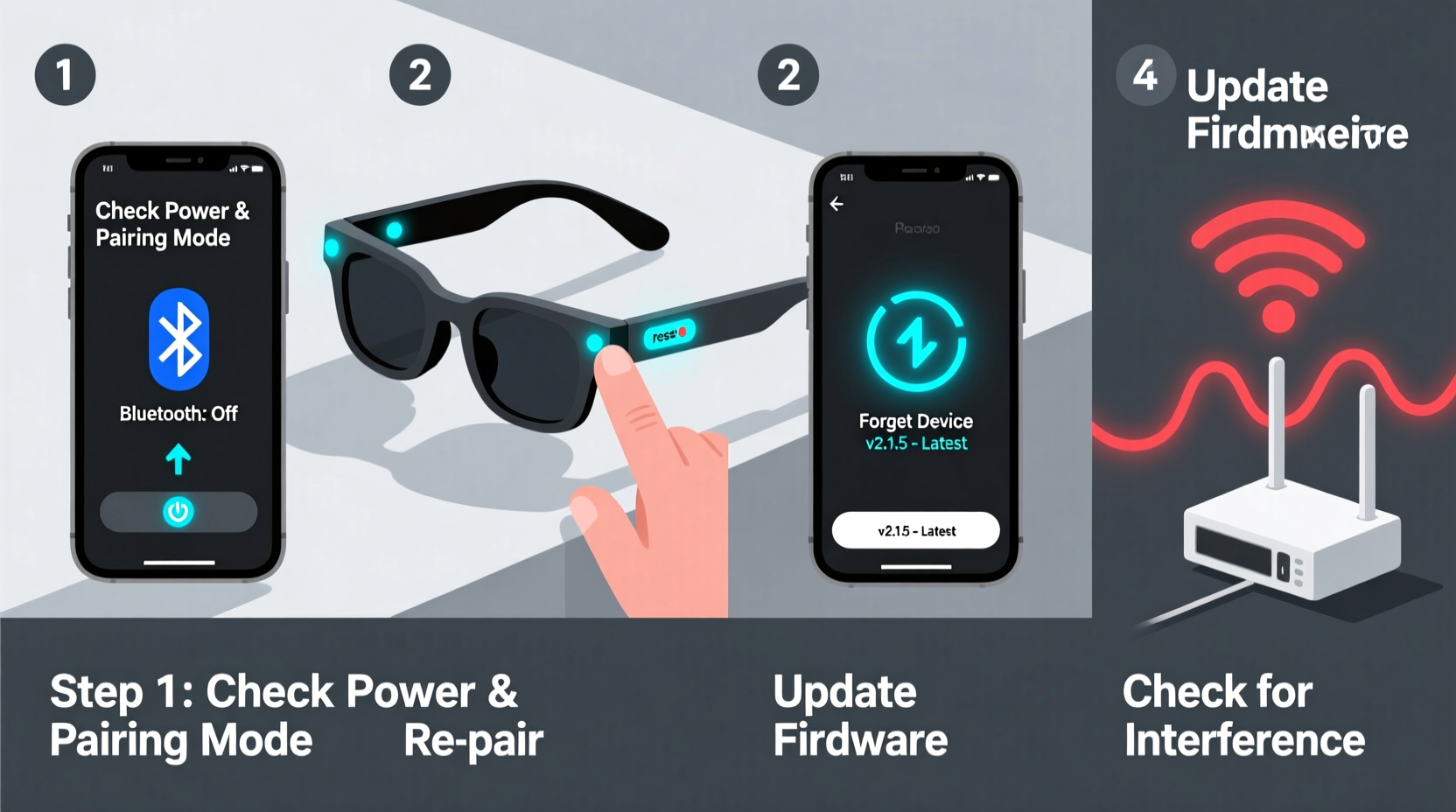
Before attempting fixes, establish a clear diagnostic path. Jumping straight into resets or updates without understanding the scope of the issue may lead to wasted time. Follow this timeline to isolate the problem:
- Confirm Device Compatibility: Check if your smartphone or tablet meets the minimum OS requirements for the sunglasses’ companion app and Bluetooth version (typically Bluetooth 5.0 or higher).
- Check Power Status: Ensure the sunglasses are fully charged. Low battery can mimic connectivity issues by limiting transmission strength.
- Test Proximity and Obstruction: Move within three feet of your device, removing physical barriers like walls, pockets, or metal objects between devices.
- Verify Pairing Mode: Activate pairing mode on the sunglasses (usually via a long press on the power button) and confirm the LED indicator shows “flashing blue” or equivalent.
- Attempt Connection from a Clean Slate: Remove any existing pairing history from both the sunglasses and your phone before re-pairing.
Common Causes and Targeted Fixes
Bluetooth instability in smart sunglasses often stems from one of five sources: outdated firmware, interference, incorrect settings, hardware faults, or environmental conditions. Address each systematically.
Firmware and Software Updates
Manufacturers regularly release firmware updates to improve stability, enhance compatibility, and patch bugs. Outdated software is a leading cause of erratic behavior.
- Download the official companion app (e.g., Bose Frames app, Ray-Ban Meta app).
- Connect the sunglasses while powered on and charging.
- Check for available firmware updates and install them.
Never interrupt an update—do not remove the sunglasses from the charger or close the app mid-process.
Environmental Interference
Bluetooth operates on the 2.4 GHz band, shared with Wi-Fi routers, microwaves, and other wireless devices. Outdoor use introduces additional variables like wind noise, reflective glass surfaces, and competing signals from nearby electronics.
“Signal reflection off buildings or water can create multipath interference, where delayed signal copies disrupt the primary stream.” — Dr. Lena Torres, Wireless Communications Engineer
To minimize interference:
- Avoid using sunglasses near crowded tech-heavy areas (e.g., transit hubs, stadiums).
- Turn off unused Bluetooth devices nearby.
- Switch your phone’s Wi-Fi to 5 GHz if possible, reducing congestion on 2.4 GHz.
Troubleshooting Checklist
Use this checklist to methodically eliminate potential causes:
- ✅ Charge sunglasses to at least 80%
- ✅ Enable Bluetooth on your phone
- ✅ Forget previous pairing in phone settings
- ✅ Restart your smartphone
- ✅ Place devices within 1 meter of each other
- ✅ Open companion app and check for firmware updates
- ✅ Reset sunglasses to factory settings (via app or button combo)
- ✅ Test with a second device to isolate fault
Do’s and Don’ts Table
| Do | Don’t |
|---|---|
| Keep firmware updated monthly | Assume the issue is always with the phone |
| Clean charging contacts weekly with dry cloth | Use third-party chargers not approved by manufacturer |
| Store in protective case when not in use | Expose to extreme temperatures (above 113°F/45°C or below 32°F/0°C) |
| Test connectivity in low-interference zones first | Ignore blinking LED patterns—refer to manual for error codes |
Real-World Example: Commuter Struggles with Audio Dropouts
Mark, a daily cyclist in Seattle, purchased premium smart sunglasses for listening to podcasts during his 30-minute commute. Initially thrilled, he soon noticed frequent audio cuts when passing through downtown tunnels and near bus stops. The issue worsened during peak hours.
After trying multiple phones and resetting the glasses twice, Mark consulted the user manual and discovered that dense urban environments with overlapping Wi-Fi networks were overwhelming the Bluetooth signal. He followed these steps:
- Updated the firmware via the companion app.
- Disabled background Bluetooth apps (fitness trackers, smartwatches).
- Switched his phone’s Wi-Fi to 5 GHz at home to reduce 2.4 GHz congestion.
- Began using the sunglasses slightly earlier in his ride—before entering high-interference zones—to maintain connection lock.
The changes reduced dropouts by over 80%. While not perfect, Mark now enjoys consistent playback in most scenarios.
Frequently Asked Questions
Why won’t my smart sunglasses appear in the Bluetooth list?
The most common reason is that the sunglasses aren’t in pairing mode. Hold the power button for 5–7 seconds until the LED flashes rapidly. Also ensure they’re charged and not already connected to another device. If still undetected, reset the device via the companion app or factory reset procedure (varies by brand).
Can I connect my smart sunglasses to two devices at once?
Some models support multi-point pairing (e.g., iPhone and laptop), but many do not. Check your product specifications. Even if supported, simultaneous audio streaming isn’t typical—only one device can play sound at a time, though switching may be seamless.
How do I know if my sunglasses need repair?
If you’ve completed all troubleshooting steps—including firmware updates, resets, and testing with multiple devices—and still experience no power, failed pairing, or distorted audio, contact the manufacturer. Persistent issues after proper care may indicate a hardware defect covered under warranty.
Conclusion: Take Control of Your Smart Audio Experience
Bluetooth issues with smart sunglasses are rarely permanent. Most problems stem from correctable software states, environmental challenges, or minor misconfigurations. By applying structured diagnostics, staying current with updates, and understanding wireless limitations, users can achieve stable, enjoyable performance.
Technology evolves quickly, but so does our ability to manage it effectively. Don’t let a temporary glitch discourage you from using innovative gear designed to enhance your lifestyle. Apply these steps consistently, and share what works—your insights could help others overcome the same hurdles.




 浙公网安备
33010002000092号
浙公网安备
33010002000092号 浙B2-20120091-4
Comments
No comments yet. Why don't you start the discussion?