
Coders spend hours each day navigating complex codebases, debugging issues, and managing multiple windows. This prolonged computer use often leads to repetitive strain injuries, especially in the wrists and forearms. One of the most effective ways to combat this is through better input devices—specifically, choosing between an ergonomic mouse and a vertical mouse. While both aim to reduce wrist strain, they differ significantly in design, function, and long-term comfort. Understanding these differences is crucial for developers who want to maintain productivity without sacrificing health.
The Root of Wrist Pain in Coders
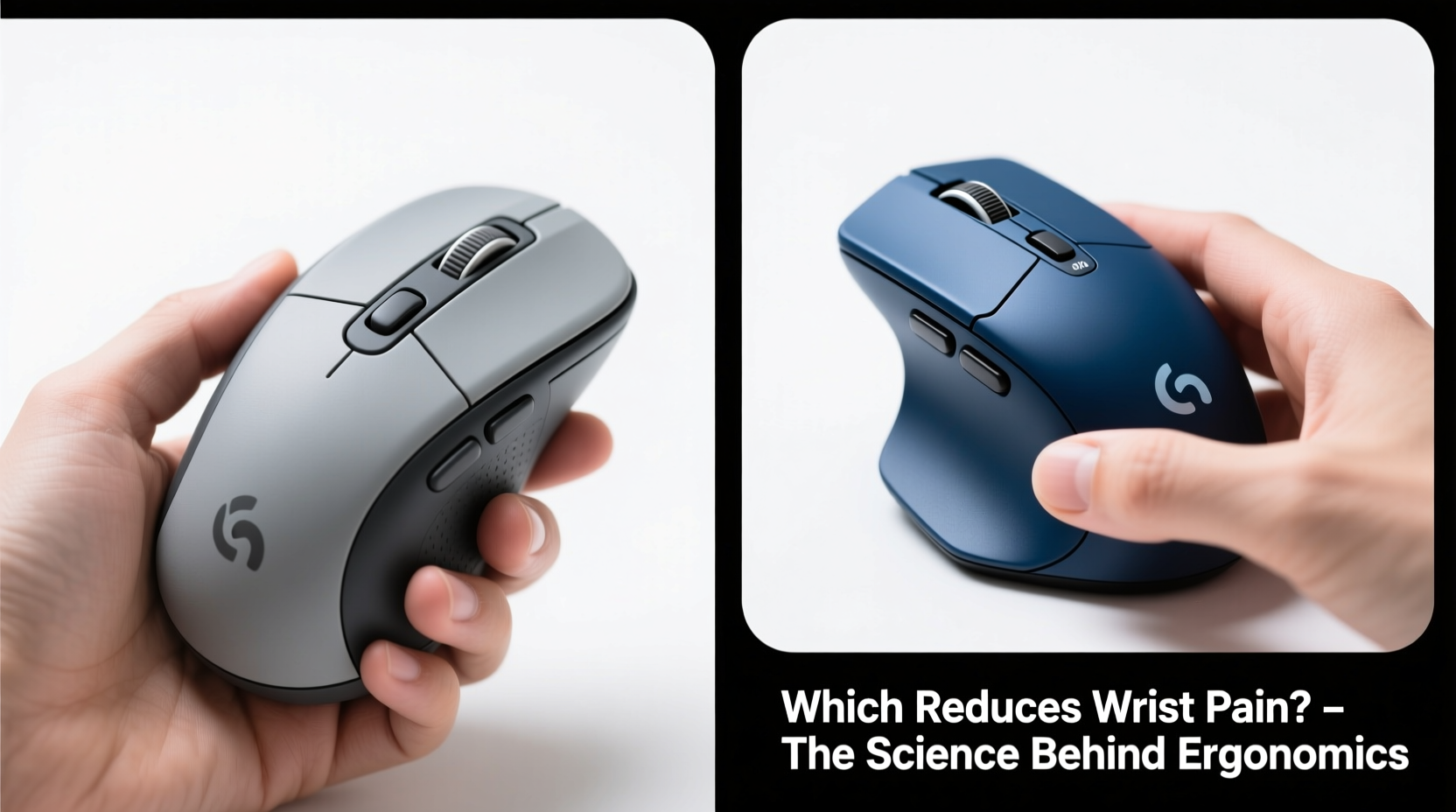
Prolonged mouse use in a traditional horizontal position forces the hand into a pronated (palm-down) posture. This unnatural alignment stresses the forearm muscles, tendons, and median nerve—particularly at the carpal tunnel. Over time, this can lead to conditions like carpal tunnel syndrome, tendonitis, or general wrist fatigue. Coders are especially vulnerable due to their high click volume, extended work sessions, and frequent switching between keyboard and mouse.
According to Dr. Laura Chen, occupational ergonomist at the Institute for Digital Health:
“Developers are among the highest-risk groups for upper-limb musculoskeletal disorders. The combination of static postures and repetitive micro-movements creates cumulative trauma that often goes unnoticed until symptoms become severe.” — Dr. Laura Chen, Occupational Ergonomist
Switching to a more ergonomic pointing device isn’t just about comfort—it’s a preventive investment in long-term physical well-being.
Ergonomic Mouse: Design and Benefits
The term “ergonomic mouse” refers broadly to any mouse designed to support natural hand positioning, reduce muscle strain, and improve alignment. These mice come in various shapes—angled, contoured, split, or elevated—but share common goals: minimizing ulnar deviation, reducing grip force, and aligning the arm with the shoulder.
Common features include:
- Sloped or tilted body to keep the hand in a handshake-like position
- Thumb rests and sculpted grips for reduced finger tension
- Programmable buttons to minimize reaching
- Wireless or ambidextrous options for flexibility
Popular models like the Logitech MX Vertical (which blurs the line between categories), Microsoft Sculpt, and Evoluent VerticalMouse offer varying degrees of tilt and support. However, not all ergonomic mice are created equal. Some only slightly adjust posture, while others make radical changes to hand orientation.
Vertical Mouse: How It Works and Why It Stands Out
A vertical mouse takes ergonomic principles further by rotating the hand into a near-vertical handshake position—typically between 50° and 90° from flat. This orientation aligns the forearm bones (radius and ulna) parallel to each other, reducing muscle strain and nerve compression.
The science behind it is straightforward: in a standard mouse position, the forearm muscles must constantly work to stabilize the hand. In contrast, a vertical grip allows the extensor and flexor muscles to remain more relaxed, decreasing the risk of overuse injuries.
Studies published in the Journal of Occupational Rehabilitation have shown that vertical mice reduce wrist deviation by up to 75% compared to conventional mice. Users report lower levels of discomfort after just two weeks of consistent use.
Key advantages of vertical mice:
- Near-natural hand posture reduces ulnar deviation
- Less pressure on the median nerve
- Improved blood flow and reduced forearm fatigue
- Better long-term sustainability for full-day coding
However, the steep learning curve is a common complaint. Precision may suffer initially, and some users experience thumb or palm soreness during the first few days as muscles adapt.
Direct Comparison: Ergonomic vs Vertical Mice
| Feature | Ergonomic Mouse | Vertical Mouse |
|---|---|---|
| Hand Position | Slightly angled (30–45°) | Highly vertical (50–90°) |
| Wrist Deviation Reduction | Moderate (30–50%) | High (60–75%) |
| Learning Curve | Low to moderate | Moderate to high |
| Precision for Fine Movements | High | Moderate (improves with time) |
| Durability & Build Quality | Varies widely | Generally robust (e.g., Logitech, Anker) |
| Portability | Often compact | Bulkier due to shape |
| Ideal For | Light to moderate daily use, dual-monitor setups | Full-time coders, those with existing wrist pain |
The data suggests that while both types outperform standard mice, vertical models provide superior biomechanical benefits—especially for individuals already experiencing discomfort.
Real-World Case: From Chronic Pain to Full Recovery
Jamal Rivera, a backend developer with eight years of experience, began experiencing sharp wrist pain after transitioning to remote work. He was coding 10+ hours daily and relying heavily on his mouse for IDE navigation and cloud dashboard management.
“I tried wrist braces and stretches, but nothing helped,” Jamal recalls. “Then my physiotherapist suggested a vertical mouse. I started with the Logitech MX Vertical and gave myself two weeks to adjust.”
Initially, he found cursor control frustrating and had to retrain muscle memory. But by week three, his wrist pain had decreased noticeably. After six weeks, he no longer needed pain relievers.
“It felt awkward at first, like typing with gloves on,” he says. “But now I can’t go back. My hands feel lighter, and I’m more focused because I’m not distracted by discomfort.”
His story reflects a growing trend: developers prioritizing long-term health over short-term convenience.
Step-by-Step Guide to Transitioning Safely
Switching to a new mouse type shouldn’t be abrupt. A structured transition minimizes frustration and maximizes adaptation success.
- Assess Your Current Setup: Note how many hours you use the mouse daily, your current pain level (scale 1–10), and your primary tasks (e.g., debugging, UI design).
- Choose the Right Device: If you have mild discomfort, start with a semi-vertical ergonomic model. If pain is persistent, opt for a true vertical mouse.
- Alternate Mice for Two Weeks: Use the new mouse for 1–2 hours per day, gradually increasing duration. This prevents muscle overload.
- Adjust Sensitivity Settings: Increase DPI and reduce acceleration to minimize large arm movements.
- Optimize Workspace Ergonomics: Ensure your desk height allows elbows at 90°, and your monitor is at eye level.
- Track Progress Weekly: Keep a simple log of pain levels, comfort, and productivity changes.
- Commit or Pivot: After four weeks, decide whether to fully switch or try an alternative model.
Expert Insight: What Medical Professionals Recommend
Dr. Arjun Patel, a hand surgeon specializing in tech-related injuries, emphasizes proactive intervention:
“The best time to change your mouse is before you need surgery. We’re seeing younger patients with chronic wrist issues directly linked to poor ergonomics. A vertical mouse isn’t a cure, but it’s one of the most effective preventive tools available.” — Dr. Arjun Patel, Hand Surgeon
He also warns against assuming all “ergonomic” products are equal: “Marketing terms like ‘comfort grip’ don’t guarantee anatomical benefit. Look for independent studies or clinical evaluations when choosing.”
Checklist: Choosing the Right Mouse for You
Before purchasing, ask yourself the following:
- ✅ Do I experience wrist, forearm, or shoulder pain after coding?
- ✅ Am I willing to invest 2–4 weeks in adapting to a new device?
- ✅ Is my workspace adjustable to support proper posture?
- ✅ Do I need programmable buttons for shortcuts (e.g., copy/paste, tab switching)?
- ✅ Will I use this mouse at home and on the go?
- ✅ Have I read verified user reviews focusing on long-term comfort?
- ✅ Does the mouse offer a trial period or return policy?
If you answered “yes” to the first three, a vertical mouse is likely your best bet. If you're pain-free but want prevention, a high-quality ergonomic model may suffice.
Frequently Asked Questions
Can a vertical mouse completely eliminate wrist pain?
No single device can guarantee pain elimination, especially if underlying issues like poor posture, lack of breaks, or pre-existing conditions exist. However, a vertical mouse significantly reduces contributing factors and is often part of a successful recovery plan when combined with stretching, proper desk setup, and movement breaks.
Are vertical mice good for gaming or graphic design?
Some vertical mice perform well in creative or gaming contexts, but precision and speed may lag compared to high-DPI gaming mice. For coders who occasionally game or design UI mockups, models like the Logitech Lift or Perixx PERIMICE-712 offer balanced performance. However, dedicated gamers may prefer sticking with traditional or ambidextrous designs.
How long does it take to get used to a vertical mouse?
Most users adapt within 1–3 weeks. Initial discomfort is normal as forearm muscles adjust to a new activation pattern. Consistent daily use, along with correct DPI settings, speeds up the process. If pain increases instead of decreases after two weeks, consult a healthcare provider.
Final Recommendation: Prioritize Long-Term Health
When comparing ergonomic and vertical mice, the evidence leans strongly toward vertical models for coders seeking meaningful reductions in wrist pain. While both types improve upon standard mice, the vertical design offers superior biomechanical alignment, making it the preferred choice for full-time developers, remote workers, and anyone with early signs of strain.
That said, no mouse can compensate for poor overall ergonomics. Pair your device upgrade with regular stretch breaks, proper chair height, and mindful typing habits. Consider using tools like Pomodoro timers or ergonomic apps to prompt movement every 30–60 minutes.
Your hands are your primary tools as a coder. Treating them with care isn’t optional—it’s essential to a sustainable, productive career.




 浙公网安备
33010002000092号
浙公网安备
33010002000092号 浙B2-20120091-4
Comments
No comments yet. Why don't you start the discussion?