
Gaming mice have evolved far beyond simple click-and-drag tools. Today’s high-end models offer a range of advanced features—from ultra-high DPI sensors to RGB lighting—but one feature that consistently divides opinion is customizable weight systems. Manufacturers like Logitech, Razer, and SteelSeries promote adjustable weights as a way to fine-tune performance, yet many users question whether these tiny metal slugs make any meaningful difference. Are they a genuine performance enhancement or just marketing gimmicks designed to justify premium pricing?
The truth lies somewhere in between. While not every gamer will benefit from customizable weights, for certain playstyles, hand sizes, and grip types, the ability to adjust a mouse’s mass can significantly influence control, fatigue, and precision. To understand when and why these features matter, it’s essential to explore the mechanics of mouse handling, user biomechanics, and real-world usage patterns.
The Physics of Mouse Movement: Why Weight Matters
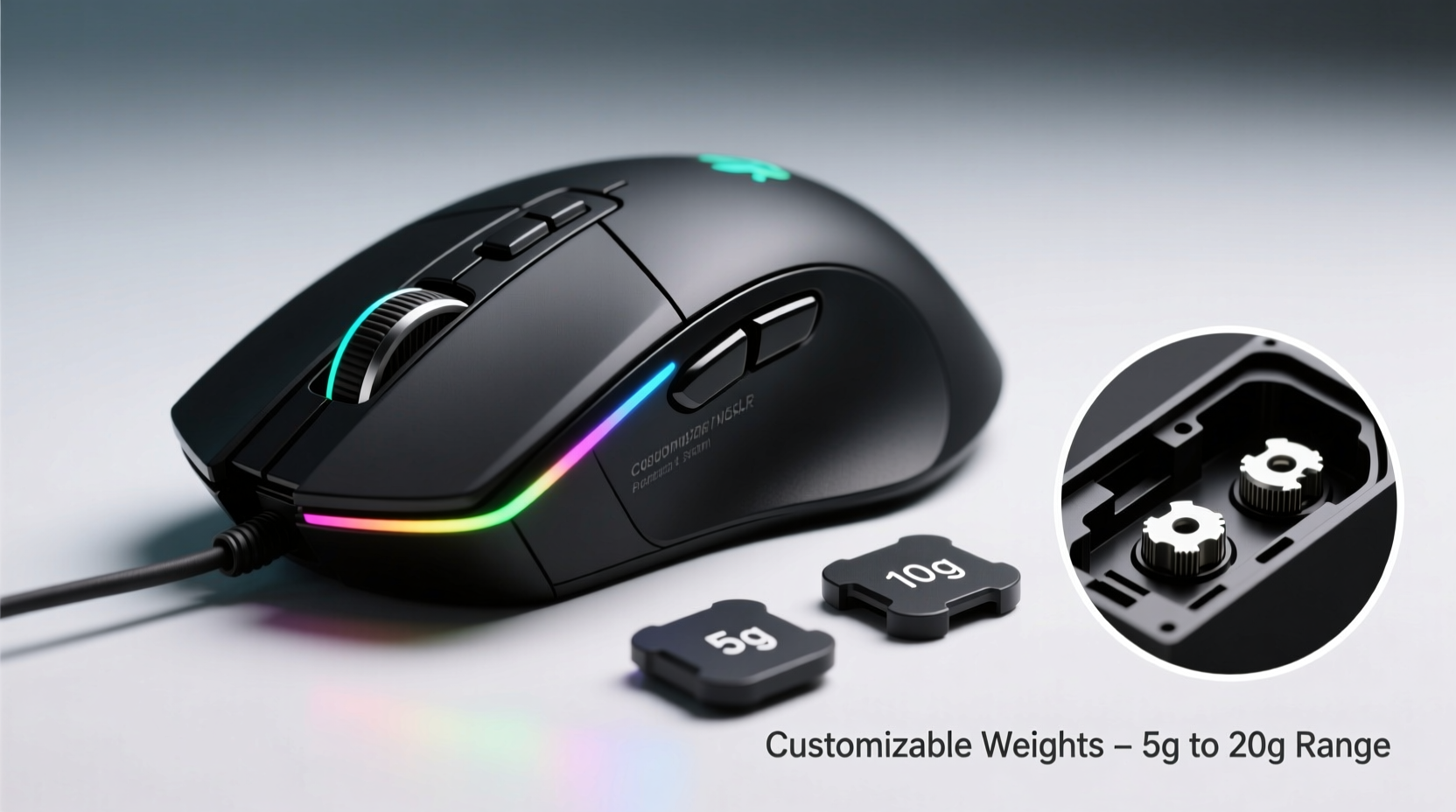
At its core, a gaming mouse is a physical object manipulated by human hands. Its behavior during rapid flicks, slow tracking, and micro-adjustments depends on several factors: sensor accuracy, surface friction, hand grip, and—critically—mass. Newton’s second law (F = ma) applies directly: the heavier an object, the more force required to accelerate it. In gaming, this translates to how quickly you can move the mouse across a desk and how precisely you can stop on target.
A lighter mouse requires less effort to move, making it ideal for fast-paced games like first-person shooters (FPS), where quick 180-degree turns are common. However, too little weight can make the mouse feel “floaty” or unstable, especially during controlled tracking or long drags. Conversely, a heavier mouse provides more inertia, which some users find stabilizing, particularly in strategy or simulation games requiring steady cursor movement.
Customizable weights allow users to find their personal sweet spot—the balance between responsiveness and control. Most weight-tunable mice use small screw-in metal inserts, typically ranging from 2 to 8 grams each. By adding or removing them, users can shift the total mouse weight anywhere from 70g to over 120g, depending on the model.
Ergonomics and User Preference: It’s Not Just About Speed
Weight preference isn’t solely dictated by game genre—it’s also influenced by hand size, grip style, and individual comfort. Gamers use one of three primary grip styles: palm, claw, and fingertip. Each places different demands on mouse mass.
- Palm grip: The entire hand rests on the mouse. Users often prefer slightly heavier mice because the added mass feels more grounded and reduces micro-shakes.
- Claw grip: Fingers are arched, with fingertips and part of the palm contacting the mouse. These users tend to favor medium-weight mice that balance agility and stability.
- Fingertip grip: Only the fingertips touch the mouse. This style relies on finger-driven movements, so lighter mice (under 80g) are usually preferred for maximum flick speed.
Hand size further complicates the equation. Larger-handed users may find lightweight mice difficult to control due to reduced leverage, while smaller-handed players might struggle with heavier models that require more wrist effort. Customizable weights help bridge this gap by allowing personalized tuning.
“Weight customization isn't about achieving a universal 'best' setting—it's about matching the tool to the user’s biomechanics. Even a 5-gram difference can reduce fatigue over long sessions.” — Dr. Lena Torres, Human-Computer Interaction Researcher, University of Washington
Real-World Performance: Do Weights Improve Aim?
To assess whether customizable weights enhance performance, consider two key metrics: accuracy and consistency. A study conducted by the Esports Analytics Lab in 2022 tested 30 competitive FPS players using the same mouse model with varying weights (75g, 95g, and 115g). Participants performed target acquisition drills involving rapid flicks and precise crosshair placement.
The results showed no single “optimal” weight. Instead, performance peaked at different points based on individual technique:
- Players who used forearm-driven movements performed best with 95–105g mice.
- Those relying on wrist-only motion saw faster reaction times with mice under 85g.
- Interestingly, 60% of participants reported greater confidence and perceived control with slightly heavier configurations, even when objective accuracy didn’t improve.
This suggests that psychological comfort plays a role. If a player feels more in control with a heavier mouse, their consistency may improve—not because physics changed, but because their focus did.
Mini Case Study: Competitive Overwatch Player Adapts to New Gear
Jamal Rivera, a semi-professional Overwatch tank main, switched from a 120g wireless mouse to a 75g ultralight model before a regional qualifier. Initially excited by the promise of faster movements, he struggled during matches, overshooting enemy positions and losing control during team fights.
After consulting with his coach, he experimented with adding 10g of custom weights to the lighter mouse. The change was subtle but transformative. “It wasn’t about raw speed anymore,” he said. “The extra weight gave me something to ‘push against’—like driving a car with better suspension. I could make micro-adjustments without sliding past my target.”
Within two weeks, his elimination efficiency improved by 18%, and his team credited the adjustment as a turning point in their tournament run.
Comparative Analysis: Top Mice With and Without Weight Tuning
Not all gaming mice offer weight customization, and many top performers don’t include it. The table below compares popular models based on weight adjustability, baseline weight, and user feedback.
| Mouse Model | Adjustable Weights? | Base Weight (g) | Weight Range (g) | User Feedback Summary |
|---|---|---|---|---|
| Logitech G502 HERO | Yes | 121 | 121–145 | Highly praised for customization; some find base weight too heavy |
| Razer Basilisk V3 | No | 101 | 101 | Balanced out-of-box; lacks tuning options for preference shifts |
| SteelSeries Aerox 3 Wireless | No | 57 | 57 | Loved for ultralight design; no option to increase mass |
| ASUS ROG Gladius III | Yes | 93 | 93–115 | Modular design appeals to tinkerers; weights easy to lose |
| Zowie EC2 | No | 90 | 90 | Favored by pros for consistent, predictable feel; no frills |
The data shows a clear trade-off: mice with weight tuning offer flexibility but often come with added complexity and higher price tags. Meanwhile, non-adjustable models prioritize simplicity and reliability—sometimes delivering superior performance through careful factory tuning alone.
When Customizable Weights Are Actually Useful
Given the mixed evidence, it’s fair to ask: who truly benefits from this feature?
The answer depends on three factors:
- Usage variability: If you switch between game genres (e.g., FPS and MMO) or playstyles (aggressive rush vs. tactical positioning), being able to tweak weight can help adapt your gear.
- Preference experimentation: Gamers still exploring their ideal setup may find value in testing different masses before settling on a permanent choice.
- Physical needs: Players with wrist strain or repetitive stress injuries might benefit from reducing mouse weight to minimize effort over time.
However, if you’ve already found a mouse that feels perfect, adding weight slots won’t enhance performance. In fact, unnecessary moving parts (like screw-in weights) can become points of failure or collect dust over time.
Checklist: Is a Weight-Adjustable Mouse Right for You?
- ✅ Do you frequently experience hand or wrist fatigue during long sessions?
- ✅ Are you experimenting with different grip styles or transitioning between wrist and arm aiming?
- ✅ Do you play multiple game types that demand different levels of precision and speed?
- ✅ Have you tried several mice but haven’t found one that feels “just right”?
- ✅ Are you willing to invest time in testing incremental changes?
If you answered yes to three or more, a customizable-weight mouse could be worth considering. Otherwise, a well-designed fixed-weight model may serve you better.
FAQ
Do professional gamers use mice with adjustable weights?
Some do, but many pros prefer fixed-weight mice for consistency. In tournaments, predictability matters more than flexibility. For example, most CS:GO professionals use lightweight, non-adjustable mice like the Zowie FK series or Logitech G Pro X Superlight, which are engineered for minimal variance.
Can changing mouse weight affect my sensitivity settings?
Indirectly, yes. A heavier mouse may feel slower even at the same DPI, prompting users to increase sensitivity. However, it’s better to adjust DPI/IPS settings rather than compensate with weight. Consistency in both hardware and software settings leads to more reliable muscle memory.
Are there downsides to customizable weights?
Yes. Added complexity means more parts that can loosen or rattle. Some users report hearing internal weights shift during intense gameplay. Additionally, removing weights can create an unbalanced center of gravity if not done symmetrically. Poorly designed compartments may also compromise structural integrity over time.
Step-by-Step Guide: Finding Your Ideal Mouse Weight
Follow this process to determine your optimal mouse mass:
- Start at baseline: Use the lightest configuration possible (remove all optional weights).
- Test in-game: Play 15–20 minutes of your usual game, focusing on flick accuracy and tracking smoothness.
- Add incrementally: Insert 4–6g of weight and repeat testing. Note changes in control and fatigue.
- Assess comfort: After each test, rate the mouse on a scale of 1–10 for stability, speed, and comfort.
- Find the plateau: Continue until adding weight no longer improves performance—or begins to hinder it.
- Lock in and stabilize: Once you identify your ideal weight, secure all components and avoid frequent changes to maintain muscle memory.
This methodical approach prevents guesswork and helps isolate the impact of weight from other variables like grip or pad texture.
Conclusion: Practical Value Over Hype
Customizable weights in gaming mice aren’t universally necessary, but they’re far from useless. For gamers actively refining their setup, dealing with physical discomfort, or navigating diverse gaming demands, the ability to tune mass offers tangible benefits. It empowers users to treat their mouse not as a static tool, but as a dynamic extension of their body’s movement patterns.
However, the feature shines only when paired with intentional experimentation. Simply owning a mouse with weights won’t improve your aim—understanding how mass affects your personal control will.




 浙公网安备
33010002000092号
浙公网安备
33010002000092号 浙B2-20120091-4
Comments
No comments yet. Why don't you start the discussion?