
Working from home has become the norm for millions, but not everyone has the luxury of a spare room to dedicate as an office. For those navigating tight quarters—studio apartments, shared living spaces, or compact urban dwellings—the challenge lies in creating a functional, comfortable workspace within limited square footage. The key isn’t more space; it’s smarter use of what you have. A well-designed small office doesn’t just save room—it enhances focus, reduces physical strain, and supports long-term productivity.
The goal isn’t to fit every gadget or piece of furniture imaginable into a tiny area. Instead, it's about intentional design: choosing pieces that serve multiple functions, optimizing lighting and airflow, and prioritizing ergonomics over aesthetics. With thoughtful planning, even a corner of your bedroom or a nook beside the kitchen can transform into a highly effective work environment.
Selecting the Right Desk and Chair
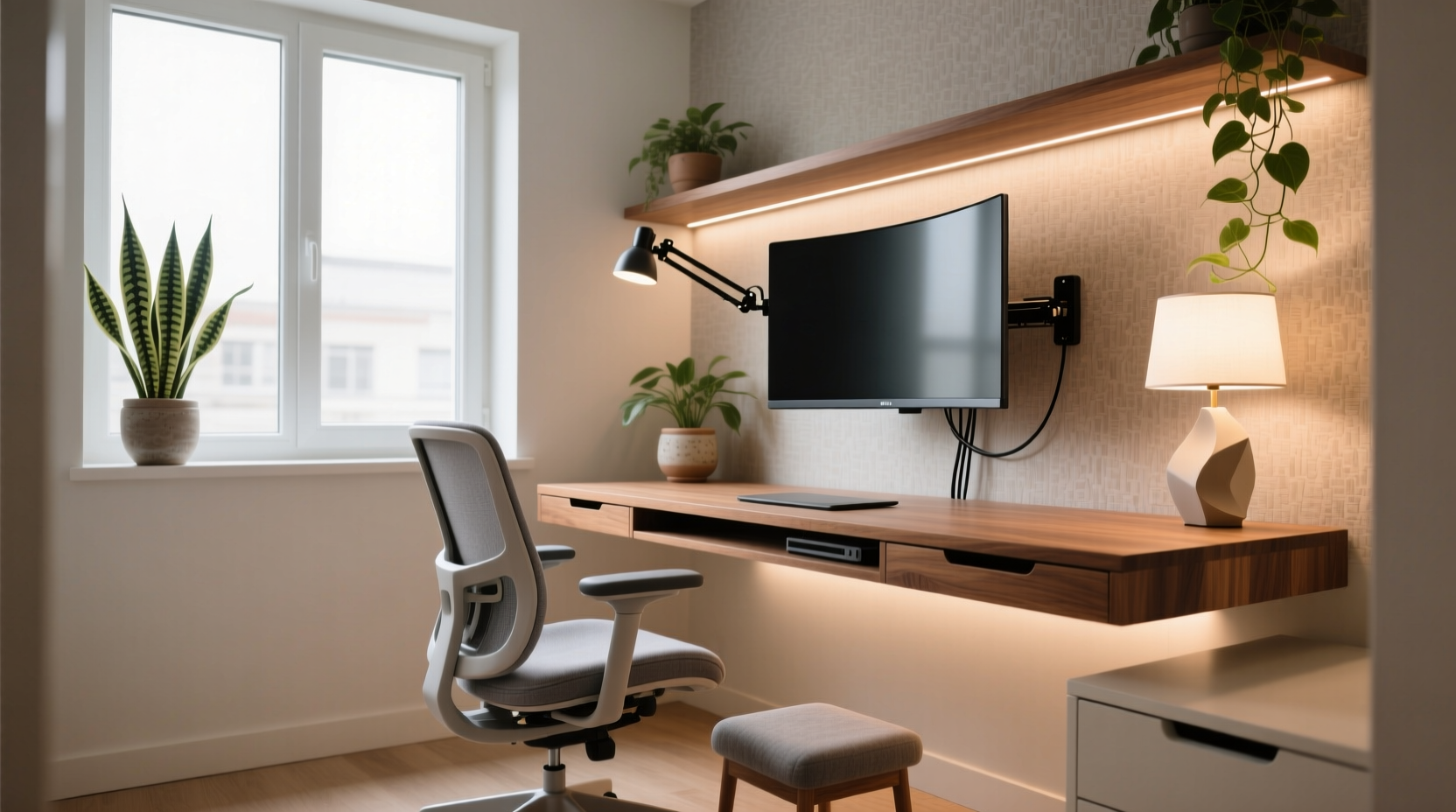
The foundation of any office is the desk and chair. In a small space, these choices are critical—not only for comfort but also for spatial efficiency. Your desk should allow enough surface area for your laptop, notebook, and perhaps a secondary monitor, while still leaving room to move freely. Wall-mounted or floating desks are excellent options because they free up floor space and create a sense of openness.
Look for compact desks with built-in cable management, adjustable height settings, or fold-down designs. These features help maintain order and adapt to changing needs throughout the day. For example, a sit-stand desk promotes movement and reduces back strain, which is especially valuable when you're confined to one area for hours.
Your chair matters just as much. Poor seating leads to chronic discomfort, reduced concentration, and long-term musculoskeletal issues. Invest in an ergonomic chair—even if it means allocating most of your budget here. Key features include lumbar support, adjustable armrests, seat depth, and breathable fabric. If floor space is extremely limited, consider a drafting chair tucked neatly under a high countertop-style desk.
Optimize Ergonomics Within Constraints
Ergonomics isn’t a luxury reserved for corporate offices—it’s essential for anyone spending extended periods at a desk. In a small workspace, poor ergonomics can be magnified due to cramped positioning. The objective is to align your body correctly so that your neck, shoulders, wrists, and spine remain in neutral positions during work.
Follow this basic ergonomic checklist:
- Your eyes should be level with the top third of your monitor screen.
- Arms should rest comfortably at 90 degrees, elbows close to your body.
- Feet should rest flat on the floor (or on a footrest).
- Wrists remain straight while typing, ideally supported by a padded surface.
In tight setups, monitor placement often becomes compromised. Laptops, in particular, force users to look down, straining the neck. To fix this, raise your screen using a stand, stack of books, or wall-mounted arm. Pair it with an external keyboard and mouse to keep your hands at desk level while your eyes stay aligned.
“Even minor misalignments compound over time. A two-inch-too-low monitor may seem trivial, but after 40 hours a week, it contributes significantly to upper back pain.” — Dr. Lena Patel, Occupational Therapist
Smart Storage and Clutter Control
Clutter is the enemy of both comfort and productivity. In a small office, disorganization quickly makes the space feel overwhelming. Every item must earn its place. Begin by auditing what you truly need daily: laptop, charger, notebook, pen, headphones. Store infrequently used items elsewhere or vertically.
Vertical storage solutions—like wall shelves, pegboards, or magnetic strips—are game-changers. They keep essentials accessible without consuming desk real estate. Use labeled bins or drawers to categorize supplies. Cable clutter should be addressed proactively: employ braided sleeves, adhesive clips, or under-desk trays to route cords cleanly.
| Solution | Best For | Space-Saving Benefit |
|---|---|---|
| Floating Shelves | Books, decor, supplies | Eliminates need for bookshelves |
| Pegboard Wall Organizer | Pens, headphones, tools | Customizable, visible access |
| Under-Desk Drawer | Small office supplies | Utilizes dead space |
| Magnetic Cable Clips | Chargers, USB cords | Prevents tangles, improves airflow |
Lighting and Atmosphere for Focus and Comfort
Lighting dramatically affects mood, alertness, and eye strain. Natural light is ideal, so position your desk near a window if possible—but avoid direct sunlight on your screen, which causes glare. Use sheer curtains or blinds to diffuse brightness evenly.
When daylight fades, layer your artificial lighting. Relying solely on overhead lights creates harsh shadows and fatigue. Instead, combine ambient ceiling lighting with task lighting (such as an adjustable LED desk lamp) and accent lighting (like a warm-toned shelf light). Choose bulbs with a color temperature between 4000K and 5000K for balanced, energizing illumination.
Air quality and scent also play subtle but important roles. Stale air leads to drowsiness. Open windows regularly or use a compact air purifier. A small desktop plant—like a snake plant or pothos—not only improves air quality but adds visual calm. Avoid strong fragrances, which can trigger headaches in enclosed areas.
Mini Case Study: Maria’s Studio Apartment Office
Maria lives in a 450-square-foot studio in downtown Seattle. Her \"office\" occupies a 5x4-foot alcove beside her bed. Initially, she worked from her couch with her laptop on her knees, leading to frequent back pain and distraction.
She restructured her space by installing a wall-mounted fold-down desk that swings shut at night. She paired it with a slim, cushioned stool stored beneath when not in use. A monitor arm lifts her screen to eye level, and a magnetic strip holds pens and scissors. Task lighting comes from a flexible gooseneck lamp clamped to the desk edge.
After four weeks, Maria reported improved posture, fewer migraines, and a clearer mental separation between work and rest. Her total investment was under $300, proving that thoughtful design beats square footage.
Step-by-Step Guide to Building Your Compact Office
Follow this timeline to build a functional, comfortable small-space office in under two weeks:
- Week 1, Day 1–2: Assess Your Space
Measure the available area. Identify power outlets, natural light sources, and traffic flow. Rule out spots where foot traffic disrupts focus. - Day 3–4: Define Your Needs
List essential equipment and daily tools. Eliminate non-essentials. Determine if you need standing capability, dual monitors, or guest seating. - Day 5–7: Purchase Core Furniture
Buy a space-efficient desk (floating, corner, or foldable) and an ergonomic chair. Prioritize adjustability and durability over low cost. - Week 2, Day 8–9: Install Storage Solutions
Mount shelves, pegboards, or drawer units. Organize supplies by frequency of use. Label containers for quick access. - Day 10–11: Set Up Lighting and Tech
Position monitor(s) at eye level. Connect cables through clips or sleeves. Add layered lighting: ambient, task, and optional accent. - Day 12–13: Fine-Tune Ergonomics
Adjust chair height, armrests, and screen angle. Test posture after 30 minutes of work. Make micro-adjustments as needed. - Day 14: Evaluate and Iterate
Spend a full workday in the space. Note discomfort, inefficiencies, or distractions. Refine layout accordingly—small changes yield big improvements.
FAQ
Can I use a dining table as a small office desk?
Yes, but only if you can maintain consistent setup and storage. Frequent packing and unpacking reduces efficiency. If using a shared table, invest in a rolling cart to store your gear when not in use.
How do I reduce noise in a small open-plan office?
Use noise-canceling headphones, add soft materials like rugs or curtains to absorb sound, and set communication boundaries with housemates. Consider a white noise machine to mask distractions.
Is it worth investing in a standing desk converter for a tiny space?
Absolutely. Standing desk converters allow you to alternate postures without replacing your existing desk. They’re especially useful when floor space limits larger sit-stand models.
Final Checklist Before You Launch Your Workspace
- ✅ Desk fits comfortably with at least 2 feet of clearance around it
- ✅ Chair provides lumbar support and adjusts to your height
- ✅ Monitor is at or slightly below eye level
- ✅ Keyboard and mouse allow relaxed wrist positioning
- ✅ Cables are managed and secured
- ✅ Task lighting eliminates screen glare
- ✅ Storage keeps desktop clear of clutter
- ✅ Airflow is adequate, with options for ventilation
- ✅ Personal touches (photo, plant, art) enhance comfort
Conclusion: Comfort Is a Design Choice, Not a Luxury
A small office doesn’t have to mean compromised comfort. By focusing on ergonomics, smart furniture choices, and intentional organization, you can create a workspace that supports both physical well-being and mental clarity. The most effective home offices aren’t defined by size—they’re defined by how thoughtfully they’re designed.
You don’t need a renovation or a bigger apartment to make meaningful improvements. Start with one change: raising your screen, adding a footrest, or clearing your cables. Each adjustment compounds, gradually transforming your environment into one that works for you, not against you.




 浙公网安备
33010002000092号
浙公网安备
33010002000092号 浙B2-20120091-4
Comments
No comments yet. Why don't you start the discussion?