
Every manufactured product comes with a unique identifier—its serial number. Whether you're registering a new laptop, filing an insurance claim for a stolen camera, or verifying the authenticity of a luxury watch, knowing where and how to find this number is essential. Yet, many people waste time searching in the wrong places or assume the number is missing when it’s simply hidden in plain sight. This guide breaks down exactly how to locate serial numbers on nearly any product, using proven methods that work across categories—from electronics to appliances, tools to vehicles.
Why Serial Numbers Matter
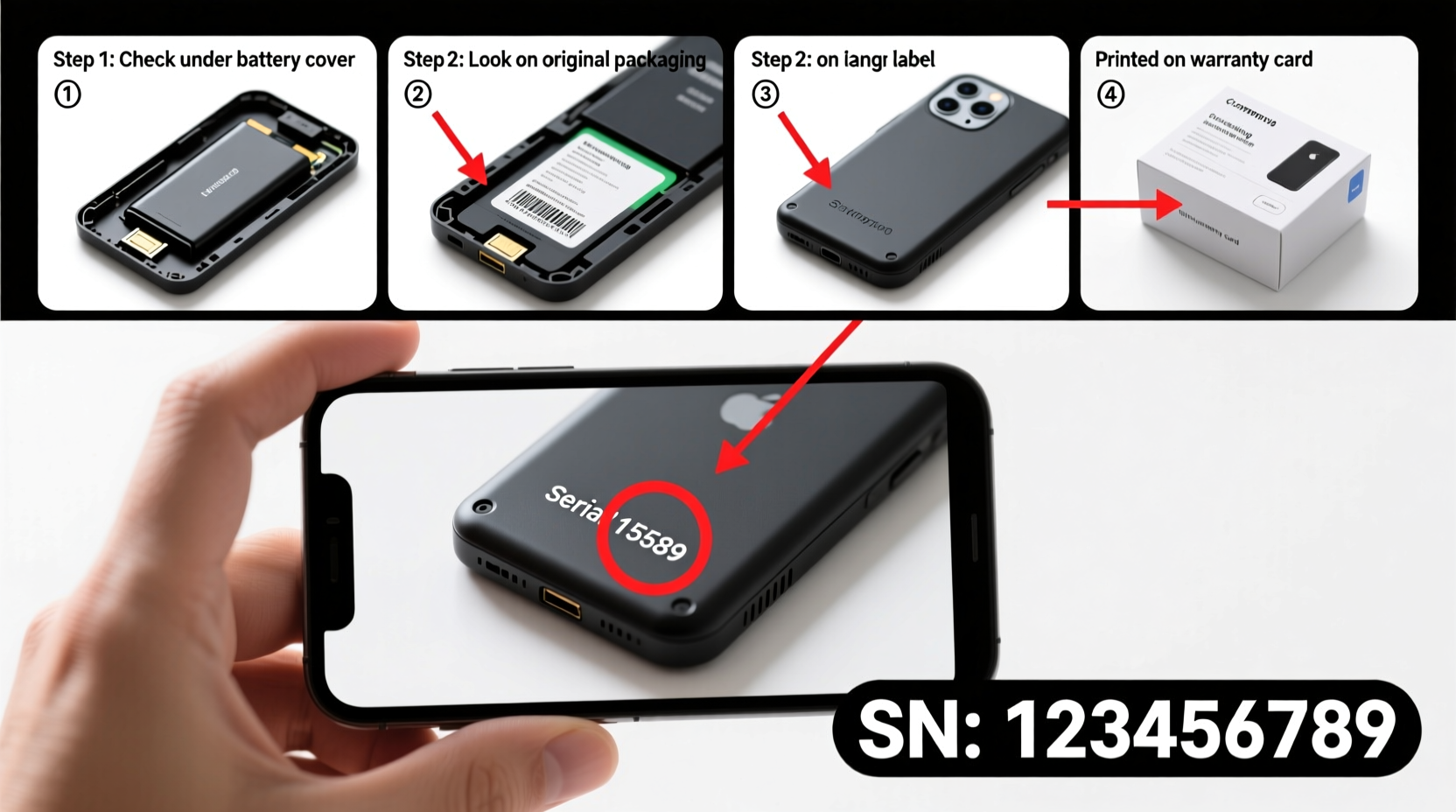
A serial number isn’t just a random string of letters and digits. It’s a product’s digital fingerprint. Manufacturers use it to track production batches, manage warranties, identify recalls, and combat counterfeiting. For consumers, having access to this number simplifies customer support, speeds up repairs, and strengthens proof of ownership.
Without a serial number, you may be denied warranty service—even if you have a receipt. In some cases, law enforcement requires it to recover stolen goods. And for secondhand buyers, verifying a serial number can prevent purchasing a blacklisted or reported device.
“Serial numbers are critical for both consumer protection and brand integrity. They create accountability throughout a product’s lifecycle.” — Daniel Reeves, Consumer Electronics Compliance Officer
Step-by-Step: How to Locate Any Product’s Serial Number
Finding a serial number doesn’t require technical expertise—just a systematic approach. Follow these steps regardless of product type.
- Check the obvious external labels: Most products display the serial number on a sticker attached to the exterior. Look on the back, bottom, side, or near ports and connectors. This is especially common with electronics, appliances, and power tools.
- Inspect packaging and documentation: If you still have the original box, check the barcode label. The serial number is often printed alongside the UPC. Also review the user manual, warranty card, or quick start guide—some brands list it there.
- Access internal system settings (for electronics): Smartphones, laptops, tablets, and smart TVs store the serial number in software. Navigate to Settings > About Device to view it. On Apple devices, it’s under General > About. On Android, look under “Status” or “Regulatory Information.”
- Remove removable parts: On items like cameras, drones, or handheld devices, the serial number may be under the battery compartment. Similarly, some appliances hide it behind filters, panels, or drawers.
- Use manufacturer-specific tools: Brands like Dell, HP, and Lenovo allow you to enter a service tag online to retrieve the full serial number. Others, such as Canon or Nikon, provide lookup tools if you register your purchase with proof of sale.
Product-Specific Locations: A Quick Reference Table
| Product Type | Common Serial Number Location | Special Notes |
|---|---|---|
| Smartphone | Settings > About Phone; IMEI dial code (*#06#) | IMEI doubles as serial on most models |
| Laptop | Underside chassis; BIOS; System Information | Dell/HP often use service tags instead of full serials |
| Washing Machine | Inside door rim; back panel; top ledge | May require opening the door fully to see |
| Camera | Base plate; inside battery compartment | Often includes model + serial on same label |
| Power Tool | Bottom housing; near motor casing | Can wear off with heavy use—photograph early |
| Vehicle (Car/Motorcycle) | Dashboard (driver’s side); VIN plate on door jamb | VIN serves as the serial equivalent |
Real Example: Recovering a Lost Laptop Serial Number
Sarah from Austin purchased a used MacBook online. When she tried to verify its warranty status, she couldn’t find the serial number. The seller hadn’t included the original box, and the engraving on the back was worn. Instead of giving up, Sarah clicked the Apple logo > About This Mac. The serial appeared instantly. She entered it on Apple’s support site and discovered the device had been reported stolen. She contacted the authorities, avoided a potential legal issue, and recovered her payment through the platform’s buyer protection.
This case shows why persistence pays. Even when physical labels fail, digital access often provides a backup.
Essential Tips for Managing Serial Numbers Long-Term
Finding the serial number once isn’t enough. Smart consumers create a lasting record. Here’s how:
- Photograph every serial number upon purchase. Store images in a secure cloud folder labeled “Product Records.”
- Create a master spreadsheet with columns for product name, model, serial number, purchase date, warranty end, and retailer.
- Register products immediately. Most manufacturers send confirmation emails that include the serial—another backup.
- Never rely solely on memory or paper receipts. Ink fades, files get lost. Digital storage is more reliable.
Common Mistakes to Avoid
Even experienced users make errors when hunting for serial numbers. Watch out for these pitfalls:
- Confusing model number with serial number: Model numbers are generic (e.g., iPhone 15), while serials are unique. Always double-check labels.
- Overlooking firmware-based retrieval: Many skip checking device settings and waste time dismantling hardware unnecessarily.
- Throwing away packaging too soon: The box often contains the clearest, most scannable version of the serial.
- Assuming no serial means counterfeit: Some budget products use batch codes instead. Contact support before making assumptions.
FAQ: Frequently Asked Questions
What if the serial number is scratched or unreadable?
Contact the manufacturer with your proof of purchase. Most companies can trace the device using order records, invoice numbers, or registered accounts. In some cases, they’ll issue a replacement label.
Is the serial number the same as the IMEI or MAC address?
For smartphones and networked devices, the IMEI (International Mobile Equipment Identity) often serves as the functional serial number. Similarly, routers and IoT devices may use the MAC address for identification. While technically different, they fulfill the same tracking role.
Can I find a serial number using a barcode scanner?
Standard barcodes (UPC/EAN) don’t contain serial numbers—they only identify product types. However, QR codes on warranty cards or inside batteries sometimes link to serial-specific web pages. Specialized scanners used by retailers or technicians can decode serialized data matrices.
Final Checklist: Never Lose a Serial Number Again
- Locate the serial number using physical inspection or device settings.
- Verify it matches the correct product (not the model number).
- Take a clear photo and store it digitally.
- Record it in a secure spreadsheet or document manager.
- Register the product with the manufacturer.
- Keep the original box for at least 90 days post-purchase.
Stay Prepared, Stay Protected
Knowing how to find a serial number turns a frustrating chore into a five-minute task. More importantly, it empowers you to protect your investments, resolve issues faster, and maintain control over your belongings. Don’t wait until something goes wrong to learn this skill. Apply these steps now, while everything is in working order. Create your product inventory today—because when you need that number, you won’t have time to figure it out.




 浙公网安备
33010002000092号
浙公网安备
33010002000092号 浙B2-20120091-4
Comments
No comments yet. Why don't you start the discussion?