
Losing a pet is one of the most distressing experiences a pet owner can face. Yet, in an age where technology is seamlessly integrated into daily life, recovering a lost pet has become significantly easier—if you know how to use the tools available. One of the most underutilized yet powerful tools is the modern dog tag, especially those embedded with scannable QR codes or linked to digital profiles.
While many pet owners attach tags to their dog’s collar, few realize that these tags can do more than just display a phone number. When properly set up and scanned, they can instantly connect a good Samaritan with the pet’s owner, medical records, and even behavioral notes. This guide walks through exactly how to scan a dog tag efficiently, what to do after scanning, and how to ensure your own pet’s tag is optimized for real-world use.
Why Scanning Dog Tags Matters
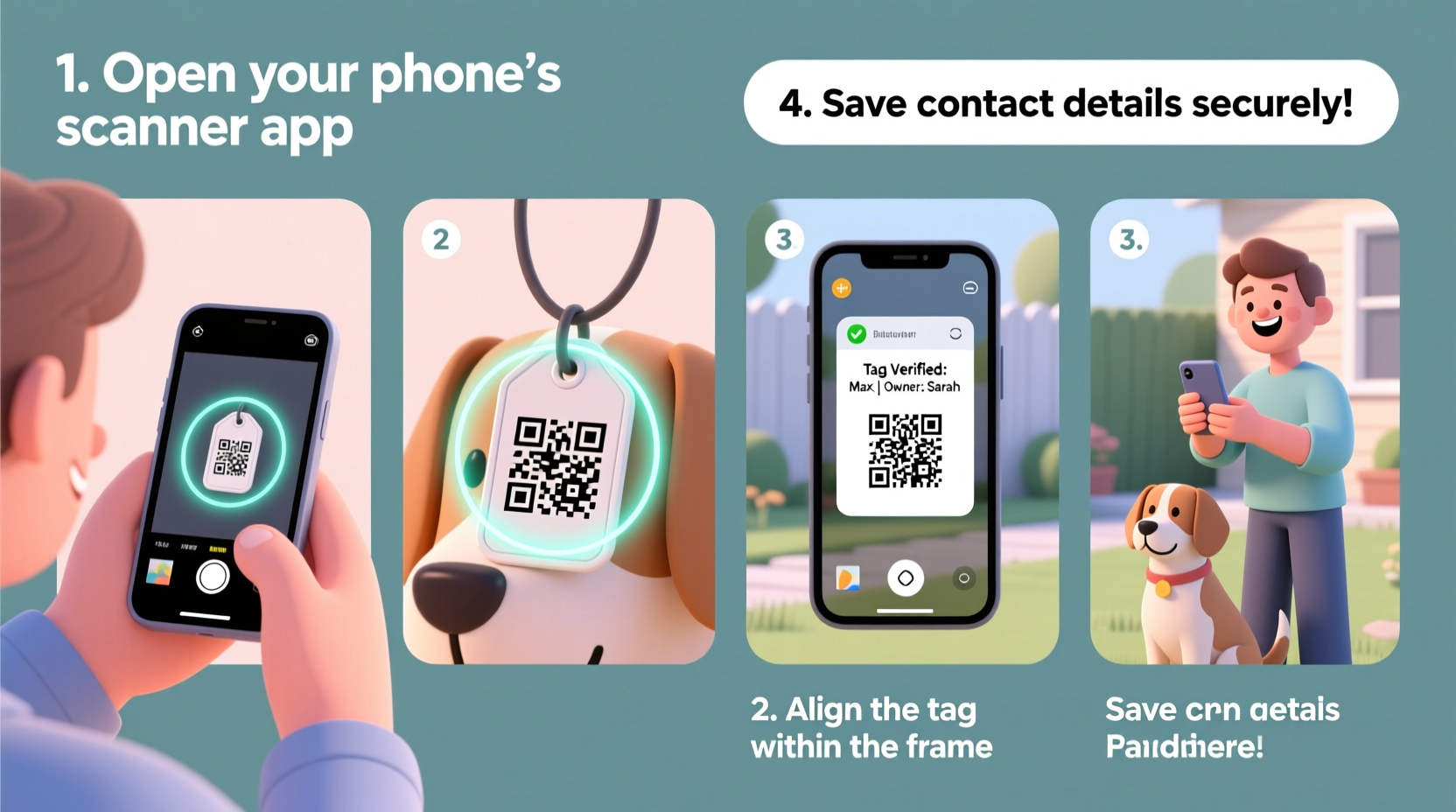
Dog tags have evolved from simple engraved metal pieces to smart access points for critical information. Traditional tags rely on someone calling a number, which may go unanswered or be outdated. In contrast, scannable tags—especially QR code-enabled ones—provide immediate access to a secure, up-to-date profile hosted online.
According to the American Veterinary Medical Association, only about 15% of lost dogs without microchips are reunited with their families. However, when identification like scannable tags or microchips is used, recovery rates jump dramatically. A scannable tag bridges the gap between physical ID and digital connectivity, making reunification faster and more reliable.
Step-by-Step Guide to Scanning a Dog Tag
Scanning a dog tag is a simple process, but doing it correctly ensures you get the right information quickly. Whether you’ve found a lost dog or want to test your own tag, follow these steps:
- Assess the Situation Safely
If you’ve found a stray dog, approach calmly and cautiously. Use a leash or ask for help if the dog seems anxious or aggressive. Your safety—and the dog’s—is the top priority. - Locate the Dog Tag
Most tags hang from the collar. Look for a small square pattern (QR code) or a symbol indicating an NFC chip (often a curved arrow icon). Some tags may say “Scan Me” or include instructions. - Prepare Your Smartphone
Unlock your phone and open the camera app. Most modern smartphones (iPhone and Android) can read QR codes directly through the default camera. For NFC tags, ensure NFC is enabled in your phone settings. - Scan the QR Code
Hold your phone steady about 6–12 inches from the tag. Center the QR code in the camera viewfinder. If supported, your phone will automatically detect the code and prompt you with a notification linking to a website. - Tap or Follow the Link
Once scanned, tap the pop-up notification to open the pet’s profile. This usually leads to a page with the owner’s contact info, the pet’s name, medical alerts, and sometimes a photo. - Contact the Owner Immediately
Call or text the provided number. If no response, consider sending a message through the platform (some services allow messaging without revealing personal details). - Stay with the Dog (If Safe)
While waiting for the owner, keep the dog in a safe, quiet place. Offer water if available, but avoid feeding them unfamiliar food.
What If the Tag Doesn’t Scan?
If the QR code doesn’t work, try adjusting the angle or cleaning the tag surface. Poor lighting, scratches, or dirt can interfere with scanning. If it still fails, look for a backup phone number engraved on the tag. You can also check for a service name (like “TagTrack” or “PetLink”) and visit their website to manually enter an ID number listed on the tag.
Optimizing Your Pet’s Tag for Easy Scanning
As a pet owner, ensuring your dog’s tag is functional and scannable is part of responsible ownership. A tag that looks good but can’t be read defeats its purpose.
| Feature | Recommended | Avoid |
|---|---|---|
| Material | Stainless steel, durable plastic | Thin aluminum, flimsy metals |
| Code Type | QR code or NFC chip | No digital link, only text |
| Engraving | Clear font, high contrast | Fancy script, small text |
| Weather Resistance | Waterproof, UV-resistant coating | Uncoated, porous surfaces |
“Modern dog tags are not just ID—they’re lifelines. A working QR code can cut recovery time from days to minutes.” — Dr. Lena Torres, Veterinarian & Animal Safety Advocate
Real-World Example: How a Scan Reunited a Family
In Columbus, Ohio, a Golden Retriever named Daisy wandered off during a thunderstorm. A neighbor spotted her shivering under a porch and noticed a shiny tag on her collar. Using his iPhone, he opened the camera and pointed it at the QR code. Within seconds, a webpage loaded showing Daisy’s photo, her owner’s cell number, and a note: “Afraid of storms—please comfort gently.”
The neighbor called immediately. The owner, who had been searching for over two hours, arrived within ten minutes. Thanks to the scannable tag, Daisy was back home before the rain stopped. Without it, she might have been taken to a shelter, delaying reunion by days—or worse, leading to permanent loss.
Essential Checklist for Pet Owners
Ensure your dog’s tag is always ready for a successful scan. Use this checklist monthly:
- ✅ Verify the QR code or NFC chip is clean and undamaged
- ✅ Test the scan using your phone or a friend’s device
- ✅ Confirm all contact information is current
- ✅ Update medical notes (e.g., allergies, medications)
- ✅ Check collar fit and tag attachment strength
- ✅ Register the tag with a national pet recovery network
Frequently Asked Questions
Can I scan a dog tag without an internet connection?
No. QR codes and NFC chips require an active internet connection to load the associated webpage. However, some advanced tags offer offline features like storing basic contact info locally, though this is rare. Always assume connectivity is needed.
What if the tag leads to an expired or inactive page?
This usually means the owner hasn’t maintained their account. In such cases, look for any secondary contact info on the tag. You can also report the dog to local shelters or use apps like FindingRover or PawBoost to post sightings.
Are NFC tags better than QR codes?
Both have advantages. QR codes work across all smartphones with cameras, while NFC requires tapping the phone to the tag but uses less battery and works in low light. For maximum compatibility, choose a tag that supports both technologies.
Take Action Today for a Safer Tomorrow
Scanning a dog tag should be as routine as checking a lost wallet for ID. With just a few seconds of effort, you could return a beloved pet to a relieved family. As a pet owner, don’t wait until your dog is missing to ensure their tag works. Test it now, keep it updated, and educate friends and neighbors on how to scan it.
Technology has transformed pet safety—use it wisely. Share this guide with fellow pet owners, start a conversation at your local dog park, or recommend scannable tags at your vet’s office. Every connected tag is a stronger link in the chain of pet protection.




 浙公网安备
33010002000092号
浙公网安备
33010002000092号 浙B2-20120091-4
Comments
No comments yet. Why don't you start the discussion?