
In an age where digital and physical worlds increasingly converge, embedding NFC (Near Field Communication) chips into decorative ornaments offers a creative way to surprise, inform, and connect. Whether you're designing a heartfelt gift, enhancing a wedding favor, or adding interactivity to home décor, this fusion of technology and craftsmanship allows a simple tap of a smartphone to reveal a hidden layer of meaning—be it a love letter, a playlist, event details, or even a photo gallery.
NFC-enabled ornaments are no longer limited to high-tech installations. With affordable tags and accessible tools, anyone can create interactive keepsakes that blend sentiment with innovation. The process is straightforward but requires attention to detail, from selecting the right components to ensuring seamless integration without compromising aesthetics.
Understanding NFC Technology in Everyday Objects
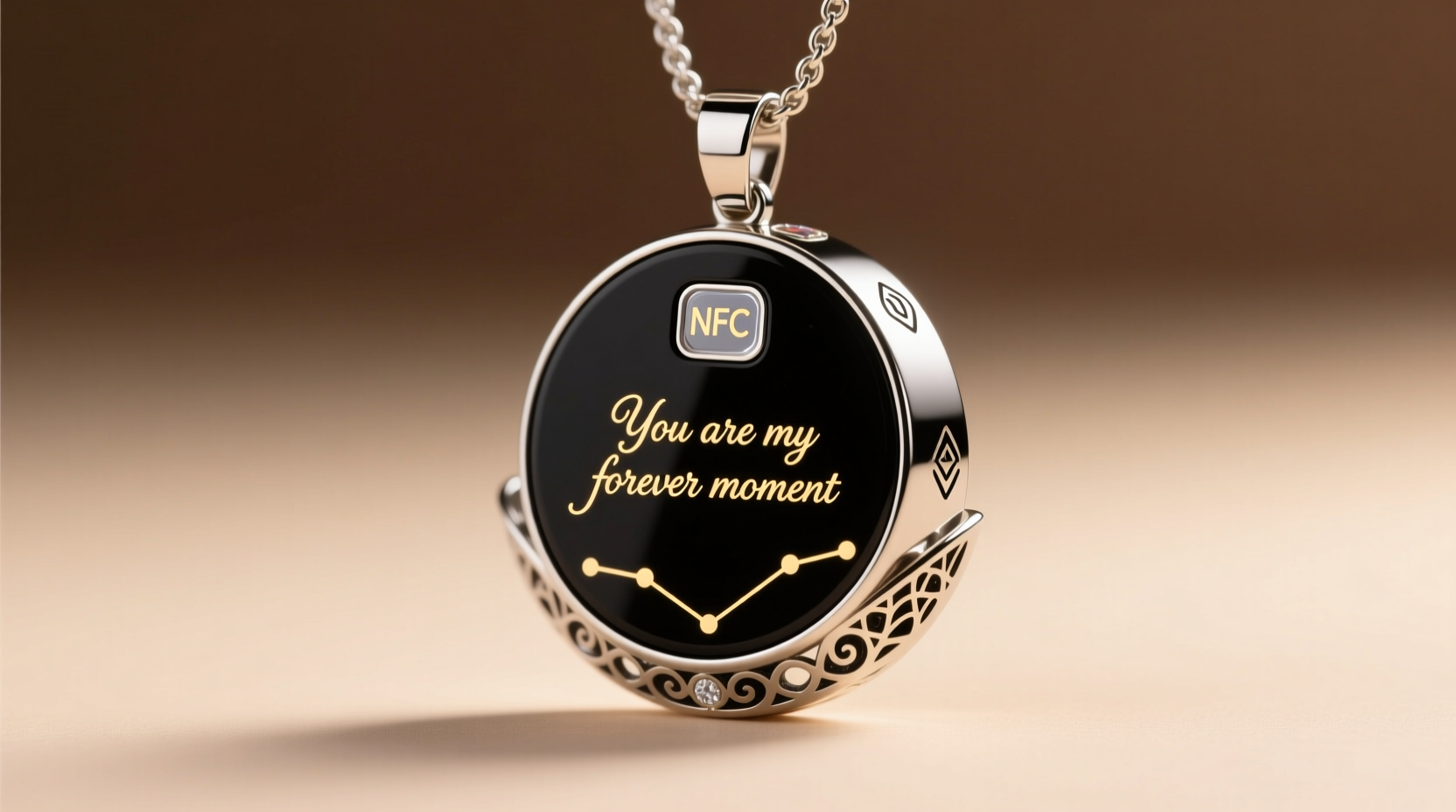
NFC is a short-range wireless communication standard that enables two devices—typically a smartphone and an NFC tag—to exchange data when brought within close proximity, usually less than 4 centimeters. Unlike Bluetooth or Wi-Fi, NFC doesn’t require pairing and activates instantly upon contact.
NFC tags used in ornament embedding are passive, meaning they don’t need a power source. They’re activated only when a compatible device (like an Android or iPhone 7 and later) taps them. Once triggered, the tag sends a signal instructing the phone to open a specific action—most commonly, a URL, text message, or contact card.
For ornaments, this means you can hide a digital experience inside a tangible object: a snowflake on a Christmas tree that plays a family video, a pendant that displays a marriage vow, or a garden stone that links to a memorial tribute.
“NFC brings emotional depth to physical objects by allowing stories to live behind surfaces. It’s not just tech—it’s storytelling.” — Dr. Lena Torres, Human-Computer Interaction Researcher, MIT Media Lab
Materials and Tools You’ll Need
Creating an NFC-integrated ornament begins with gathering the right supplies. The goal is to embed the chip discreetly while preserving the visual appeal and durability of the piece.
| Item | Purpose | Recommended Options |
|---|---|---|
| NFC Tags | Stores the digital command (e.g., URL) | NTAG213, NTAG215, or NTAG216 (waterproof variants preferred) |
| Ornament Base | Physical object to embed the chip into | Resin pendants, wooden slices, ceramic tiles, acrylic shapes |
| Smartphone | To program and test the NFC tag | Android (any recent model), iPhone (iOS 13+ with NFC reader support) |
| NFC Writing App | To encode the tag with your message or link | NFC Tools (Android), Shortcut (iOS), Trigger (iOS) |
| Adhesive | To secure the chip in place | Epoxy resin, E6000 glue, or UV-curing adhesive |
| Protective Coating | To seal the chip from moisture and damage | Clear resin, Mod Podge, or silicone sealant |
| Optional: Drill or Carving Tool | To create space for the chip | Pin vise drill, X-Acto knife, Dremel tool |
Step-by-Step Guide to Embedding an NFC Chip
Follow this detailed sequence to successfully integrate an NFC chip into any ornament. Precision and patience ensure both functionality and elegance.
- Select and Prepare the Ornament
Choose a material that allows internal embedding. Wood, resin, and soft ceramics work best. Avoid thick metal or aluminum-heavy pieces, as metal interferes with NFC signals. - Determine the Embedding Location
Decide where the chip will go. Ideally, place it near the surface and away from conductive materials. For pendants, center the chip toward the back; for flat ornaments, position it off-center to avoid finger contact during scanning. - Create a Cavity (If Needed)
If the ornament is solid, use a small drill bit (1–2 mm smaller than the tag’s diameter) to carve a shallow recess. Depth should match the tag’s thickness—usually 0.5 mm. Never drill completely through unless intentional. - Program the NFC Tag
Open your NFC writing app. Select “Write” and choose the action type: URL, plain text, or Wi-Fi connection. For personalized messages, generate a short link to a Google Doc, private YouTube video, or webpage hosted on a free platform like GitHub Pages or Notion. Tap “Write” and hold your phone over the unembedded tag until confirmation appears. - Test Before Embedding
Verify the programmed tag works by tapping it with another phone. Ensure the correct content loads. This step prevents wasted effort if the tag fails post-installation. - Secure the Chip
Apply a small amount of epoxy or E6000 glue into the cavity. Gently press the tag into place, ensuring it lies flat. Avoid air bubbles. Let dry for at least 12 hours. - Seal and Protect
Cover the embedded area with a clear coating. For resin projects, pour a thin layer over the entire surface. For wood, use a brush-on sealer. This protects against moisture, scratches, and accidental dislodging. - Final Test
After curing, test again with a smartphone. Some materials—especially dense resins—can slightly weaken signal strength. If scanning fails, reposition the tag closer to the surface in future attempts.
Real Example: A Wedding Guest Favor That Tells a Story
Sophie and James wanted their wedding guests to feel personally connected. Instead of traditional cards, they created custom wooden heart ornaments engraved with each guest’s name. Inside each was an NFC chip linked to a private webpage containing a thank-you note, photos from the couple’s journey, and a Spotify playlist of songs meaningful to their relationship.
The hearts were laser-cut, sanded smooth, and fitted with NTAG215 chips embedded using a pin vise drill. After programming and sealing with food-safe walnut oil, they were tied with twine and placed on tables. Guests tapped their phones curiously—and many later shared screenshots of the page, calling it “the most memorable favor ever.”
This project took Sophie about three hours for 50 units, mostly due to batch programming and drying time. She emphasized consistency: “I labeled each tag before programming to avoid mix-ups. And I tested every single one after sealing.”
Best Practices and Common Pitfalls
While embedding NFC chips seems simple, subtle mistakes can render them useless. Follow these do’s and don’ts to ensure success.
| Action | Do | Don't |
|---|---|---|
| Placement | Keep chip within 2 mm of surface; avoid metal backing | Bury deep in thick material or behind foil layers |
| Programming | Use shortened, reliable URLs (e.g., Bitly or TinyURL) | Link to unstable personal cloud folders that may expire |
| Durability | Seal with waterproof coating, especially for outdoor use | Leave exposed to humidity or direct sunlight |
| Design | Add a subtle indicator (e.g., “Tap to Reveal”) near the chip | Make users guess where to tap |
| Testing | Test with multiple phone models (iPhone and Android) | Assume all NFC readers behave identically |
Checklist: Preparing Your NFC Ornament Project
- ☐ Choose ornament material compatible with NFC (non-metallic)
- ☐ Purchase waterproof NFC tags with sufficient memory (NTAG215+)
- ☐ Decide on the digital content (message, video, audio, etc.)
- ☐ Create and shorten the destination URL
- ☐ Install an NFC writing app on your smartphone
- ☐ Designate a workspace with good lighting and minimal clutter
- ☐ Program and test a sample tag before mass production
- ☐ Mark the tap zone visibly or tactically (engraving, dot)
- ☐ Seal and cure each piece fully before final testing
- ☐ Document the project (for troubleshooting or replication)
Frequently Asked Questions
Can iPhones read NFC tags embedded in ornaments?
Yes. iPhones from the iPhone 7 onward support NFC reading via built-in apps or third-party tools like Shortcut or Trigger. While earlier iOS versions had limited access, iOS 13 and later allow full integration. Users simply need to bring the top of their phone near the tag—no app opening required if using a URL.
How long do NFC tags last?
NFC tags have no battery and are designed to last 10 years or more under normal conditions. However, exposure to water, extreme heat, or physical damage can reduce lifespan. Proper sealing extends longevity significantly, especially for outdoor or wearable ornaments.
Can I update the message after embedding?
No—once an NFC tag is locked (recommended after programming), its data cannot be changed. If you anticipate needing updates, consider linking to a dynamic webpage that you can edit independently. The tag points to the URL, not the content itself, so changes to the page reflect instantly.
Bringing Meaning to the Moment
Embedding NFC chips into ornaments transcends novelty. It transforms static objects into vessels of memory, emotion, and connection. A child’s handmade ornament gains new depth when tapping it plays a voice recording from a grandparent. A corporate gift becomes unforgettable when it reveals a personalized thank-you video. Even public art installations use this technique to deliver layered narratives with a tap.
The barrier to entry has never been lower. With under $20 in materials and a few hours of focused work, you can create something that surprises, delights, and endures. As digital experiences grow more impersonal, these hybrid tokens stand out by combining tactile beauty with intimate storytelling.




 浙公网安备
33010002000092号
浙公网安备
33010002000092号 浙B2-20120091-4
Comments
No comments yet. Why don't you start the discussion?