
A clean, clutter-free entertainment setup starts with managing what's most visible: the tangle of cords snaking behind your television. While many solutions involve wall mounting or permanent installations, not everyone can—or wants to—drill holes into drywall or cabinetry. Whether you're renting, preserving rental property, or simply avoiding tools, there are effective, non-invasive ways to conceal cords and achieve a sleek, organized look.
The goal isn’t just aesthetics—it’s also safety and convenience. Loose cables pose tripping hazards, attract dust, and make rearranging or cleaning difficult. With thoughtful planning and the right accessories, you can streamline your setup using only removable, adhesive-based, or mechanical solutions that leave no trace when removed.
Why Avoid Drilling? Common Constraints and Concerns
Drilling may seem like the go-to for cord management, but it’s often impractical or prohibited. Renters face lease restrictions that ban permanent modifications. Homeowners may avoid drilling due to tile, brick, or plaster walls that complicate installation. Others simply prefer flexible setups that allow for reconfiguration as needs change.
Additionally, incorrect drilling can damage wires hidden in walls, lead to moisture issues if exterior walls are involved, or compromise structural integrity if done near load-bearing zones. Even minor holes require patching, which introduces mess and effort when moving out.
Thankfully, modern cable management products have evolved to offer strong, reliable alternatives. These solutions prioritize ease of use, reusability, and visual discretion—making them ideal for temporary or sensitive environments.
Step-by-Step Guide: Concealing Cords Without Drilling
Follow this logical sequence to transform a chaotic cable cluster into a tidy, nearly invisible system—no power tools required.
- Gather and assess all cables: Unplug and lay out every cord connected to your TV, soundbar, streaming device, game console, and power strip. Identify which ones are essential and which can be eliminated (e.g., using a single HDMI switch instead of multiple inputs).
- Trim excess length: Coiling extra cable creates bulk. Use Velcro straps to loosely wrap surplus wire into neat loops. Avoid tight bends that could damage internal wiring.
- Group related cords: Bundle power cables separately from signal cables (HDMI, optical, Ethernet). This reduces electromagnetic interference and makes troubleshooting easier.
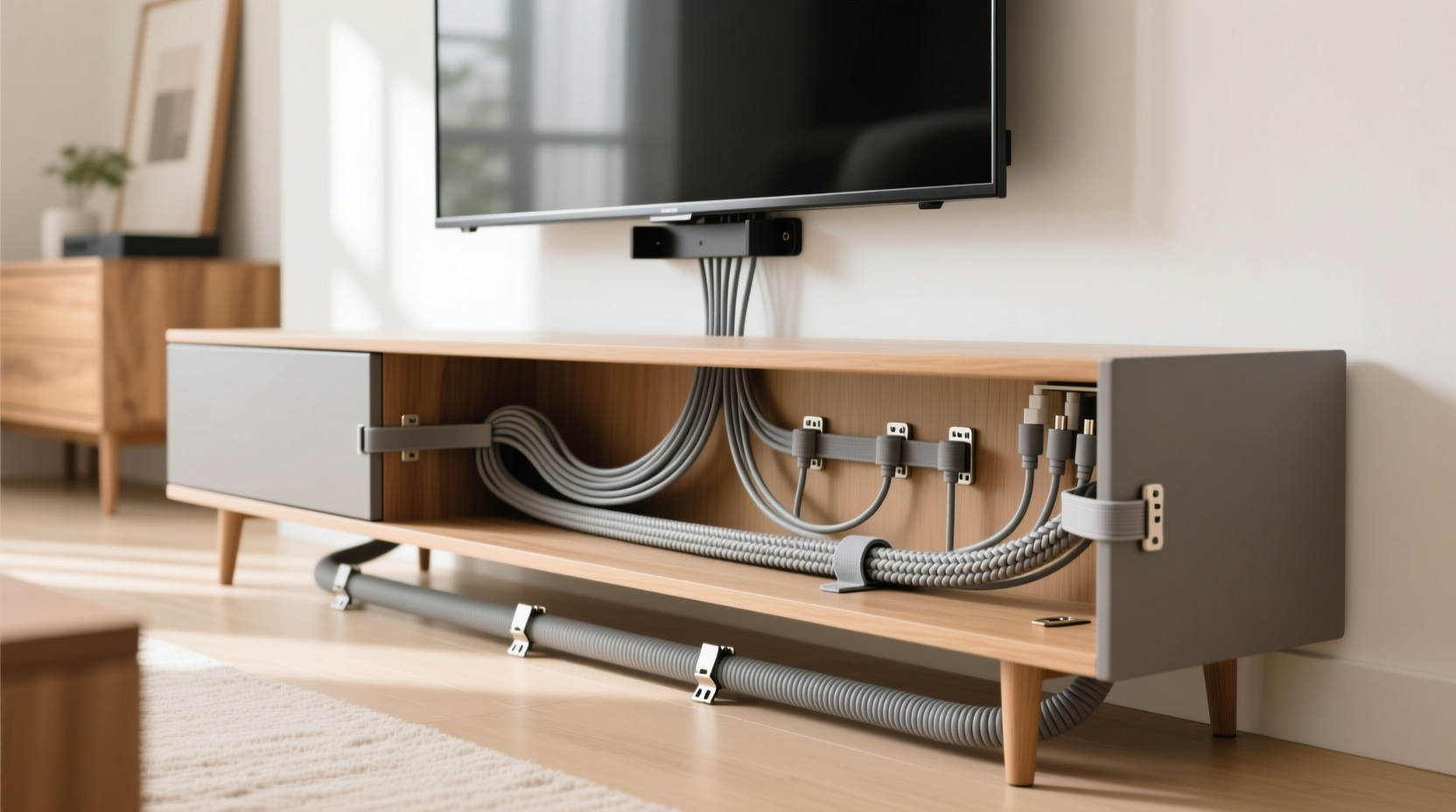
- Use adhesive-backed raceways: Install a low-profile plastic channel along the back of your TV stand or media console. These snap shut and hide multiple cords inside. Choose white or black to blend with furniture.
- Route cables downward discreetly: Guide bundles from the TV down the rear legs or sides of the stand using adhesive clips. Position them close to corners where they’re less visible from seating angles.
- Hide floor-level cords with flat cord covers: Use peel-and-stick baseboard raceways to carry wires along the wall-to-floor junction. These stay flush and can be painted to match trim.
- Organize the final drop to outlets: If your outlet is nearby, use a fabric-covered cord sleeve to bundle everything into one streamlined line. For distant outlets, consider a wireless HDMI transmitter to eliminate one cable entirely.
This process takes under an hour and requires only scissors, Velcro strips, and a few purchased accessories—all easily removable.
Top Non-Drill Solutions Compared
Not all cord-hiding products are created equal. Here’s a breakdown of the most effective options available today, evaluated for strength, appearance, ease of removal, and cost.
| Product Type | Best For | Removable? | Visibility | Avg. Cost |
|---|---|---|---|---|
| Adhesive Cable Clips | Light-duty routing on stands or walls | Yes – leaves minimal residue | Low (if matched to surface) | $5–$10 |
| Self-Adhesive Raceways | Multiple cords along vertical/horizontal surfaces | Yes – clean removal with heat | Medium (visible profile) | $12–$20 |
| Furniture Cord Covers | Baseboard runs or floor transitions | Yes – peel-off design | Low to Medium | $15–$25 |
| Magnetic Cable Ties | Metal TV stands or mounts | Yes – fully reusable | Very Low | $8–$12 |
| Fabric Cord Sleeves | Bundling loose cords aesthetically | Yes – no residue | Medium (textured appearance) | $10–$18 |
Choose based on your furniture material, cable volume, and desired permanence. For example, magnetic ties work only on steel surfaces but are nearly invisible. Fabric sleeves add a soft touch but aren’t ideal for long wall runs.
Real Example: Sarah’s Rental Living Room Makeover
Sarah lives in a historic apartment with strict no-modification rules. Her entertainment center had become a jungle of HDMI, power, and speaker wires trailing from a wall-mounted TV to a wooden stand below. Landlords wouldn’t allow any holes, even small ones.
She used a combination of self-adhesive raceways along the back edge of her TV console and clear cable clips to guide wires down the side panels. She bundled secondary cords with a gray fabric sleeve and ran them along the baseboard using a paintable cord cover she later tinted to match the trim.
The result? From her sofa, only a thin, neutral-colored line was visible at floor level—far less noticeable than before. When she moved out six months later, she warmed the adhesive with a hairdryer and peeled everything off without damaging the wood or paint.
“I thought I’d have to live with the mess,” she said. “But these products made it look professionally installed—and I didn’t break any rules.”
“Non-invasive cable management has improved dramatically. Today’s adhesives can hold up to 5 pounds per clip and remove cleanly with proper technique.” — Marcus Lin, Home Automation Installer & AV Designer
Checklist: No-Drill Cord Hiding Essentials
Before starting your project, gather these items to ensure smooth execution:
- ✅ Adhesive-backed cable clips or raceways
- ✅ Velcro straps or reusable zip ties
- ✅ Fabric cord sleeve (optional, for aesthetic bundling)
- ✅ Scissors or cable cutter
- ✅ Isopropyl alcohol and cloth (for surface prep)
- ✅ Hairdryer (for future removal without residue)
- ✅ Colored labels or masking tape (for identifying cords)
- ✅ Measuring tape (to estimate needed lengths)
Clean surfaces thoroughly before applying any adhesive. Dust, oil, or polish residue can reduce grip. Wipe areas with rubbing alcohol and let dry completely. Apply pressure to each attachment for 30 seconds after placement to activate the bond.
Common Mistakes to Avoid
Even simple projects can go wrong without attention to detail. Here are frequent errors people make when hiding cords without drilling:
- Overloading adhesive clips: Small clips are meant for light cables. Power bricks and thick HDMI cords add weight that can cause detachment over time.
- Ignoring airflow: Bundling too tightly around hot devices like gaming consoles can trap heat and reduce performance.
- Routing across high-traffic floor zones: Even flat cord covers can be tripping hazards. Stick to perimeter walls and behind furniture whenever possible.
- Using permanent-looking materials in rentals: White plastic raceways may stand out on dark walls. Opt for paintable or neutral options.
- Forgetting service loops: Don’t pull cables too tight. Leave a slight slack (6–8 inches) behind devices to allow for unplugging and adjustments.
Also, avoid mixing AC power and data cables in the same conduit without separation. While low risk in short runs, it can introduce signal noise in audio/video systems.
Frequently Asked Questions
Can I use Command Strips for cord management?
Yes, 3M Command™ strips come in specialized versions for cables, including hook styles and raceway mounts. They’re engineered for clean removal and work well on painted walls, wood, and tile. Just ensure you select the correct weight rating and follow application instructions precisely.
What if my TV stand doesn’t have a back panel?
If your stand is open-backed, use a combination of lateral routing and floor-level concealment. Run cords down the sides of the cabinet using adhesive clips, then transition to a baseboard raceway. You can also place a decorative basket or box behind the stand to hide the convergence point near the outlet.
Are wireless solutions reliable enough to reduce cords?
For certain connections, yes. Wireless HDMI kits can transmit video signals up to 30 feet without lag, eliminating one major cable. Bluetooth audio adapters allow speakers to connect without physical input. However, power cords still need management—so these should complement, not replace, physical organization.
Final Thoughts: A Cleaner Setup Is Within Reach
Hiding cords behind your TV stand without drilling is not only possible—it’s straightforward with the right approach. Modern adhesive technologies, smart bundling techniques, and thoughtful routing can deliver results that rival professional installations. The key is selecting the right tools for your environment and applying them with care.
Whether you’re preparing for guests, simplifying daily life, or protecting your space from clutter-related stress, taking control of your cables pays immediate dividends. And because these methods are reversible, you maintain flexibility for future changes.




 浙公网安备
33010002000092号
浙公网安备
33010002000092号 浙B2-20120091-4
Comments
No comments yet. Why don't you start the discussion?