
A cluttered desk with tangled cords isn’t just unsightly—it can disrupt workflow, reduce productivity, and make even the most ergonomic setup feel chaotic. In today’s home office era, where desks double as workstations, creative hubs, and video call backdrops, a clean cable management system is no longer optional. The good news? You don’t need expensive gear or technical expertise to achieve a sleek, cord-free appearance. With thoughtful planning and a few clever tools, you can transform a messy jungle of power strips, USB cables, and monitor wires into a streamlined, professional setup.
This guide walks through proven methods to hide cords neatly behind your desk, offering realistic solutions for different desk types, budgets, and tech loads. Whether you’re using a standing desk, a wall-mounted unit, or a compact IKEA model, these strategies will help you reclaim visual calm and functional efficiency.
Why Cable Management Matters Beyond Aesthetics
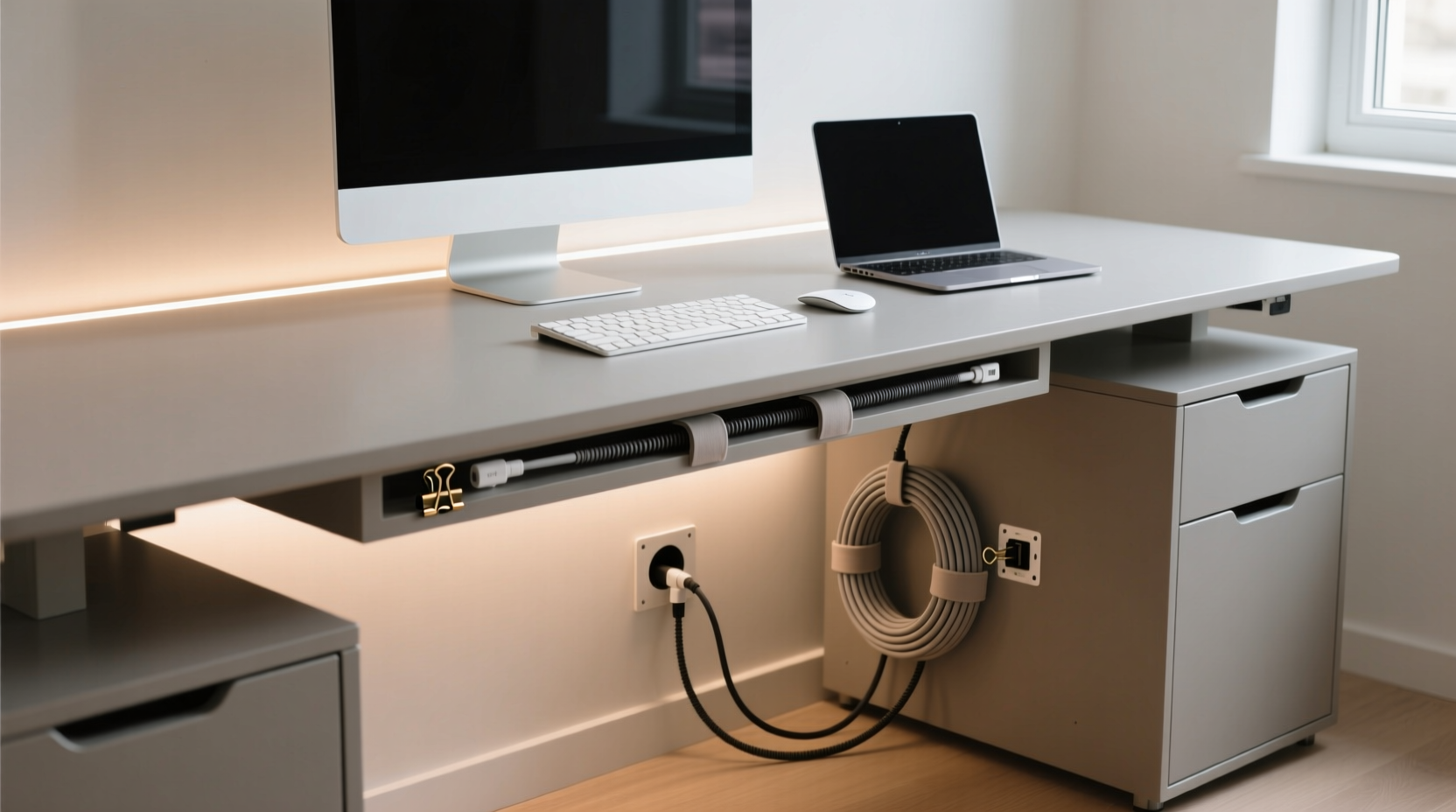
Most people think of cable organization as a cosmetic fix—something to make their workspace “look better” in Zoom meetings. But effective cord hiding delivers tangible benefits beyond appearances:
- Safety: Loose cords pose tripping hazards and increase wear from foot traffic or pets.
- Durability: Protected cables last longer when not constantly bent, stretched, or exposed to dust.
- Accessibility: Organized wiring makes it easier to unplug devices, troubleshoot issues, or upgrade equipment.
- Mental clarity: Studies show that physical clutter contributes to mental fatigue. A tidy desk supports focus and reduces decision fatigue.
“Good cable management isn’t about hiding problems—it’s about designing systems that support both function and peace of mind.” — Daniel Kim, Workspace Design Consultant at Form & Flow Studio
Step-by-Step Guide: How to Hide Cords Neatly Behind Your Desk
Follow this logical sequence to declutter your desk wiring in under an hour. This process works whether you're setting up a new workstation or reorganizing an existing one.
- Unplug and assess all devices. Turn off and disconnect everything connected to your desk—monitors, laptop chargers, lamps, speakers, docking stations. Lay them out on the floor so you can see what you’re working with.
- Categorize by function and frequency of use. Group items into categories like “daily use,” “occasional,” and “rare.” This helps prioritize which cords should be easily accessible versus those you can bundle and tuck away permanently.
- Measure cable lengths. Identify excess slack. If a cord reaches the outlet with two feet to spare, it’s contributing to clutter. Consider shorter replacements or plan how to coil the extra length neatly.
- Choose your primary management method. Based on your desk type and wall access, decide whether adhesive clips, raceways, sleeves, or under-desk trays are best suited (more on options below).
- Route cords along a single path. Avoid crisscrossing. Run all cables down one leg or side of the desk, ideally near a wall or baseboard where they can be hidden more easily.
- Secure and conceal. Use clips, ties, or channels to fasten cords together and route them toward outlets or power strips.
- Test and adjust. Plug everything back in. Check for strain on connectors, overheating, or awkward bends. Make micro-adjustments until operation feels smooth.
Top 5 Clean Setup Ideas for Cord Concealment
No two desks are identical, so flexibility is key. Here are five reliable approaches tailored to common setups.
1. Under-Desk Cable Tray
Ideal for standard desks with open backs, an under-desk cable tray mounts beneath the desktop surface and acts as a catch-all for power strips and bundled cords. It keeps everything contained but accessible. Look for models with Velcro straps or built-in clips.
2. Adhesive Cable Clips
Inexpensive and tool-free, adhesive clips stick directly to the back of your desk or wall. Route each cord through individual clips to maintain separation and prevent tangling. Best for lightweight cables like HDMI, USB, or headphone cords.
3. Braided Cable Sleeve
Bundle multiple cords together using a stretchable braided sleeve. Choose a color that matches your desk or decor. These sleeves compress neatly and give a polished, custom-wired look. Great for grouping monitor, keyboard, and mouse cables.
4. Wall-Mounted Cable Raceway
For permanent installations, install a low-profile plastic raceway along the baseboard or wall behind your desk. Paint it to match the wall for near-invisibility. All cords run inside, emerging only at device points and outlets. This is especially effective in rental-friendly spaces where drilling is allowed but visible wires aren’t.
5. Power Strip Box with Ventilation
Hide your power strip and plug cluster inside a ventilated box designed for heat dissipation. Some models include cable grommets on multiple sides, allowing entry from beneath the desk or behind a wall. Pair with a surge protector for safety and longevity.
Do’s and Don’ts of Cord Hiding: What Works (and What Doesn’t)
| Do | Don’t |
|---|---|
| Use Velcro ties instead of zip ties—they’re reusable and gentler on insulation. | Over-tighten bundles, which can damage internal wires over time. |
| Leave a service loop—a small coil of extra cable—for future adjustments. | Run high-voltage cords (like space heaters) through enclosed boxes without ventilation. |
| Group similar devices (e.g., monitor + webcam + speaker) into one sleeve or channel. | Ignore heat buildup. Always ensure power strips have airflow. |
| Anchor cables at both ends to prevent sagging or accidental pulls. | Let cords dangle within reach of pets or foot traffic. |
| Label or color-code cords for quick identification. | Use electrical tape as a long-term solution—it yellows and loses adhesion. |
Real Example: Transforming a Home Office Corner
Jamie, a freelance graphic designer in Portland, worked from a corner desk wedged between two bookshelves. Her dual monitors, drawing tablet, laptop dock, lamp, and wireless charger created a spaghetti-like mess of cords that spilled onto the floor. After tripping twice in one week, she decided to reorganize.
She started by unplugging everything and identifying redundant devices. She replaced a bulky old power strip with a slim vertical model and mounted it inside a ventilated fabric power strip cover. Using adhesive clips, she routed all cords down the left leg of her desk, then ran them horizontally along the baseboard using a white plastic raceway painted to match the wall.
She grouped data cables (HDMI, USB) into a black braided sleeve and used Velcro wraps to keep bundles neat. Labels were added with mini flags from a craft store. The entire project took 90 minutes and cost under $35. The result? A clean, professional-looking workspace that impressed clients during video calls—and eliminated tripping hazards.
Essential Tools and Products for a Clean Setup
You don’t need a full toolkit, but these items make the job faster and more effective:
- Velcro cable ties (reusable): Ideal for bundling without damaging wires.
- Adhesive-backed clips or mounts: For securing cords along desk edges or walls.
- Braided cable sleeves (various diameters): Combine multiple cords into a single, tidy strand.
- Vented power strip enclosure: Hides outlets while allowing heat to escape.
- Cable raceway kit: Includes channels, screws, and end caps for wall mounting.
- Cable grommet (if modifying furniture): Allows cords to pass cleanly through desktop holes.
- Label maker or colored tape: For easy identification during maintenance.
Frequently Asked Questions
Can I paint a plastic cable raceway to match my wall?
Yes. Use a plastic primer first, then apply latex or acrylic paint in your wall color. Allow full drying time between coats. Matte finishes blend best and avoid glare.
What’s the safest way to hide cords on a carpeted floor?
Use flat, low-profile cord covers designed for carpets. These snap over wires and lie flush with the floor, reducing trip risk. Avoid taping cords directly to carpet—they can pull up fibers and become loose over time.
How often should I check or reorganize my cable setup?
Every 3–6 months. Dust buildup, device changes, or shifting furniture can loosen connections. A quick inspection ensures cords remain secure and undamaged.
Checklist: Create Your Own Clean Desk Wiring System
Follow this checklist to ensure nothing is missed:
- ☐ Unplug all devices and lay them out for assessment
- ☐ Identify essential vs. redundant electronics
- ☐ Measure cable lengths and cut or coil excess
- ☐ Choose a primary management method (tray, raceway, sleeve, etc.)
- ☐ Mount cable clips or trays under or behind the desk
- ☐ Bundle similar cords using Velcro or sleeves
- ☐ Route all cables along a single, logical path
- ☐ Secure power strip in ventilated enclosure
- ☐ Label each cord for future reference
- ☐ Test all connections and adjust as needed
- ☐ Schedule next review in 3–6 months
“A clean desk isn’t about perfection—it’s about intention. Every wire you organize is a small act of respect for your space and your time.” — Lena Torres, Productivity Coach and Author of *Workspace Wellness*
Final Thoughts: Start Small, Think Long-Term
You don’t need to overhaul your entire setup in one day. Even wrapping a single bundle of cords with a Velcro tie makes a difference. The goal isn’t a flawless, magazine-ready desk—it’s a workspace that feels intentional, functional, and free of daily frustrations.
As your tech needs evolve, so can your cable strategy. Begin with one method—say, adhesive clips or a cable sleeve—and expand as needed. Over time, you’ll develop a system that suits your habits, furniture, and aesthetic preferences.




 浙公网安备
33010002000092号
浙公网安备
33010002000092号 浙B2-20120091-4
Comments
No comments yet. Why don't you start the discussion?