
In compact living spaces, every square foot counts. Cluttered electronics, especially routers, can disrupt the visual harmony of a small apartment. While it’s tempting to tuck your router into a closet, drawer, or behind furniture for a cleaner look, doing so often leads to frustrating Wi-Fi dead zones and sluggish internet speeds. The good news: you don’t have to choose between aesthetics and performance. With thoughtful placement, strategic shielding, and a few clever tricks, it’s entirely possible to conceal your router while maintaining strong, reliable coverage across your entire space.
This guide dives into practical, tested strategies that balance design sensibility with technical functionality. Whether you’re renting and can’t rewire, or simply want a minimalist setup, these methods will help you integrate your router seamlessly—without turning your bedroom into a buffering zone.
Understand How Wi-Fi Signals Travel
Before attempting to hide your router, it's essential to understand the physics of Wi-Fi transmission. Most home routers use 2.4 GHz and 5 GHz radio frequencies. These signals behave like light—they travel in straight lines and weaken when obstructed. Unlike wired connections, wireless signals are sensitive to materials, distance, and interference from other electronics.
The 2.4 GHz band has better range and wall-penetration but is slower and more prone to interference from microwaves, cordless phones, and neighboring networks. The 5 GHz band offers faster speeds but has shorter range and struggles with solid obstacles. Modern dual-band routers switch between them, but only if conditions allow.
“Wi-Fi doesn’t go through walls—it goes around and through small openings. Obstructions force signals to diffract, reducing strength.” — Dr. Alan Kim, Network Engineer at Urban Broadband Solutions
Common materials affect signal strength differently:
| Material | Signal Impact | Notes |
|---|---|---|
| Drywall | Low | Minimal attenuation; generally safe |
| Wood | Medium | Thicker shelves may reduce strength slightly |
| Metal | High | Blocks nearly all signal; avoid enclosures |
| Concrete/Brick | Very High | Significant degradation; best avoided |
| Glass | Low | Most types are transparent to Wi-Fi |
| Water (e.g., fish tanks) | High | Absorbs 2.4 GHz signals effectively |
Knowing this helps you make informed decisions about where—and how—to hide your router.
Smart Placement: The Foundation of Strong Coverage
Location matters more than concealment. Even the most beautifully hidden router won’t help if it’s buried in a corner. The ideal spot is central, elevated, and unobstructed.
Place your router as close to the center of your apartment as possible. If your unit is rectangular, aim for the middle third along the longest axis. Elevation also plays a role—signals radiate outward and downward from the antennas. Mounting the router on a shelf or stand (even behind a TV console) improves reach compared to floor-level placement.
Also consider proximity to interference sources. Devices like microwaves, baby monitors, Bluetooth speakers, and even fluorescent lights emit electromagnetic noise that degrades Wi-Fi quality. Keep your router at least 3–5 feet away from such appliances.
Step-by-Step: Optimize Router Position in 5 Minutes
- Evaluate your layout: Sketch a rough floor plan of your apartment, marking key rooms and common usage areas (bedroom, kitchen, desk).
- Identify the center: Find the most central point accessible to all zones.
- Choose an elevated surface: Use a bookshelf, entertainment center, or floating shelf near that area.
- Test signal strength: Use a Wi-Fi analyzer app (like NetSpot or Wi-Fi Analyzer) to check speed and stability in each room.
- Adjust incrementally: Move the router a few inches at a time, retesting until coverage is balanced.
Creative Concealment Without Signal Loss
Once positioned correctly, focus shifts to hiding the device aesthetically. The goal isn't invisibility—it's integration. Here are several effective, signal-friendly methods:
Use Decorative Furniture with Ventilation
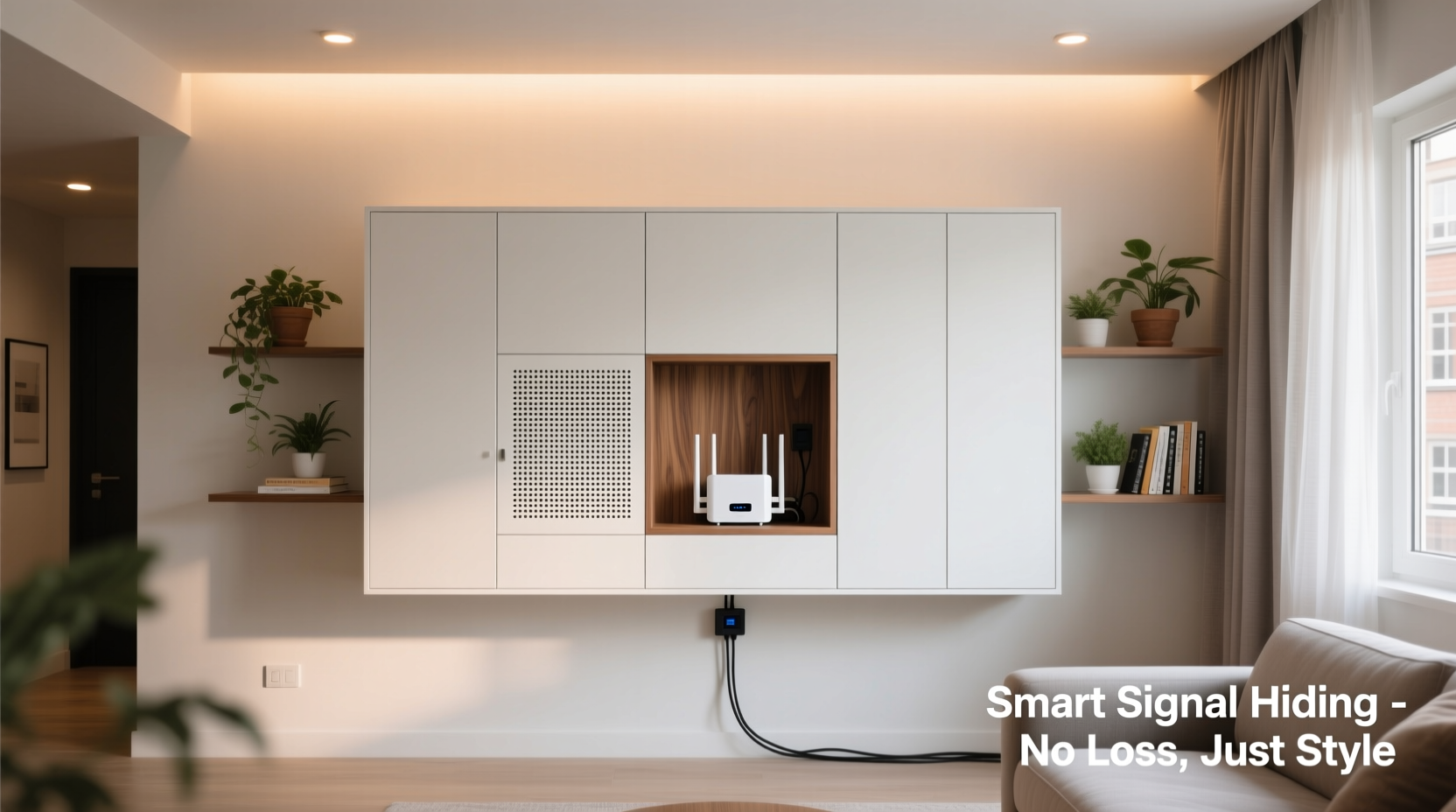
Open shelving units, media consoles, or display cabinets offer excellent camouflage. Choose one with slatted sides or open backs to allow airflow and signal dispersion. Avoid fully enclosed entertainment centers with solid doors.
If using a cabinet, leave the doors open or remove them entirely. Alternatively, replace solid panels with mesh inserts or perforated wood, which let signals pass while keeping dust out.
Camouflage with Houseplants and Art
Strategically place a tall plant or decorative screen in front of the router to break line-of-sight without blocking signals. Ferns, fiddle-leaf figs, or bamboo in lightweight pots work well. Just ensure leaves aren’t pressing directly against antennas.
You can also hang a framed artwork or tapestry nearby to draw attention away from the device. This works best when the router is already tucked into a functional space like a side table or shelf.
Build a Custom Router Enclosure
For renters or DIY enthusiasts, a custom box made from low-density fiberboard (LDF) or cardboard lined with fabric can disguise the router. Key features:
- Top and sides should have ventilation holes or mesh panels.
- Never use metal paint, foil backing, or conductive materials.
- Keep internal space loose—don’t cram cables or stack items inside.
Mini Case Study: Hiding a Router in a Studio Apartment
Marina, a graphic designer living in a 450-square-foot Brooklyn studio, wanted a clean, modern aesthetic but struggled with her bulky ISP-provided router sitting next to her bed. She initially tried placing it in a wooden nightstand drawer, only to lose connectivity in the bathroom and kitchen.
After testing different spots, she moved the router to a mid-height open shelf in her living area—positioned behind a small potted monstera. She angled the antennas upward and used a fabric-covered box with laser-cut hexagon vents on three sides. The result? Full coverage throughout the apartment, including stable Zoom calls from her Murphy bed workstation, and a clutter-free look her guests compliment regularly.
Her solution combined central placement, partial concealment, and natural decor—proving that form and function can coexist in tight spaces.
Do’s and Don’ts of Router Hiding
| Do | Don’t |
|---|---|
| Use open shelves or ventilated enclosures | Place router inside a metal cabinet |
| Position centrally and elevate off the floor | Bury under books, clothes, or cushions |
| Angle external antennas vertically | Lay the router flat with antennas down |
| Use mesh or fabric covers instead of solid lids | Seal in plastic bins or microwave-like containers |
| Test speed after any relocation | Assume a “neater” location is always better |
Boost Performance with Simple Upgrades
Sometimes, hiding limitations stem from outdated hardware. If your current router struggles even in open spaces, consider upgrades that give you more flexibility:
- Upgrade to a mesh system: Small apartments benefit from compact nodes. Place one near your modem and another in a distant room. The primary node can be hidden more easily since the secondary extends coverage.
- Replace ISP routers: Carrier-provided modems often have weak antennas and poor firmware. Swap in a modern router like TP-Link Archer A7 or ASUS RT-AX55 for better beamforming and range.
- Use Ethernet backhaul: If you must hide the main router, connect a Wi-Fi extender via Ethernet cable to maintain full speed without wireless hop loss.
Antenna orientation also matters. For multi-story studios or lofts, position one antenna vertically and one horizontally to spread signals across planes. Most manufacturers recommend vertical alignment for single-floor coverage.
Checklist: Hide Your Router the Right Way
- ✅ Test current signal strength in all rooms
- ✅ Identify the most central, elevated location
- ✅ Remove obstructions (metal, water, thick walls)
- ✅ Choose a ventilated, non-metallic enclosure or shelf
- ✅ Camouflage with plants, art, or matching décor
- ✅ Ensure antennas are upright and unblocked
- ✅ Re-test Wi-Fi speed and stability after setup
- ✅ Consider a mesh system if coverage remains weak
FAQ
Can I put my router in a closet?
Generally not recommended. Most closets have limited ventilation and are surrounded by dense materials. If absolutely necessary, use a shallow, open-front shelf near the door, avoid hanging clothes nearby, and ensure the door stays open. Monitor signal drops closely.
Will painting a router box block the signal?
Regular latex paint won’t interfere, but metallic or conductive paints will. Also avoid lining the interior with aluminum foil, thermal insulation, or magnetic sheets. Stick to breathable fabrics or mesh for inner linings.
Is it safe to cover a router with fabric?
Yes, as long as airflow isn’t restricted. Routers generate heat, and overheating reduces performance and lifespan. Use lightweight, loosely draped cloth—not thick quilts or sealed covers. Never block ventilation grills.
Conclusion: Design Meets Digital Performance
Hiding your router in a small apartment doesn’t require sacrificing speed or reliability. By respecting the fundamentals of wireless transmission and applying thoughtful design choices, you can achieve both a tidy space and seamless connectivity. The key is balancing visibility with openness—using furniture, greenery, and smart enclosures to integrate technology naturally into your environment.
Start with optimal placement, then layer in concealment techniques that preserve airflow and signal propagation. Test rigorously, upgrade when needed, and remember: the best-hidden router is one you forget about—because it just works.




 浙公网安备
33010002000092号
浙公网安备
33010002000092号 浙B2-20120091-4
Comments
No comments yet. Why don't you start the discussion?