
For gamers, the holiday season isn’t just about snowmen and reindeer—it’s an opportunity to merge nostalgia, tech, and tradition into something uniquely personal. A gaming-inspired Christmas tree does exactly that: it transforms a classic holiday symbol into a celebration of digital adventures, pixelated victories, and favorite franchises. With controller ornaments as the centerpiece, this type of tree blends craftsmanship, fandom, and festivity in one dazzling display.
Whether you're decorating your apartment after a long day of work or surprising your kids with a retro-themed holiday surprise, building a gaming tree is more than decoration—it's storytelling through tinsel. From selecting the right base to crafting authentic-looking controller baubles, every choice reflects personality and passion. This guide walks through the entire process, offering practical advice, creative inspiration, and expert-backed tips to ensure your tree stands out as much as your high score.
Selecting the Right Tree Base
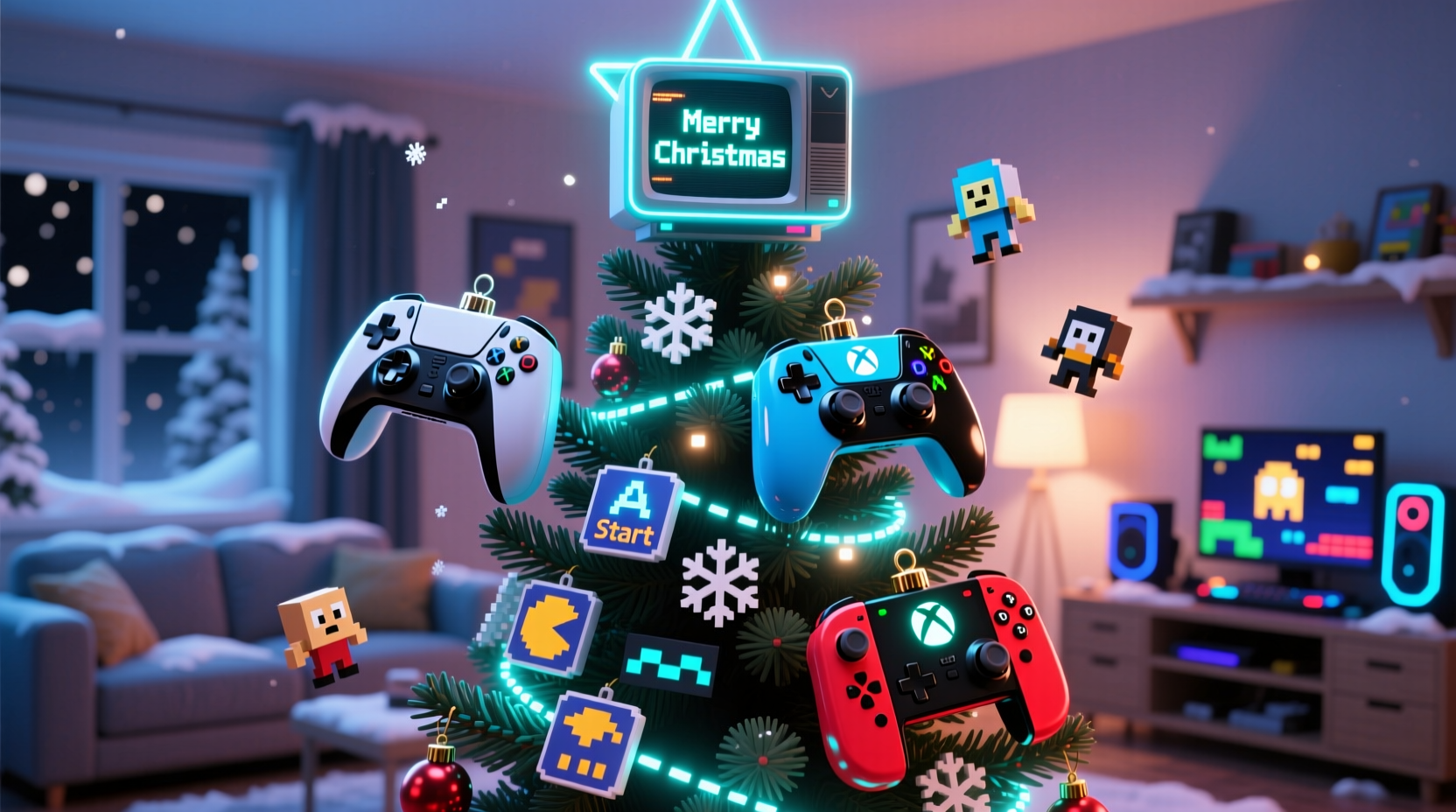
The foundation of any great Christmas tree—gaming-themed or not—is the tree itself. While real trees offer scent and authenticity, artificial ones provide durability, reusability, and easier customization. For a gaming-inspired setup, where weight and attachment points matter (especially with heavier ornaments), an artificial tree gives you full control over shape, color, and structure.
Consider these factors when choosing your base:
- Height: Standard ceiling heights (8–9 feet) suit most living rooms. Opt for a 6.5–7.5 foot tree to leave space for a star or gamer-themed topper like a glowing Triforce or floating Pac-Man ghost.
- Foliage density: Full-bodied trees mimic realism but can obscure detailed ornaments. Lighter, sparse branches allow better visibility of small controller decorations and LED string patterns.
- Color: Traditional green works well, but black or blue-tinted trees create a striking contrast for neon lights and colorful game icons, enhancing the “digital” feel.
- Pre-lit vs. bare: Pre-lit trees save time, but custom stringing lets you layer different light types—such as warm white for ambiance and RGB LEDs for dynamic effects synced to music or game sounds.
Crafting Controller Ornaments: Materials & Methods
Controller ornaments are the heart of the theme. They don’t need to be exact replicas—stylized versions often look better at small scale—but they should evoke recognizable design cues from iconic systems: the symmetry of an Xbox pad, the D-pad of a Nintendo Game Boy, or the dual analog layout of a PlayStation.
You can make these from various materials depending on your skill level and desired finish:
- Foam Board Cutouts: Lightweight and easy to cut, foam board allows precise shapes. Print a template of your favorite controller front view, trace it, and use an X-Acto knife to cut. Paint buttons in contrasting colors and attach a ribbon loop for hanging.
- Polymer Clay Models: For 3D miniatures, bakeable clay lets you sculpt depth and texture. Bake at low heat, then paint with acrylics. Seal with matte varnish to reduce glare under lights.
- Resin Castings: Advanced crafters can create silicone molds from actual controllers (using non-functional units) and pour colored resin. Embed tiny LED micro-lights inside for a “powered-on” effect.
- 3D Printing: Digital designers can model miniature controllers in software like Tinkercad or Blender and print them at 1:6 scale. Use PLA filament for detail and sand lightly before painting.
| Material | Difficulty | Cost (per ornament) | Best For |
|---|---|---|---|
| Foam Board | Low | $1–$2 | Beginners, large batches |
| Polymer Clay | Medium | $3–$5 | Detailed, tactile ornaments |
| Resin | High | $6–$10 | Showpiece centerpieces |
| 3D Printed | High (tech setup) | $2–$4 | Reproducible, accurate models |
Themed Decorations Beyond Controllers
A compelling gaming tree doesn’t stop at controllers. Expand the narrative with accessories that represent broader gaming culture:
- Pixel Art Baubles: Paint glass or plastic spheres with 8-bit characters like Mario, Link, or Sonic using fine brushes or dotting tools.
- Health Bar Garland: Create a paper chain shaped like a video game HUD, with segments labeled “100%”, “50%”, “LOW HP!!” in bold fonts.
- Power-Up Ornaments: Craft miniature mushrooms (Super Mario), Master Balls (Pokémon), or speed boosts (F-Zero). Use felt, beads, or polymer clay.
- Game Discs & Cartridges: Mini CD spindles or fake NES cartridges strung with twine add vertical interest. Label them with fictional holiday titles like “Xmas Kart” or “Frostcraft.”
- Lighting Effects: Use programmable LED strips to simulate screen glitches, scrolling code, or rhythm pulses. Set them to flash during “level up” moments via remote.
“Thematic consistency elevates holiday decor from cute to memorable. When every piece tells part of a story, people don’t just see a tree—they experience a world.” — Lena Torres, Interactive Exhibit Designer, Museum of Play
Step-by-Step Assembly Timeline
Building a cohesive gaming tree takes planning. Follow this timeline to avoid last-minute stress and ensure quality results.
- Week 1: Concept & Planning
- Choose a primary gaming theme (e.g., retro, sci-fi, multiplayer).
- Sketch a rough layout showing ornament placement and color scheme.
- Create a shopping list: tree, lights, ornament supplies, adhesives, paints.
- Week 2: Ornament Production
- Start crafting controller ornaments in batches of 5–10.
- Allow drying/curing time between layers (paint, resin, glue).
- Test-fit hangers and adjust balance to prevent tilting.
- Week 3: Tree Setup & Lighting
- Assemble the tree in its final location—avoid moving it once decorated.
- String main lights evenly, focusing on inner branches for glow-through effect.
- Add secondary lighting (RGB strips, battery-powered puck lights) behind key ornaments.
- Week 4: Decoration & Finishing Touches
- Hang controller ornaments first, spacing them across quadrants for visual balance.
- Fill gaps with smaller themed pieces—health bars, power-ups, pixel stars.
- Top with a custom topper: a golden joystick, a Minecraft creeper hat, or a lit-up “PLAYER 1” sign.
- Play ambient game music softly during unveiling for immersive impact.
Mini Case Study: The Retro Revival Tree
When Mark Chen, a software developer and lifelong gamer, moved into his first house, he wanted his holiday decor to reflect his identity beyond generic snowflakes. He dedicated two weekends to building a “Retro Revival” tree centered on controllers from the 1980s to early 2000s.
He started with a pre-lit frosted artificial tree to mimic static noise on an old CRT screen. His ornaments included hand-painted foam board replicas of the Atari CX-40, NES Advantage, Sega Dreamcast pad, and original Xbox controller—each scaled to fit proportionally. He added flickering red LEDs inside transparent balls to resemble “continue?” screens.
The final touch was a garland made from repurposed USB cables, interlaced with tiny printed QR codes linking to classic browser games like Snake and Tetris. Guests could scan them with their phones while sipping eggnog.
“It wasn’t just a tree,” Mark said. “It was a conversation starter. My mom played Pong on her phone for the first time because of it.”
Checklist: Building Your Gaming Christmas Tree
- ☐ Choose tree type (artificial recommended) and set up in final location
- ☐ Decide on gaming theme (retro, modern, franchise-specific)
- ☐ Gather materials for controller ornaments (foam, clay, resin, etc.)
- ☐ Craft at least 10–15 controller decorations with secure hangers
- ☐ Select complementary lights (white, RGB, flicker-effect)
- ☐ Design secondary ornaments (pixel art, health bars, power-ups)
- ☐ String lights and test all connections
- ☐ Hang ornaments strategically—larger near bottom, balanced by color
- ☐ Install unique topper (joystick, character, illuminated sign)
- ☐ Add interactive elements (QR codes, sound clips, motion sensors)
- ☐ Photograph and share online with #GamerTree
Frequently Asked Questions
Can I use real controllers as ornaments?
Yes, but consider size and weight. Full-sized controllers are too large and heavy for standard branches. Instead, use broken or donated controllers cut down to faceplates only, or mount them on a nearby shelf as part of a larger display rather than hanging directly on the tree.
How do I protect delicate ornaments from pets or kids?
Place fragile items higher on the tree or encase them in clear ornament shells. For homes with active pets, opt for durable materials like sealed polymer clay or 3D-printed plastic. You can also create a “low zone” with plush Pokémon or soft fabric badges within reach.
What if I’m not crafty? Can I still make this work?
Absolutely. Purchase ready-made gaming-themed ornaments from online marketplaces or fan stores. Combine them with DIY touches like custom ribbons (“Continue? YES/NO”) or themed tree skirts (a giant printed circuit board pattern). Even curated store-bought items arranged thoughtfully can create a powerful thematic impact.
Conclusion: Power Up Your Holiday Spirit
A gaming-inspired Christmas tree with controller ornaments isn’t just decoration—it’s a declaration of joy, memory, and belonging. It honors the hours spent mastering levels, beating bosses, and sharing co-op laughs. More than any mass-produced Santa figurine, this kind of tree reflects who you are: someone who finds magic not just in snowfall, but in spawn points and save files.
By blending creativity with technical care—from balanced ornament distribution to thoughtful lighting—you build more than a seasonal centerpiece. You create a legacy piece that can evolve year after year, adding new consoles, new games, new memories. Whether you’re a casual player or a competitive streamer, your tree becomes a living archive of play.




 浙公网安备
33010002000092号
浙公网安备
33010002000092号 浙B2-20120091-4
Comments
No comments yet. Why don't you start the discussion?