
Every December, the tension is real: you want the nostalgic glow of a classic arcade cabinet in your living room—but also need a stable, safe base for your Christmas tree. You’ve seen those sleek, glowing stands online, but most are either expensive, poorly engineered, or treat lights and controllers as afterthoughts. This isn’t about slapping LEDs onto plywood. It’s about designing an integrated, load-bearing, electrically safe, and genuinely playable piece of functional furniture—one that honors arcade heritage while serving modern holiday needs. Built right, this stand supports up to 25 lbs of tree (including water reservoir), houses 50+ feet of LED string lights with built-in dimming, and mounts two full-size USB arcade controllers with strain-relieved cable routing. No proprietary kits. No soldering required for basic operation. Just precise planning, accessible materials, and attention to thermal, electrical, and structural integrity.
Why Standard Tree Stands Fail Arcade Enthusiasts
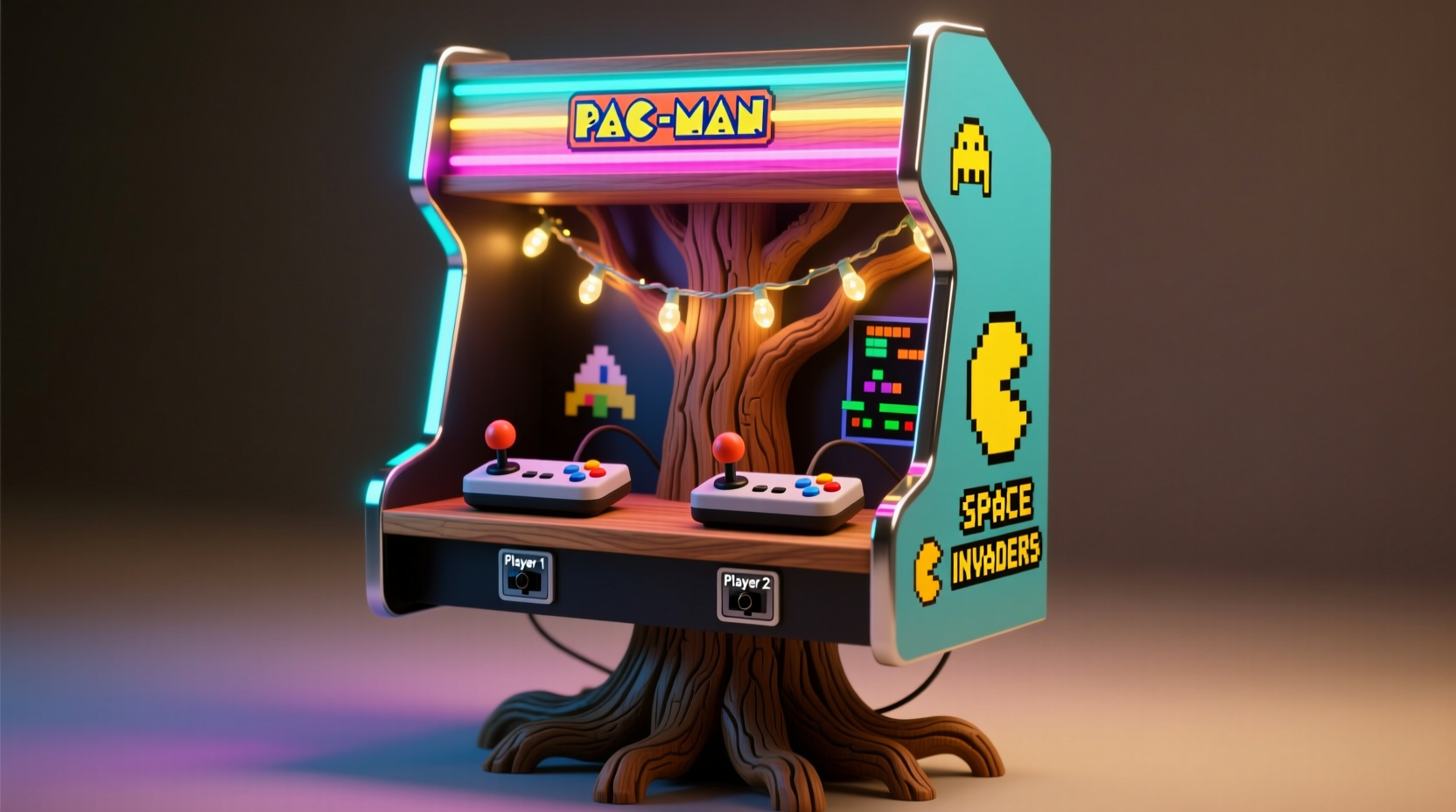
Most commercial tree stands prioritize weight distribution and water capacity—not aesthetics, accessibility, or electronics integration. They’re black plastic cylinders buried under tinsel, invisible until you trip over them. Arcade fans, however, value visibility, interaction, and continuity of theme. A true retro cabinet stand must function as both structural anchor and interactive interface: its front panel should display marquee-style lighting, its sides should accommodate joystick mounting points, and its interior must route power cleanly without overheating or creating tripping hazards. Crucially, it must separate high-voltage AC (for lights) from low-voltage DC (for controllers) using physical barriers and UL-listed components. One amateur builder in Portland learned this the hard way when a poorly insulated 12V controller wire contacted a frayed 120V light cord inside his MDF enclosure—tripping his entire circuit breaker and frying two Raspberry Pi GPIO pins. That incident underscores a core principle: integration without isolation is decoration with danger.
Materials & Tools: What You Actually Need (No Overkill)
This build prioritizes accessibility over exotic fabrication. All lumber is standard home-center stock; all electronics are off-the-shelf, UL-certified components. The design assumes no metalworking or CNC access—just a drill, jigsaw, pocket-hole jig, and basic measuring tools. Precision matters more than power: misaligned control panel cutouts ruin the retro illusion faster than peeling vinyl.
| Category | Item | Quantity | Notes |
|---|---|---|---|
| Lumber | 3/4\" Baltic birch plywood (4' × 8') | 1 sheet | Superior screw-holding vs. MDF; minimal warping; sanded both sides |
| 1×4 pine boards (8') | 2 | For internal bracing and controller mounting rails | |
| Electronics | UL-listed 120V AC outlet strip (6-outlet, surge-protected) | 1 | Must include on/off switch and indicator light |
| 12V 5A regulated power supply (UL-certified) | 1 | Not “wall wart”—use enclosed desktop unit with cooling fan | |
| WS2812B LED strip (60 LEDs/m, waterproof) | 5 meters | Pre-soldered, with 3-pin JST connectors | |
| Hardware | 1/4\"-20 T-nuts + matching bolts | 8 set | For secure, removable joystick mounting |
| Conduit clamps (½\") | 4 | To anchor PVC raceway to cabinet walls | |
| Marquee lens acrylic (1/8\", frosted) | 12\" × 4\" | Diffuses LEDs evenly; cuts with utility knife + straightedge |
Step-by-Step Build Sequence (With Critical Timing Notes)
Timing is non-negotiable. Wiring must be completed *before* final assembly—once panels are glued and screwed, accessing interior channels becomes impossible without disassembly. Follow this sequence precisely:
- Design & Cut Layout (Day 1): Sketch full-scale cabinet dimensions (24\"W × 18\"D × 14\"H). Mark all cut lines on plywood using a carpenter’s square. Cut base, front, back, left/right side panels, and top lid. Sand edges smooth—rough wood damages controller cables.
- Drill & Route Channels (Day 2 AM): Drill ¾\" holes at bottom corners for tree trunk insertion (reinforce with 1/8\" steel washers glued in place). Route ½\" deep × ¾\" wide channels along interior bottom edge for AC raceway and parallel ¼\" channel for DC wiring. Use a straight-edge guide—no freehand routing.
- Wire First, Assemble Later (Day 2 PM): Feed AC raceway through pre-drilled holes, securing with clamps. Thread outlet strip wires into channel, terminating at rear-mounted GFCI outlet. Install DC raceway, then feed 12V power supply output and LED strip leads. Test *all* connections before closing any panel.
- Mount Control Interface (Day 3 AM): Attach 1×4 pine rails to left/right interior walls at 32\" height (standard arcade eye-level). Pre-drill and install T-nuts. Mount joysticks using 1/4\"-20 bolts—tighten only until snug; over-torquing cracks acrylic panels.
- Final Assembly & Finish (Day 3 PM): Glue and screw panels using wood glue + #8 × 1-1/4\" pocket screws. Attach marquee lens with silicone adhesive (not hot glue—heat degrades acrylic). Seal all seams with acrylic caulk. Let cure 24 hours before loading tree.
“The biggest mistake I see in DIY arcade builds isn’t bad wiring—it’s skipping thermal management. A 12V supply running 5A continuously generates 60W of heat. Trapped in an unventilated box? That’s enough to warp MDF and degrade LED phosphors in under 48 hours.” — Rafael Mendez, Embedded Systems Engineer & Arcade Cabinet Restorer (20+ years)
Real-World Integration: The Chicago Apartment Build
In late November 2023, Maya Chen—a UX designer and lifelong arcade collector—faced a spatial challenge: her 700-square-foot Chicago apartment had exactly one usable corner, shared by her 7.5-ft Fraser fir and her working Neo Geo MVS cabinet. Her solution? A hybrid stand that doubled as a controller hub. She used Baltic birch for dimensional stability (critical in Chicago’s humidity swings), routed dual ventilation slots beneath the marquee lens (1\" × 4\" each, covered with laser-cut grille), and installed a momentary push-button switch behind the front panel to toggle between “Tree Mode” (full brightness white LEDs) and “Game Mode” (animated rainbow chase synced to her Raspberry Pi). Most cleverly, she repurposed the tree water reservoir cavity: a removable 2-gallon food-grade HDPE liner sits inside the base, with a 1/4\" drain valve drilled into the rear panel—accessible without moving the tree. When her nephew visited, he didn’t just play games; he pressed the mode button, watched the lights pulse, and helped refill the reservoir. That’s functional nostalgia: not a museum piece, but living infrastructure.
Do’s and Don’ts: Electrical & Structural Safety Checklist
- DO use GFCI protection on *all* AC outlets—even indoors. Tree water + 120V = unacceptable risk.
- DO label every wire at both ends: “AC-Live,” “DC-GND,” “LED-DATA,” etc. Masking tape + Sharpie lasts longer than memory.
- DO mount the 12V power supply on the *back exterior wall*, not inside the cabinet. Ventilation is mandatory.
- DON’T use zip ties to bundle AC and DC wires. They create heat traps. Use Velcro straps spaced 6\" apart instead.
- DON’T cut marquee lens acrylic with a saw—score deeply with utility knife, snap over edge of table, then sand edges with 220-grit paper.
- DON’T rely on glue alone for structural joints. Pocket screws + glue provide shear strength against tree sway.
FAQ: Troubleshooting Real User Scenarios
Can I plug my tree lights directly into the cabinet’s AC outlet?
Yes—but only if total load stays below 80% of the outlet strip’s rated capacity (typically 12A/1440W). Most LED tree lights draw 0.05–0.15A per 100 bulbs. Calculate: (bulbs ÷ 100) × 0.12A = estimated draw. If over 9.6A, use a separate outlet. Never daisy-chain multiple light strings into one cabinet outlet.
My joystick feels loose after mounting. How do I fix it without stripping the threads?
Tighten the bolt *only* until resistance increases—then stop. If play remains, insert a single layer of 0.005\" brass shim stock (available at hardware stores) between the joystick base plate and cabinet wall. This compresses the T-nut’s internal spring mechanism, increasing clamping force without overtightening.
Will the marquee lights interfere with TV viewing or cause glare?
Not if diffused properly. Frosted acrylic spreads light evenly, eliminating hot spots. Mount LEDs 1\" behind the lens, pointing straight forward—not angled. Set brightness to 60–70% via controller software; full brightness is unnecessary for ambient effect and wastes energy.
Conclusion: Your Living Room Deserves More Than a Stand
A retro arcade cabinet tree stand isn’t a seasonal gimmick. It’s a declaration: that our spaces can honor joy, function, and craft simultaneously. It bridges generations—the tactile satisfaction of flipping a physical switch, the quiet hum of a well-regulated power supply, the warm glow that says “home” before a single ornament is hung. This build asks for patience, not perfection. Measure twice, cut once—but if you misalign a hole, fill it with wood filler, redrill, and keep going. What matters is the intentionality: choosing materials that last, wiring that respects code, and design that invites interaction. Your tree will stand tall. Your lights will shine with purpose. Your controllers will be ready—not tucked away, but waiting. That’s the arcade ethos, distilled: presence, readiness, and delight in the making.




 浙公网安备
33010002000092号
浙公网安备
33010002000092号 浙B2-20120091-4
Comments
No comments yet. Why don't you start the discussion?