
In a modern workspace or entertainment center, it's common to have a tangle of cables connecting laptops, monitors, phones, speakers, gaming consoles, and more. Labels can help, but they wear off, look unprofessional, or simply aren’t available when you need them most. The good news is that organizing cables without relying on labels is not only possible—it can be efficient, elegant, and sustainable. By leveraging visual cues, physical structure, and consistent habits, you can create a system that’s intuitive and easy to maintain.
Why Avoid Labels? The Hidden Drawbacks
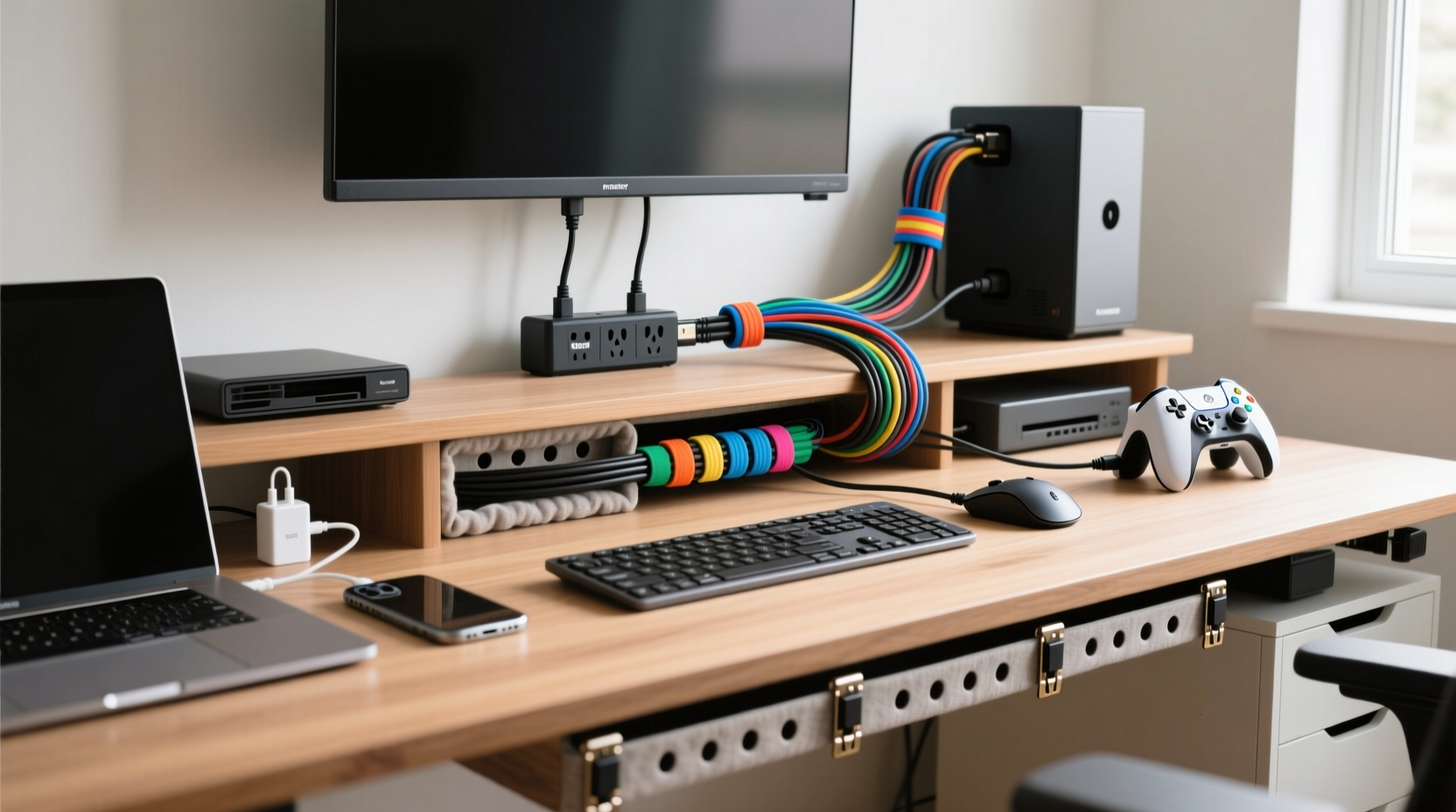
Labels seem like the obvious solution for cable identification, but they come with several limitations. Adhesive labels peel over time, especially in environments with temperature changes or dust. Printed labels fade, and handwritten ones become illegible. Worse, applying labels to every cable in a growing setup becomes tedious and unsustainable.
Additionally, labeling doesn't solve the core problem: clutter. A labeled mess is still a mess. True organization combines identification with structure. Without labels, you're forced to think more creatively—using shape, color, length, and placement to differentiate cables. This often results in a cleaner, more intuitive system.
“Over-reliance on labels masks poor cable management fundamentals. The best systems are self-explanatory.” — Daniel Reeves, Electronics Infrastructure Consultant
Color-Coding: Your Visual Shortcut System
One of the most effective ways to distinguish cables without labels is through color. Even if your cables didn’t come in different colors, inexpensive accessories can transform them into a color-coded network.
Use colored heat-shrink tubing, cable sleeves, or even brightly colored zip ties near the ends of each cable. Assign specific colors to device types: blue for audio, green for networking, red for power, yellow for video, etc. Over time, your brain will associate these colors with their functions, making troubleshooting or reconnections faster.
If you’re dealing with multiple monitors or USB peripherals, consider purchasing cables in distinct colors from the start. Many manufacturers now offer multi-color packs specifically for desktop organization.
Cable Routing and Physical Layout Strategy
The path a cable takes can tell you as much as a label would. A well-thought-out routing plan uses space intentionally so that each cable follows a unique trajectory to its destination.
- Vertical separation: Group cables by function and route them through different vertical zones—left side for power, center for data, right for audio/video.
- Horizontal layering: Use under-desk trays or adhesive-backed clips to separate tiers: top layer for frequently changed cables (like phone chargers), bottom for permanent connections (like monitor HDMI).
- Directional logic: Always route laptop charging cables to the back-left corner, streaming devices to the back-right. Consistency builds muscle memory.
This spatial logic means you don’t need to read anything—you just remember where things go based on location and direction.
Step-by-Step: Designing a Label-Free Routing System
- Unplug all devices and lay them out on a table.
- Group cables by type: power, HDMI, USB, Ethernet, audio.
- Assign each group a physical zone on your desk or wall.
- Use cable clips or raceways to guide each group along a dedicated path.
- Reconnect devices, ensuring each cable follows its designated route.
- Test access and adjust paths for ease of use.
Shape and Form: Using Cable Memory to Your Advantage
Cables naturally take on shapes based on how they’re stored. You can exploit this “cable memory” to create unique silhouettes for different cords. For example, coil your laptop charger tightly into a small loop, but let your monitor’s HDMI cable rest in a wide figure-eight. After repeated use, each cable will retain its shape, making it instantly recognizable by form alone.
This technique works especially well with fabric-wrapped or semi-rigid cables, which hold bends better than stiff rubber-coated ones. If your cables don’t hold shape well, use soft velcro ties to maintain a distinctive loop size or fold pattern.
| Cable Type | Suggested Shape | Retention Method |
|---|---|---|
| Laptop Charger | Tight spiral (3–4 inches) | Fabric twist tie |
| HDMI (Monitor) | Figure-eight fold | Velcro strap at midpoint |
| USB Hub Cable | Zig-zag accordion fold | Plastic sleeve |
| Ethernet | Straight with single U-bend | Clip to underside of desk |
With practice, you’ll recognize your monitor’s HDMI cable not because it says “Monitor,” but because it’s the only one folded in a figure-eight.
Device-Specific Anchoring Techniques
Anchor cables physically to the devices they serve. This eliminates confusion because each cable is uniquely tied to its endpoint. Methods include:
- Wrapping excess length around a leg of a speaker or base of a monitor.
- Using a small zip tie to loosely secure a cable near the port of a printer or router.
- Threading a cable through a slot or handle on a device (e.g., some projectors have built-in cable guides).
These anchors make it nearly impossible to disconnect the wrong cable. Even if two cables look identical, only one will have that slight bend or kink from being wrapped around a specific object.
Mini Case Study: The Home Office Transformation
Mark, a freelance designer, had a desk buried under 14 cables: dual monitors, drawing tablet, docking station, phone charger, external drives, and audio interface. He tried labeling, but the tape peeled within weeks. Frustrated, he redesigned his setup using non-label strategies.
He started by grouping cables into three color families: white for power, black for data, and gray for audio. He used adhesive cable clips to route power cables down the left side of his desk, data cables through a central under-desk tray, and audio cables along the right edge near his speakers. Each monitor’s HDMI was coiled into a figure-eight and secured with a gray velcro tie. His laptop charger was the only cable kept in a tight spiral, stored in a magnetic wrap when not in use.
Within a week, Mark could plug and unplug devices blindfolded. When his partner needed to reset the router, she followed the single yellow Ethernet cable running straight from the modem—no reading required. The system reduced setup time by 70% and eliminated accidental disconnections.
Checklist: Build Your Label-Free Cable System
Follow this actionable checklist to implement a clean, label-free organization strategy:
- ✅ Unplug and sort all cables by function.
- ✅ Assign color identifiers using ties, sleeves, or wraps.
- ✅ Define spatial zones for routing (left, center, right).
- ✅ Use clips, trays, or raceways to enforce paths.
- ✅ Shape each cable uniquely and secure with reusable ties.
- ✅ Anchor critical cables to their devices physically.
- ✅ Test the system weekly and refine routes for usability.
- ✅ Maintain consistency—always coil or route the same way.
Common Mistakes to Avoid
Even with the best intentions, people undermine their cable organization efforts. Here are frequent pitfalls:
- Over-tightening zip ties: Can damage internal wires and make adjustments difficult.
- Ignoring future expansion: Leave room in trays and raceways for new devices.
- Inconsistent coiling: Mixing tight and loose coils defeats shape-based recognition.
- Using permanent adhesives: Opt for removable mounts so you can reconfigure later.
Avoiding these ensures your system remains functional and scalable.
FAQ: Label-Free Cable Organization
Can I use this method in a shared workspace?
Absolutely. In fact, label-free systems often work better in shared environments because they rely on visual and spatial logic everyone can learn quickly. Establish team-wide standards for color codes and routing paths during onboarding.
What if all my cables are the same color and type?
Introduce differentiation manually. Use colored electrical tape near the ends (less obtrusive than full labels), apply textured sleeves, or tie small knots in specific cables (e.g., one knot for printer, two for scanner). Just ensure the modification doesn’t interfere with connectivity.
How do I handle temporary cables, like guest phone chargers?
Designate a “guest zone”—a single hook or clip away from primary routes. Use a bright red or striped cable exclusively for visitors. Its uniqueness makes it stand out and prevents it from blending into your main system.
Expert Insight: The Psychology of Intuitive Design
Effective cable management isn’t just about neatness—it’s about reducing cognitive load. When you eliminate the need to read, you reduce decision fatigue.
“The fastest system is the one you don’t have to think about. Color, shape, and position are processed subconsciously—use them to your advantage.” — Dr. Lena Torres, Cognitive Ergonomics Researcher
Systems that leverage peripheral vision and tactile memory allow users to operate efficiently under stress or low light. This is why professional studios and control rooms rarely use text labels; they rely on layout, color, and repetition for rapid identification.
Conclusion: Clarity Without Clutter
Organizing cables without labels isn’t a limitation—it’s an opportunity to build a smarter, more intuitive system. By combining color, shape, spatial routing, and physical anchoring, you create an environment where every cable has a clear identity and purpose. No peeling stickers, no deciphering handwriting, no frustration.
The goal isn’t just tidiness; it’s fluency. When your setup becomes second nature, you reclaim time, reduce errors, and gain confidence in managing your tech ecosystem. Whether you’re at a cluttered desk or a high-end studio, these principles scale and adapt.




 浙公网安备
33010002000092号
浙公网安备
33010002000092号 浙B2-20120091-4
Comments
No comments yet. Why don't you start the discussion?