
Returning a mobile phone to Movistar doesn’t have to be complicated. Whether you’ve changed your mind after purchase, received a defective device, or discovered it doesn’t meet your expectations, knowing the correct process can save time, stress, and potential financial loss. This guide walks you through every stage of returning a Movistar mobile phone—legally, efficiently, and without unnecessary friction.
Movistar, as part of Telefónica, operates across several countries including Spain, Germany, and parts of Latin America. While policies may vary slightly by region, core return principles remain consistent. Understanding these nuances is key to a successful return.
Understanding Your Return Rights
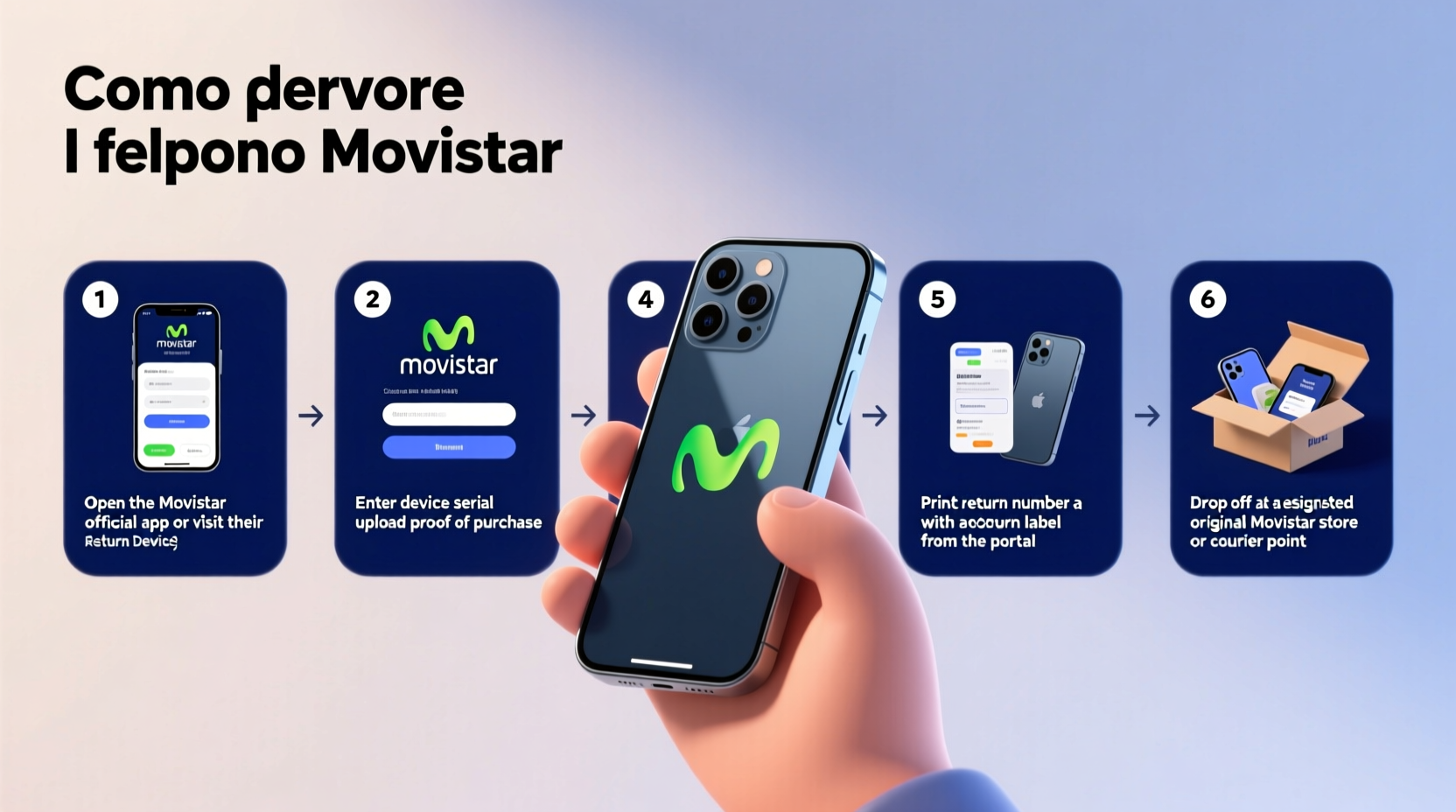
Your ability to return a Movistar mobile phone depends on where you bought it, under what conditions, and within which timeframe. In most European Union countries, consumers benefit from a 14-day legal right to withdraw from distance contracts (such as online purchases), per the Consumer Contracts Regulations. This includes phones bought via Movistar’s website or over the phone.
In physical stores, the rules are less uniform. Some retailers offer voluntary return windows, but they’re not legally required unless the product is faulty. If the phone is defective upon arrival, you’re protected under statutory warranty laws—typically allowing repair, replacement, or refund within the first six months.
“Under EU law, consumers who buy electronics online have a clear 14-day cooling-off period. Retailers must accept returns even if the customer simply changes their mind.” — Elena Ruiz, Consumer Law Advisor, Madrid Legal Aid Network
Step-by-Step Guide to Returning Your Movistar Phone
Follow this structured process to ensure your return is accepted smoothly, whether initiated online or in-store.
- Determine Eligibility: Confirm that your return falls within the allowed window—14 days for online purchases, or check store policy for in-person buys. The phone must be unused, undamaged, and in original condition.
- Back Up Your Data: Before initiating the return, back up contacts, photos, messages, and apps. Once returned, all data will be wiped permanently.
- Reset the Device: Perform a factory reset to remove personal information. Go to Settings > System > Reset Options > Erase All Data. Ensure Find My Device (or equivalent) is disabled.
- Gather Required Items: Collect the phone, charger, SIM ejector tool, original box, manual, and proof of purchase (invoice or order number).
- Contact Movistar Support: For online orders, log into your account at movistar.com and navigate to ‘My Orders’. Select the device and choose ‘Return Item’. For in-store purchases, visit the location with all materials.
- Print Return Label (if applicable): Online customers will receive a prepaid return label via email. Print and attach it securely to the package.
- Pack Securely: Place the phone and all accessories inside the original box. Use padding to prevent damage during transit. Seal the parcel tightly.
- Ship or Drop Off: Send the package via the designated courier or deliver it to a Movistar retail outlet or service center.
- Wait for Confirmation: Movistar typically processes returns within 5–7 business days after receiving the item. You’ll receive an email confirmation once inspected.
- Receive Refund: Refunds are issued to the original payment method. It may take 3–5 additional days for funds to appear in your account.
Do’s and Don’ts When Returning Your Phone
| Do’s | Don’ts |
|---|---|
| Keep the original packaging intact | Remove protective films before return |
| Back up data before resetting | Scratch or damage the screen |
| Include all accessories and manuals | Use non-original boxes for shipping |
| Initiate return within 14 days (online) | Delay sending the device after approval |
| Track your shipment with provided ID | Send cash or insurance unless requested |
Real Example: A Successful Return in Spain
Carlos from Barcelona purchased a new Movistar Samsung Galaxy A54 online. Upon unboxing, he realized the screen brightness was lower than expected, and the size felt awkward in his hand. Within 48 hours, he logged into his Movistar account, selected the return option, and printed the shipping label. He packed the phone with all accessories in the original box, taped the label securely, and handed it to the courier. Five days later, Movistar confirmed receipt and processing. By day seven, his credit card showed a full refund. Carlos avoided restocking fees and kept his purchase experience positive because he acted quickly and followed protocol.
What Happens If the Phone Is Faulty?
If your Movistar phone arrives damaged or develops a fault within the first few weeks, your rights expand significantly. Under the Spanish Consumer Guarantees Act (and similar frameworks in other EU countries), you can demand a repair, replacement, or refund depending on severity.
- First 30 days: Right to a full refund, no questions asked.
- Months 2–6: Burden of proof shifts to the seller; Movistar must prove the defect wasn’t present at delivery.
- After 6 months: You must provide evidence the issue existed at time of sale.
To report a defect:
- Contact Movistar Customer Service via phone or chat.
- Describe the issue clearly (e.g., “screen flickering since first boot” or “battery drains in two hours”).
- They may ask you to run diagnostics or visit a service center.
- If confirmed defective, you’ll be offered a replacement unit or refund.
“When dealing with faulty devices, documentation is everything. Take videos of the issue, note error messages, and keep communication records with support.” — Javier Morales, Tech Support Lead, Madrid Mobile Clinic
Frequently Asked Questions
Can I return a phone if I opened the box but didn’t use it?
Yes, in most cases—especially for online purchases—as long as the device is unused, unactivated, and all components are present. Cosmetic damage like scratches or removed seals may disqualify the return.
Will I be charged a restocking fee?
Movistar does not typically charge restocking fees for returns within the legal withdrawal period. However, if accessories are missing or the device shows signs of use, deductions may apply.
How long does the refund take?
Once Movistar receives and inspects the device, processing takes 5–7 business days. Banking institutions may require an additional 3–5 days to reflect the amount in your account.
Final Checklist Before Sending Back Your Phone
- Phone fully backed up
- Factory reset completed
- Find My Device / Google Account signed out
- Original box and packaging available
- All accessories included (charger, cable, SIM tool)
- Proof of purchase ready (digital or printed)
- Return authorization obtained
- Package labeled correctly
Conclusion: Make Your Return Smooth and Stress-Free
Returning a Movistar mobile phone doesn’t need to be daunting. With the right preparation and understanding of consumer rights, the process can be quick and seamless. Whether you're returning due to buyer’s remorse or a manufacturing defect, following the proper steps ensures you’re treated fairly and refunded promptly.
Start today by checking your purchase date, gathering your materials, and initiating the return through official channels. Protect your investment, respect the guidelines, and exercise your rights confidently. A little attention to detail now can make all the difference in getting your money back without hassle.




 浙公网安备
33010002000092号
浙公网安备
33010002000092号 浙B2-20120091-4
Comments
No comments yet. Why don't you start the discussion?