
Smart rings have become essential tools for tracking health metrics like heart rate, sleep quality, and activity levels. With constant contact against skin, sweat, and environmental debris, these devices accumulate grime quickly. However, improper cleaning can compromise sensitive internal components—especially optical sensors, accelerometers, and charging contacts. Unlike traditional jewelry, smart rings are complex electronic devices requiring a thoughtful maintenance approach. Cleaning them incorrectly may lead to inaccurate readings, corrosion, or even permanent damage. This guide provides a thorough, sensor-safe method for keeping your smart ring hygienic, functional, and looking new.
Why Regular Cleaning Matters
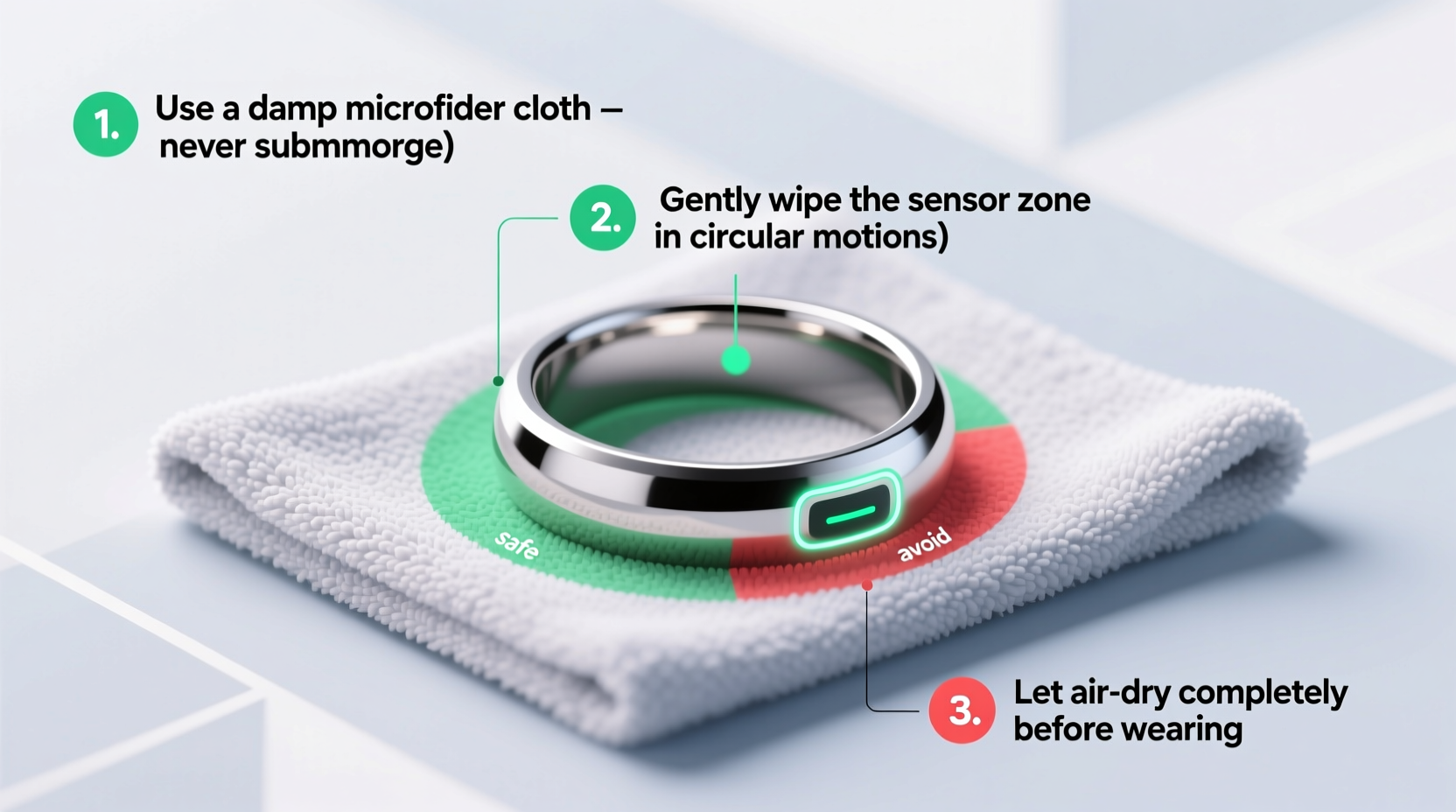
Sweat, oils, lotions, and dead skin cells build up on the surface of your smart ring over time. These residues not only dull its appearance but can also interfere with sensor accuracy. Optical heart rate monitors, for example, rely on unobstructed light transmission through the skin. A film of dirt or oil between the sensor and your finger reduces signal clarity, leading to inconsistent or incorrect data. Additionally, moisture trapped under the band or around the charging port can promote bacterial growth and corrosion.
Cleaning isn’t just about aesthetics—it’s critical for performance and hygiene. Dermatologists warn that unwashed wearable devices can contribute to skin irritation, folliculitis, or allergic reactions in sensitive individuals. Routine maintenance ensures both personal health and device reliability.
Step-by-Step Guide to Safe Smart Ring Cleaning
Cleaning a smart ring requires precision and care. Follow this detailed process to avoid damaging delicate electronics while thoroughly removing contaminants.
- Power Down and Remove the Ring
Start by turning off your smart ring if it has a power-off option. While most models don’t support full shutdowns, removing it from your finger is the first step. Avoid attempting to clean while wearing it, as water or cleaner could seep into crevices unnoticed. - Inspect for Debris
Hold the ring under bright light and examine the inner band, sensor window (usually on the underside), and charging pins. Use a magnifying glass if needed. Look for visible buildup, especially around the metal contacts or textured surfaces where grime tends to accumulate. - Prepare a Gentle Cleaning Solution
Mix a few drops of mild liquid dish soap with warm (not hot) water in a small bowl. Avoid soaps with moisturizers, dyes, or exfoliants. Alternatively, use distilled water with a 50/50 mix of isopropyl alcohol (70%) if disinfection is a priority—this concentration evaporates quickly and won’t leave residue. - Clean with a Soft-Bristled Brush
Dip a soft toothbrush (preferably unused and designated for device cleaning) into the solution. Gently scrub the outer and inner surfaces using circular motions. Pay special attention to grooves, seams, and sensor areas. Do not press hard; let the bristles do the work. Never submerge the ring unless explicitly rated for full immersion (e.g., IP68 or higher). - Wipe with a Microfiber Cloth
Dampen a lint-free microfiber cloth with clean water or the diluted alcohol solution. Wring it out thoroughly so it's only slightly moist. Wipe down the entire surface to remove any remaining soap or debris. For the sensor lens, use a dry corner of the cloth to buff gently and prevent streaking. - Rinse (If Applicable) and Dry Completely
If you used soap, lightly rinse the ring under lukewarm running water—only if manufacturer guidelines permit. Immediately pat dry with a clean, absorbent towel. Then, place it on a dry microfiber cloth in a well-ventilated area for at least 30 minutes. Ensure no moisture remains near the charging port before recharging. - Sanitize Charging Contacts
Use a cotton swab lightly dampened with isopropyl alcohol to clean the charging pins. Rotate the swab to avoid pressing debris further in. Allow the contacts to air-dry completely before connecting to the charger.
Avoid These Common Mistakes
- Using abrasive cleaners like bleach, ammonia, or window sprays
- Soaking the ring in liquids for extended periods
- Using paper towels or rough fabrics that can scratch coatings
- Exposing the ring to ultrasonic cleaners or steam
- Recharging before ensuring all moisture is gone
“Electronics with optical sensors are highly sensitive to surface contamination. Even thin layers of oil can degrade measurement accuracy by up to 30%.” — Dr. Lena Torres, Biomedical Engineer & Wearable Tech Researcher
Do’s and Don’ts: Quick Reference Table
| Do | Don’t |
|---|---|
| Use mild soap and warm water | Use household cleaners (Windex, Lysol, etc.) |
| Clean weekly with a soft brush | Scrub aggressively with metal tools |
| Dry thoroughly before charging | Submerge unless IP68-rated |
| Disinfect contacts with 70% isopropyl alcohol | Use compressed air near ports (can force moisture deeper) |
| Store in a dry, cool place when not in use | Leave in direct sunlight or humid bathrooms |
Real Example: How One User Restored Sensor Accuracy
Mark, a fitness coach in Denver, noticed his smart ring was failing to track nighttime heart rate consistently. The device would often report “poor signal” during sleep sessions. After ruling out fit issues and software glitches, he inspected the inner band and discovered a yellowish film—likely a mix of sweat and sunscreen residue. Following a careful cleaning protocol using a soft brush and isopropyl alcohol wipe, he dried the ring for two hours before recharging. The next night, his ring recorded a full sleep cycle with accurate HRV (Heart Rate Variability) data. Mark now cleans his ring every Sunday evening and keeps a travel-sized microfiber cloth in his gym bag for quick wipe-downs post-workout.
This case illustrates how minor neglect can significantly impact functionality—and how simple maintenance restores performance.
Special Considerations by Material and Model
Not all smart rings are built the same. Materials affect cleaning tolerance and long-term durability. Always consult your user manual, but general guidelines apply:
- Titanium Rings: Highly resistant to corrosion. Can tolerate brief rinsing but avoid prolonged exposure to chlorinated water. Polish with a jewelry cloth monthly to retain luster.
- Stainless Steel: Prone to fingerprint smudges and minor tarnishing. Clean with soapy water and dry immediately to prevent water spots.
- Polymer or Coated Bands: Found in budget-friendly models. Avoid alcohol-based cleaners, which may degrade protective coatings over time. Stick to water and mild soap.
- Gold or PVD-Coated Finishes: Scratch easily. Never use brushes—opt for a damp microfiber cloth only.
Popular models like the Oura Ring, Ultrahuman Ring Air, and Circular Ring each have specific care instructions. For instance, Oura advises against soaking and recommends avoiding solvents. Ultrahuman notes that their device is water-resistant but not waterproof during active swimming. Always align your cleaning routine with the manufacturer’s specifications.
Frequently Asked Questions
Can I wear my smart ring in the shower?
Most smart rings are water-resistant, not waterproof. While brief exposure to water (like handwashing) is generally safe, prolonged immersion in soapy or hot water can degrade seals over time. Shower steam and chemicals in shampoos or body washes may penetrate small gaps and corrode internal components. It’s best to remove your ring before showering regularly.
Is it safe to use alcohol wipes on my smart ring?
Yes—but with caution. Pre-moistened alcohol wipes (70% isopropyl) are effective for disinfecting surfaces. However, avoid excessive saturation. Wipe gently and allow the ring to air-dry completely. Do not use wipes containing benzene, acetone, or other harsh solvents, as they can damage plastic housings and anti-reflective coatings on sensors.
My ring smells after wearing. What should I do?
An odor usually indicates bacterial buildup from sweat and skin oils. Deep-clean the ring using the step-by-step method above. For persistent smells, soak a cotton pad in diluted vinegar (one part white vinegar to three parts water), wrap it around the inner band for 2 minutes, then rinse and dry thoroughly. Vinegar acts as a natural deodorizer and antimicrobial agent without harming most materials.
Essential Cleaning Checklist
Keep this checklist handy for consistent maintenance:
- ☐ Power off or remove the ring from finger
- ☐ Inspect sensor area and charging port for debris
- ☐ Mix mild soap with warm water or prepare 70% isopropyl alcohol
- ☐ Use soft brush to gently scrub surfaces
- ☐ Wipe with slightly damp microfiber cloth
- ☐ Rinse briefly (if permitted) and dry completely
- ☐ Clean charging pins with alcohol-dampened swab
- ☐ Allow 30+ minutes of air drying before recharging
- ☐ Test sensor function after cleaning
Conclusion: Make Cleaning Part of Your Routine
Your smart ring is an investment in your health and daily awareness. Treating it with care ensures it continues delivering reliable insights for months or years. Just as you wouldn’t skip brushing your teeth, don’t overlook the importance of cleaning your wearable. A few minutes every week can prevent long-term damage, maintain sensor accuracy, and keep your device comfortable to wear. By following these proven methods, you protect both your health data and the hardware itself. Take action today—grab that soft brush and give your smart ring the attention it deserves.




 浙公网安备
33010002000092号
浙公网安备
33010002000092号 浙B2-20120091-4
Comments
No comments yet. Why don't you start the discussion?