
Christmas trees have long been canvases for personal expression—family heritage, minimalist elegance, rustic charm, or maximalist glitter. But for the growing community of gamers, streamers, and digital culture enthusiasts, tradition is evolving. A gaming-themed Christmas tree isn’t just novelty; it’s a celebration of identity, nostalgia, and shared joy across generations—from retro 8-bit fans to modern esports supporters. Controller ornaments sit at the heart of this aesthetic: tactile, symbolic, and instantly recognizable. Yet many attempt this theme only to end up with a cluttered, visually disjointed tree that feels more like a garage sale than a curated holiday statement. The difference between a gimmicky decoration and a cohesive, gallery-worthy display lies in intentionality—not just *what* you hang, but *how*, *why*, and *in what order*. This guide distills years of experience from holiday stylists, game studio event designers, and home decor professionals who’ve brought this theme to life in homes, conventions, and even official Nintendo and Xbox pop-up experiences.
Understanding the Core Aesthetic: Beyond Just “Gaming”
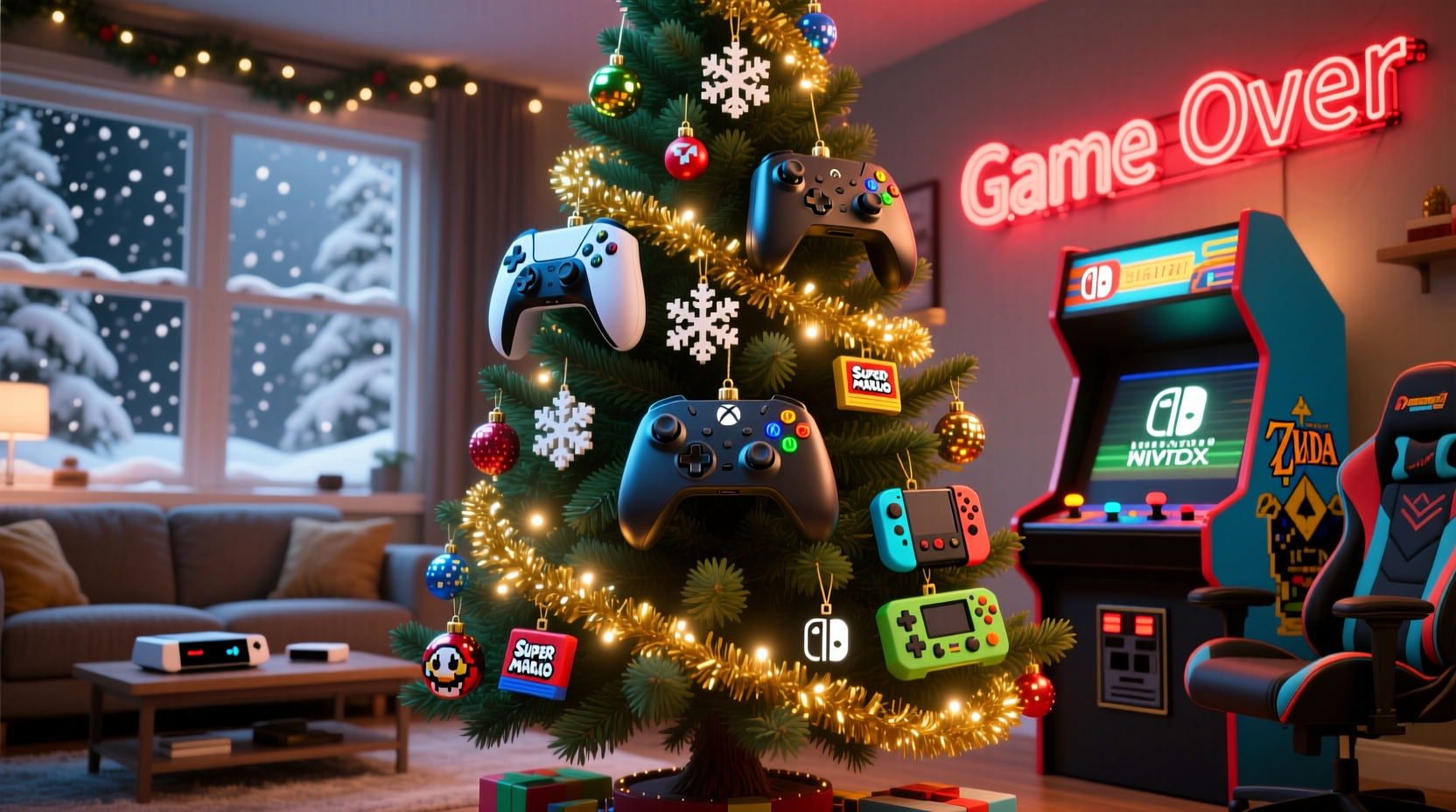
A successful gaming-themed tree avoids generic tropes—no pixelated snowmen wearing headsets or neon “LOL” banners draped haphazardly. Instead, it embraces one of three authentic visual languages:
- Retro Arcade: Warm amber lighting, CRT-inspired gradients, Pac-Man ghosts, Donkey Kong barrels, and vintage joystick silhouettes. Dominant colors: burnt orange, deep teal, mustard yellow, and matte black.
- Modern Console: Clean lines, branded symmetry (e.g., PlayStation’s triangle-circle-cross-square motif), Xbox green or Nintendo red accents, and subtle UI-inspired elements like health bars or XP meters as garland accents.
- Indie & Creator Culture: Hand-drawn sprites, pixel-art characters, Twitch emotes reimagined as ornaments, and DIY embroidered controller shapes. Emphasizes texture, imperfection, and storytelling over polish.
The key is choosing *one* anchor aesthetic—and sticking to it. Mixing PlayStation symbols with Nintendo branding, arcade fonts with sleek OLED-inspired lighting, or retro palettes with cyberpunk neon creates visual noise, not narrative.
Building Your Controller Ornament Collection: Sourcing & Customization
Controller ornaments range from mass-produced plastic trinkets to hand-crafted resin pieces. Quality and authenticity vary dramatically. Here’s how to build a collection that looks intentional—not accidental.
| Type | Pros | Cons | Best For |
|---|---|---|---|
| Official Licensed Ornaments (e.g., Xbox, Nintendo, PlayStation) | Perfect color matching, accurate proportions, durable materials, collector value | Limited availability, higher price ($25–$45 each), often sold out by November | Anchor ornaments—use 3–5 as focal points on major branches |
| 3D-Printed Custom Controllers | Fully customizable (size, color, button layout), supports indie creators, lightweight | Requires post-print sanding/painting, inconsistent finish quality without professional finishing | Mid-tier layer—add 8–12 for depth and variation |
| Resin or Wood-Cut DIY Kits | Affordable ($8–$15), excellent for personalization (paint, decals, epoxy pours), great tactile feel | Time-intensive, requires basic craft tools and ventilation | Personalized layer—ideal for family names, gamer tags, or milestone years (e.g., “2023: Elden Ring Completion”) |
| Vintage Controller Replicas (e.g., NES Zapper, Sega Genesis Six Button) | Nostalgic authenticity, conversation-starting, naturally aged patina | Fragile, may contain lead paint (not safe near children/pets), limited supply | Statement pieces—use sparingly (1–2) at eye level |
When selecting controllers, prioritize scale consistency. A 4-inch PS5 DualSense next to a 2-inch Game Boy Advance controller breaks visual rhythm. Aim for ornaments within a 1.5-inch size range. Also consider weight: heavy ornaments pull branches downward, creating unnatural droop. Lightweight resin or hollow 3D-printed versions distribute better than solid wood or dense plastic.
Step-by-Step Tree Styling Timeline (60-Minute Process)
Styling isn’t about hanging ornaments randomly—it’s a choreographed sequence. Follow this exact order for professional results:
- Prep the Tree (5 min): Fluff branches outward and upward—not downward. Trim any broken or misshapen tips. Use a ladder or step stool to reach the top third first.
- Add Lighting (12 min): Use warm white LED lights (2700K–3000K) for retro themes; cool white (4000K) for modern console aesthetics. Wrap lights *spiral-style* from base to tip—never horizontal rings. Start at the trunk and move outward, hiding wires under foliage. Use 100 lights per foot of tree height.
- Install Structural Garlands (10 min): Skip tinsel. Instead, use: (a) Ribbon-cut circuit board strips (matte silver or copper foil), (b) Pixel-patterned burlap ribbon (for retro), or (c) Braided Ethernet cable (for modern). Drape loosely—not tightly wound—to mimic data flow or power cables.
- Place Anchor Ornaments (15 min): Hang your 3–5 largest licensed controllers first—at 12, 3, 6, and 9 o’clock positions on the outermost branches, spaced evenly vertically. Ensure no two identical controllers face the same direction (rotate angles for dynamism).
- Fill With Mid-Tier Ornaments (12 min): Add 3D-printed or painted controllers in complementary colors. Cluster in groups of three (e.g., one red, one black, one gray) at varying depths—some tucked deep into branches, some forward-facing.
- Final Details (6 min): Tuck in 5–7 small thematic accents: tiny dice (for tabletop gamers), miniature microphones (for streamers), QR code ornaments linking to your holiday playlist, or folded paper cranes shaped like Game Boy cartridges. Finish with a topper: a glowing “POWER” button, a miniature arcade cabinet, or a suspended floating joystick.
Real-World Execution: The Thompson Family Tree (2023)
In Portland, Oregon, the Thompson family transformed their 7.5-foot Fraser fir into a tribute to three generations of gaming. Grandfather Jim (72) introduced NES in 1986. Daughter Maya (34) is a Twitch streamer. Son Leo (10) just beat *Super Mario Bros. Wonder* solo. Their tree blended eras without chaos:
- Base Layer: Warm white LEDs + braided black-and-red Ethernet garland (nod to Maya’s streaming setup).
- Controllers: One official NES controller (Jim’s), one custom 3D-printed Switch Pro controller engraved with Leo’s initials, and one glossy Xbox Series X ornament (Maya’s main rig).
- Unifying Element: All controllers were mounted on matte black acrylic stands—same height, same angle—creating visual continuity despite different eras.
- Hidden Detail: Inside the tree’s inner ring, they strung 12 tiny LED-lit “health bars” (red-to-green gradient) that pulsed softly—a subtle nod to shared gameplay moments.
The result wasn’t “gaming stuff on a tree.” It was a layered family story told through design discipline. As Maya noted in her December stream: “People didn’t say ‘cool controller tree.’ They said, ‘That tree *feels* like your living room.’ That’s the goal.”
“Thematic cohesion isn’t about uniformity—it’s about emotional resonance. A single well-placed NES controller surrounded by warm light and soft textures evokes more nostalgia than ten mismatched game logos.” — Lena Cho, Lead Designer, SXSW Gaming Expo Holiday Installations
Do’s and Don’ts of Gaming Tree Safety & Longevity
Gaming ornaments introduce unique hazards: plastics with volatile compounds, metallic finishes, embedded electronics, and delicate paint layers. Ignoring safety compromises both enjoyment and preservation.
| Do | Don’t |
|---|---|
| Use UL-listed LED lights only—never incandescent bulbs near plastic controllers (heat warps ABS plastic) | Hang battery-powered ornaments with exposed coin cells where children or pets can access them |
| Store ornaments in acid-free boxes with individual padded compartments—especially for painted or metallic finishes | Stack controllers flat; instead, suspend them vertically using archival tissue rolls in storage boxes |
| Clean resin or 3D-printed ornaments with microfiber cloth + 70% isopropyl alcohol (test first on hidden area) | Use glass cleaner or ammonia-based sprays—they dissolve printed details and fade metallic coatings |
| Rotate ornament placement annually to prevent branch fatigue and uneven wear on specific limbs | Hang heavy ornaments on thin outer branches—always anchor to thick interior stems |
FAQ
Can I mix controllers from different brands on one tree?
Yes—but only if unified by a deliberate concept. For example: a “cross-platform friendship” theme could use Xbox green, PlayStation blue, and Nintendo red controllers—all mounted on identical white stands, wrapped in matching matte-black ribbon, and lit with uniform warm-white LEDs. Without unifying treatment, mixing brands reads as disorganized rather than inclusive.
How do I make DIY controller ornaments look professional—not craft-store amateurish?
Three non-negotiable steps: (1) Sand every 3D-printed piece with 220-grit then 400-grit sandpaper before painting; (2) Use automotive-grade primer (e.g., Rust-Oleum Painter’s Touch) for smooth, chip-resistant base; (3) Apply final coat with an airbrush or high-quality fine-tip brush—never a foam brush. Then seal with matte clear coat (Krylon UV-Resistant Clear) to prevent yellowing.
What if I don’t own a physical controller—can I still do this theme authentically?
Absolutely. Focus on abstraction: geometric ornaments shaped like controller buttons (circle, cross, square, triangle), laser-cut plywood pieces with engraved joysticks, or even origami-folded paper controllers. Authenticity lives in intention and detail—not hardware ownership. One award-winning 2022 tree in Austin used only hand-stitched felt controllers, each embroidered with the stitcher’s favorite game quote—proving material fidelity matters less than narrative sincerity.
Conclusion
A gaming-themed Christmas tree styled with controller ornaments is more than seasonal decoration. It’s a declaration of belonging—in a world where digital spaces are now primary sites of connection, memory, and joy. It honors late-night co-op sessions, childhood triumphs, and the quiet pride of mastering a hard-fought boss battle. But its power comes not from the objects themselves, but from the care invested in arranging them with purpose: the precision of lighting angles, the thought behind color harmony, the respect for material integrity, and the courage to tell a personal story without apology. You don’t need rare collectibles or a decorator’s budget. You need clarity of vision, patience in execution, and the willingness to treat your tree not as background, but as a centerpiece of meaning. So unbox those controllers—not as relics, but as heirlooms in the making. Fluff your branches. Measure your lights. Choose your palette. And build something that doesn’t just look like a game—but *feels* like home.




 浙公网安备
33010002000092号
浙公网安备
33010002000092号 浙B2-20120091-4
Comments
No comments yet. Why don't you start the discussion?