
Wireless charging has become a standard convenience for modern smartphone users, offering a clutter-free way to power up devices. However, many people overlook a critical factor that can silently undermine this convenience: their phone case. While cases protect against drops and scratches, certain materials or designs can interfere with the electromagnetic induction process required for wireless charging. If your phone charges slowly—or not at all—on a wireless pad, the case might be the culprit.
Understanding how wireless charging works and recognizing the signs of interference allows you to make informed decisions about which case to use. This guide breaks down practical methods to test your case, identifies problematic materials, and provides actionable steps to maintain optimal charging performance without sacrificing protection.
How Wireless Charging Works: A Quick Primer
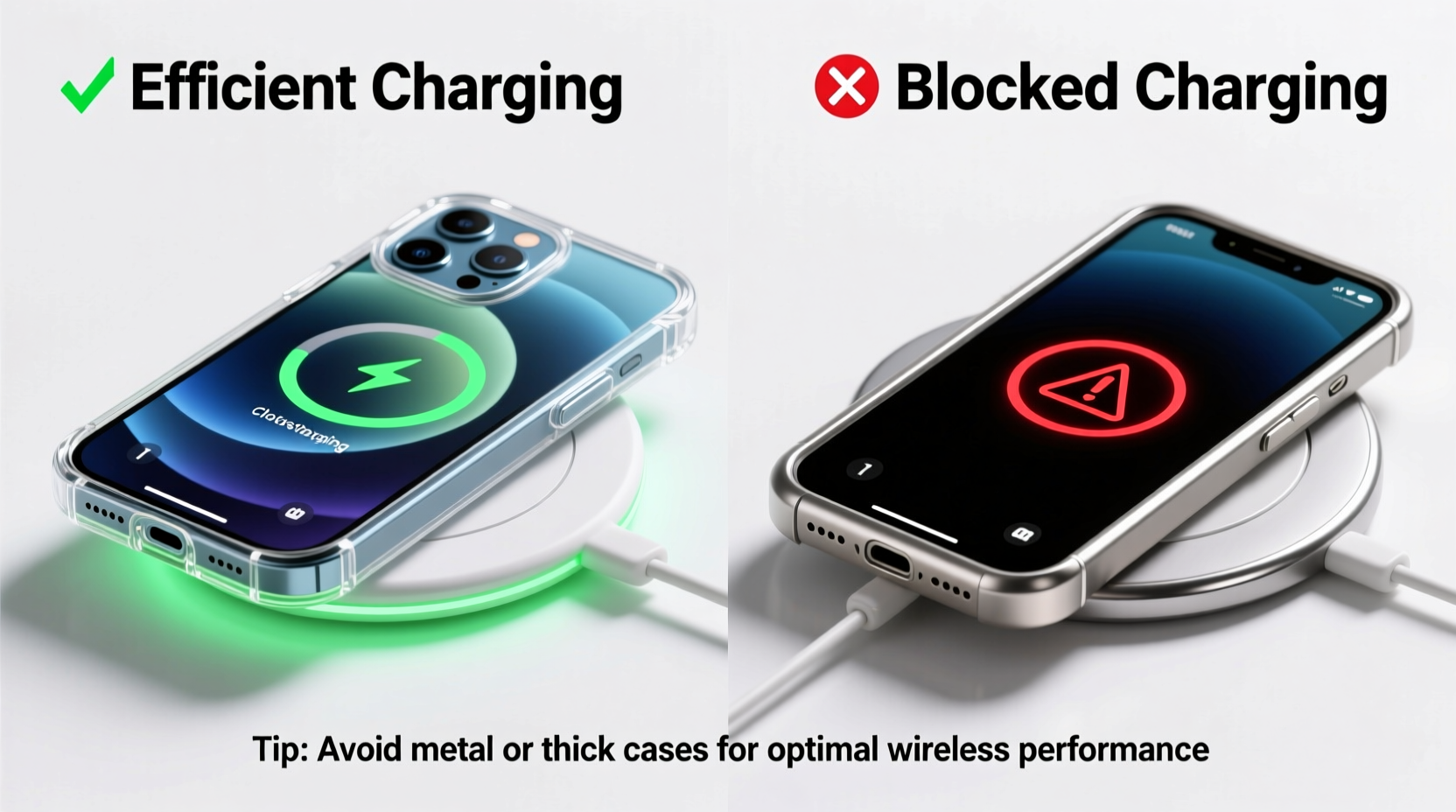
Wireless charging relies on electromagnetic induction between two coils—one in the charging pad and one inside the phone. When the phone is placed on the charger, an alternating current in the pad’s coil generates a magnetic field, which induces a current in the phone’s receiver coil, thereby charging the battery.
This process requires close proximity and alignment between the coils. Any obstruction—especially materials that absorb or deflect electromagnetic fields—can reduce efficiency or prevent charging altogether. The gap introduced by thick cases or metallic components disrupts this delicate interaction.
“Even a 1mm increase in distance between the coil and the phone can reduce charging efficiency by up to 30%.” — Dr. Alan Zhou, Electrical Engineer specializing in consumer electronics power systems
Signs Your Phone Case Is Interfering With Charging
Not all cases block wireless charging, but certain symptoms indicate interference:
- Charging starts and stops intermittently: The connection between coils is inconsistent due to misalignment or shielding.
- No charging occurs at all: The case may contain metal, magnets, or thick layers that completely block signal transfer.
- Slower-than-normal charging speed: Even if the phone charges, reduced wattage (e.g., 5W instead of 15W) suggests inefficiency.
- Excessive heat generation: Energy loss from poor coupling converts into heat, often felt on the back of the phone or case.
- Phone only charges when perfectly centered: Indicates alignment issues exacerbated by case thickness.
These signs don’t always point to the case—faulty chargers or debris on the charging surface can also cause problems—but the case should be among the first suspects when issues arise suddenly after installation.
Step-by-Step Guide to Test Your Phone Case
To definitively determine whether your case is affecting wireless charging, follow this structured testing protocol:
- Power down both devices: Turn off your phone and unplug the wireless charger to reset any cached errors.
- Clean all surfaces: Wipe the back of your phone and the charging pad with a dry microfiber cloth to remove dust or residue.
- Test without the case: Place the bare phone on the charger. Observe whether charging initiates within 10 seconds. Check the charging speed via settings (if supported) or monitor battery percentage over 15 minutes.
- Reapply the case and retest: Put the case back on and repeat step 3 using the same charger and position.
- Vary positions slightly: Shift the phone a few millimeters left, right, forward, and back. Note if charging only works in one spot—this suggests alignment sensitivity worsened by the case.
- Monitor temperature: After 10 minutes of charging with the case, feel the back of the phone. Excessive warmth indicates energy loss.
- Repeat with a different charger (optional): Use a second wireless charger to rule out hardware defects.
If performance drops significantly with the case on, it’s interfering with charging efficiency. The next step is identifying why.
Materials That Block or Reduce Wireless Charging Efficiency
Not all phone cases are created equal. Some materials are inherently incompatible with wireless charging due to their physical properties.
| Material | Effect on Wireless Charging | Common Use Cases |
|---|---|---|
| Metal (aluminum, steel) | Blocks entirely – reflects and absorbs electromagnetic fields | Luxury cases, magnetic mounts with metal plates |
| Thick rubber or silicone (>3mm) | Reduces efficiency – increases distance between coils | Heavy-duty protective cases |
| Carbon fiber | May partially block – conductive layers interfere | Sleek, premium cases |
| Leather (thin, genuine) | Generally safe – non-conductive and thin | Fashion-forward cases |
| Plastic (polycarbonate, TPU) | Safe – minimal interference when under 2.5mm thick | Standard clear or colored cases |
| Magnets (e.g., MagSafe-compatible rings) | Can help alignment – designed to work with specific chargers | iOS MagSafe cases |
The key takeaway: conductivity and thickness are the main enemies of efficient wireless charging. Metal is the most disruptive, but even thick non-metallic cases degrade performance by increasing the air gap between coils.
Mini Case Study: The Wallet Case Dilemma
James, a frequent commuter, bought a stylish wallet case that held his ID and credit cards. He noticed his iPhone wouldn’t charge wirelessly unless he removed the case. Assuming the charger was faulty, he purchased a new one—only to face the same issue.
After reading online about metal interference, he inspected the case closely and found a thin aluminum plate embedded in the back, likely for RFID protection or structural rigidity. Removing the case allowed normal charging. He later tested placing just the empty case on the charger—it became warm, indicating energy absorption.
James switched to a thinner, plastic-based case without metal components, and his phone now charges efficiently overnight. His experience highlights how seemingly minor design elements can have major functional consequences.
Checklist: Choosing a Wireless-Charging-Friendly Case
Before buying or continuing to use a phone case, verify compatibility with this checklist:
- ✅ No visible or detectable metal parts on the back or edges
- ✅ Thickness less than 3mm (measure with calipers if possible)
- ✅ Made from non-conductive materials like TPU, polycarbonate, or thin leather
- ✅ Specifically labeled as “wireless charging compatible” by the manufacturer
- ✅ For iPhone users: Look for MagSafe certification if using Apple’s ecosystem
- ✅ No built-in battery or electronic components (these can interfere)
- ✅ Minimalist design without bulky add-ons like kickstands or card slots with metal
When in doubt, consult product specifications or reach out to customer support. Reputable brands often publish technical details about wireless charging compatibility.
Expert Tips to Maintain Charging Efficiency
Beyond selecting the right case, daily habits influence wireless charging performance. Consider these recommendations from industry professionals:
- Use certified chargers: Qi-certified chargers ensure standardized performance and safety. Counterfeit or uncertified models may struggle even with compatible cases.
- Align the phone properly: Center the phone directly over the charger’s coil. Many pads have markings or lights to guide placement.
- Avoid charging through surfaces: Don’t place the charger under wood, glass, or fabric tables unless specifically designed for such use.
- Update firmware: Some phones and chargers receive updates that improve power negotiation and thermal management.
- Limit multitasking while charging: Running processor-heavy apps increases heat, reducing charging speed and exacerbating inefficiencies caused by cases.
FAQ: Common Questions About Phone Cases and Wireless Charging
Can a phone case damage my wireless charger?
While rare, poorly designed cases with sharp edges or embedded metal can scratch the charging pad’s surface or cause overheating. Consistent overheating may degrade the charger’s internal components over time. Using a smooth, non-abrasive case minimizes this risk.
Do all MagSafe cases work perfectly with wireless charging?
Most do, because they’re engineered with precise magnet alignment and thin profiles. However, third-party MagSafe-compatible cases vary in quality. Stick to reputable brands or those officially listed by Apple to ensure consistent performance.
Is it safe to leave my phone on a wireless charger overnight with a case?
Yes, provided the case doesn’t cause excessive heat buildup. Modern phones and chargers include thermal protection, but prolonged high temperatures can accelerate battery wear. If the phone feels hot after hours of charging, consider removing the case or switching to a thinner alternative.
Conclusion: Optimize Protection Without Sacrificing Performance
Your phone case shouldn’t come at the cost of reliable charging. By understanding the physics behind wireless power transfer and recognizing early warning signs, you can quickly identify when a case is causing issues. Simple tests, material awareness, and smart purchasing choices empower you to maintain fast, efficient charging without leaving your phone exposed.
Start today by removing your current case and running a controlled test. If performance improves, explore slimmer, non-metallic alternatives that balance protection and functionality. Technology should simplify life—not create hidden frustrations. Take control of your charging setup and enjoy the seamless experience wireless charging was meant to deliver.




 浙公网安备
33010002000092号
浙公网安备
33010002000092号 浙B2-20120091-4
Comments
No comments yet. Why don't you start the discussion?