
Decorating for the holidays should spark joy—not frustration. One of the most common challenges homeowners face is visualizing how Christmas lights will look once installed. Will the string length cover the eaves? Do multicolored bulbs clash with the roofline? Is the front porch too crowded with net lights? These questions often go unanswered until after hours of untangling wires and climbing ladders—only to realize the setup isn’t quite right.
Today, augmented reality (AR) filters offer a smarter solution. With just a smartphone and the right app, you can project virtual Christmas lights onto your home’s exterior in real time, test different color schemes, and plan installations with precision. This technology eliminates guesswork, reduces unnecessary purchases, and helps create a cohesive, professional-looking display—all from your living room couch.
Why AR is transforming holiday decorating
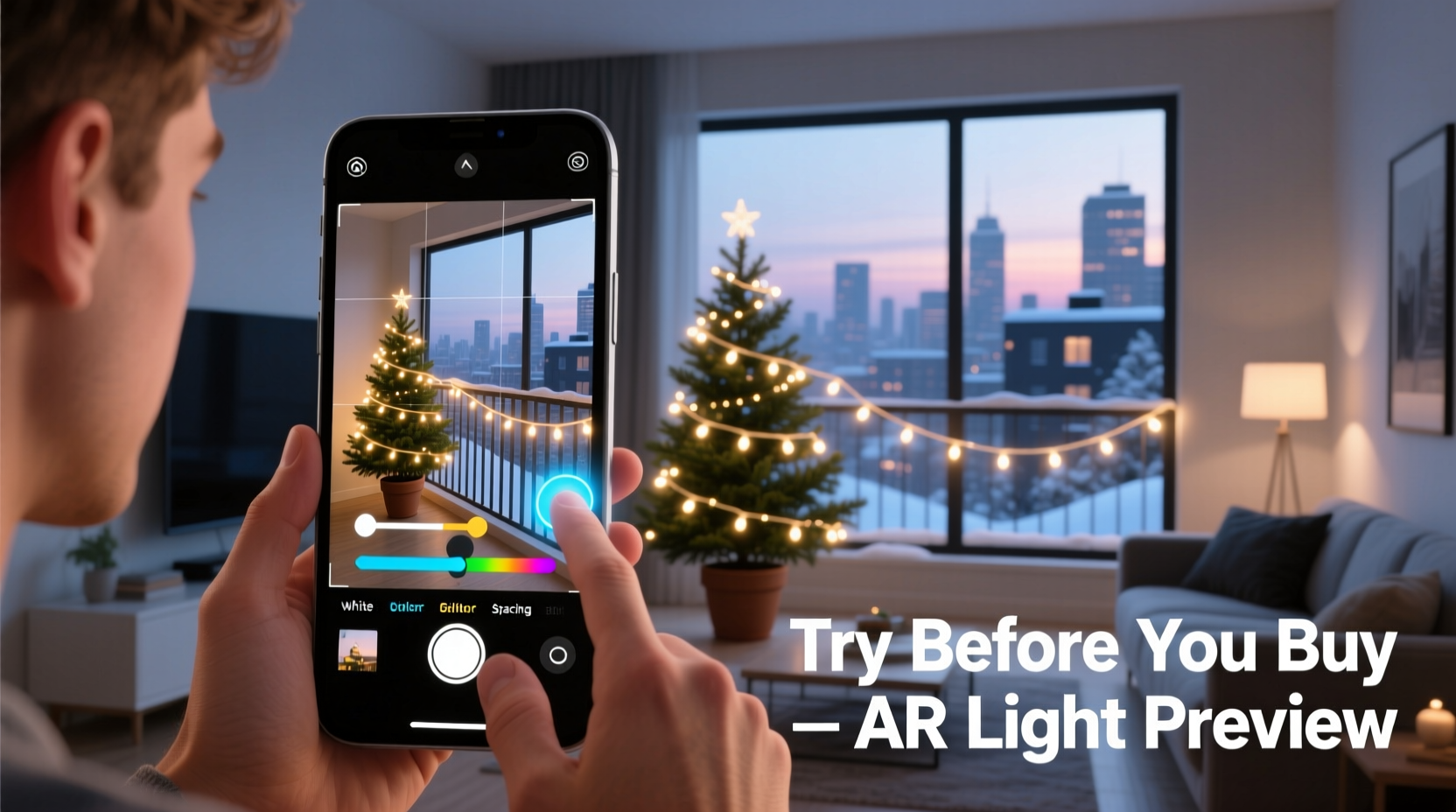
Augmented reality overlays digital content onto the physical world through a device’s camera. In the context of holiday lighting, AR allows users to simulate how various types of lights—twinkle strands, icicle drops, rope lights, and more—will appear on windows, roofs, trees, and walkways. Unlike static mockups or imagination-based planning, AR provides a dynamic, life-sized preview that adjusts as you move your phone.
The rise of AR-compatible shopping tools from major retailers like Amazon, Lowe’s, and The Home Depot has made this technology accessible to everyday consumers. Apps now integrate directly with product catalogs, letting users place actual items for sale into their real-world environment before committing to a purchase.
“AR is no longer a novelty—it’s a practical tool for spatial decision-making. For seasonal decor, it prevents costly errors and streamlines installation.” — Daniel Park, Smart Home Technology Consultant at BrightPath Labs
This shift is especially valuable during the holiday season, when impulse buys and mismatched styles can lead to cluttered, inconsistent displays. By using AR, homeowners can experiment freely without financial risk or physical effort.
Step-by-step: How to preview Christmas light placements using AR
Using AR to visualize your light layout takes only minutes and requires no technical expertise. Follow this step-by-step process to get accurate, useful previews:
- Choose an AR-compatible app: Start with platforms known for home visualization. Recommended options include:
- The Home Depot Mobile App (with “View in Your Space” feature)
- Lowe’s app (powered by Google’s ARCore)
- Amazon’s View in Room tool (available on iOS and Android)
- Adobe Aero (for custom designs)
- Select your desired lights: Browse the app’s holiday section and pick specific products—such as C9 multicolor LED strings, warm white icicle lights, or green wire net lights. Tap the “View in Your Space” option.
- Scan your environment: Open your phone’s camera and slowly pan across the area you want to decorate—your front porch, roofline, or garden tree. The app will map surfaces and detect planes like walls, fences, and railings.
- Place virtual lights: Once the surface is recognized, tap where you want the lights to begin. Drag to extend them along eaves, wrap around columns, or drape over bushes. Most apps allow scaling and rotation for accuracy.
- Adjust colors and density: Some advanced tools let you toggle between light colors, brightness levels, and animation effects (e.g., twinkling vs. steady). Experiment to see which combinations complement your home’s architecture and paint.
- Save and share views: Take screenshots or record short clips of your design. Share them with family members or contractors to gather feedback before purchasing or installing.
- Compare multiple layouts: Repeat the process with different configurations—try outlining windows one way and draping lights another—to determine what feels balanced and festive.
Top AR apps for Christmas light visualization
Not all AR tools are created equal. Below is a comparison of leading apps based on usability, realism, and integration with retail inventory.
| App | Best For | Key Features | Limitations |
|---|---|---|---|
| The Home Depot | Real-time product placement | Direct linking to purchasable lights, accurate scale rendering, easy interface | Limited to in-stock items; no custom animations |
| Lowe’s | Outdoor structure mapping | Strong outdoor tracking, works well with large surfaces like roofs and trees | Slower load times; occasional glitches in complex environments |
| Amazon View in Room | Broad product selection | Access to thousands of third-party light sets, user reviews visible in-app | Lower visual fidelity; less precise alignment |
| Adobe Aero | Custom creative designs | Create non-standard patterns (e.g., snowflakes, stars), import 3D models | Requires learning curve; not linked to retail purchases |
For most users, The Home Depot or Lowe’s apps provide the best balance of realism and convenience. If you're designing a themed display or working with a contractor, Adobe Aero offers greater creative control, though it lacks direct shopping integration.
Common pitfalls and how to avoid them
Even with AR, poor planning can still lead to disappointing results. Many users make assumptions that seem logical but don’t translate well in practice. Here are frequent missteps and how AR can help correct them:
- Misjudging string length: A single strand may look sufficient in AR, but when placed along a long roofline, gaps become obvious. Use the app’s measurement overlay (if available) or manually count feet by pacing the area first.
- Overlighting small spaces: Porches and entryways can feel overwhelming with dense net lights. Preview sparser arrangements and step back virtually to assess balance.
- Ignoring architectural features: Columns, shutters, and dormers add character but can be missed in traditional planning. Rotate your view in AR to ensure lights enhance—not obscure—these details.
- Choosing clashing colors: Cool white LEDs may look elegant in-store but appear harsh against warm brick. Test multiple color temperatures side by side in your actual environment.
Real example: A suburban homeowner’s AR success story
Sarah Mendoza, a homeowner in Portland, Oregon, had always avoided elaborate Christmas displays. Past attempts led to tangled wires, mismatched bulb colors, and one fallen ladder incident. Last year, she decided to try AR after seeing a neighbor’s flawless rooftop layout.
Using The Home Depot app, Sarah scanned her two-story colonial house and began placing C7 warm white lights along the roof peaks and window frames. She tested blue-tinted icicle strands but found they looked too cold against her red door. Switching to pure white improved harmony. She then added green net lights to her holly bushes—only to realize, via AR, that they overwhelmed the plants.
After three iterations, Sarah finalized a minimalist yet striking design: white outlines on upper levels, subtle path lighting, and a single lit wreath on the door. She ordered exactly what she needed, installed everything in under two hours, and received compliments throughout the season.
“I spent 20 minutes in AR and saved myself eight hours of trial and error,” she said. “It felt like having a decorator in my pocket.”
Checklist: Preparing for AR-powered light planning
Before launching your AR session, complete these steps to ensure accurate, actionable results:
- Charge your smartphone fully—AR uses significant battery power.
- Clean your phone’s camera lens to improve image clarity.
- Clear obstructions near target areas (e.g., move patio furniture).
- Measure key dimensions (eave length, tree height) for reference.
- Decide on a theme (traditional, modern, whimsical) to guide color choices.
- Identify power outlet locations to ensure virtual designs are realistically wired.
- Download and test your chosen AR app ahead of time.
Frequently asked questions
Can AR filters show how lights look at night?
Most consumer AR tools simulate lights in daytime conditions and do not replicate true nighttime glow. However, some apps use enhanced brightness and ambient shadows to suggest luminosity. For a better approximation, view your design in a dim room or use video editing software to darken screenshots.
Do I need special equipment to use AR for Christmas lights?
No. Any modern smartphone with a rear camera and ARKit (iOS) or ARCore (Android) support is sufficient. Most devices manufactured after 2018 meet these requirements. No additional hardware like smart glasses or sensors is needed.
Can I save my AR design for next year?
Yes. While most apps don’t store designs permanently, you can save screenshots, videos, or notes about product names and placement patterns. Store these in a holiday planning folder for reuse. Some users even sketch diagrams based on their AR previews for quick reference.
Maximizing value: From preview to installation
AR isn’t just for inspiration—it’s a blueprint for efficient execution. Once you’ve finalized your virtual layout, use it to streamline the real-world process:
- Create a shopping list: Note exact product names, lengths, and quantities seen in AR. Avoid overbuying by sticking to the plan.
- Map installation order: Begin with hard-to-reach areas like rooflines, then move to ground-level features. Refer to your AR model as a visual guide.
- Test electrical load: Ensure your circuit can handle the total wattage of your planned setup. Many AR apps don’t account for power needs, so calculate this separately.
- Involve family or professionals: Share your AR recordings with helpers so everyone understands the vision. Contractors can use them to quote accurately and install faster.
“The best holiday displays aren’t the brightest—they’re the most thoughtful. AR gives people the space to think before they string.” — Lena Tran, Lighting Designer and Holiday Display Consultant
Conclusion: Light up smarter, not harder
Christmas lights should bring wonder, not worry. With AR filters, you can eliminate the stress of guessing, returning ill-fitting strands, or dismantling poorly planned setups. Whether you’re a minimalist decorator or a neighborhood spectacle creator, augmented reality puts precision and creativity at your fingertips.
The technology is free, fast, and increasingly intuitive. It turns your home into a canvas and your phone into a decorator’s toolkit. This season, skip the frustration and start with a preview. Design confidently, buy wisely, and install smoothly—knowing exactly how your lights will look before a single bulb is unplugged.




 浙公网安备
33010002000092号
浙公网安备
33010002000092号 浙B2-20120091-4
Comments
No comments yet. Why don't you start the discussion?