
Choosing where to plant a tree is one of the most consequential decisions in landscape planning. A poorly placed maple can block solar panels, lift sidewalks, or crowd utility lines—problems that often don’t appear until years later, when removal costs exceed $3,000. Traditional methods—paper sketches, scaled printouts, or mental estimation—lack spatial fidelity and fail to account for real-world variables like seasonal sun angles, mature canopy spread, or subsurface root zones. Augmented reality (AR) apps bridge that gap by overlaying photorealistic 3D tree models onto your live camera feed, anchored precisely to your yard’s terrain and structures. This isn’t novelty tech—it’s precision planning made accessible. When used deliberately, AR transforms tree placement from guesswork into an informed, visual, and collaborative process.
Why AR Previewing Matters More Than You Think
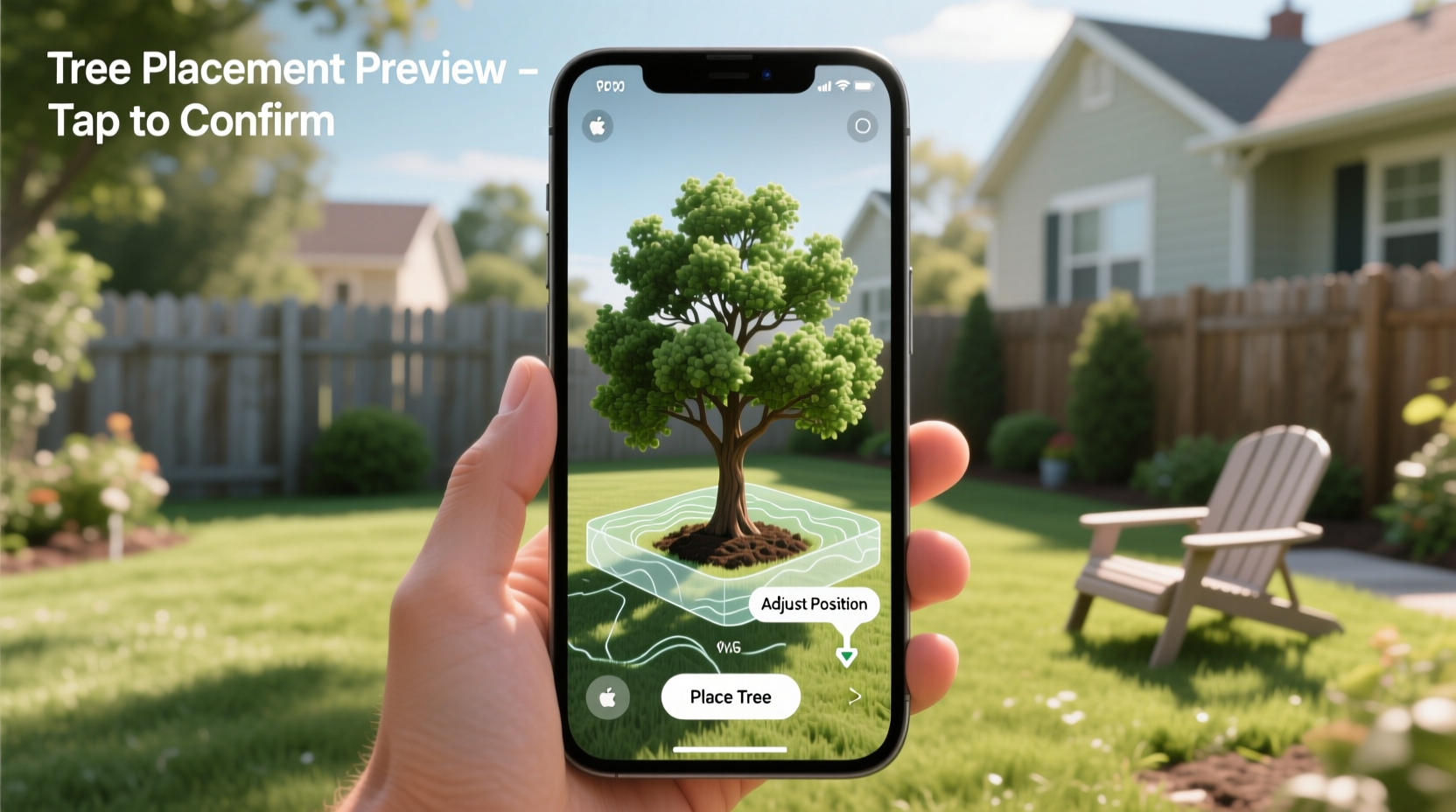
Most homeowners underestimate how dramatically trees change over time. A young ‘Red Sunset’ maple may stand 8 feet tall at planting—but within 15 years, it will reach 45 feet with a 35-foot canopy and roots extending 2–3 times beyond the drip line. Without accurate visualization, critical conflicts go unnoticed: a ‘Linden’ planted 6 feet from a foundation may crack footings as its roots expand; a ‘Japanese Maple’ placed in full afternoon sun may suffer leaf scorch no amount of watering can fix. According to the International Society of Arboriculture, over 68% of urban tree removals stem from avoidable placement errors—not disease or storm damage. AR doesn’t eliminate judgment, but it surfaces spatial consequences *before* the first shovel breaks ground. It reveals sightline obstructions, shadows cast at 3 p.m. in December, and whether a ‘Crape Myrtle’ will clear the eaves when fully grown. That foresight saves money, time, and ecological investment.
Step-by-Step: Using AR Apps to Preview Tree Placement
- Choose the right app: Prioritize tools with verified botanical models (not generic “tree” icons), metric scaling, and terrain-aware anchoring. Top performers include TreePlotter AR (industry standard for municipal planners), Garden Answers AR (user-friendly for homeowners), and iScape (excellent for iOS users with realistic lighting simulation).
- Calibrate your space: Open the app and point your device at flat, unobstructed ground. Tap to place a reference marker. Walk slowly in a square around the intended planting zone while holding the device steady—this helps the app map surface elevation and detect slopes or retaining walls.
- Select species and size: Search by scientific or common name. Choose the *mature* height and spread—not the nursery pot size. Adjust trunk diameter and canopy density sliders to match regional growth expectations (e.g., slower growth in clay soil vs. sandy loam).
- Anchore and rotate: Tap to anchor the 3D model at your chosen spot. Use two fingers to rotate the view—inspect from all angles, including low-to-the-ground perspectives to check clearance under decks or over walkways.
- Test seasonal conditions: Toggle built-in sun path tools to simulate June 21st at noon (maximum solar gain) and December 21st at 4 p.m. (lowest angle, longest shadows). Observe how shade falls across garden beds, south-facing windows, or solar panel arrays.
- Document and compare: Take screenshots at each key viewpoint. Save versions for 3–4 candidate locations. Overlay them side-by-side to evaluate trade-offs: privacy vs. light loss, windbreak effectiveness vs. roof overhang interference.
What to Look For—and What to Ignore—in AR Tree Models
Not all AR tree renderings are created equal. Many free apps use cartoonish, uniformly shaped canopies that bear little resemblance to real growth habits. A ‘Sugar Maple’ should display a dense, rounded crown with layered horizontal branching—not a lollipop sphere. Likewise, a ‘River Birch’ must show exfoliating bark texture and pendulous, multi-stemmed form. Below is a comparison of features that separate reliable tools from decorative gimmicks:
| Feature | Reliable AR Apps | Low-Fidelity Apps |
|---|---|---|
| Botanical accuracy | Models based on USDA Plant Database + arborist field measurements; distinct leaf shapes, bark textures, and branching architecture per species | Generic “tree” templates reused across species; identical canopies for oak, maple, and pine |
| Scale fidelity | Height, spread, and trunk girth adjustable to reflect local soil, climate, and age; includes growth rate sliders (e.g., “slow: 6–12”/yr vs. “fast: 24–36”/yr) | Fixed-size models only; no customization for regional variation or site conditions |
| Terrain integration | Detects slopes >5°, anchors roots realistically to grade, shows root flare elevation relative to soil line | Plants trees on flat, featureless planes—even on steep hillsides or raised beds |
| Light & shadow physics | Dynamic shading based on GPS location, date, and time; accounts for cloud cover and ambient light reflection off nearby surfaces | Static, uniform shadows; no time-of-day or seasonal variation |
| Data export | Exports annotated PDF reports with coordinates, sun path graphs, and recommended setbacks from structures/utility lines | No export options; screenshots only |
Real-World Example: The Suburban Backyard Redesign
In Oak Park, Illinois, homeowner Lena R. wanted to replace two aging ash trees lost to emerald ash borer. She planned to install native ‘Bur Oaks’ for longevity and wildlife value—but hesitated near her 100-year-old brick patio. Using TreePlotter AR, she tested three locations: 4 feet east of the patio edge, 8 feet west beside the garage, and 12 feet north along the property line. At first glance, the eastern spot seemed ideal—close to the patio for shade. But AR revealed the mature canopy would extend 10 feet over the patio, dropping heavy acorns onto pavers and blocking afternoon light to her kitchen window. The western option interfered with overhead power lines visible in the app’s utility overlay. Only the northern placement cleared all constraints—yet still provided dappled shade by the patio’s northwest corner. Lena shared the AR screenshots with her certified arborist, who confirmed root zone compatibility with existing sewer lines. She planted last spring. By fall, the saplings were thriving—and her neighbor commented, “It already looks like it’s been there for years.” That confidence came not from intuition, but from seeing the future, in real time, on her own lawn.
Expert Insight: When Technology Meets Arboricultural Wisdom
“AR won’t tell you whether a species suits your soil pH or deer pressure—but it forces you to confront spatial realities no brochure conveys. I ask every client to run AR previews *before* calling me for a site visit. It shifts the conversation from ‘Where should I put this?’ to ‘Given what we now see, what species best fulfills this function without conflict?’ That’s where real stewardship begins.” — Dr. Marcus Teller, ISA Board Certified Master Arborist and Urban Forestry Director, Chicago Region Tree Initiative
Common Pitfalls—and How to Avoid Them
- Ignoring microclimate effects: AR shows geometry, not temperature. A south-facing wall creates a heat island that may stress a ‘Dogwood’ labeled “partial shade.” Pair AR with a soil thermometer and moisture probe before finalizing.
- Overlooking underground utilities: Even advanced AR apps don’t auto-detect private lines (e.g., sprinkler valves, septic drain fields). Always call 811 and mark those zones manually in-app using measurement tools.
- Trusting default settings: Many apps default to “ideal conditions” growth rates. Reduce height/spread projections by 15–20% if your site has compacted soil, high salinity, or frequent drought.
- Skipping the neighbor perspective: Stand at your property line and preview the tree from adjacent yards. Will a ‘Weeping Willow’ block their view? Will autumn leaf drop clog their gutters? AR makes empathy tangible.
FAQ
Do I need expensive hardware to use AR tree preview apps?
No. Most robust AR landscaping apps work on iPhones XS and newer, or Android devices with ARCore support (Samsung Galaxy S9+, Google Pixel 3+, or equivalent). You don’t need AR glasses or tablets—just a smartphone with a rear-facing camera and updated OS. Free versions offer core functionality; paid tiers ($4.99–$12.99/year) unlock species libraries, sun path analytics, and export features.
Can AR show how roots will grow underground?
Current consumer AR apps do not render subsurface root systems in real time—but leading tools like RootView Pro (integrated with TreePlotter) provide interactive 2D cross-sections showing expected lateral root spread and depth zones based on species, soil type, and irrigation. These aren’t predictive simulations, but science-based visual guides aligned with ISA root mapping standards.
What if the AR model looks distorted or floats above the ground?
This usually means poor surface detection. Move to a well-lit area with textured ground (grass, gravel, or soil—not reflective pavers or wet asphalt). Hold your phone 2–3 feet above the surface and slowly trace the perimeter of your planting zone. If distortion persists, restart the app and recalibrate in an open space away from large metal objects or Wi-Fi interference.
Conclusion
Planting a tree is an act of faith—in the soil, in the climate, and in the future you’re helping to shape. Augmented reality doesn’t replace that faith; it grounds it in observable, adjustable reality. It turns abstract ideas like “shade for the patio” or “screen from the road” into measurable, visual experiences you can walk around, pause, and reconsider. It invites collaboration—with family members who want to see the view from their favorite chair, with contractors verifying clearance for equipment access, with arborists refining species selection before delivery. Every tree you plant is a decades-long commitment. Why make that choice without seeing it first? Download one trusted AR app this week. Step outside. Point your phone at bare earth. Watch a future canopy bloom in real time—then decide, with clarity, exactly where life takes root.




 浙公网安备
33010002000092号
浙公网安备
33010002000092号 浙B2-20120091-4
Comments
No comments yet. Why don't you start the discussion?