
Choosing a Christmas tree is one of the most joyful—and surprisingly stressful—parts of holiday preparation. You’ve measured your ceiling height, cleared floor space, and debated between real and artificial—but nothing compares to the disappointment of hauling a 7-foot Nordmann fir into your living room only to realize it blocks the fireplace mantel, crowds the sofa, or casts an awkward shadow across your favorite reading nook. Augmented reality (AR) eliminates that guesswork. Today’s smartphones and tablets can overlay photorealistic 3D tree models onto your actual living space in real time, letting you test scale, proportion, lighting, and sightlines before committing to a purchase. This isn’t futuristic speculation: AR tree preview tools are widely available, free or low-cost, and require no technical expertise. What matters is knowing which apps deliver accurate spatial mapping, how to calibrate them properly, and what design principles to apply when evaluating placement options.
Why AR beats tape outlines and mental visualization
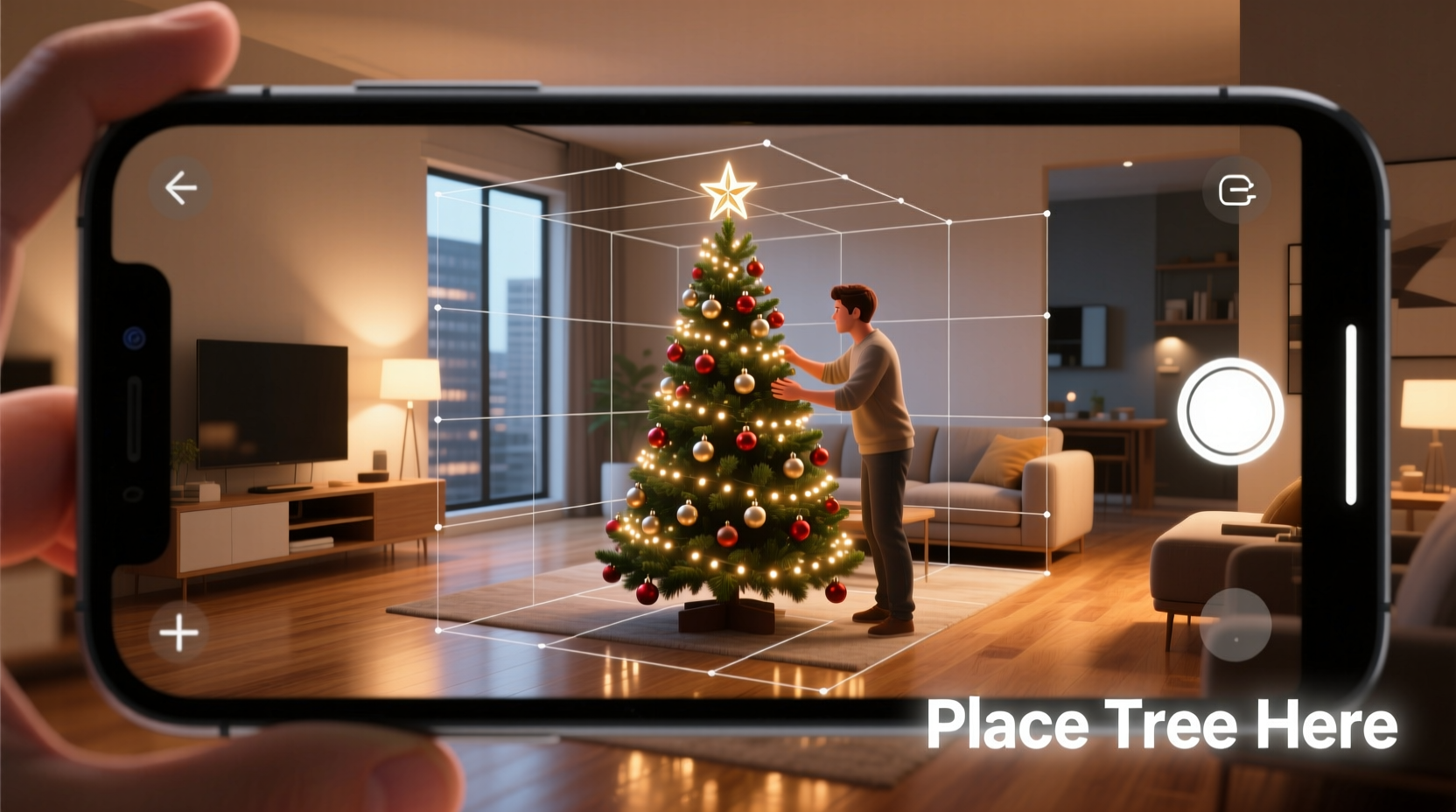
For decades, people have used painter’s tape on floors to “map” potential tree locations—or stood in corners holding up broomsticks while squinting at doorways. These analog methods address only one dimension: footprint. They ignore vertical clearance, branch volume, visual weight, and interaction with existing furniture and architectural features. AR goes further. It uses your device’s LiDAR sensor (on newer iPhones and iPads) or advanced motion tracking (on Android and older iOS devices) to build a dynamic 3D mesh of your room. When you place a virtual tree, the app accounts for ceiling height, window placement, wall texture, ambient light direction, and even subtle occlusion—so branches realistically disappear behind your bookshelf or cast soft shadows on the rug.
Research from the National Retail Federation shows that 68% of holiday shoppers who used AR for home décor preview reported higher satisfaction with their final purchase—and 41% said they avoided at least one return. For Christmas trees specifically, this translates to fewer last-minute swaps, reduced delivery fees, and less physical strain from moving heavy objects multiple times.
Step-by-step: Setting up your first AR tree preview
- Prepare your space: Clear walkable paths around the intended tree area. Remove small reflective objects (like glass vases or mirrors) that can confuse depth sensors.
- Update your device: Ensure your smartphone or tablet runs iOS 15+ or Android 10+. Older OS versions may lack required ARKit or ARCore support.
- Download a trusted app: Choose one with verified tree models and room-scanning capability (see comparison table below). Avoid apps that only show static images overlaid on camera feeds—they’re not true AR.
- Scan your room: Open the app and follow its guided instructions. Slowly pivot your device in a wide arc, keeping it waist-high. Let the app detect walls, floors, and large furniture. Most scans take 20–45 seconds.
- Select and place your tree: Browse realistic models—real species like Fraser fir or artificial styles like pre-lit slim-profile trees. Tap to drop the tree at your desired location. Use two fingers to rotate, pinch to resize, and drag to reposition.
- Evaluate critically: Walk around the virtual tree. Crouch down to check sightlines from a child’s perspective. Stand back to assess balance against windows or artwork. Toggle lighting modes to see how ornaments reflect under different bulbs.
Top AR apps compared: Features, accuracy, and limitations
| App Name | Platform | Tree Models | Room Scanning Accuracy | Key Strengths | Notable Limitations |
|---|---|---|---|---|---|
| Wayfair | iOS & Android | 120+ (real & artificial) | ★★★★☆ (LiDAR-enhanced on Pro models) | Real-time lighting simulation; integrates with retailer inventory; lets you save multiple placements | Requires account creation; some premium trees locked behind email signup |
| Target Measure & Place | iOS & Android | 75+ (focus on artificial) | ★★★☆☆ (Relies on motion sensors only) | Simple interface; instant size scaling; shows clearance warnings (e.g., “3 inches from ceiling”) | Limited real-tree species; no ornament customization |
| Amazon AR View | iOS & Android | 200+ (broadest selection) | ★★★★★ (Best-in-class depth mapping) | Supports multi-angle viewing; shows exact dimensions on-screen; works offline after initial download | Tree models lack seasonal lighting toggles; no “before/after” side-by-side mode |
| Christmas Tree AR (by Studio Mobi) | iOS only | 40+ (high-fidelity real species) | ★★★★☆ (Excellent for smaller rooms) | Botanical accuracy (branch density, needle texture); seasonal lighting presets (warm white, cool white, multicolor) | No furniture import; cannot save scans; $2.99 one-time fee |
Design principles for optimal tree placement
AR doesn’t just tell you *if* a tree fits—it reveals whether it *belongs*. Placement affects both function and feeling. A well-sited tree anchors the room without dominating it, creates natural gathering zones, and enhances existing architectural rhythm. Apply these interior design fundamentals when testing placements:
- The 20% Rule: Your tree should occupy no more than 20% of your room’s total floor area. In a 12' × 16' living room (192 sq ft), that means a footprint under 38 sq ft—roughly a 6' diameter base. AR helps visualize this ratio instantly.
- Ceiling Clearance Margin: Allow at least 4–6 inches between the top of the tree and ceiling fixtures. AR overlays highlight proximity warnings, but also consider crown compression: real trees settle 1–2 inches over 48 hours; factor that in when sizing.
- Sightline Integrity: From your primary seating position (sofa, armchair), the tree should be fully visible—not bisected by doorframes or partially obscured by bookshelves. Use AR’s “walk-around” mode to simulate viewing angles.
- Flow & Function: Maintain at least 36 inches of clear walking space around the tree’s perimeter. Test traffic patterns: Can someone move from kitchen to dining area without detouring? Does the tree block HVAC vents or smoke detector coverage?
“Augmented reality transforms tree shopping from a gamble into a design decision. When clients use AR before purchasing, we see fewer spatial conflicts and far more cohesive holiday interiors.” — Maya Lin, Interior Designer and Founder of Hearth & Form Studio
Mini case study: The corner conundrum solved
Sarah K., a graphic designer in Portland, faced a persistent problem: her 100-year-old Craftsman bungalow has narrow doorways and built-in cabinetry flanking the living room entrance. Every year, she chose a 6.5-foot tree based on ceiling height alone—only to discover it blocked the doorway’s swing and made the entryway feel claustrophobic. Frustrated, she tried Wayfair’s AR tool before ordering in 2023. She scanned her living room, placed a 6-foot slim-profile artificial tree in the traditional corner spot—and immediately saw the issue: the tree’s upper branches extended 11 inches into the doorway’s arc. She rotated the model 15 degrees, then tested placement 2 feet left along the same wall. The AR overlay showed improved flow, unobstructed sightlines to the fireplace, and balanced symmetry with her vintage sofa. She ordered the tree, added a 36-inch-wide woven basket stand for visual grounding, and reported zero adjustments needed upon delivery. “It wasn’t just about avoiding a mistake,” she shared. “It felt like collaborating with a designer who knew my space better than I did.”
Essential checklist before finalizing your AR preview
- ✅ Scan during daytime with curtains open for maximum sensor clarity
- ✅ Verify ceiling height manually (tape measure) and input it into the app—don’t rely solely on AR estimation
- ✅ Test at least three placements: traditional corner, centered on longest wall, and asymmetric off-center
- ✅ Toggle between “day” and “evening” lighting modes to assess glow intensity and ornament visibility
- ✅ Check clearance from heat sources (radiators, fireplaces, baseboard heaters)—most AR apps don’t warn about thermal safety
- ✅ Save screenshots of your top two placements and share them with household members for consensus
FAQ
Do I need a high-end phone for accurate AR tree previews?
No. While LiDAR-equipped devices (iPhone 12 Pro and later, iPad Pro 2020+) deliver faster, more precise scanning—especially in low-light or complex spaces—modern mid-tier Android phones (Samsung Galaxy S21+, Google Pixel 6 and newer) and iPhone 11 and later run ARCore and ARKit reliably. Focus on software updates and ambient light over hardware specs.
Can AR show how ornaments will look on the tree?
Most consumer apps do not render custom ornaments in real time due to processing limits—but several (including Amazon AR View and Christmas Tree AR) offer preset ornament packs (glass balls, wooden stars, vintage tinsel) that you can toggle on/off. For true personalization, take a screenshot of your preferred AR placement and use photo-editing apps to layer in your own ornament photos.
What if my room has unusual architecture—vaulted ceilings, sloped walls, or columns?
AR handles vaulted ceilings well, especially with LiDAR, as it maps vertical planes accurately. Sloped walls may cause minor drift in edge detection; mitigate this by scanning slowly and repositioning the tree slightly away from the angled surface. Columns are generally recognized as obstacles—place your tree so its base clears the column’s footprint by at least 12 inches, then use AR’s “rotate view” to confirm sightlines aren’t compromised.
Conclusion
Augmented reality for Christmas tree placement is more than a novelty—it’s a practical exercise in spatial intelligence and intentional design. It shifts the focus from “Will it fit?” to “How will it live here?” By testing scale, light, and relationship to your everyday environment before bringing anything through the door, you invest in calm rather than chaos. You honor your home’s architecture instead of fighting it. And you make room—literally and emotionally—for what the season truly offers: presence, connection, and unhurried joy. This year, skip the tape measures and second-guessing. Download one trusted AR app, spend 90 focused minutes scanning and experimenting, and let technology serve your peace of mind. Your future self—standing beneath a perfectly sited, beautifully proportioned tree, surrounded by loved ones—will thank you.




 浙公网安备
33010002000092号
浙公网安备
33010002000092号 浙B2-20120091-4
Comments
No comments yet. Why don't you start the discussion?