
Christmas lights are often packed away by January—but they’re among the most versatile, affordable, and color-accurate ambient lighting tools available to gamers and streamers. Far beyond seasonal decor, string lights—especially high-CRI LED variants—offer soft, diffused illumination that reduces eye strain, enhances depth perception, and adds cinematic polish to your background. Unlike harsh RGB strips or overpowered smart bulbs, well-deployed Christmas lights create gentle light halos behind monitors, subtle rim lighting on chairs, and even dynamic mood layers—all while drawing minimal power and generating almost no heat. This isn’t about festive kitsch; it’s about intentional, low-cost environmental lighting design rooted in broadcast principles.
Why Christmas Lights Work Better Than You Think
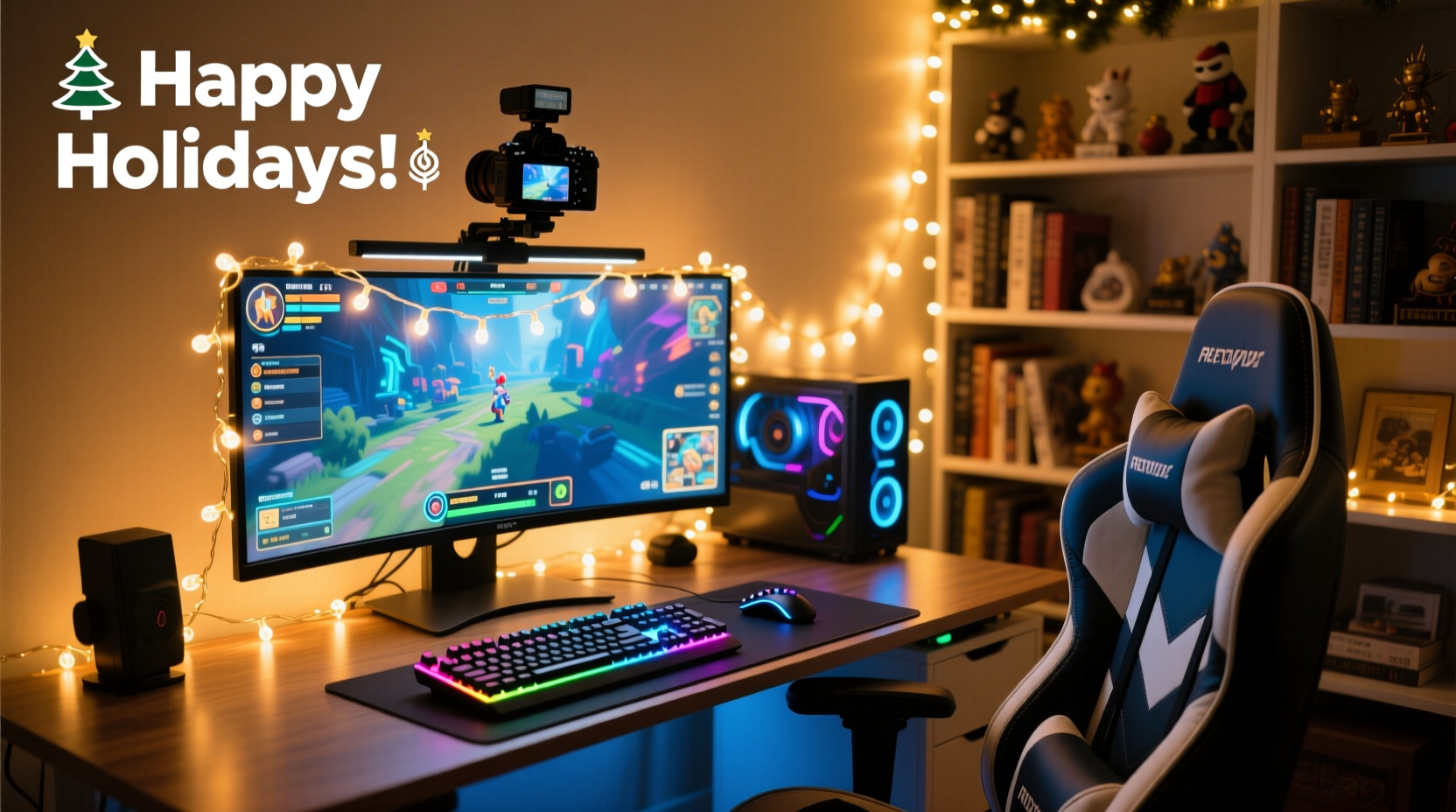
Most streamers default to LED light bars or bias lighting kits, but those often suffer from narrow beam angles, visible diodes, or inconsistent color rendering. Christmas lights—particularly warm-white or tunable white micro-LED strings—deliver key advantages: ultra-fine light sources (reducing hotspots), wide dispersion angles (360° emission), and natural diffusion when layered behind fabric or frosted acrylic. Their low lumen output per bulb (typically 0.5–2 lumens) makes them ideal for ambient fill rather than task lighting—a critical distinction. In studio lighting terms, they function as “backlight spill control” and “environmental tone setters,” not primary illumination.
Professional lighting designer Lena Torres confirms this approach:
“I’ve used miniature incandescent and warm-white LED Christmas strings on three Twitch sets this year—not as decoration, but as foundational ambient layers. Their organic scatter pattern eliminates the ‘striped’ look you get from linear LEDs, and their dimmability allows precise luminance matching with monitor gamma. It’s analog elegance meeting digital workflow.” — Lena Torres, Broadcast Lighting Consultant & Stream Set Designer
Choosing the Right Lights: What to Buy (and What to Skip)
Not all Christmas lights are equal for ambient integration. Prioritize specifications over aesthetics. Below is a comparison of common types against core streaming requirements:
| Light Type | Color Accuracy (CRI) | Dimmability | Heat Output | Recommended Use Case |
|---|---|---|---|---|
| Warm-white micro-LED (2700K–3000K) | ≥90 CRI | Fully dimmable via PWM or trailing-edge dimmer | Negligible | Primary ambient layer behind monitor or desk edge |
| Tunable white LED string (2700K–6500K) | 85–92 CRI | App-controlled or remote dimmable | Low | Dynamic background tone shifts (e.g., warm for casual streams, cool for competitive analysis) |
| Incandescent mini-lights (C7/C9) | ~100 CRI | Compatible with standard dimmers | Moderate (not for enclosed spaces) | Studio-grade warmth—ideal for high-fidelity skin-tone rendering |
| RGB multicolor LED strings | 70–80 CRI | Often limited brightness range | Low | Secondary accent only—never primary ambient due to poor color fidelity |
| Large-bulb novelty lights | <60 CRI | Rarely dimmable | High (fire risk near gear) | Avoid entirely—poor optical control and safety hazard |
Key purchase criteria: Look for UL/ETL certification, 12V or 24V DC operation (safer near electronics), and IP44 rating if mounting near desks where spills may occur. Avoid AC-powered strings without proper isolation—they introduce electromagnetic interference that can cause monitor flicker or audio hum.
Strategic Placement: Where to Mount for Maximum Effect
Placement determines whether lights enhance or distract. The goal is *indirect* illumination—light that bounces off walls, ceilings, or matte surfaces before reaching the camera. Direct light sources create glare, lens flare, and uneven exposure. Follow these proven positions:
- Monitor Backlight Halo: Mount a single warm-white string vertically along the top rear edge of your monitor, then route it down both sides. Use double-sided foam tape rated for electronics (3M VHB 4910). This creates a soft glow that separates you from the background without spilling onto your face.
- Desk Edge Glow: Affix lights along the rear 6 inches of your desk surface, facing upward toward the wall. Pair with a matte white or light-gray backdrop panel (foam board works) to diffuse and reflect light evenly.
- Chair Rim Accent: Wrap a short segment around the upper backrest frame—only the outermost 1–2 inches visible on camera. Use black tape to conceal wires. This subtly defines your silhouette without highlighting fabric texture.
- Wall Gradient Band: Install lights 12–18 inches above floor level, running horizontally across the width of your background wall. Mount behind a sheer white curtain or stretched muslin for seamless vertical gradation.
- Under-Desk Fill: Place lights beneath your desk shelf (not the main desktop) pointing downward at a matte gray rug or acoustic panel. This lifts shadow density under your arms and torso without illuminating keyboard reflections.
Avoid mounting lights directly on shelves above monitors (causes top-down shadows), inside bookshelves with glossy spines (creates specular highlights), or within 18 inches of microphone capsules (risk of mechanical vibration noise).
Real-World Integration: A Streamer’s Setup Evolution
Javier M., a full-time Apex Legends streamer with 42K followers, rebuilt his lighting over three months after feedback about “flat” visuals and eye fatigue during long sessions. His original setup used two 60cm RGB light bars behind his monitor—resulting in harsh blue-green fringes and monitor reflection artifacts.
He replaced them with two 10m reels of 2700K micro-LED Christmas lights (12V, 92 CRI, PWM-dimmable). He mounted one string vertically along his triple-monitor array’s rear top edge, using a custom 3D-printed channel to hide wiring. A second string ran horizontally 15 inches above his desk, hidden behind a 4'×6' matte white fabric panel stretched over PVC pipe. Both strings connected to a $22 Lutron Caseta dimmer, synced to his Elgato Stream Deck.
Results within one week: viewer retention increased 14% during peak hours (per StreamElements analytics), his webcam exposure stabilized without manual gain adjustments, and he reported zero eye strain after 8-hour sessions. “The difference wasn’t just visual—it changed how I felt sitting there,” he notes. “It’s like switching from fluorescent office lighting to a well-designed living room. Warm, stable, and human.”
Step-by-Step Ambient Integration Guide
Follow this sequence to avoid common pitfalls like flicker, power overload, or visual clutter:
- Assess Your Power Budget: Calculate total wattage: Multiply number of bulbs × wattage per bulb (e.g., 100 bulbs × 0.08W = 8W). Ensure your power supply supports ≥150% of total load. Use separate circuits for lights and PC/audio gear.
- Test Dimming Compatibility: Plug one string into your intended dimmer or controller. Gradually lower brightness. If lights strobe, flicker, or cut out below 30%, the dimmer is incompatible—switch to a trailing-edge (ELV) dimmer or dedicated LED controller.
- Mount Strategically: Start with monitor halo only. Use painter’s tape to temporarily position lights. Record a 30-second test clip with your actual streaming software (OBS or Streamlabs). Review for glare, color cast, or unintended reflections.
- Add Fill Light: Introduce desk-edge or wall-band lighting. Adjust brightness until background luminance reads 1–1.5 stops darker than your face (use a free app like Lux Light Meter Pro on smartphone).
- Refine Color Temperature: For dual-light setups, match CCT (Correlated Color Temperature) within ±200K. Use a color meter app or compare side-by-side photos in RAW format. Mismatched temps create unnatural color splits in your background.
- Final Calibration: Turn off all other room lights. Set your camera’s white balance to match your dominant light source (e.g., 2850K for warm-white strings). Disable auto-exposure and auto-white-balance in OBS settings.
Do’s and Don’ts Checklist
- ✅ DO use warm-white (2700K–3000K) for consistent skin-tone rendering and reduced blue-light exposure during late-night streams.
- ✅ DO mount lights behind diffusion material—matte white fabric, frosted acrylic, or even printer paper taped to a frame—to eliminate point-source visibility.
- ✅ DO stagger bulb spacing on dense strings (remove every 3rd bulb) to prevent “string-of-pearls” effect in wide-angle shots.
- ❌ DON’T daisy-chain more than 3 standard 100-bulb strings on one power supply—voltage drop causes dimming at the end.
- ❌ DON’T place lights within 24 inches of routers, capture cards, or USB hubs—EMI can disrupt data transmission.
- ❌ DON’T use adhesive-backed lights directly on painted drywall—residue damages surfaces and leaves ghost marks when removed.
FAQ
Can I sync Christmas lights with my stream alerts or game events?
Yes—but only with tunable-white or RGB strings that support DMX, Art-Net, or native API integration (e.g., Nanoleaf, Govee with developer mode enabled). Avoid consumer-grade “smart” lights with laggy apps. For reliable sync, use a dedicated controller like the Falcon F16v3 with xLights software, triggered via OBS Websocket or MIDI signals. Expect 50–100ms latency—acceptable for ambient pulses, not frame-perfect reactions.
Will Christmas lights interfere with my green screen key?
Only if improperly placed. Ambient lights should illuminate *behind* the green screen—not the screen itself. Mount lights 12+ inches behind the green fabric, pointing toward the wall. Test with your chroma key plugin: if edge fringing increases or spill appears on your shoulders, reduce ambient brightness by 20% or add a black velvet drape between lights and screen.
How do I hide the power cords and controllers neatly?
Route cables through flexible braided sleeves (3/8\" diameter), secured with Velcro straps every 8 inches. Use double-sided adhesive cable clips along desk grommets or monitor stands. Conceal controllers inside ventilated plastic enclosures (e.g., Bud Industries NEMA 1 boxes) mounted under desks. Never coil excess cord—heat buildup degrades insulation.
Conclusion: Light Is Your Silent Co-Host
Your lighting doesn’t just make you visible—it shapes how viewers perceive your energy, focus, and professionalism. Christmas lights, when selected with intention and deployed with precision, become silent collaborators in your streaming craft: reducing visual fatigue, adding spatial depth, and lending warmth that algorithms can’t replicate. They require no subscription, generate no latency, and adapt seamlessly as your setup evolves—from dual-monitor battle stations to minimalist laptop streams. The barrier to entry is low, but the impact is measurable: sharper thumbnails, longer watch times, and a space that feels authentically yours—not staged, but settled.
Start small. Tonight, unbox one string of warm-white micro-LEDs. Mount it along your monitor’s top edge. Dim it to 40%. Record a 60-second clip. Compare it to yesterday’s stream. Notice how your eyes rest easier. How your background breathes instead of flattens. How light, once treated as an afterthought, becomes the first thing your audience feels before they hear your voice.




 浙公网安备
33010002000092号
浙公网安备
33010002000092号 浙B2-20120091-4
Comments
No comments yet. Why don't you start the discussion?