
Adding ambient lighting to a gaming setup transforms more than just the look of your space—it enhances immersion, reduces eye strain, and personalizes your environment. While high-end RGB systems offer dynamic color control, many gamers overlook an accessible, cost-effective alternative: Christmas lights. When used strategically, these festive strands can deliver professional-grade backlighting with minimal investment and maximum flexibility. Whether you're building your first battle station or upgrading an existing one, integrating Christmas lights behind your monitor, desk, or walls creates a glowing halo that reacts subtly to gameplay and room dynamics.
The appeal lies in simplicity and adaptability. Unlike rigid LED strips designed specifically for PCs, Christmas lights come in various lengths, colors, and brightness levels. They’re easy to install, widely available, and often battery-powered or USB-compatible—making them ideal for temporary setups or renters who can’t modify their space permanently. With careful planning, they can mimic the behavior of premium bias lighting systems while adding a unique visual flair all their own.
Why Backlighting Matters in Gaming Setups
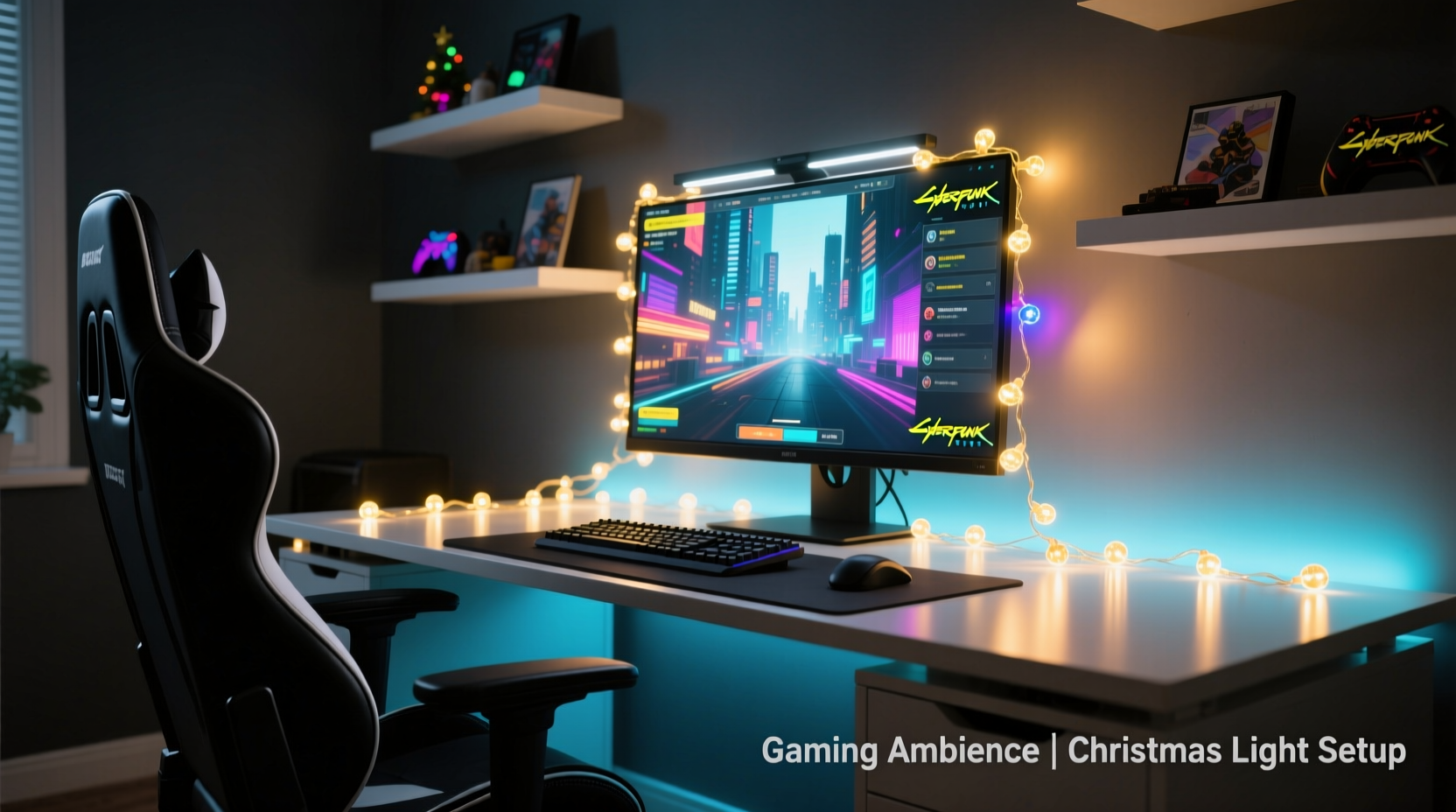
Ambient backlighting isn't just decorative; it serves functional purposes rooted in visual comfort and perception. Bias lighting—the practice of placing soft light behind a screen at a lower intensity than the display—reduces contrast fatigue by balancing the brightness differential between the bright screen and dark surroundings. This is especially important during long gaming sessions under low ambient light.
Studies from display ergonomics experts suggest that proper bias lighting improves perceived contrast and color accuracy on screens. The human eye adjusts more comfortably when there's consistent background illumination, reducing strain and improving focus. In gaming, where split-second decisions matter, minimizing distractions caused by flickering shadows or harsh contrasts can make a subtle but meaningful difference.
“Proper ambient lighting behind a monitor helps stabilize pupil dilation, which reduces eye fatigue during extended screen exposure.” — Dr. Lena Patel, Vision Ergonomics Researcher, University of Michigan
Christmas lights, particularly warm white or adjustable-color variants, are well-suited for this role. Their diffused glow avoids direct glare while filling the negative space behind monitors with gentle radiance. When placed correctly, they create depth, making flat walls appear dimensional and drawing attention toward the center of action: your screen.
Selecting the Right Type of Christmas Lights
Not all Christmas lights work equally well for gaming setups. Choosing the correct type depends on power source, color output, size, and control options. Below is a comparison of common varieties and their suitability for ambient backlighting:
| Light Type | Pros | Cons | Best For |
|---|---|---|---|
| Mini Incandescent | Warm glow, nostalgic feel | High heat output, less energy-efficient | Temporary seasonal setups |
| LED String Lights (Warm White) | Cool to touch, low power draw, long lifespan | Limited color range (if single-color) | Daily-use bias lighting |
| RGB LED Strings | Full color spectrum, remote/app control | Higher cost, may require AC adapter | Dynamic mood lighting |
| Battery-Powered Tape Lights | No visible cords, portable | Shorter run time, limited brightness | Minimalist or mobile stations |
For most gaming environments, **LED string lights with warm white or tunable white settings** provide the best balance of performance and practicality. If you prefer customization, opt for smart RGB strings compatible with apps or voice assistants. These allow you to sync colors with in-game events or shift tones based on time of day—for example, cooler whites in the morning, warmer hues at night.
Step-by-Step Installation Guide
Installing Christmas lights as ambient backlighting requires precision to maintain aesthetics and safety. Follow this timeline-based process to achieve clean, effective results without damaging equipment or surfaces.
- Plan Your Layout (15 minutes)
Measure the area behind your monitor and along the edges of your desk. Determine whether you want linear strips behind the screen, perimeter outlining, or wall coverage. Sketch a rough diagram if needed. - Gather Supplies (10 minutes)
You’ll need:- One or more strands of LED Christmas lights (preferably 5–10 meters)
- Adhesive clips or clear mounting hooks
- Extension cord or USB hub (if applicable)
- Velcro ties or cable management sleeves
- Optional: dimmer switch or smart controller
- Prepare the Surface (10 minutes)
Clean the back edge of your desk and wall surface with a microfiber cloth. Dust and oils reduce adhesive grip. Avoid applying lights directly over heat sources like GPUs or power supplies. - Attach Mounting Clips (20 minutes)
Space adhesive clips every 6–8 inches along the rear lip of your desk or wall trim. Press firmly for 10 seconds per clip to ensure bonding. For painted drywall, consider removable putty instead of permanent adhesives. - Thread the Lights (15 minutes)
Weave the strand through each clip, starting from the power source. Keep tension even—avoid sagging or stretching. Loop excess length behind furniture rather than cutting the strand. - Connect and Test (10 minutes)
Plug in the lights and observe brightness and uniformity. Adjust positioning if certain bulbs cast shadows or glare into view. Use a dimmer or app to lower intensity until the glow feels supportive, not distracting. - Manage Cables (10 minutes)
Use Velcro straps to bundle cords neatly along the underside of your desk. Route power adapters near existing outlets to prevent tripping hazards. Conceal wires using raceways or desk grommets if available.
Once installed, evaluate the effect after dark. Sit in your usual gaming position and check for reflections on the screen. If visible, reposition bulbs slightly outward or downward to redirect spill.
Design Strategies for Maximum Impact
Backlighting should complement—not compete with—your primary setup. Strategic placement enhances spatial awareness and aesthetic cohesion. Consider these proven design principles:
- Focus on the Horizon Line: Place lights just above or behind the top edge of your monitor to simulate horizon glow, mimicking natural light distribution.
- Create Depth with Layered Strands: Use two parallel rows—one close to the wall, another near the desk back edge—to generate a floating effect.
- Match Color Temperature to Screen Output: Warm white (2700K–3000K) pairs well with OLED or warm-mode displays. Cool white (4000K+) suits brighter, daylight-calibrated screens.
- Sync with Game Themes: During horror games, use dim red or blue lighting to amplify tension. For fantasy RPGs, cycle through mystical purples and greens.
Real Example: Transforming a Dorm Room Setup
Jamal, a college student in Chicago, wanted to upgrade his cramped dorm gaming station without violating housing policies. He couldn’t drill holes or use permanent fixtures. Using a single 6-meter string of battery-powered warm-white LED fairy lights, he clipped the strand along the upper edge of his desk-back wall using removable adhesive hooks. He powered it via a small USB battery pack tucked inside a bookshelf.
The result? A soft golden aura enveloped his monitor, eliminating the stark black void behind the screen. His roommate noticed reduced eye discomfort during late-night co-op sessions. After four months, Jamal replaced the batteries once and reported no peeling or residue upon removal. The entire project cost under $20 and took less than 30 minutes.
Common Mistakes and How to Avoid Them
Even simple installations can go wrong without foresight. Here are frequent pitfalls and their solutions:
- Mistake: Over-bright lighting causing screen glare.
Solution: Use a dimmer or place lights farther from reflective surfaces. - Mistake: Visible wires detracting from clean lines.
Solution: Run cables underneath desks or inside cable covers. - Mistake: Heat buildup from incandescent bulbs near electronics.
Solution: Always choose LED-only strings for proximity to gear. - Mistake: Flickering due to poor connections.
Solution: Buy reputable brands and inspect connectors before purchase.
“Many people treat holiday lights as temporary decor. But with thoughtful integration, they become part of the functional lighting ecosystem.” — Mark Tran, Interior Lighting Designer
FAQ
Can I leave Christmas lights on overnight safely?
Yes—if they are LED-based and certified by a recognized testing laboratory (such as UL or ETL). LEDs produce negligible heat and consume little power. However, avoid covering them with fabric or flammable materials, and unplug if leaving for extended periods.
Do colored lights affect gameplay visibility?
Indirectly. Bright, saturated colors may influence peripheral vision or mood. For competitive play, stick to neutral whites. For immersive single-player experiences, dynamic colors can enhance atmosphere without compromising focus.
How do I sync lights with my games?
If using smart RGB strings (like those from Govee or Philips), integrate them with software such as Hyperion, OpenRGB, or LIFX Scene Sync. Some platforms detect on-screen colors and mirror them in real time, creating a seamless extension of the game world.
Checklist: Installing Christmas Light Backlighting
- ☐ Measure your desk and wall space
- ☐ Select LED-based, low-heat string lights
- ☐ Choose warm white or RGB depending on desired effect
- ☐ Purchase adhesive clips or mounting solution
- ☐ Plan cable routing path
- ☐ Install clips and thread lights securely
- ☐ Test brightness and adjust positioning
- ☐ Manage cords with ties or raceways
- ☐ Evaluate screen reflections from seated position
- ☐ Schedule maintenance (battery changes, dusting)
Conclusion
Using Christmas lights to backlight a gaming setup proves that innovation doesn’t require expensive gear. With thoughtful selection and precise installation, humble holiday decorations evolve into powerful tools for ambiance, comfort, and personal expression. The glow behind your screen does more than look good—it supports your eyes, elevates your mood, and turns any corner into a dedicated gaming sanctuary.




 浙公网安备
33010002000092号
浙公网安备
33010002000092号 浙B2-20120091-4
Comments
No comments yet. Why don't you start the discussion?