
When Apple introduced Cinematic Mode with the iPhone 13 series, it promised a dramatic shift in mobile videography—bringing depth-of-field control, automatic focus transitions, and post-capture editing to everyday users. But more than two years later, many creators are asking: does it deliver on that promise, or is it just clever marketing wrapped in shallow tech? The answer isn’t binary. Cinematic Mode has strengths, but also clear limitations when compared to standard video recording.
To truly assess its value, we need to look beyond the glossy demos. We’ll examine how it works under real conditions, compare image quality and usability, explore creative applications, and hear from professionals using it in production. Only then can we decide whether it’s a game-changer—or simply a well-packaged feature looking for a purpose.
How Cinematic Mode Actually Works
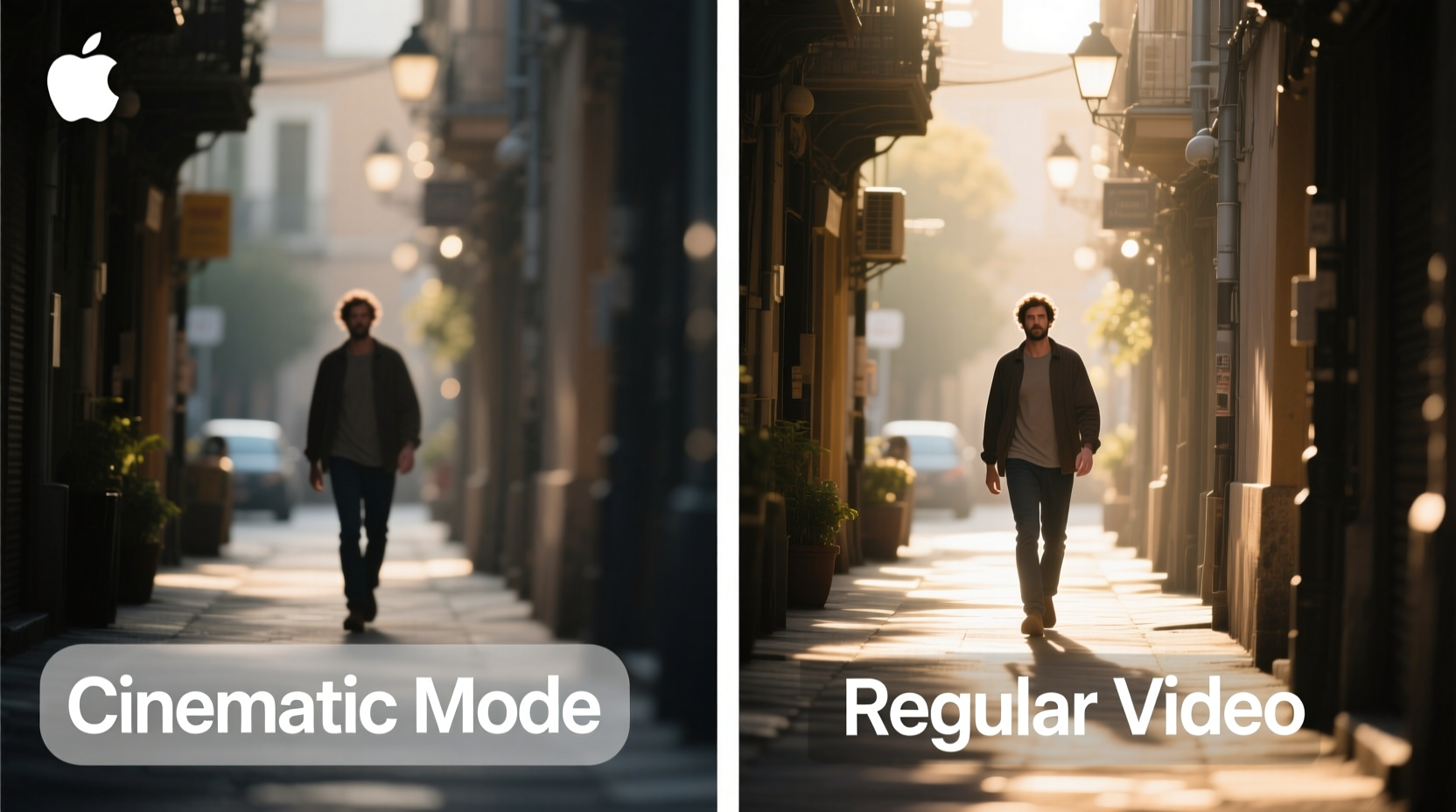
Cinematic Mode leverages the iPhone’s dual (or triple) camera system, LiDAR scanner (on Pro models), and machine learning algorithms to simulate a shallow depth of field typically associated with high-end cinema cameras. It records spatial data during filming, allowing the phone to identify subjects and backgrounds, then applies selective focus blur in real time.
Unlike traditional bokeh effects applied after shooting, Cinematic Mode enables dynamic focus pulls. That means if someone enters the frame or looks away, the focus can automatically shift—just like a skilled camera operator might do on set. Even more impressively, this focus transition can be adjusted after recording, giving users editing flexibility usually reserved for professional workflows.
However, this automation comes at a cost. Cinematic Mode defaults to 1080p resolution at 30fps, even on devices capable of 4K. While newer iPhones have improved this slightly, it still lags behind the full-resolution capabilities of standard video modes.
Direct Comparison: Cinematic Mode vs Regular Video
| Feature | Cinematic Mode | Regular Video (Default) |
|---|---|---|
| Resolution | 1080p (up to 4K on iPhone 15 Pro) | Up to 4K HDR at 60fps |
| Framerate | 30fps only | 24/30/60fps options |
| Dynamic Range | Lower (no Dolby Vision by default) | Full Dolby Vision HDR support |
| Focus Control | Auto focus pulls + post-editable | Manual tap-to-focus only |
| Low-Light Performance | Moderate (due to processing overhead) | Excellent (especially Night mode) |
| Editing Flexibility | Adjust focus points and depth post-shoot | Limited to color grading and cropping |
| File Size | Larger (due to depth map data) | Smaller relative to bitrate |
The trade-offs are evident. You gain creative control over focus and depth but sacrifice resolution, frame rate, and dynamic range. For social media clips or intimate vlogs, this may be acceptable. For documentaries, events, or any project requiring archival-quality footage, standard video remains superior.
Real-World Example: A Travel Vlogger’s Dilemma
Consider Maya, a travel content creator filming in Kyoto during cherry blossom season. She wants to capture her reaction as she walks through Maruyama Park, then smoothly shift focus to a blooming tree behind her.
In regular video mode, she’d need to manually adjust focus mid-shot—an unreliable process on a moving subject. With Cinematic Mode, the iPhone detects her face, then shifts focus to the tree as she turns. The result? A seamless, emotionally resonant moment captured effortlessly.
But there’s a catch. When uploading to YouTube, she notices the 1080p30 footage lacks the crispness of her other 4K60 clips. On large screens, compression artifacts become visible, and motion feels less fluid. Her audience praises the “cinematic” feel, but videophiles comment on the downgrade in technical quality.
This illustrates the core tension: Cinematic Mode excels in storytelling impact but falters in technical fidelity. It’s not inherently better—it’s different, optimized for immediacy over longevity.
Expert Insight: What Industry Professionals Say
“Cinematic Mode is the best example of ‘accessible storytelling’ I’ve seen on a smartphone. It won’t replace a RED camera, but it gives aspiring filmmakers tools they could only dream of five years ago.” — Daniel Reyes, Director of Photography and Mobile Filmmaking Instructor at NYFA
“The artificial focus transitions can feel robotic. In real cinematography, focus pulls are nuanced—driven by emotion, timing, and human instinct. The algorithm guesses, and sometimes it guesses wrong.” — Lena Choi, Indie Filmmaker and Sony Alpha Ambassador
These perspectives highlight a key truth: Cinematic Mode democratizes certain aspects of filmmaking, but doesn’t replicate the artistry of manual control. Its value depends on your goals. If you're crafting short-form content for Instagram or TikTok, the aesthetic flair often outweighs technical flaws. For long-form narrative work, it's best used selectively.
When to Use Cinematic Mode: A Practical Checklist
- ✅ Shooting close-ups of people (interviews, reactions, testimonials)
- ✅ Creating emotional emphasis in short films or reels
- ✅ Capturing product reveals with automatic focus shifts
- ✅ Filming in stable lighting conditions (avoid extreme contrast)
- ✅ Prioritizing storytelling over technical specs
- ❌ Avoid in fast-paced action scenes or sports
- ❌ Don’t use in low light unless absolutely necessary
- ❌ Skip it when you plan heavy color grading or visual effects
Step-by-Step Guide to Getting the Most Out of Cinematic Mode
- Open the Camera app and swipe to \"Movie\" mode (iPhone 13 and later).
- Tap the subject you want in focus before recording begins.
- Maintain distance: Stay within 3–8 feet of your subject for optimal depth sensing.
- Light evenly: Avoid backlighting or harsh shadows that confuse the depth algorithm.
- Record with intent: Plan natural eye-line shifts or movements to trigger smooth focus transitions.
- Edit afterward: Open the video in Photos, tap “Edit,” then adjust focus points and depth strength.
- Export wisely: For platforms supporting HD, ensure settings preserve quality; avoid excessive compression.
Frequently Asked Questions
Can I turn on Cinematic Mode for front-facing selfies?
Yes. Starting with iOS 16, Cinematic Mode is available for FaceTime and selfie videos using the front camera on iPhone 14 and later. However, depth accuracy is reduced due to the lack of ultra-wide sensor input.
Does Cinematic Mode work in low light?
Poorly. In dim conditions, the depth mapping becomes unreliable, leading to “swimming” focus effects or incorrect subject detection. Apple’s Smart HDR helps, but results are inconsistent. For night scenes, stick to standard video mode.
Can I disable automatic focus transitions?
Yes. During editing in the Photos app, you can lock focus on a single subject throughout the clip. This is useful when the auto-detection misfires or distracts from your intended framing.
Final Verdict: Worth the Hype or Just a Gimmick?
Cinematic Mode isn’t a gimmick—but it’s not magic either. It represents a meaningful step toward intelligent, expressive mobile filmmaking. For casual users and social-first creators, its ability to generate professional-looking depth effects with zero effort is transformative. The fact that you can reframe focus after shooting is nothing short of revolutionary for non-professionals.
Yet, for serious videographers, it remains a supplemental tool rather than a primary one. The resolution cap, limited dynamic range, and occasional AI misjudgments prevent it from being a reliable choice for high-stakes projects. It shines brightest when used intentionally—not as a default setting, but as a creative option among many.
Ultimately, the hype was partially justified. Cinematic Mode didn’t reinvent mobile video, but it did lower the barrier to entry for visual storytelling. It’s not about replacing regular video—it’s about expanding what’s possible without extra gear or expertise.




 浙公网安备
33010002000092号
浙公网安备
33010002000092号 浙B2-20120091-4
Comments
No comments yet. Why don't you start the discussion?