
Modern kitchen appliances have evolved far beyond basic functionality. Refrigerators, once simple cooling units, now come packed with digital interfaces, Wi-Fi connectivity, and full-color touchscreens embedded in the door. These smart fridges promise convenience, better food management, and even entertainment—like streaming music or checking the weather while you cook. But with prices often exceeding $3,000, many consumers are left wondering: is it really worth upgrading to a smart fridge with touchscreen features?
The answer isn’t straightforward. While touchscreen fridges offer compelling innovations, they also come with trade-offs in cost, reliability, and long-term value. This article breaks down the real-world pros and cons, evaluates user experiences, and helps you determine whether this high-tech upgrade aligns with your lifestyle and budget.
What Defines a Smart Fridge with Touchscreen?
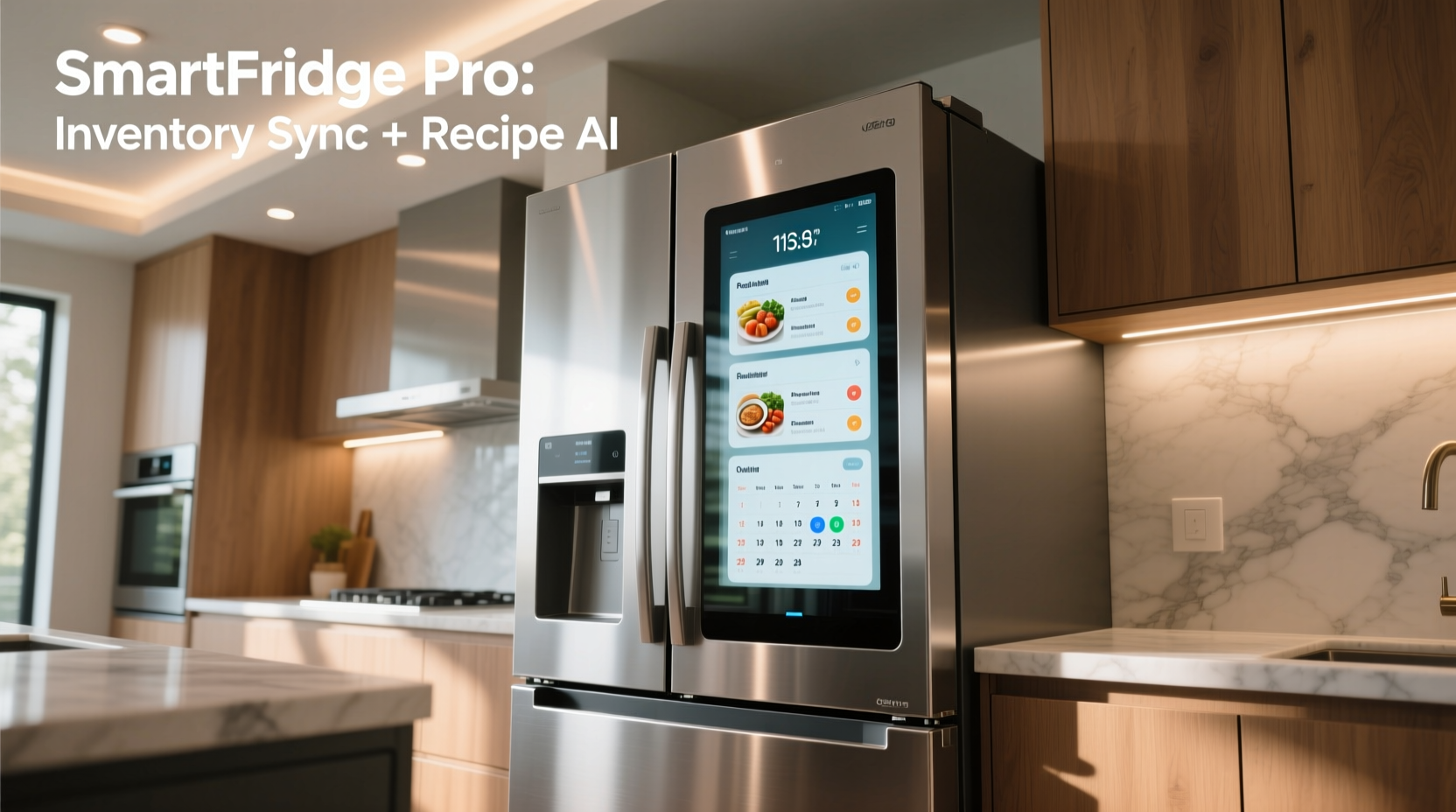
A smart fridge with a touchscreen goes beyond standard refrigeration by integrating a built-in display—usually 10 to 32 inches—on the exterior of the door. These displays run on operating systems like Tizen (Samsung), Android-based platforms (LG), or proprietary interfaces. They allow users to interact with apps, control settings, view internal cameras, manage grocery lists, stream media, and connect with other smart home devices.
Common features include:
- Internal cameras that let you see contents remotely via smartphone
- Voice assistant integration (Google Assistant, Alexa)
- Calendar, notes, and reminder functions
- Recipe suggestions based on available ingredients
- Music and video streaming
- Wi-Fi and app connectivity for remote temperature adjustments
- Family communication tools (shared shopping lists, messages)
Manufacturers market these models as central hubs for modern kitchens, blending utility with entertainment. However, the added complexity raises valid concerns about durability, software updates, and whether most users actually utilize the advanced features.
Benefits of a Touchscreen Smart Fridge
For some households, a smart fridge delivers tangible improvements in daily life. The advantages become most apparent when integrated into a connected home ecosystem.
Improved Food Management
One of the standout benefits is enhanced food organization. Internal cameras allow users to check what’s inside the fridge from their phone while at the grocery store, reducing duplicate purchases and minimizing waste. Some models use AI to recognize items and suggest recipes or alert you when food is nearing expiration.
Seamless Integration with Smart Homes
If your home already uses voice assistants or smart lighting, thermostats, or security systems, a touchscreen fridge can serve as a central command center. You can adjust the thermostat, view security camera feeds, or set timers without reaching for your phone.
Convenience for Busy Households
Families benefit from shared calendars and messaging. A parent can leave a note about dinner plans, kids can add snacks to the shopping list, and meal prep becomes more collaborative. For households juggling multiple schedules, this centralized communication adds real value.
Entertainment and Utility During Cooking
Streaming music, videos, or podcasts directly from the fridge screen keeps you entertained during meal prep. Some users appreciate having step-by-step recipe instructions displayed hands-free, especially when dealing with messy ingredients.
“Smart fridges aren’t just about cooling—they’re becoming interactive kitchen assistants. The best implementations reduce friction in daily routines.” — Dr. Lena Patel, Home Technology Researcher at MIT Media Lab
Drawbacks and Hidden Costs
Despite the appeal, several drawbacks make many buyers reconsider the investment.
High Initial Cost
Smart fridges typically cost $2,500 to $5,000—two to three times more than comparable non-smart models. This premium pays for the display, processors, cameras, and software, not necessarily improved cooling performance.
Short Software Lifespan
Unlike smartphones or laptops, refrigerators last 10–15 years. Yet, manufacturers rarely commit to long-term software support. After 3–5 years, apps may stop working, updates may cease, and the touchscreen could become obsolete or sluggish.
Limited Real-World Usage
Studies show that most users abandon advanced features within months. According to a 2023 Consumer Reports survey, only 22% of smart fridge owners regularly used the touchscreen beyond basic calendar or weather checks. Many found the interface slow or unnecessary.
Maintenance and Repair Challenges
When the touchscreen fails, repairs are expensive. Replacing the entire door panel can cost over $1,000. Additionally, water damage from spills or humidity can short-circuit sensitive electronics—a risk not present in traditional fridges.
Privacy and Security Concerns
Smart fridges collect data: what you eat, when you open the fridge, voice commands, and even images of your kitchen. While companies claim encryption and privacy safeguards, any internet-connected device is vulnerable to hacking. In 2022, a security flaw in a major brand allowed hackers to access internal camera feeds remotely.
Real-Life Example: The Martinez Family’s Experience
The Martinez family upgraded to a top-tier Samsung Family Hub fridge in 2020, excited by its 21.5-inch touchscreen, internal cameras, and recipe integration. Initially, they loved the ability to see inside the fridge from their phones and share grocery lists.
However, by 2022, the touchscreen began lagging. The camera feed froze frequently, and the grocery app stopped syncing with their phones after a firmware update. One spill near the display caused a short circuit, requiring a $900 repair. Today, they use the fridge primarily for cooling and occasionally check the weather. “We thought it would change how we cook,” said Maria Martinez. “But honestly, we’d save money and stress with a regular fridge.”
Their story reflects a broader trend: initial excitement fades when technology doesn’t deliver consistent, long-term value.
Comparison: Smart vs. Traditional Fridges
| Feature | Smart Fridge with Touchscreen | Traditional Fridge |
|---|---|---|
| Average Price | $2,800 – $5,000 | $800 – $1,800 |
| Lifespan | 10–12 years (electronics may fail earlier) | 12–15 years |
| Energy Efficiency | Varies; some models less efficient due to screens | Generally high (ENERGY STAR rated) |
| Repair Cost (screen/electronics) | $600 – $1,200+ | $150 – $400 (compressor/seals) |
| Food Management Tools | Cameras, apps, expiration alerts | Manual tracking only |
| Software Updates | Limited (typically 3–5 years) | N/A |
| User Engagement Over Time | High initially, declines after 6–12 months | Consistently functional |
Who Should Consider Upgrading?
Not every household will benefit equally. The following profiles are most likely to find value in a touchscreen smart fridge:
- Tech-savvy families who rely on smart home ecosystems and want centralized control.
- Meal planners and health-conscious users who track ingredients and use recipe apps daily.
- Large households needing shared calendars, grocery lists, and communication tools.
- Home entertainers who enjoy playing music or displaying photos during gatherings.
On the other hand, if you prioritize reliability, low maintenance, and long-term savings, a traditional refrigerator remains the smarter choice.
Step-by-Step Guide: Deciding Whether to Upgrade
Follow this process to make an informed decision:
- Evaluate your current fridge’s condition. If it still cools efficiently and meets your storage needs, an upgrade may be premature.
- Identify your pain points. Do you forget what’s inside? Struggle with meal planning? Need better family coordination?
- Research specific models. Focus on brands known for software stability (e.g., LG, Samsung) and check warranty terms for electronic components.
- Test the interface in-store. Navigate the touchscreen, load apps, and assess responsiveness.
- Calculate total cost of ownership. Include purchase price, potential repair costs, and energy usage over 10 years.
- Consider alternatives. A $200 tablet mounted on the fridge can replicate many smart features at a fraction of the cost.
- Wait for sales or refresh cycles. New models launch in spring; older versions often drop in price significantly.
Practical Checklist Before Buying
- ✅ Does my kitchen Wi-Fi signal reach the fridge location?
- ✅ Am I already using smart home devices?
- ✅ Will my family actually use the touchscreen features?
- ✅ Does the warranty cover screen and camera failures?
- ✅ Can I mount a tablet instead for similar functionality?
- ✅ Is energy efficiency prioritized over tech features?
- ✅ Have I read recent user reviews about software bugs?
Frequently Asked Questions
Can I disable the touchscreen if I don’t use it?
Yes, most models allow you to turn off the display or switch to a basic mode. However, the system still consumes power in standby, and background processes may continue running.
Do smart fridges help reduce food waste?
Potentially, but only if you actively use the inventory tracking and alert features. Studies show users who engage with these tools report 15–20% less spoilage. Passive users see no significant difference.
Are there security risks with smart fridge cameras?
Yes. Always change default passwords, enable two-factor authentication if available, and disable the camera when not needed. Avoid models that store footage in unencrypted cloud servers.
Conclusion: Weighing Value Against Hype
Upgrading to a smart fridge with a touchscreen can be exciting—but excitement alone shouldn’t drive a $4,000 decision. For a small segment of users deeply embedded in smart home technology, these appliances offer meaningful convenience and integration. For everyone else, the benefits are often overshadowed by high costs, limited software longevity, and underused features.
Before committing, ask yourself: will this improve my daily life in a measurable way? Or am I buying into a vision of the future that doesn’t match my reality? In most cases, a reliable, energy-efficient refrigerator paired with a smartphone or tablet offers the same organizational benefits at a fraction of the price and risk.
If you do proceed, choose a model with strong customer support, clear update policies, and modular design that allows screen replacement. And remember: the smartest appliance isn’t always the one with the biggest screen—it’s the one that works consistently, year after year.




 浙公网安备
33010002000092号
浙公网安备
33010002000092号 浙B2-20120091-4
Comments
No comments yet. Why don't you start the discussion?