
In large homes—especially those with thick walls, multiple floors, or sprawling layouts—Wi-Fi dead zones are more than an annoyance; they’re a disruption. Streaming buffers, video calls drop, and smart devices go offline. When the signal from your router fails to reach the basement, backyard, or far bedroom, it’s natural to look for a fix. Two of the most common solutions are mesh Wi-Fi systems and range extenders. But which one truly eliminates dead zones? The answer isn’t always straightforward, but understanding how each technology works reveals a clear winner for most households.
How Wi-Fi Signals Travel (and Why They Fail)
Wi-Fi signals are radio waves transmitted by your router, typically operating on 2.4 GHz or 5 GHz frequencies. The 2.4 GHz band travels farther but is slower and more prone to interference from microwaves, cordless phones, and neighboring networks. The 5 GHz band offers faster speeds but has shorter range and struggles with obstacles like concrete walls or metal ducts.
In a large house, especially one over 2,500 square feet or with complex architecture, a single router often can't cover every room effectively. Signal strength degrades with distance and obstructions. This creates “dead zones”—areas where the signal is too weak for reliable connectivity. While relocating the router helps slightly, it rarely solves the problem entirely.
The solution lies not in boosting the original signal, but in intelligently extending it. That’s where range extenders and mesh Wi-Fi come in—but they do so in fundamentally different ways.
Range Extenders: A Quick Fix With Hidden Costs
A Wi-Fi range extender (also called a repeater) is a plug-in device that captures your existing Wi-Fi signal and rebroadcasts it. It's inexpensive, easy to set up, and widely available. At first glance, it seems like the perfect solution: place it halfway between your router and the dead zone, and voilà—coverage improves.
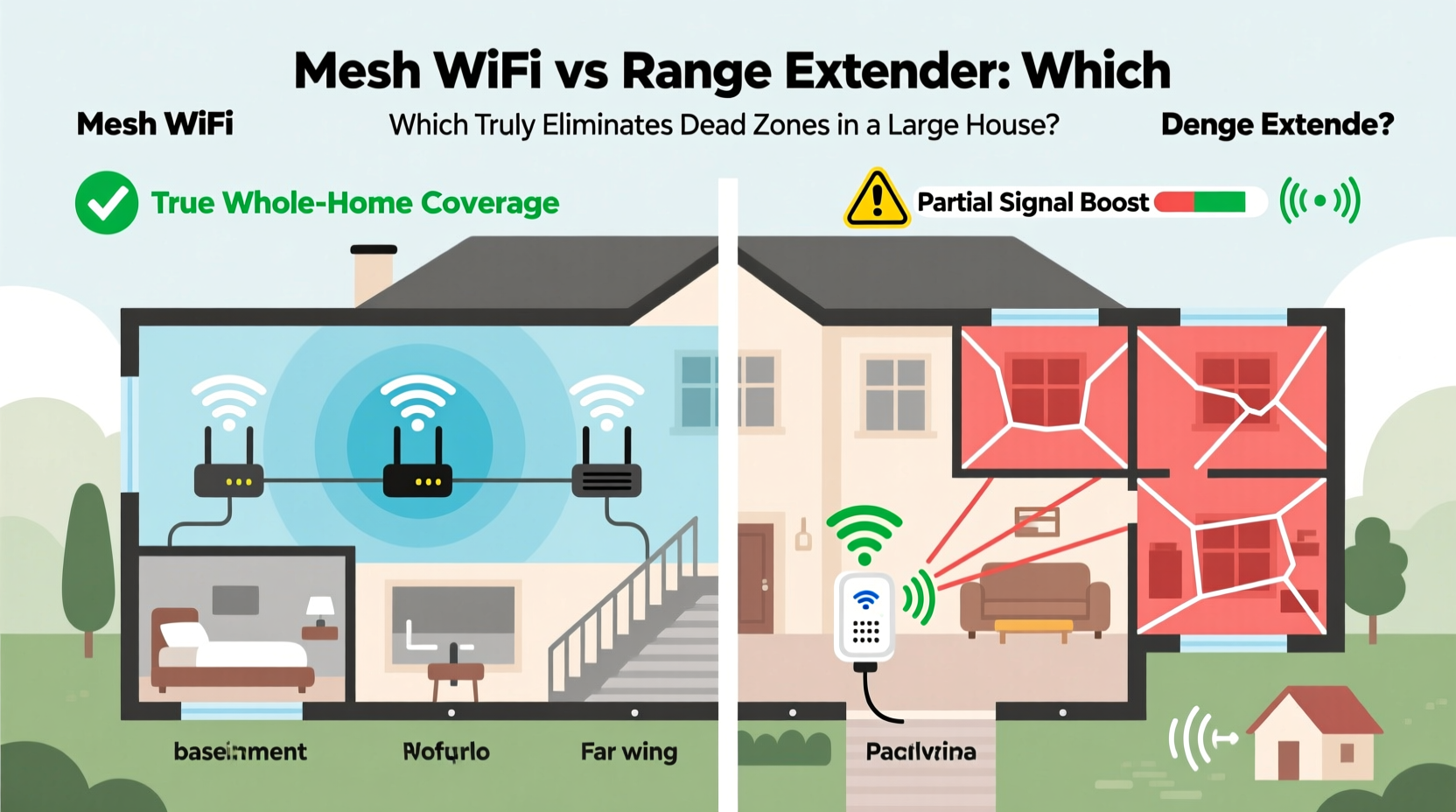
But there’s a catch: extenders work by duplicating the signal, not enhancing it. When an extender receives data from the router, it must retransmit it to your device. This process cuts bandwidth in half because the same radio is used for both receiving and sending—a limitation known as \"half-duplex\" communication.
Additionally, most extenders create a separate network name (SSID), forcing you to manually switch between the main network and the extended one as you move through the house. Even with newer models that support seamless roaming, performance often lags due to latency and signal degradation.
Mesh Wi-Fi: Seamless Coverage Designed for Large Homes
Mesh Wi-Fi systems consist of multiple units—called nodes—that work together as a single network. One node connects directly to your modem, while additional nodes are placed strategically around the home. Unlike extenders, mesh nodes communicate over dedicated backhaul channels (often using a third radio on the 5 GHz band), preserving full bandwidth for your devices.
More importantly, mesh systems use intelligent routing. Data finds the fastest path between nodes, avoiding bottlenecks. They also support seamless roaming: your phone or laptop stays connected to the strongest node without dropping or requiring manual switching.
Modern mesh systems like Google Nest Wifi, Eero Pro 6, and TP-Link Deco XE75 offer tri-band radios, Wi-Fi 6/6E support, and advanced features like Quality of Service (QoS) to prioritize streaming or gaming. For large homes with high bandwidth demands, mesh Wi-Fi isn’t just better—it’s transformative.
“Mesh networks are designed for whole-home coverage. They eliminate the trade-offs inherent in older extension technologies.” — Dr. Alan Torres, Network Systems Engineer, IEEE Member
Key Differences: Mesh Wi-Fi vs Range Extender
| Feature | Mesh Wi-Fi System | Range Extender |
|---|---|---|
| Network Name (SSID) | Single, unified network | Often creates duplicate SSID |
| Bandwidth Efficiency | Full bandwidth via dedicated backhaul (tri-band models) | Halved due to signal repetition |
| Roaming Experience | Seamless handoff between nodes | Manual switching often required |
| Setup Complexity | App-guided, intuitive | Simple, but less control |
| Cost | Higher ($200–$600 for 2–3 pack) | Low ($30–$100) |
| Best For | Homes over 2,500 sq ft, multi-story, high device count | Small signal gaps, budget fixes |
Real-World Example: The Smith Family Home
The Smiths live in a 3,200-square-foot colonial-style home with hardwood floors, brick walls, and three levels. Their original router sat in the basement office, leaving the upstairs bedrooms and backyard patio with spotty connections. Video calls dropped during work hours, and their security cameras frequently went offline.
They first tried a $40 range extender in the hallway upstairs. Initially, the second floor saw improved signal bars. But streaming still stuttered, and devices would disconnect when moving between floors. The extender created a second network named “WiFi_Ext,” causing confusion among family members.
Six months later, they invested in a three-node mesh system. They placed one node near the modem in the basement, one in the living room on the main floor, and one upstairs. Within minutes, all devices automatically connected to a single network named “SmithHome.”
Results were immediate: 4K streaming became smooth, Zoom calls stayed stable, and outdoor smart lights responded instantly. The system’s app even showed a heat map of coverage, confirming that dead zones had vanished.
While the upfront cost was higher, the long-term reliability justified the investment. As one family member put it: “It’s the first time we’ve had Wi-Fi everywhere without fighting with settings.”
Step-by-Step: Choosing and Installing the Right Solution
- Assess Your Home’s Layout: Measure square footage, note construction materials (e.g., stucco, concrete), and identify current dead zones.
- Evaluate Device Count: Homes with 15+ devices (phones, tablets, smart TVs, IoT gadgets) benefit more from mesh systems.
- Determine Budget: Range extenders are cheaper but limited. Mesh systems cost more but deliver lasting performance.
- Select the Right Equipment: For homes under 2,000 sq ft with minor issues, a dual-band extender may suffice. For larger homes, choose a tri-band mesh system with Wi-Fi 6 support.
- Install Strategically: Place mesh nodes no more than two rooms apart, ideally on the same floor. Avoid enclosing them in cabinets or near metal objects.
- Test and Optimize: Use tools like Wi-Fi analyzer apps to verify coverage. Adjust node placement if necessary.
When a Range Extender Might Still Make Sense
Despite its limitations, a range extender isn’t obsolete. It can be effective in specific scenarios:
- You have a small dead zone, like a backyard shed or garage, within moderate range of the main router.
- Budget is tight, and you need a temporary fix.
- You only need basic connectivity for low-bandwidth tasks like checking email or smart lighting.
However, if you're streaming, gaming, or working from home in the affected area, a range extender likely won’t meet your needs. Its convenience comes at the cost of speed, stability, and user experience.
Expert Checklist: Upgrade Your Wi-Fi Like a Pro
Before buying any equipment, follow this checklist to ensure you make the right choice:
- ✅ Map out dead zones using a Wi-Fi scanning app (e.g., NetSpot, Wi-Fi Analyzer).
- ✅ Confirm your internet plan speed—don’t invest in high-end hardware if your service is capped at 25 Mbps.
- ✅ Check if your modem/router combo supports modern standards (avoid using outdated equipment as the base).
- ✅ Decide whether you want a managed system (mesh) or a simple plug-in device (extender).
- ✅ Read reviews focusing on real-world performance, not just specs.
- ✅ Consider future-proofing: Wi-Fi 6 or 6E mesh systems will support next-gen devices for years.
Frequently Asked Questions
Can I use a mesh system with my existing router?
Yes. Most mesh systems can operate in “access point mode” or replace your router entirely. Simply disable your router’s Wi-Fi and connect the primary mesh node to it via Ethernet.
Do mesh nodes need to be on the same floor?
Ideally, yes. Vertical signal penetration is weaker, especially through concrete or metal. For multi-story homes, place one node per level for best results.
Will a range extender slow down my internet for everyone?
Not exactly—but it reduces available bandwidth for devices connected to it. Since it shares the same channel, heavy usage on the extender can impact overall network efficiency.
Conclusion: The Clear Winner for Eliminating Dead Zones
For large houses plagued by dead zones, mesh Wi-Fi is the superior and often essential solution. It delivers consistent speed, seamless roaming, and reliable coverage across every room and floor. While range extenders offer a low-cost shortcut, they compromise performance and user experience—making them unsuitable for modern, connected homes.
Technology should simplify life, not complicate it. A well-designed mesh network operates quietly in the background, ensuring that every device stays connected, no matter where it is. The initial investment pays off in uninterrupted streaming, smoother video calls, and smarter home automation.




 浙公网安备
33010002000092号
浙公网安备
33010002000092号 浙B2-20120091-4
Comments
No comments yet. Why don't you start the discussion?