
For gamers with larger hands, finding a controller that fits naturally is more than a matter of preference—it’s essential for comfort, precision, and endurance during long gaming sessions. The PlayStation 5's DualSense and Microsoft’s Xbox Elite Series 2 (and now Series 3) are two of the most advanced controllers on the market. But when it comes to accommodating bigger palms and longer fingers, which one truly delivers superior ergonomics?
This article breaks down the physical design, grip style, thumb reach, weight distribution, and customization options of both controllers. We’ll analyze how each performs in extended gameplay, examine user feedback from individuals with large hands, and offer actionable insights to help you choose the best fit.
Design Philosophy and Hand Fit
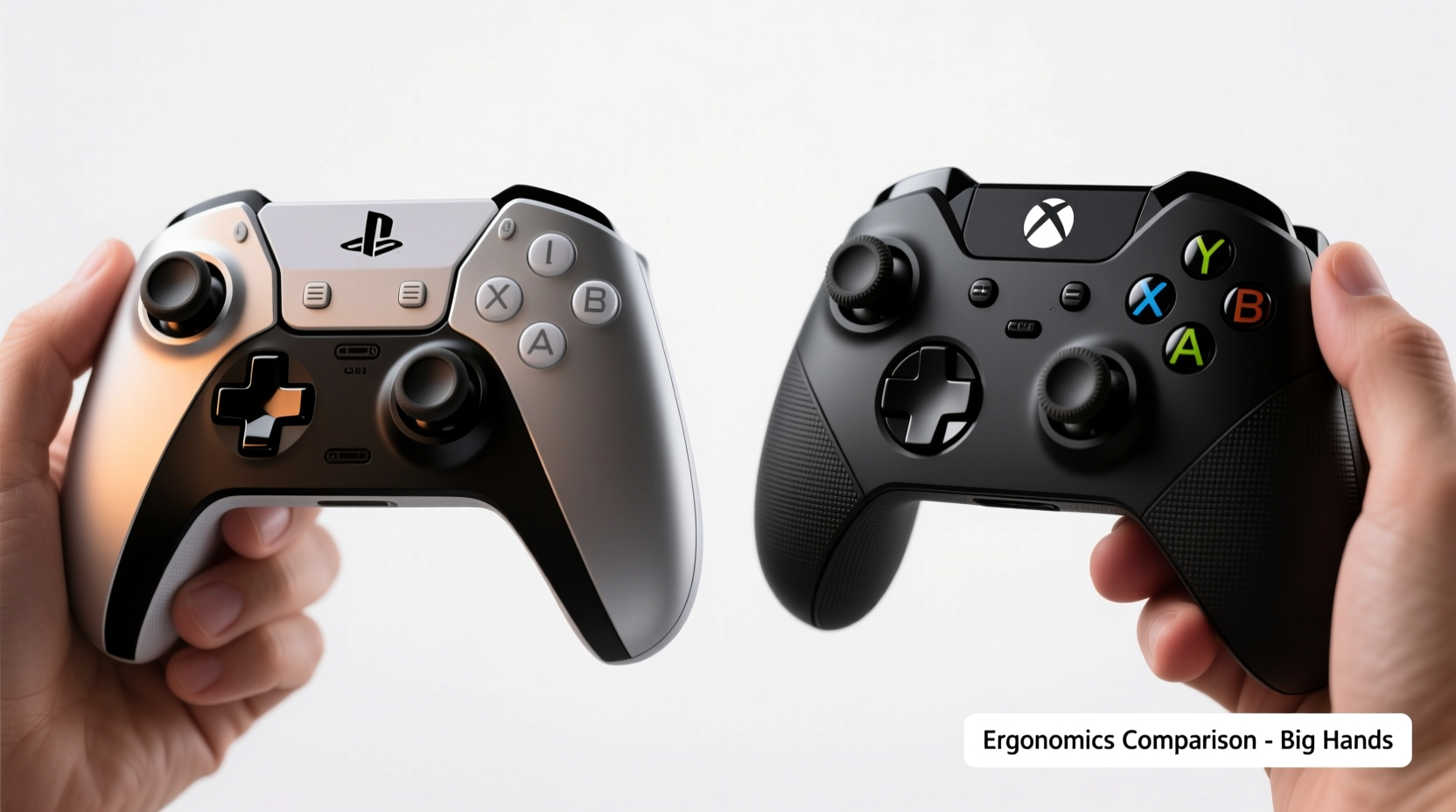
The DualSense and Xbox Elite controllers were built with different philosophies in mind. The DualSense emphasizes immersion through haptics and adaptive triggers, while the Xbox Elite line prioritizes performance, precision, and modularity. These differences influence their ergonomics—especially for users with hand sizes above average.
The average adult male hand length (from wrist crease to tip of middle finger) ranges from 7 to 7.6 inches. For those at the upper end or beyond, many standard controllers feel cramped, forcing awkward thumb positioning or pinky strain. Let’s look at how each controller accommodates these dimensions.
The DualSense features a sleek, curved body with pronounced grips that flare outward. While this gives it a modern aesthetic, some users with larger hands report that the back edges dig into the base of the palm during prolonged use. Additionally, the trigger placement can stretch the index fingers slightly, particularly when using rear paddles (via third-party add-ons).
In contrast, the Xbox Elite Series 2 and 3 have a broader, boxier profile with gently contoured grips. They’re designed to sit deeper in the palm, allowing the fingers to rest more naturally over the face buttons and analog sticks. This shape tends to suit larger hands better, especially when combined with optional rubberized side panels that improve grip without adding bulk.
Thumb Reach and Analog Stick Placement
One of the most critical ergonomic factors for big-handed gamers is thumb reach across the analog sticks and D-pad. Poorly positioned sticks force overextension, leading to fatigue and reduced accuracy.
The DualSense places its left analog stick relatively close to the center of the controller. For users with wide palms, this often means the thumb must stretch diagonally upward to reach the top-left edge of the stick, increasing muscle tension during precise movements (e.g., sniping or platforming). The right stick is positioned higher than on previous DualShock models, which helps reduce cramping but may still require slight adjustment for optimal control.
The Xbox Elite controllers feature a more symmetrical layout. Both analog sticks are recessed slightly and spaced farther apart than on the DualSense. This allows thumbs to operate within a neutral arc, minimizing lateral stretching. Moreover, the Elite Series 3 introduces adjustable stick tension, letting users fine-tune resistance based on hand strength and sensitivity preferences—an advantage for those who rely heavily on thumb dexterity.
A real-world example illustrates this difference: James, a 6'3\" gamer with a hand length of 7.8 inches, found that after two-hour sessions with the DualSense, his left thumb would begin to ache from constant micro-adjustments. Switching to the Xbox Elite Series 2, he reported immediate relief. “The sticks felt like they were under my thumbs naturally,” he said. “I didn’t have to think about where my fingers were—I could just play.”
“Ergonomic efficiency isn’t just about size—it’s about alignment. When controls fall within the natural range of motion, reaction times improve and fatigue drops significantly.” — Dr. Lena Torres, Human Factors Engineer at GameTech Labs
Button Layout and Finger Accessibility
Accessibility of face buttons, bumpers, and triggers plays a major role in overall comfort. Gamers with long fingers need enough clearance so digits don’t accidentally press adjacent inputs, yet sufficient proximity to allow quick transitions.
The DualSense uses a compact triangle/circle/cross/square layout. While visually balanced, the square and cross buttons are positioned closer together, making them harder to distinguish by touch alone—especially for players with thick fingers. The bumper buttons (L1/R1) are flat and short, requiring a deliberate press that some find satisfying but others describe as “shallow” for rapid tapping.
The Xbox Elite maintains Microsoft’s traditional ABXY arrangement, known for its generous spacing and tactile differentiation. Button domes are slightly raised, reducing mispresses. The bumpers (LB/RB) are longer and more curved, wrapping around the top edge of the controller. This design lets users hook their index fingers comfortably, distributing pressure evenly rather than concentrating it at the fingertip.
Another key difference: paddle integration. The Xbox Elite includes four customizable rear paddles out of the box. Positioned within easy reach of the ring and pinky fingers, these allow remapping of actions like jumps or reloads—freeing up thumbs for primary controls. This reduces finger travel and enhances accessibility, particularly beneficial for large-handed players who might otherwise struggle to reposition quickly.
The DualSense lacks built-in paddles, though third-party clip-on solutions exist. However, these often extend beyond the controller’s rear edge, creating pressure points for users whose palms rest flush against the back panel.
Ergonomic Comparison Table
| Feature | DualSense (PS5) | Xbox Elite Series 3 |
|---|---|---|
| Grip Width | ~105 mm | ~112 mm |
| Analog Stick Spacing | 78 mm (center-to-center) | 86 mm (center-to-center) |
| Trigger Reach (Index Finger) | Moderate stretch required | Natural resting position |
| Rear Paddles | No (aftermarket only) | Yes (4 programmable) |
| Weight | 280 g (with battery) | 284 g (Series 3) |
| Customizable Components | Limited (stick caps only) | High (sticks, D-pad, back case, tension) |
| Palm Support for Large Hands | Fair (edges may dig in) | Excellent (broader contact surface) |
Customization and Personal Fit
True ergonomic superiority isn’t just about default design—it’s about adaptability. A controller that can be tailored to individual anatomy will always outperform one locked into a single configuration.
The Xbox Elite Series 3 excels here. It comes with interchangeable components: three types of analog stick heights and shapes, multiple D-pad styles (including a hybrid directional pad), and optional textured grips. Users can adjust stick tension screws to increase or decrease resistance—ideal for those with stronger grip strength or joint sensitivity.
For someone with large hands, swapping in taller concave sticks improves thumb contact and leverage. Choosing a domed D-pad makes diagonal inputs easier without overreaching. And installing extended rubberized side panels increases palm coverage, preventing slippage during intense moments.
By comparison, the DualSense offers minimal customization. You can replace stick caps with third-party alternatives, but internal mechanics remain fixed. There’s no way to alter trigger resistance, bumper depth, or grip angle. While Sony introduced firmware updates for button mapping, the lack of hardware flexibility limits personalization for non-average hand sizes.
This gap becomes apparent in competitive settings. Pro player Marcus R., who competes in first-person shooters and has hand measurements in the 95th percentile, switched from DualSense to Elite Series 2 mid-season due to consistency issues. “I kept missing crouch taps because my pinky couldn’t reliably hit L1,” he explained. “With the Elite, I mapped crouch to a rear paddle and gained millisecond-level precision. That’s tournament-winning detail.”
Step-by-Step Guide: Testing Controllers for Big Hands
If you're deciding between these two controllers, follow this practical evaluation process:
- Measure Your Hand: Use a ruler to measure from the wrist crease to the tip of your middle finger. Note also the span from thumb tip to pinky tip when fully extended.
- Simulate Gameplay Grip: Hold each controller as if playing—thumbs on sticks, index fingers on triggers, middle fingers supporting the underside. Check for gaps or pressure points.
- Test Thumb Range: Move thumbs from dead center to extreme corners of both analog sticks. Assess whether full motion feels fluid or strained.
- Check Button Access: Press every face button, bumper, and trigger without shifting your grip. See if any require lifting or repositioning.
- Try Paddle Use (if applicable): Engage rear paddles with ring and pinky fingers. Determine if they’re reachable without curling unnaturally.
- Assess Long-Term Comfort: Play for at least 30 minutes. Pay attention to early signs of fatigue, heat buildup, or discomfort.
- Adjust Settings: On the Elite, experiment with stick height and tension. On the DualSense, test button remapping via console settings.
Frequently Asked Questions
Can I use the Xbox Elite on PS5?
No, the Xbox Elite controller is not officially supported on PlayStation consoles. While some third-party adapters claim compatibility, they often introduce input lag and limited functionality, especially with haptic features.
Does the DualSense cause hand cramps for big-handed users?
Some users report mild cramping during extended sessions, primarily due to the narrower grip and forward stick placement. Adding silicone grip sleeves can help distribute pressure, but won’t change the fundamental geometry.
Is the Xbox Elite worth the extra cost for ergonomic benefits?
If you play frequently and have larger-than-average hands, yes. The combination of customizable parts, superior button layout, and rear paddles provides tangible improvements in comfort and control that justify the higher price for many serious gamers.
Final Verdict: Which Controller Wins for Big Hands?
While both controllers are well-engineered, the Xbox Elite Series 3 clearly offers better ergonomics for users with large hands. Its wider chassis, optimized analog stick spacing, integrated rear paddles, and extensive customization options create a more natural, sustainable grip. The ability to tailor the controller to your specific anatomy ensures long-term comfort and enhanced performance.
The DualSense, though innovative in its haptics and audio integration, falls short in structural adaptability. Its sleeker form factor favors medium-sized hands and sacrifices some functional space for aesthetics. Without built-in paddles or meaningful hardware mods, it remains less ideal for those needing maximum reach and support.
That said, if you’re deeply invested in the PlayStation ecosystem and prefer immersive experiences over competitive edge, the DualSense is still usable—with caveats. Consider pairing it with grip extensions or switching to games that don’t demand constant thumb movement.
Conclusion
Choosing the right controller isn’t just about brand loyalty or feature lists—it’s about how well it fits your body. For gamers with big hands, small design differences translate into significant impacts on comfort and control. Based on hand fit, button accessibility, and customization potential, the Xbox Elite Series 3 stands out as the superior choice.
Don’t settle for discomfort. Take the time to test both controllers, apply ergonomic principles, and invest in gear that works *with* your physiology—not against it.




 浙公网安备
33010002000092号
浙公网安备
33010002000092号 浙B2-20120091-4
Comments
No comments yet. Why don't you start the discussion?