
Choosing between a Ring and a Nest doorbell isn’t just about design or ease of installation—it’s also about long-term value, reliability, and performance. Two critical factors that influence user satisfaction are subscription costs and video lag. While both brands offer compelling features, the differences in pricing models and responsiveness can significantly affect your daily experience. This breakdown compares Ring and Nest doorbells head-to-head, focusing on monthly fees, cloud storage options, and how each handles video latency during live viewing and alerts.
Subscription Models: What You Pay For
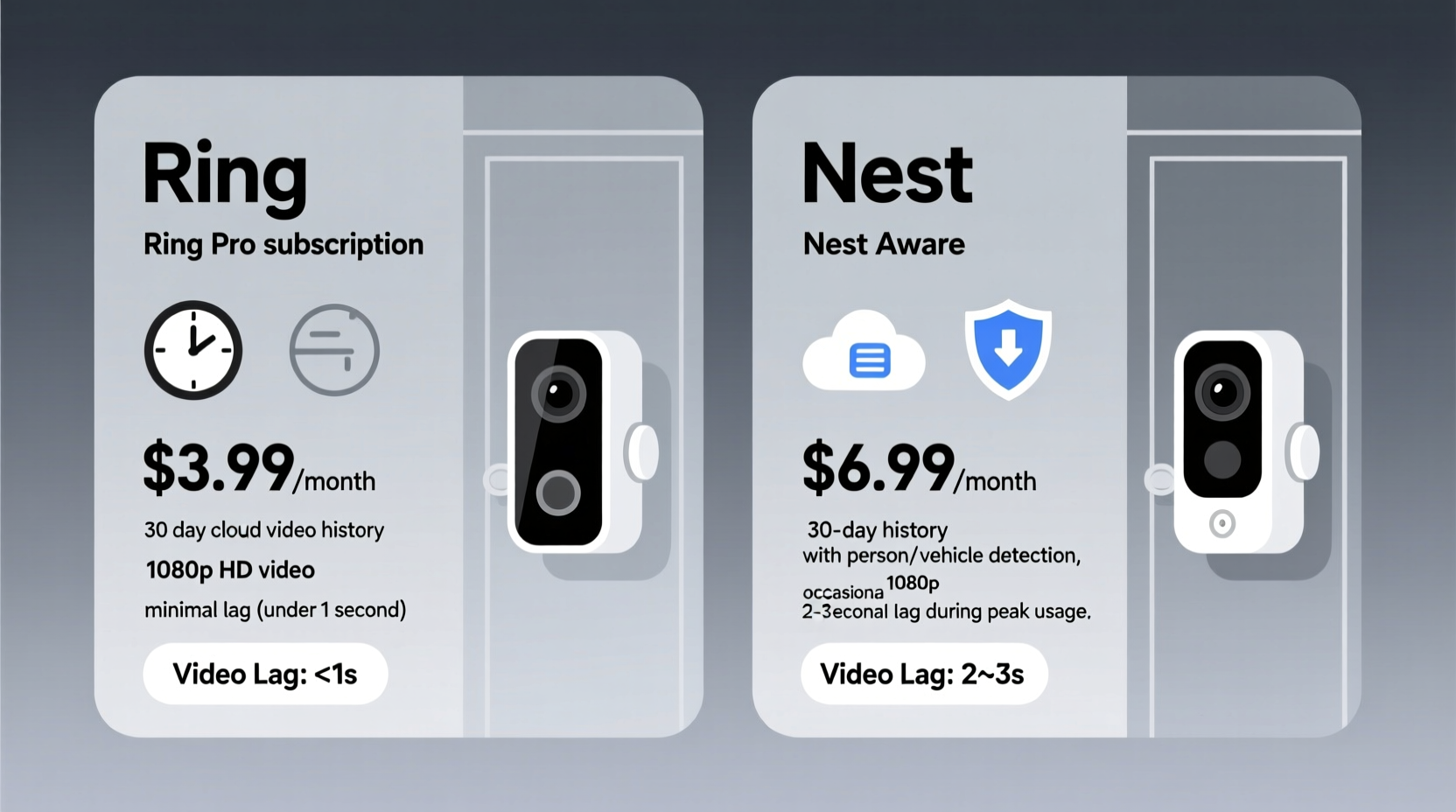
Both Ring and Nest require subscriptions for full functionality, particularly when it comes to video history and advanced alert features. However, their pricing structures differ in flexibility, tier options, and included benefits.
Ring offers three primary plans:
- Ring Protect Basic – $4/month per device (or $40/year): Includes 60 days of video recording, snapshot capture every few minutes, and cloud access.
- Ring Protect Plus – $10/month (covers all devices at one location): Adds extended warranty, 10% off select Ring products, and unlimited cloud recordings.
- Ring Protect Pro – $20/month (all devices): Offers professional monitoring, cellular backup, and 180-day video retention.
Nest, now under Google’s umbrella, uses a different model called Nest Aware. It's tied to your Google account and billed annually:
- Nest Aware – $8/month ($99/year): Provides 30 days of continuous video history for wired doorbells, event-based history for battery models, intelligent alerts (person, package, animal), and facial recognition.
- Nest Aware Plus – $15/month ($199/year): Includes 10-day continuous video recording across all cameras, 60-day event history, familiar face detection, and package alerts.
- Nest Aware Premium – $25/month ($329/year): Covers all devices in the home with up to 10 outdoor cameras, 30-day continuous video, and advanced AI-powered alerts.
Video Lag: The Real-Time Performance Factor
Video lag—the delay between motion occurring at your door and seeing it in the app—can be frustrating, especially when trying to answer the door remotely. Both systems rely on internet connectivity, but their processing architecture leads to noticeable differences.
Ring typically experiences **1.5 to 3 seconds** of lag under normal conditions. In high-traffic moments or poor Wi-Fi environments, this can stretch to 5–7 seconds. The company has acknowledged latency issues in older firmware versions, though recent updates have improved response times for newer models like the Ring Video Doorbell Pro 2.
Nest tends to perform better in this area. Most users report **under 1 second to 1.5 seconds** of delay, even on standard broadband connections. This advantage stems from Google’s robust global infrastructure and edge computing optimizations. Nest leverages Google Cloud’s low-latency streaming protocols, which prioritize real-time delivery over data compression.
“Low video latency isn’t just a convenience—it’s a security necessity. A two-second delay could mean missing a porch pirate in action.” — David Lin, Smart Home Security Analyst at TechGuard Labs
Detailed Comparison Table: Costs & Performance
| Feature | Ring | Nest |
|---|---|---|
| Entry-Level Subscription | $4/month per device | $8/month (annual billing) |
| Multi-Device Plan | $10/month (unlimited devices at one location) | $15–$25/month (scales with coverage needs) |
| Free Tier Available? | Yes (live view only, no recordings) | No (requires subscription for any video history) |
| Cloud Recording Duration | 60 days (Basic), Unlimited (Plus/Pro) | 30–60 days (event-based); 10–30 days (continuous) |
| Average Video Lag | 1.5–3 seconds (up to 7 sec in poor conditions) | 0.8–1.5 seconds |
| Intelligent Alerts | Motion zones, person detection (with subscription) | Person, package, animal, vehicle, facial recognition |
| Offline Access | No local storage option | Limited preview buffering; no SD card support |
| Warranty Extension | Included in Protect Plus | Not offered |
Real-World Scenario: The Package Delivery Test
Consider Sarah, a remote worker living in a suburban neighborhood with moderate internet speeds (60 Mbps down). She installed both a Ring Video Doorbell 4 and a Google Nest Doorbell (wired) side by side to evaluate performance.
During a week-long test involving scheduled deliveries, neighbor interactions, and random motion triggers, she observed key differences:
- When a courier dropped off a package, the Ring alert took 2.8 seconds to appear. By the time she opened the app, the person was already walking away. Playback showed clear footage, but the initial delay hindered interaction.
- The Nest sent an alert in 1.2 seconds. She was able to open the live feed while the delivery person was still placing the box, allowing her to speak through the chime and confirm safe drop-off.
- Over seven days, Ring stored 42 event clips with 60-day retention (on Basic plan). Nest generated 38 events but offered timeline scrubbing due to continuous recording (on Aware Plus).
- Sarah noted that Ring’s app occasionally froze during back-to-back alerts, while Nest handled concurrent events smoothly.
While both systems captured usable video, the immediacy of Nest’s response gave her greater confidence in real-time monitoring. However, she found Ring’s lower base price appealing for future expansions to garage and backyard cameras.
Step-by-Step: Choosing Based on Your Needs
Follow this decision framework to determine which system suits your priorities:
- Assess your budget: Calculate total annual cost based on number of devices. For one doorbell, Ring is cheaper. For three or more, compare Protect Plus vs. Nest Aware tiers.
- Evaluate internet quality: Run a speed test near your doorbell. If upload speed is below 2 Mbps, expect higher lag on both platforms—but Nest may buffer more efficiently.
- Determine usage patterns: Do you need to talk to visitors in real time? Prioritize low-latency systems like Nest. Are you mainly reviewing incidents after the fact? Ring’s longer retention may suffice.
- Check integration preferences: Ring works best with Alexa and Amazon ecosystem. Nest integrates seamlessly with Google Assistant, Chromecast, and other Google services.
- Test before committing: Use free trials if available. Ring allows limited-time free access to some features. Nest does not offer trial subscriptions, but returns are accepted within 30 days.
Common Pitfalls to Avoid
Consumers often overlook hidden trade-offs when comparing smart doorbells. Here are frequent missteps:
- Ignoring upload speed: Video uploads rely heavily on upstream bandwidth. Many ISPs throttle upload rates, leading to choppy streams and delayed alerts.
- Assuming free plans are sufficient: Without a subscription, neither Ring nor Nest saves video. If someone rings and leaves before you respond, there’s no way to review what happened.
- Underestimating long-term costs: A $100 doorbell with a $5/month subscription becomes more expensive than the hardware itself within two years.
- Overlooking Wi-Fi placement: Poor signal strength increases encoding delays and rebuffering. Consider using a Wi-Fi extender or switching to a wired (Ethernet) Nest model.
Expert Recommendations and Future Trends
Industry experts suggest looking beyond current specs and considering longevity and roadmap support.
“Google’s investment in AI-driven analytics gives Nest a technological edge. Over time, we’ll see smarter filtering, predictive alerts, and tighter integration with emergency services.” — Dr. Lena Patel, IoT Research Lead at Stanford Digital Living Lab
Meanwhile, Ring continues expanding its neighborhood-focused features, such as integrated police partnerships and community crime maps. These appeal to users prioritizing broader safety networks over individual device performance.
Looking ahead, both companies are exploring local processing to reduce dependency on the cloud. Rumors suggest future models may include onboard storage via microSD cards or encrypted local hubs—potentially reducing subscription pressure and improving response times.
Frequently Asked Questions
Can I avoid subscriptions entirely with either brand?
No. While both allow live viewing without a subscription, recorded video, intelligent alerts, and historical playback require paid plans. Ring offers basic live view for free; Nest disables most features without Aware.
Which has better video quality during lag spikes?
Nest generally maintains smoother streaming under network stress due to adaptive bitrate technology. Ring sometimes drops resolution abruptly, causing pixelation before recovering.
Is it possible to switch from Ring to Nest without losing data?
No. Data is not transferable between ecosystems. All video history, settings, and alert preferences must be recreated manually. Back up important clips externally before migrating.
Final Verdict and Action Plan
The choice between Ring and Nest ultimately hinges on whether you prioritize affordability and ecosystem synergy or performance and responsiveness. Ring wins on entry-level pricing and multi-device scalability, making it ideal for budget-conscious households adding cameras gradually. Nest excels in real-time responsiveness, AI-powered intelligence, and seamless Google integration—perfect for tech-forward users who value immediacy and precision.
If minimizing video lag is crucial—such as for elderly care monitoring, pet check-ins, or high-theft areas—Nest’s superior streaming infrastructure justifies its higher cost. But if you’re primarily interested in capturing events for later review and integrating with Alexa routines, Ring delivers solid value at a lower price point.




 浙公网安备
33010002000092号
浙公网安备
33010002000092号 浙B2-20120091-4
Comments
No comments yet. Why don't you start the discussion?