
Back pain affects millions of office workers worldwide. Prolonged sitting has long been linked to chronic lower back discomfort, poor posture, and reduced mobility. As awareness grows, standing desks have surged in popularity as a potential solution. But does simply switching from a seated to a standing workstation deliver faster relief from back pain? Or are the benefits more nuanced? The answer lies not in an either/or choice, but in understanding how both postures impact spinal mechanics, muscle engagement, and long-term musculoskeletal health.
The debate isn’t just about comfort—it’s about sustainable productivity and injury prevention. Research shows that sedentary behavior alters spinal loading, weakens core stabilizers, and increases disc pressure over time. Standing, while seemingly healthier, introduces new challenges if done incorrectly or excessively. To determine which approach reduces back pain faster—and more effectively—we need to examine biomechanics, clinical evidence, and real-world usage patterns.
The Hidden Cost of Sitting All Day
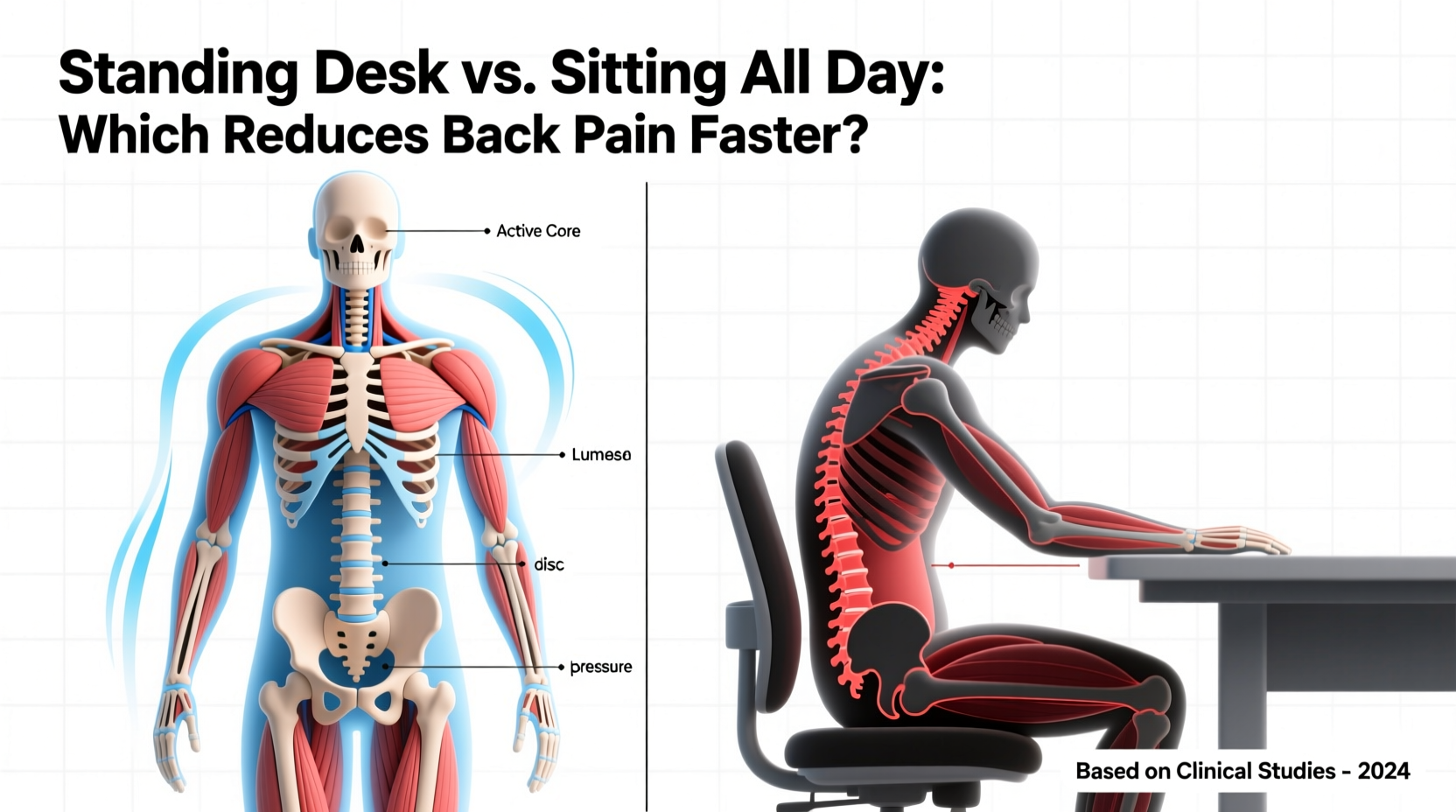
Sitting for extended periods—especially in poorly designed chairs or with slouched posture—places significant strain on the lumbar spine. When seated, the pelvis tilts backward, flattening the natural curve of the lower back (the lumbar lordosis). This change increases pressure on intervertebral discs by up to 40% compared to standing. Over hours, this sustained compression can lead to disc degeneration, muscle imbalances, and inflammation.
A landmark study published in the European Spine Journal found that individuals who sit more than six hours daily are twice as likely to develop chronic low back pain compared to those who sit less than three hours. Moreover, prolonged sitting reduces blood flow to spinal tissues, impairing nutrient delivery and waste removal—key factors in disc health.
“Sitting is more dangerous than smoking, kills more people than HIV, and is responsible for turning us into an obese and inactive society.” — Dr. James Levine, Mayo Clinic researcher and author of *Get Up!*
The problem isn’t sitting itself, but uninterrupted sitting. Without regular movement, hip flexors shorten, glutes deactivate, and postural muscles weaken. These changes contribute directly to mechanical back pain—the kind caused by poor alignment and muscular dysfunction rather than acute injury.
How Standing Desks Influence Back Pain Relief
Standing desks offer a compelling alternative by encouraging upright posture and reducing spinal compression. When standing correctly, the body maintains its natural spinal curves, engages core muscles, and promotes better circulation. Many users report immediate reductions in lower back stiffness and discomfort after transitioning to a standing workstation—even within the first few days.
A 2020 randomized controlled trial conducted at the University of Waterloo showed that participants using sit-stand desks reported a 32% reduction in lower back pain after eight weeks, compared to only 9% improvement in the control group who continued sitting full-time. Notably, pain reduction was most pronounced during midday and late afternoon—times when seated workers typically experience peak fatigue and discomfort.
However, standing all day isn't a cure-all. Poorly implemented standing routines can shift pain from the lower back to the feet, knees, or upper back due to improper ergonomics. Standing too rigidly without micro-movements can also reduce venous return and increase fatigue, counteracting potential benefits.
Comparative Analysis: Standing Desk vs Continuous Sitting
| Factor | Sitting All Day | Using a Standing Desk (Properly) |
|---|---|---|
| Spinal Disc Pressure | High (up to 90% of body weight) | Moderate (slightly higher than sitting, but dynamic) |
| Muscle Engagement | Low (glutes, core underused) | Moderate to High (active stabilization required) |
| Posture Support | Dependent on chair quality; often poor | Better alignment when ergonomically set up |
| Pain Reduction Speed | Slow or worsening over time | Faster initial relief (within 1–4 weeks) |
| Risk of Overuse Injury | Disc degeneration, sciatica | Plantar fasciitis, varicose veins (if misused) |
| Metabolic Rate | ~1 MET (sedentary) | ~1.3–1.5 METs (light activity) |
The data suggests that while standing doesn’t eliminate back pain overnight, it creates conditions conducive to faster recovery. By promoting movement, improving posture, and activating postural muscles, standing desks help break the cycle of immobility that fuels chronic back issues.
Real-World Impact: A Mini Case Study
Consider Sarah Thompson, a 37-year-old software developer who spent nearly nine hours a day seated before developing persistent lower back pain. Despite trying chiropractic care and physical therapy, her symptoms recurred weekly. After consulting an ergonomic specialist, she replaced her traditional desk with an adjustable sit-stand model and adopted a structured routine: 45 minutes sitting, 30 minutes standing, followed by five minutes of walking or stretching.
Within two weeks, Sarah noticed reduced stiffness upon waking. By week four, her reliance on pain relievers dropped by 70%. At three months, her MRI showed improved disc hydration at L4-L5—a rare reversal typically seen only with intensive rehabilitation. While multiple factors contributed, including targeted exercises and posture correction, Sarah credits the standing desk as the “catalyst” that made consistent movement possible during work hours.
Her experience reflects broader trends: interventions that promote motion yield faster symptom relief than passive treatments alone.
Optimal Strategy: Movement Integration Over Posture Fixation
The fastest way to reduce back pain isn’t choosing between standing and sitting—it’s integrating frequent transitions between both. The human body evolved for variability, not static positions. Even elite athletes incorporate rest intervals; similarly, office workers benefit most from rhythmic shifts in posture.
Research from the American College of Sports Medicine recommends alternating sitting and standing every 30 to 60 minutes to optimize musculoskeletal function. This approach prevents fatigue in any single muscle group, maintains circulation, and supports spinal nutrition through dynamic loading.
Step-by-Step Guide to Reducing Back Pain with a Standing Desk
- Set Up Your Desk Ergonomically: Adjust the standing desk so your monitor is at eye level and your elbows form a 90-degree angle when typing. Feet should be flat, shoulders relaxed.
- Start Gradually: Begin with 15–20 minutes of standing per hour. Increase by 5-minute increments weekly until reaching 2–3 hours total daily.
- Use Anti-Fatigue Matting: Soft surfaces encourage subtle leg movements that enhance circulation and reduce joint stress.
- Incorporate Microbreaks: Every 20–30 minutes, perform a 1-minute stretch or walk in place. Try pelvic tilts, cat-cow motions, or shoulder rolls.
- Pair Standing with Core Activation: Engage your transverse abdominis gently while standing to support the spine without over-tensing.
- Track Progress: Keep a log of pain levels, energy, and focus for four weeks. Note improvements and adjust timing accordingly.
Common Mistakes That Delay Recovery
- Standing too long too soon: Causes foot, knee, or lower back strain due to unconditioned muscles.
- Poor desk height: Forces hunched shoulders or raised arms, increasing cervical and thoracic tension.
- No movement during standing: Locking knees or standing rigidly negates circulatory benefits.
- Ignoring footwear and flooring: Concrete or hardwood floors amplify fatigue without cushioning.
- Replacing sitting with static standing: Fails to address the root issue—lack of motion.
These errors turn a promising intervention into another source of strain. Success depends not on the desk itself, but on how it’s used.
Expert Recommendations for Sustainable Relief
Dr. Laura Chen, a physiatrist specializing in workplace ergonomics, emphasizes balance: “The goal isn’t to stand all day. It’s to move more throughout the day. A standing desk is a tool—not a magic fix. Pair it with deliberate posture checks, scheduled walks, and strength training for lasting results.”
“The best posture is the next posture.” — Dr. Mary Ann Wilmarth, Chief of Physical Therapy at Harvard University Health Services
This mantra underscores a critical principle: variability trumps perfection. Whether sitting or standing, the key is avoiding prolonged stillness. Even brief interruptions—like standing during phone calls or walking to refill water—accumulate into meaningful physiological benefits.
Frequently Asked Questions
Can a standing desk completely eliminate my back pain?
Not necessarily. While many experience significant improvement, complete elimination often requires addressing additional factors like core weakness, psychological stress, or underlying structural issues. A standing desk is part of a holistic strategy, not a standalone cure.
How long should I stand each day to see results?
Most studies show measurable pain reduction within two to four weeks when standing for 2–3 hours daily, broken into 30–60 minute intervals. Individual results vary based on baseline fitness, desk setup, and overall activity levels.
Is it worse to stand all day than to sit?
Yes, if done improperly. Full-day standing without breaks increases risk of lower limb swelling, varicose veins, and muscle fatigue. The optimal approach combines sitting, standing, and light movement throughout the day.
Final Checklist: Maximize Back Pain Relief with Your Standing Desk
- Ergonomic Setup
- Monitor at eye level, elbows at 90°, wrists neutral
- Transition Schedule
- Alternate every 30–60 minutes; use reminders
- Supportive Accessories
- Anti-fatigue mat, supportive shoes, optional footrest
- Daily Movement Goals
- At least 5 minutes of walking or stretching per hour
- Core Engagement
- Practice gentle abdominal bracing while standing
- Pain & Posture Tracking
- Log symptoms weekly to assess progress
Conclusion: Take Action Today for a Pain-Free Tomorrow
The evidence is clear: standing desks reduce back pain faster than continuous sitting—but only when used intelligently. Simply replacing a chair with a standing station won’t guarantee relief. Lasting improvement comes from integrating movement, optimizing ergonomics, and listening to your body’s signals.
If you’ve been struggling with work-related back pain, don’t wait for symptoms to worsen. Start small: invest in an adjustable desk or converter, set a timer for posture shifts, and add short walks between tasks. These incremental changes compound into dramatic improvements in comfort, focus, and long-term spinal health.




 浙公网安备
33010002000092号
浙公网安备
33010002000092号 浙B2-20120091-4
Comments
No comments yet. Why don't you start the discussion?