
Carrying your iPhone securely while maintaining effortless access is a daily challenge. Whether you're commuting, traveling, or simply navigating a busy day, dropping your phone can mean costly repairs or data loss. A wrist strap offers both protection and convenience—keeping your device within reach and reducing the risk of accidental drops. More than just functional, modern wrist straps come in a range of colors, materials, and designs that complement your personal style. Installing one doesn’t require advanced tools or technical knowledge. With the right case and accessories, you can enhance both safety and aesthetics in minutes.
Why Use a Wrist Strap with Your iPhone?
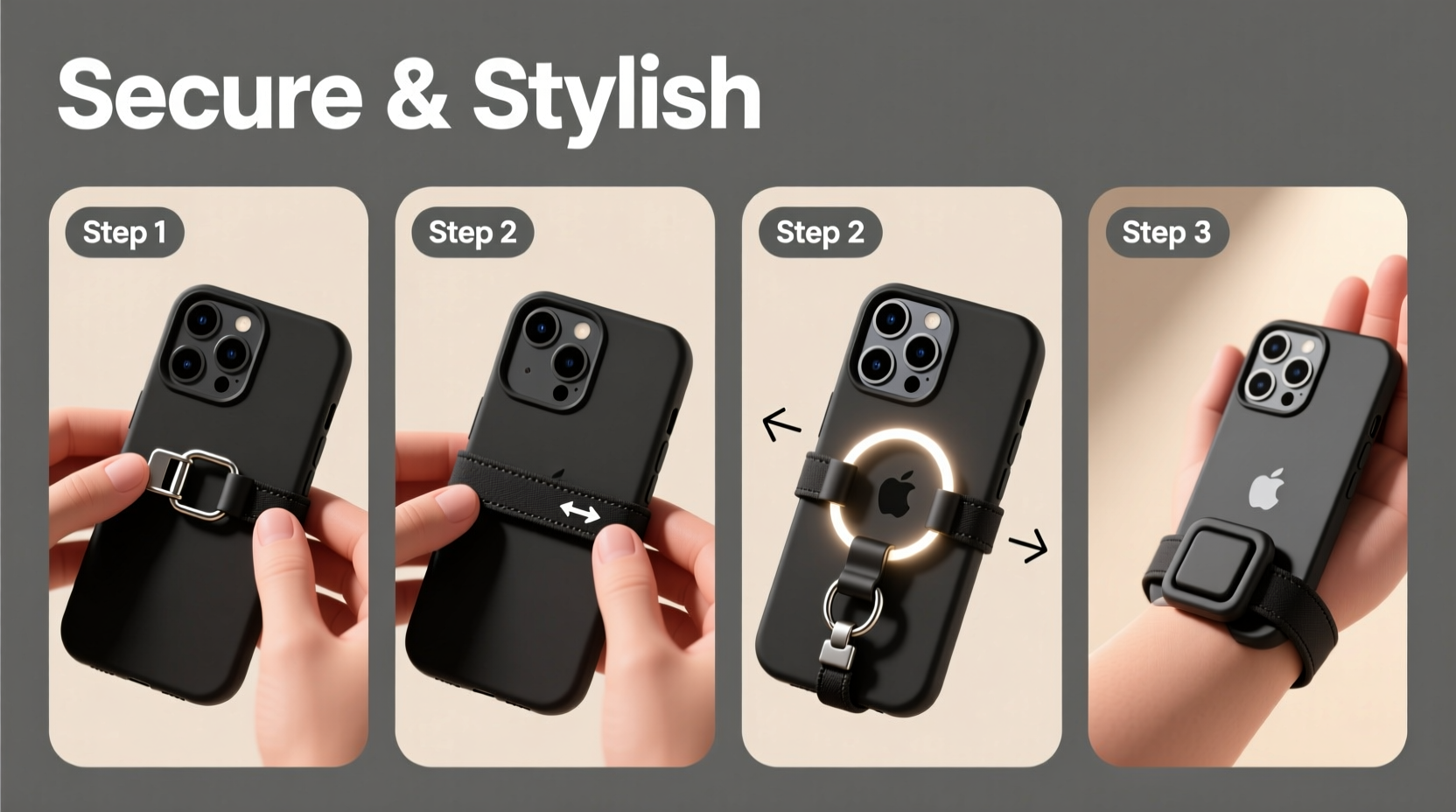
A wrist strap transforms how you interact with your phone. It’s particularly valuable in high-movement environments—crowded streets, public transit, concerts, or outdoor activities. The simple addition of a strap acts as a physical tether, preventing slips from sweaty hands or sudden jolts. Beyond security, it promotes better ergonomics by allowing you to hold your phone more naturally, reducing strain during extended use.
Stylistically, wrist straps have evolved beyond basic lanyards. Today’s options include braided nylon, vegan leather, silicone loops, and even customizable engraved metal connectors. These details elevate an otherwise utilitarian accessory into a fashion statement. For those who value minimalism, slim-profile straps integrate seamlessly with sleek cases without adding bulk.
“Adding a wrist strap is one of the most cost-effective ways to protect your investment. It’s not just about avoiding drops—it’s about confidence in how you carry your device.” — Jordan Lee, Mobile Accessory Designer
Choosing the Right Case and Strap Combo
Not all iPhone cases support wrist straps. Compatibility depends on design features such as built-in loops, anchor points, or modular attachment systems. Before purchasing a strap, verify whether your current case supports it—or consider upgrading to one designed for this purpose.
Cases with integrated lanyard holes are common among rugged, lifestyle, and minimalist brands. Look for models labeled “lanyard-ready,” “strap-compatible,” or “everyday carry (EDC) optimized.” Popular brands like Nomad, Spigen, and Incipio offer cases with reinforced side cutouts specifically engineered for secure strap attachment.
When selecting a strap, prioritize material durability and comfort:
- Nylon webbing: Lightweight, water-resistant, and strong—ideal for active users.
- Silicone: Soft on skin, flexible, and easy to clean; best for casual daily wear.
- Vegan leather: Stylish and durable but may degrade faster under UV exposure.
- Beaded or decorative straps: Fashion-forward but less suited for heavy-duty use.
Step-by-Step Installation Guide
Installing a wrist strap correctly ensures long-term reliability and safety. Follow these steps carefully to avoid damaging your case or compromising the connection.
- Inspect your iPhone case. Locate the lanyard hole or loop—usually found on the left or right lower corner of the case.
- Select your strap. Ensure the end connector (metal ring, plastic clip, or elastic loop) fits through the case’s opening.
- Thread the connector through the hole. If using a metal ring, pass it through from the outside inward.
- Secure the loop. Pull the strap’s tail end through the ring and tighten gently until snug against the case.
- Test tension. Apply light pressure to simulate a drop scenario—ensure the knot holds and the strap doesn’t slip.
- Adjust length if possible. Some straps feature sliding buckles or knots for customized fit around the wrist.
If your case lacks a built-in loop, consider third-party solutions like adhesive-mounted D-rings or hybrid cases that combine protection with attachment points. However, permanent modifications should be approached cautiously, especially if you plan to resell your device.
Do’s and Don’ts of Wrist Strap Use
| Do’s | Don’ts |
|---|---|
| Use reinforced knots when attaching straps manually | Don’t rely solely on weak fabric loops without reinforcement |
| Choose straps with breakaway clasps for child-safe use | Don’t wrap the strap too tightly around your wrist |
| Clean straps regularly to prevent dirt buildup | Don’t use damaged or frayed straps |
| Match strap color/style to your outfit or case | Don’t force oversized connectors into small loops |
Real-World Example: Commuter Safety Upgrade
Sophia, a graphic designer in Chicago, used to carry her iPhone 14 Pro Max in a slim silicone case. During her morning train commute, she frequently juggled coffee, bag, and phone—resulting in two near-drops in one month. After researching solutions, she switched to a MagSafe-compatible case with a side lanyard loop and paired it with a 10-inch navy blue nylon strap. Within days, she noticed improved grip confidence and no longer felt anxious about fumbling her phone. The strap also matched her work tote, blending utility with professionalism.
“It’s subtle, but it makes a real difference,” she said. “I don’t think twice about pulling out my phone now—even when I’m holding three things at once.”
Maintenance and Longevity Tips
A well-maintained wrist strap lasts significantly longer and performs better under stress. Regular inspection helps catch early signs of wear before failure occurs.
- Clean fabric straps monthly with mild soap and water; air dry completely before reuse.
- Check stitching and connection points weekly for fraying or loosening.
- Store your phone with the strap loosely draped—not twisted or stretched—to preserve elasticity.
- Rotate between multiple straps to extend each one’s lifespan.
Frequently Asked Questions
Can I install a wrist strap on any iPhone case?
No—not all cases support wrist straps. Only cases with dedicated lanyard holes, loops, or modular anchors are compatible. You can retrofit some cases with adhesive D-rings, but this may affect warranty or structural integrity.
Will a wrist strap interfere with wireless charging?
Generally, no. Most straps attach to the side or bottom edge, leaving the back of the phone accessible. However, bulky connectors or tight wraps might obstruct placement on certain chargers. Remove the strap if needed for optimal alignment.
Are wrist straps safe for children or seniors?
Yes, provided they use breakaway clasps or adjustable lengths. For children, ensure the strap isn’t long enough to pose entanglement risks. Seniors benefit from added grip security, especially those with reduced hand strength.
Final Checklist Before You Begin
- Checklist: Installing Your iPhone Wrist Strap
- ☐ Confirm your case has a lanyard hole or attachment point
- ☐ Select a strap made from durable, skin-friendly material
- ☐ Verify connector size matches case loop diameter
- ☐ Test installation with gentle pull to confirm security
- ☐ Adjust length for comfort without restricting movement
- ☐ Inspect strap weekly for signs of wear or damage
Conclusion: Secure, Stylish, and Simple
Adding a wrist strap to your iPhone case is a small change with meaningful benefits. It bridges the gap between practicality and personal expression, offering peace of mind without sacrificing style. By choosing the right combination of case and strap, installing it properly, and maintaining it over time, you create a carrying solution tailored to your lifestyle. Whether you're walking through a crowded festival or managing a hectic workday, that extra layer of security makes all the difference.




 浙公网安备
33010002000092号
浙公网安备
33010002000092号 浙B2-20120091-4
Comments
No comments yet. Why don't you start the discussion?