
Opening a savings account is one of the most effective ways to build financial security. Among major U.S. banks, Chase Bank stands out for its nationwide presence, digital tools, and competitive savings options. Whether you're saving for an emergency fund, a vacation, or long-term goals, setting up a Chase Savings Account can be a smart move—if done correctly. This guide walks you through every stage of the process, from preparation to final approval, with practical tips to ensure your application goes smoothly.
Why Choose a Chase Savings Account?
Chase offers several advantages for savers. With over 4,700 branches and 15,000 ATMs across 48 states, in-person banking remains accessible. Its mobile app consistently ranks among the best in usability, allowing users to deposit checks remotely, track spending, and set savings goals. The bank also provides linked checking and savings accounts, making transfers between them seamless.
Their standard Chase Savings℠ account requires no monthly service fee if you meet certain conditions—like maintaining a $300 minimum daily balance or having a linked qualifying Chase checking account. For those just starting out, this flexibility makes it easier to avoid unnecessary charges while building healthy financial habits.
Step-by-Step Guide to Opening Your Account
- Research Available Accounts
Visit the official Chase website and compare savings account types. The main option is the Chase Savings℠ account, but regional promotions or special offers may exist. Look for introductory bonuses—some locations offer up to $200 for new customers who meet specific criteria. - Gather Required Documents
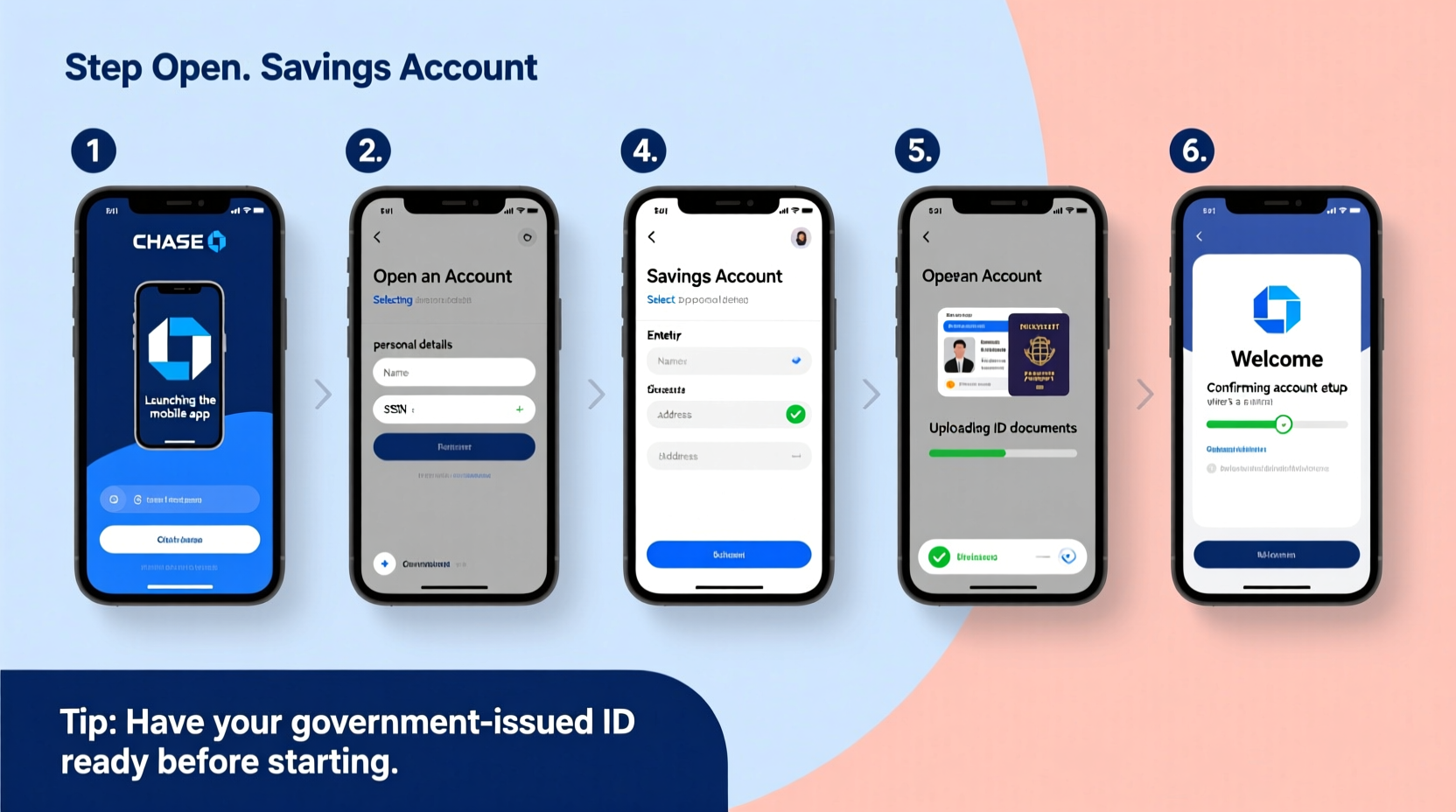
You’ll need:- A valid government-issued ID (driver’s license, state ID, or passport)
- Your Social Security Number (SSN) or Individual Taxpayer Identification Number (ITIN)
- An initial deposit (typically $25 minimum)
- Routing and account number from an external bank if funding online
- Decide Between Online or In-Person Application
Most people find applying online faster and more convenient. However, visiting a local branch allows you to speak directly with a banker, resolve questions immediately, and potentially get same-day access to services like debit cards or checks. - Complete the Application Form
On the Chase website, navigate to “Open an Account” and select “Savings.” Fill in personal details including full name, date of birth, address, employment status, and contact information. Double-check all entries—typos are a common reason for processing delays. - Fund Your Account
After approval, transfer funds via external bank link or bring cash/check to a branch. Chase typically verifies external accounts using micro-deposits (two small amounts sent within 1–3 business days), which you must confirm before full access is granted. - Set Up Alerts and Goals
Once active, use the Chase Mobile® app to enable low-balance alerts, automatic transfers, and savings goals. These tools help maintain discipline and grow your balance over time.
Common Pitfalls and How to Avoid Them
Even straightforward applications can run into issues. Here are frequent problems—and how to prevent them:
| Issue | Why It Happens | How to Prevent |
|---|---|---|
| Application denied due to ChexSystems record | Previous bank account mismanagement (overdrafts, fraud) | Check your ChexSystems report beforehand; dispute errors if needed |
| Verification delays | Mismatched ID info or unstable internet during video verification | Use updated documents and a stable connection; apply during weekday hours |
| Failed funding attempts | Incorrect routing/account numbers or unverified external accounts | Double-check digits; allow 1–3 days for micro-deposit confirmation |
“Many applicants overlook the importance of consistent personal data across platforms. If your address on file with your current bank differs from what you enter on the Chase form, it can trigger a red flag.” — Laura Simmons, Consumer Banking Advisor
Pro Tips for a Smooth Application Process
- Apply During Business Hours: While Chase accepts applications 24/7, submitting between 9 AM and 5 PM Eastern Time increases the chance of real-time support if technical issues arise.
- Use a Desktop Instead of Mobile: Although the mobile site works, the desktop version offers clearer navigation and fewer input errors, especially when uploading documents.
- Link a Checking Account Early: Doing so helps waive the $5 monthly service fee and enables automatic transfers, reinforcing consistent saving behavior.
- Verify Identity Promptly: If prompted for identity verification via video call, complete it the same day. Delays here can push back account activation by several days.
Mini Case Study: Sarah’s Successful Application
Sarah, a 29-year-old graphic designer in Chicago, wanted to open a Chase Savings Account to separate her emergency fund from daily spending. She had previously closed a bank account after overdrafting twice, which left a mark on her ChexSystems report.
Instead of applying directly, she first requested her ChexSystems report and discovered outdated negative entries. She disputed them with supporting documentation and waited two weeks for resolution. Then, she visited a downtown Chase branch with her updated ID, proof of income, and $50 in cash for the initial deposit.
By explaining her situation honestly and showing responsible recent behavior, the banker helped her open a second-chance savings account with limited features but no credit check. Six months later, after consistent deposits and no issues, she upgraded to a standard Chase Savings℠ account with full benefits.
Sarah’s experience shows that even with past banking challenges, success is possible with preparation and transparency.
Checklist: Before You Submit Your Application
- ☐ Checked your ChexSystems report for accuracy
- ☐ Gathered valid photo ID and SSN/ITIN
- ☐ Confirmed your current address matches official records
- ☐ Prepared at least $25 for initial deposit
- ☐ Reviewed terms for monthly fees and waiver options
- ☐ Ensured device has working camera/mic (for online ID verification)
- ☐ Set aside 20 minutes for uninterrupted application time
Frequently Asked Questions
Can I open a Chase savings account without a checking account?
Yes, you can open a standalone savings account. However, linking it to a Chase checking account waives the $5 monthly service fee, making it financially advantageous.
Is my money safe in a Chase savings account?
Absolutely. Chase is FDIC-insured up to $250,000 per depositor, per ownership category. This means your savings are protected even in the unlikely event of bank failure.
How long does it take to get approved?
Most online applications receive instant decisions. If additional verification is required, approval may take 1–3 business days. Branch applications are often processed the same day.
Final Thoughts and Next Steps
Opening a Chase savings account doesn’t have to be complicated. With proper preparation, attention to detail, and awareness of potential hurdles, you can complete the process efficiently and start building your financial foundation. The key is not rushing—take time to review your documents, understand the terms, and choose the right account for your needs.
Remember, a savings account is more than just a place to park money. It's a tool for achieving peace of mind, preparing for life’s surprises, and reaching meaningful goals. By following this guide, you’re already ahead of the curve.




 浙公网安备
33010002000092号
浙公网安备
33010002000092号 浙B2-20120091-4
Comments
No comments yet. Why don't you start the discussion?