
Carrying your phone on a crossbody strap has become a practical solution for hands-free convenience, especially in crowded spaces or while traveling. However, many users attempt quick fixes that compromise both security and device safety. A poorly attached strap can lead to drops, screen damage, or even complete loss of the phone. The right method ensures your phone stays protected, accessible, and comfortably positioned throughout the day. This guide walks you through the correct way to attach a crossbody strap with precision, using compatible accessories and proper techniques.
Why Secure Attachment Matters
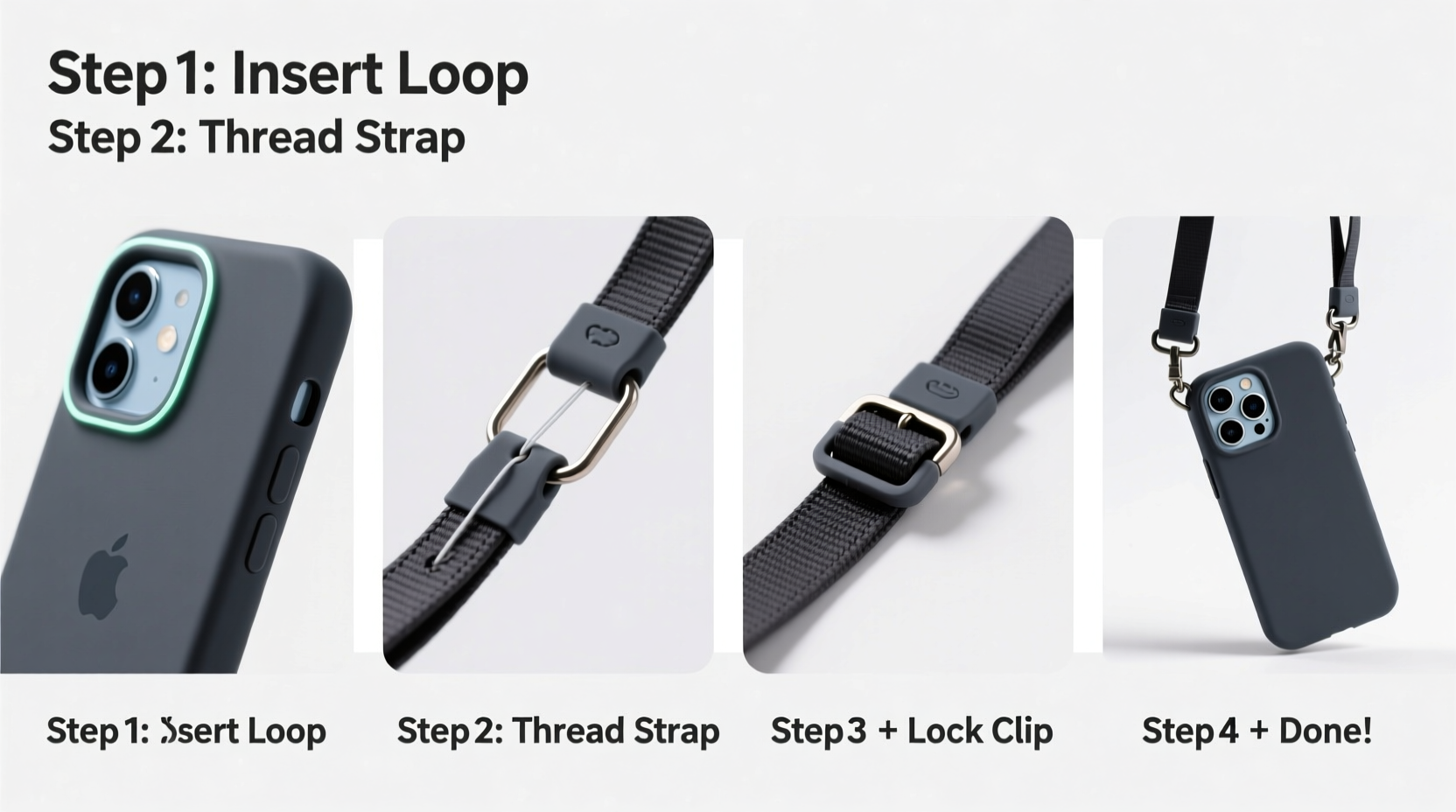
A crossbody strap isn’t just a fashion statement—it’s a functional tool designed to reduce the risk of dropping your phone and to keep it within reach during active use. When improperly installed, however, the strap becomes a liability. Loose loops, weak adhesives, or incompatible hardware can fail under tension, especially when the phone swings or catches on objects.
According to mobile accessory engineers at TechGrip Labs, “The average smartphone weighs between 170–220 grams. When momentum is added—like pulling from a bag or sudden movement—the stress on attachment points can exceed 5 kilograms. That demands secure anchoring, not makeshift solutions.”
“Any strap system must distribute force across reinforced anchor points, not rely solely on adhesive or thin lanyard holes.” — Lena Park, Product Design Engineer, Mobile Accessory Group
Choosing the Right Phone Case and Strap
Not all phone cases support crossbody straps. The foundation of a secure setup lies in selecting components designed to work together. Look for cases with built-in lanyard loops, metal eyelets, or modular attachment systems such as MagSafe-compatible rings or integrated carabiner slots.
Cases made from rugged materials like polycarbonate, TPU, or hybrid composites often include reinforced anchor zones near the corners. Avoid ultra-slim silicone or fabric-backed cases unless they explicitly advertise lanyard support.
For the strap itself, prioritize adjustable nylon or polyester webbing with a width of at least 1 cm. These materials resist fraying and stretching. Avoid elastic straps—they stretch unpredictably and increase swing radius, raising impact risk if the phone hits a surface.
Step-by-Step Guide to Attaching the Strap
- Evaluate your phone case: Confirm it has either dedicated lanyard holes (usually near top corners) or a magnetic/clip-on ring mount. If not, purchase a compatible replacement case.
- Select the attachment method: Use either a durable split ring, a carabiner clip, or a woven loop connector depending on your case design.
- Attach the connector: Open the split ring or carabiner and thread it through both lanyard holes on the same side of the case. Close securely. This dual-hole threading prevents rotational stress on a single point.
- Connect the strap end: Most straps have a loop or metal D-ring at each end. Clip the open end of the carabiner or split ring into this loop.
- Adjust length and test tension: Wear the strap diagonally across your body. The phone should rest slightly below chest level, close to your torso. Pull gently on the device to simulate motion; there should be no slippage or wobbling at the connection.
- Reinforce if necessary: For heavier phones (e.g., Pro models with camera bumps), add a secondary retention band around the midframe or use a case with a built-in tether slot.
Alternative Method: Using Adhesive Mounts (With Caution)
If your case doesn’t support mechanical attachment, some users opt for adhesive-mounted lanyard bases. These small plastic or metal plates stick to the back of the phone or case using industrial-strength 3M tape.
This method carries risks. Over time, heat, moisture, and repeated stress can weaken the bond. It's acceptable only as a temporary solution or for very light daily use.
Do’s and Don’ts: Attachment Best Practices
| Do | Don't |
|---|---|
| Use cases with dual-lanyard hole reinforcement | Thread the strap through only one corner hole |
| Choose straps with anti-slip shoulder pads | Use string, ribbon, or shoelaces as substitutes |
| Inspect connections weekly for wear | Allow children to swing the phone on the strap |
| Store the phone with the strap detached overnight | Expose the strap to prolonged sunlight or moisture |
| Opt for breakaway clasps in high-movement environments | Ignore frayed stitching or bent connectors |
Real-World Example: Commuter Safety Upgrade
Sophie, a transit nurse in Chicago, used to carry her phone in her coat pocket while riding buses and walking hospital corridors. She lost two phones in six months—one snatched in a crowded station, another dropped during a rush. After researching mobile security, she switched to a rugged OtterBox case with lanyard ports and paired it with a 1.2 cm-wide nylon crossbody strap.
She followed the dual-hole attachment method described above and adjusted the strap so the phone rested against her hip, out of sight but instantly accessible. In the eight months since, she hasn’t had a single incident. “It feels like my phone is part of me now,” she said. “I don’t worry about pickpockets or fumbling while holding charts.”
Essential Checklist Before You Wear Your Strap
- ✅ Confirm your case has reinforced lanyard holes or compatible mounts
- ✅ Inspect the strap for fraying, loose stitching, or damaged clips
- ✅ Attach via both top-side holes using a split ring or carabiner
- ✅ Adjust strap length so the phone rests snugly against your body
- ✅ Test movement: walk, turn, bend, and simulate reaching for items
- ✅ Avoid overloading pockets or bags that might catch the phone
Frequently Asked Questions
Can I use a wrist strap instead of a crossbody?
Yes, but wrist straps offer less protection in dynamic environments. They’re better suited for static use—like taking photos or scanning tickets. Crossbody straps prevent swinging and provide superior theft deterrence due to tighter body contact.
Will attaching a strap void my phone’s warranty?
No. Simply adding a strap does not affect manufacturer warranties. However, damage caused by improper installation—such as cracked casings from forced threading—is typically not covered. Always follow the manufacturer’s guidelines for accessory use.
How do I clean and maintain the strap?
Remove the strap weekly and hand-wash with mild soap and water. Air-dry completely before reattaching. Check stitching and hardware monthly. Replace the strap every 6–12 months with regular use.
Final Recommendations for Long-Term Security
A well-attached crossbody strap transforms how you interact with your phone—giving you freedom without sacrificing safety. The key is investing in quality components and respecting the mechanics of secure attachment. Avoid shortcuts like tying knots around buttons or relying on flimsy adhesive mounts. Instead, build a system that balances durability, comfort, and reliability.
As urban mobility increases and personal device value rises, proactive measures like secure strapping are no longer optional—they’re essential habits for modern digital life.




 浙公网安备
33010002000092号
浙公网安备
33010002000092号 浙B2-20120091-4
Comments
No comments yet. Why don't you start the discussion?