
Carrying your iPhone in a wallet case offers convenience and protection, but prolonged hand use can lead to strain or accidental drops. Attaching a shoulder strap transforms your everyday carry into a hands-free experience—ideal for travel, commuting, or busy days on the go. However, not all wallet cases are designed with strap compatibility in mind, and improper attachment can compromise both functionality and device safety. This guide walks you through the correct methods to securely attach a shoulder strap to your iPhone wallet case, ensuring durability, balance, and peace of mind.
Understanding Your Wallet Case Design
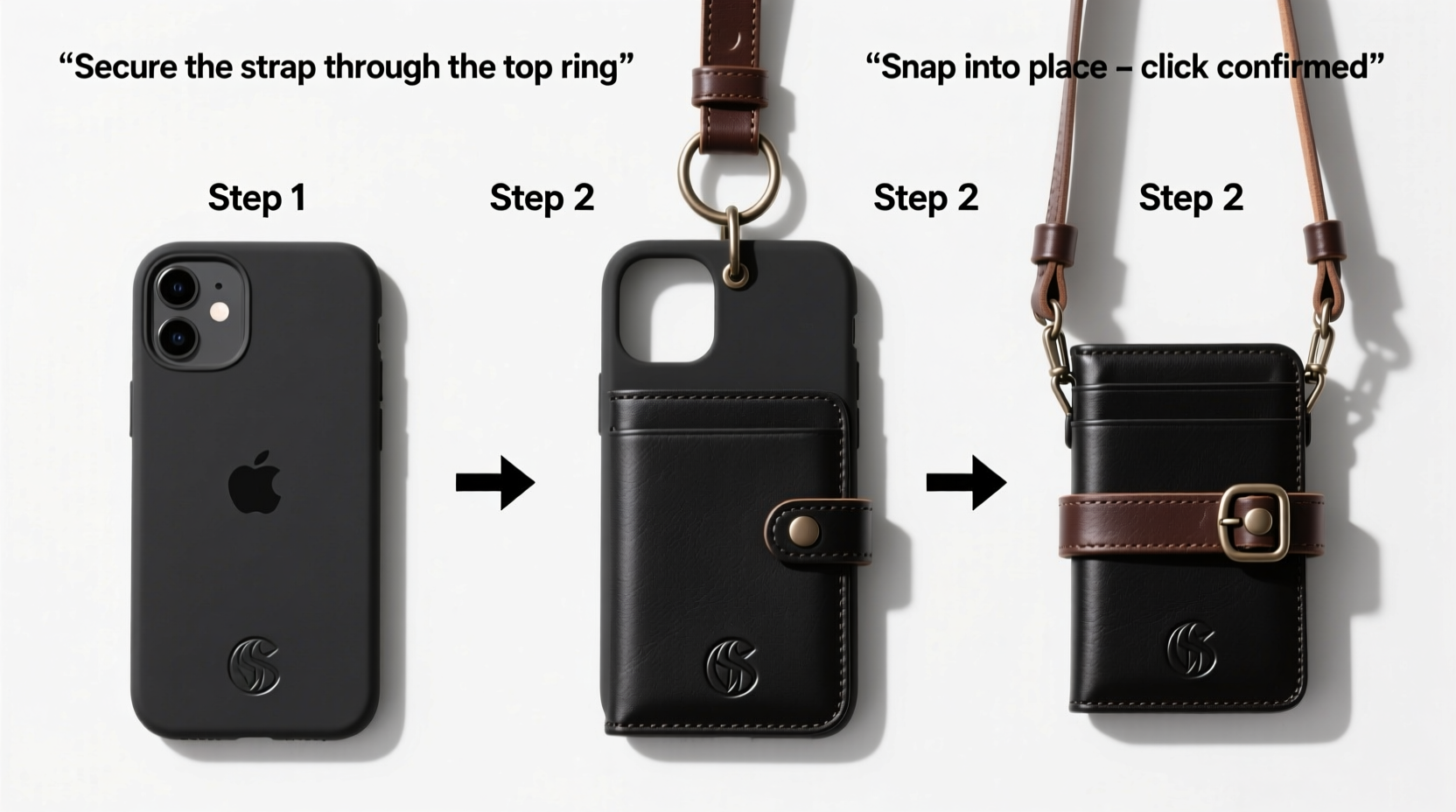
Before attaching any accessory, it’s essential to evaluate your iPhone wallet case’s structure. Most wallet cases combine a protective phone sleeve with front or side compartments for cards and cash. Some models include built-in loops, D-rings, or reinforced stitching points specifically for straps; others do not. Identifying these features determines whether you can attach a strap directly or need an adapter.
Common design elements include:
- Integrated rings: Small metal or plastic loops embedded in the corners or sides.
- Reinforced stitching: Dense thread patterns indicating potential anchor points.
- Fold-over flaps: May obscure attachment zones unless modified.
- Material strength: Genuine leather and polycarbonate offer better load-bearing than thin silicone or fabric blends.
If your case lacks visible attachment points, don’t assume it’s incompatible. Many users successfully retrofit third-party accessories using discreet reinforcement techniques that maintain aesthetics without sacrificing security.
Selecting the Right Strap and Hardware
Not all straps are created equal. Choosing the right one depends on weight distribution, adjustability, and how it connects to your case. Below is a comparison of common options:
| Type | Pros | Cons | Best For |
|---|---|---|---|
| Nylon Webbing Strap | Durable, lightweight, adjustable, moisture-resistant | May stretch slightly over time | Daily urban use |
| Leather Crossbody Strap | Stylish, ages well, firm support | Heavier, less flexible, requires conditioning | Formal or minimalist looks |
| Silicone Loop Strap | Compact, grippy, easy to install | Limited length, no hands-free carry | Short outings, added grip only |
| Retractable Wrist Lanyard | Convenient, retractable, tangle-free | Not suitable for shoulder carry | Quick access needs |
For true shoulder carry, opt for a nylon or leather crossbody strap between 36–52 inches long, with quick-detach hardware like carabiners or snap hooks. Ensure the connector fits snugly around your case’s loop or adapter without slipping.
“Always match strap tensile strength to your total carried weight. A fully loaded wallet case can exceed 12 oz—use nothing less than 20-lb rated components.” — Jordan Lee, Accessory Engineer at Urban Gear Labs
Step-by-Step Guide to Secure Attachment
Follow this sequence to safely add a shoulder strap to any iPhone wallet case—even those not originally designed for one.
- Inspect the case for natural anchor points. Look for thick seams near the top corners or small molded loops. Avoid areas with thin material or moving hinges.
- Clean the surface. Use isopropyl alcohol on a cotton swab to remove oils or residue from manufacturing, improving adhesion if using adhesive mounts.
- Choose your attachment method:
- If rings exist: Thread the strap’s hook directly through.
- If no rings: Attach a micro D-ring using a strong epoxy or rivet kit (see next section).
- Install hardware (if needed). For adhesive D-rings, press firmly for 60 seconds and let cure 24 hours. For screw-mounted types, use a precision drill bit only if the case shell allows.
- Connect the strap. Clip or loop the strap onto the ring, ensuring the closure mechanism locks securely.
- Test under tension. Simulate movement by gently swinging the phone while holding the strap. Check for wobbling, detachment, or stress on seams.
- Adjust length. Set the strap so the phone rests diagonally across your torso or at hip level, avoiding awkward reaches or dangling.
Reinforcement Options for Non-Compatible Cases
Many popular wallet cases lack built-in anchors. In such cases, consider these proven reinforcement strategies:
- Metal corner D-rings: Small, flat metal rings (approx. 10mm) bonded with industrial-strength adhesive like E6000.
- Slide-in card adapters: Credit-card-sized holders with external loops that fit inside your case’s card slot.
- Sleeve extenders: Silicone bands that wrap around the phone and feature integrated loops.
Real-World Example: Transforming a Slim Leather Wallet Case
Sophia, a freelance photographer in Seattle, used a sleek leather wallet case she loved—but constantly switching bags during shoots was inefficient. She wanted to wear her phone like a secondary camera. Her case had no loops, just smooth edges and a magnetic closure.
She purchased two miniature brass D-rings and high-bond fabric adhesive. After cleaning the upper left corner of the case back, she applied the adhesive to the D-ring base and pressed it flush against the seam where the leather met the inner frame. She repeated on the opposite side for balance. After 24 hours of drying, she attached a 42-inch waxed cotton strap with brass snap hooks.
The result? A secure, stylish crossbody setup that stayed put during outdoor shoots. The phone remained accessible, and the added weight didn’t warp the leather thanks to strategic placement along load-bearing seams.
Checklist: Secure Strap Installation
Use this checklist before finalizing your setup:
- ✅ Inspected case for weak spots or flexible materials
- ✅ Selected strap with adequate length and strength rating
- ✅ Verified presence or installed reliable anchor point(s)
- ✅ Used appropriate tools and adhesives (if modifying case)
- ✅ Ensured strap connector locks securely (no accidental release)
- ✅ Balanced weight distribution when worn
- ✅ Tested under real-world motion (walking, reaching, bending)
- ✅ Confirmed easy removal for charging or storage
Frequently Asked Questions
Can I damage my iPhone wallet case by adding a strap?
Potentially, yes—if you use improper adhesives, drill incorrectly, or overload weak areas. Always reinforce stress points and avoid modifications that compromise structural integrity. When in doubt, use non-permanent solutions like slide-in adapters.
Is it safe to hang my iPhone by the strap when not in use?
Only if the attachment system is robust and the environment is controlled. Hanging on a hook overnight can strain connectors over time. Better practice: lay it flat or store in a pocket. Occasional brief hangs are acceptable if the strap is taut and the phone doesn’t swing.
Will a shoulder strap affect wireless charging?
Generally, no. Most straps attach to the exterior without covering the back panel. However, metal rings placed near the center could interfere. Test charging after installation. If issues arise, reposition the anchor point toward the edge.
Final Thoughts and Next Steps
Attaching a shoulder strap to your iPhone wallet case isn’t just about convenience—it’s about optimizing how you interact with your most essential device. With thoughtful selection, precise installation, and regular inspection, you can enjoy hands-free mobility without compromising security or style. Whether you’re navigating crowded streets, managing errands with children, or simply reducing hand fatigue, a well-fitted strap enhances daily functionality.
Start today: assess your current case, gather the right tools, and follow the steps outlined here. Your future self will appreciate the ease and confidence that comes from knowing your phone is secure, accessible, and ready for whatever the day brings.




 浙公网安备
33010002000092号
浙公网安备
33010002000092号 浙B2-20120091-4
Comments
No comments yet. Why don't you start the discussion?