
Tracking a mobile device’s location can be essential for safety, coordination, or peace of mind. Whether you’re helping a family member navigate an unfamiliar city, ensuring your child arrives at school safely, or trying to locate a lost phone, Google Maps offers a reliable and accessible solution. However, the ability to track someone’s location comes with ethical and legal responsibilities. This guide walks you through the legitimate, secure, and respectful use of Google Maps for location tracking—ensuring you stay within privacy boundaries while maximizing functionality.
Understanding Location Sharing on Google Maps
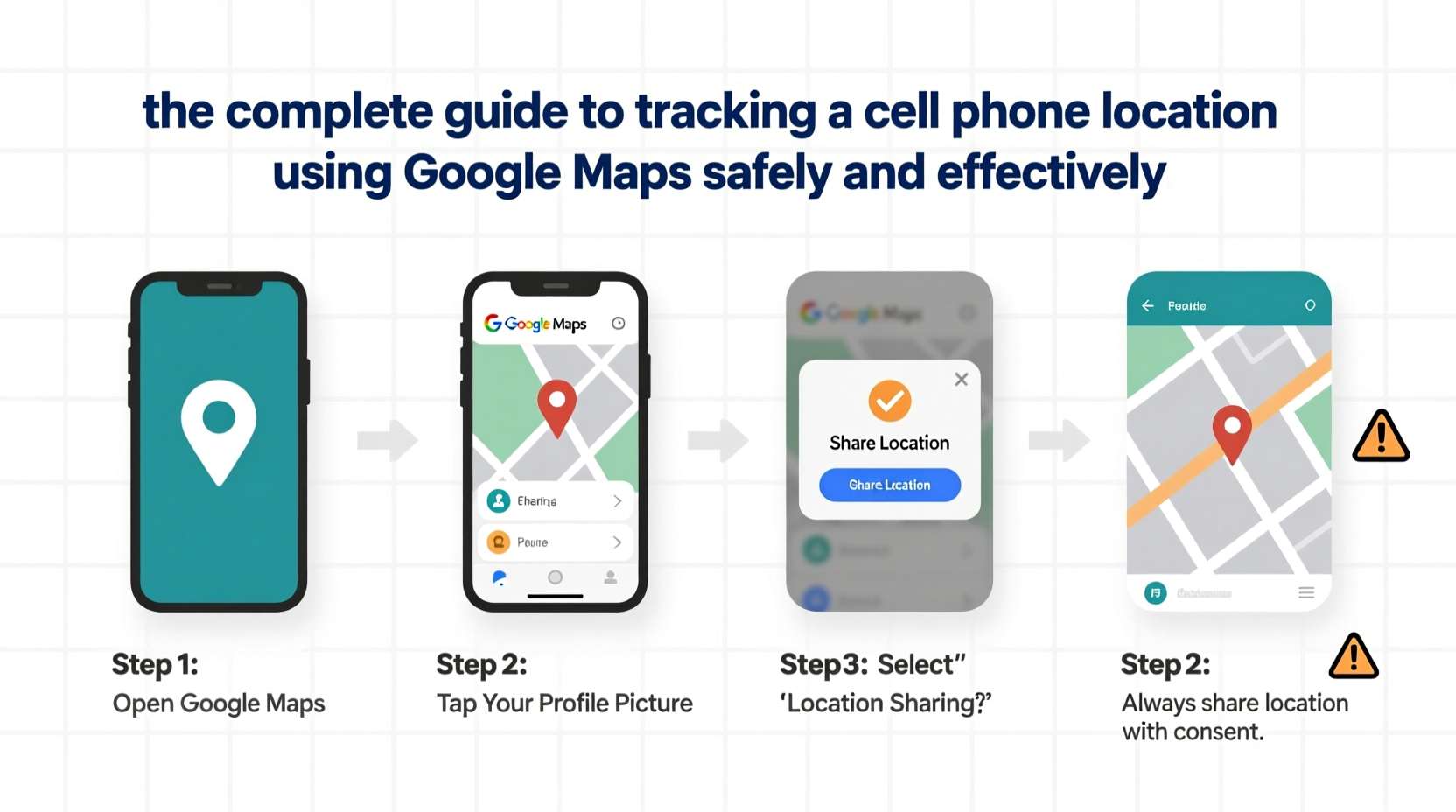
Google Maps allows users to share their real-time location with others for a set duration or indefinitely. This feature is built into the app and works across Android and iOS devices. It does not require third-party software or invasive tools, making it one of the most trusted methods for temporary or ongoing location sharing.
The system relies on GPS, Wi-Fi, and mobile network data to determine a device’s position. Accuracy varies depending on signal strength and environmental factors but typically ranges from 5 to 20 meters in open areas.
Crucially, location sharing is opt-in. The person being tracked must actively agree to share their location. This ensures compliance with privacy standards and prevents unauthorized surveillance.
Step-by-Step: How to Track a Phone Using Google Maps
Follow this sequence to begin tracking a device through Google Maps. Both parties need a Google account and internet access.
- Open Google Maps on the device you want to track (e.g., your child’s phone).
- Tap your profile picture or initial in the top-right corner.
- Select “Location sharing” from the menu.
- Choose “Share location”.
- Select the contact you wish to share with via Gmail, phone number, or contact list.
- Set the duration: 1 hour, 3 hours, until you turn it off, or a custom time.
- Tap “Share”. The recipient will receive a notification and can view the location in real time.
To view someone else’s shared location:
- Open Google Maps on your device.
- Tap your profile icon > “Location sharing”.
- Select the person whose location you want to view.
- Their current position appears on the map, updated in near real time.
You can also pin frequent sharers for quick access and receive automatic updates if they’re running late based on traffic conditions.
Best Practices for Safe and Responsible Tracking
While the technology is straightforward, responsible usage is critical. Misuse of location tracking can damage relationships and violate privacy laws in some jurisdictions.
- Obtain explicit consent every time you initiate or resume tracking.
- Limit tracking duration to what’s necessary—avoid indefinite sharing unless mutually agreed upon.
- Respect boundaries: Do not monitor someone during private moments or without cause.
- Use strong account security (two-factor authentication) to prevent unauthorized access to your own location data.
- Review shared locations regularly and remove outdated permissions.
“Location tracking should enhance safety, not create surveillance. Trust and communication are more effective than constant monitoring.” — Dr. Lena Patel, Digital Ethics Researcher, Stanford University
Do’s and Don’ts of Google Maps Location Sharing
| Do’s | Don’ts |
|---|---|
| Share location during road trips for safety coordination | Track someone without their knowledge |
| Use temporary sharing for meetups in crowded places | Leave location sharing enabled indefinitely |
| Verify your child’s arrival at school or extracurriculars | Monitor a partner due to jealousy or suspicion |
| Enable only when internet and battery allow | Assume 100% accuracy in tunnels or remote areas |
| Educate teens on how to control their own sharing settings | Share location with untrusted contacts or public links |
Real-World Example: Family Safety During Travel
The Rivera family planned a weekend trip with two cars. Maria, the mother, wanted to ensure her teenage son, Alex, who was driving with friends, stayed on route. Before departure, she asked Alex if he’d be comfortable sharing his location for the day. He agreed, seeing it as a way to avoid repeated check-in calls.
Maria opened Google Maps, selected “Location sharing,” and chose Alex from her contacts. She set it for 12 hours. When heavy rain slowed traffic near the mountains, the app alerted her that Alex was delayed. She didn’t panic—she saw he was still moving and simply texted, “Saw you’re behind schedule—drive safe!” Alex appreciated the concern without feeling micromanaged.
This example shows how location tracking, when used respectfully, supports safety without undermining independence.
Troubleshooting Common Issues
Sometimes location tracking doesn’t work as expected. Here are common problems and fixes:
- Location not updating? Check if the device has internet access and location services enabled.
- “Location unavailable” message? The user may have turned off sharing or their phone is powered down.
- Inaccurate positioning? GPS signals weaken indoors or in dense urban areas. Wait until the device is outdoors.
- Can’t see a contact? Ensure you’re using the correct Google account and the contact hasn’t blocked sharing.
FAQ: Common Questions About Google Maps Tracking
Can I track someone without them knowing?
No. Google Maps requires active consent to share location. Silent or hidden tracking is not supported and violates Google’s policies and privacy laws in most countries.
How accurate is Google Maps location tracking?
Accuracy depends on the device and environment. Outdoors with clear sky view, it’s typically within 5–10 meters. Indoors or in cities with tall buildings, accuracy may drop to 50 meters or more.
Does location sharing drain the battery?
Yes, continuous GPS use increases battery consumption. Modern devices manage this efficiently, but extended tracking may reduce battery life by 15–30% over several hours.
Final Checklist: Use Google Maps Tracking Responsibly
- Confirm both devices have Google Maps installed and updated.
- Ensure each user is signed into a Google account.
- Request permission before initiating location sharing.
- Select an appropriate time limit for sharing.
- Verify the location appears correctly on the recipient’s map.
- Turn off sharing when no longer needed.
- Review privacy settings monthly to manage active shares.
Conclusion: Stay Connected, Stay Respectful
Google Maps provides a powerful yet simple tool for staying connected with loved ones, coordinating travel, or recovering a lost device. When used ethically and with mutual agreement, location sharing enhances safety and reduces anxiety. But its power demands responsibility—always prioritize consent, transparency, and purpose.




 浙公网安备
33010002000092号
浙公网安备
33010002000092号 浙B2-20120091-4
Comments
No comments yet. Why don't you start the discussion?