
For millions of urban commuters, the journey to work or school involves balancing a laptop, charger, notebook, water bottle, and often a lunch bag. Among the most common choices for carrying these essentials are tote bags and backpacks. While both have loyal followings, one question persists: which offers better comfort and protection when transporting a laptop during a daily commute?
The answer isn’t as simple as declaring one winner. Comfort is subjective, influenced by body type, commute length, terrain, and how much gear you carry. However, when it comes to ergonomics, weight distribution, device safety, and long-term wearability, certain design features tip the scales in favor of one over the other.
This article breaks down the key differences between tote bags and backpacks for laptop-carrying commuters, evaluating real-world performance across multiple dimensions. Whether you’re a minimalist with just a MacBook and phone or someone hauling a full tech setup through subway tunnels and city sidewalks, understanding these trade-offs can help you choose the right bag — and avoid back pain, shoulder strain, or a damaged device.
Ergonomics and Weight Distribution
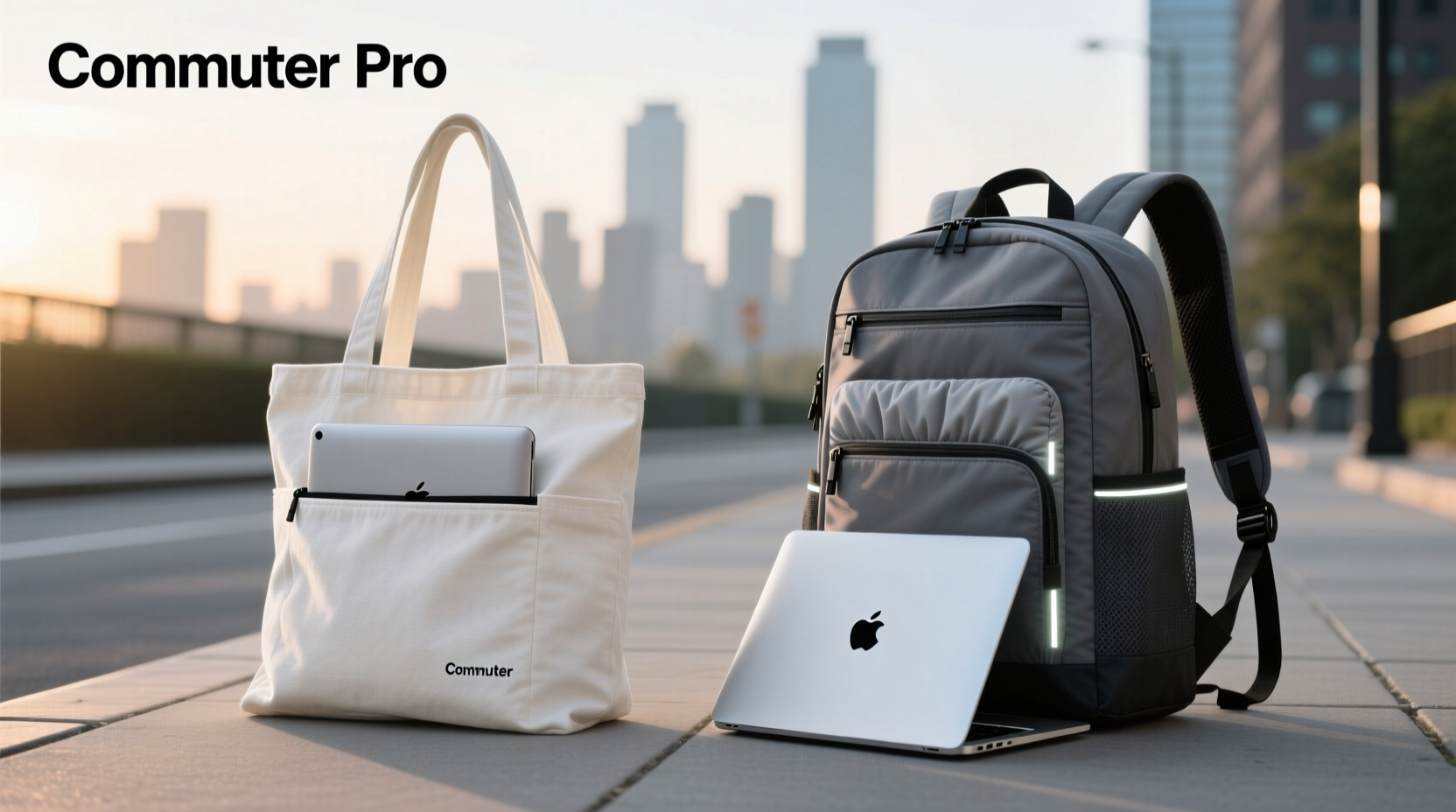
One of the most critical factors in determining comfort is how weight is distributed across the body. The human spine is designed to carry loads evenly, and any imbalance can lead to postural strain, especially over time.
Tote bags rely on a single or dual shoulder strap, placing all weight on one or both shoulders. Even with padded straps, this concentrated pressure can dig into the trapezius muscle, leading to fatigue after just 15–20 minutes of walking. This becomes worse if the bag is overloaded or carried on one side consistently, creating muscular imbalances.
Backpacks, by contrast, distribute weight across both shoulders and, in many cases, transfer part of the load to the hips via a waist or sternum strap. This balanced load-sharing reduces strain on individual muscles and keeps the center of gravity closer to the body’s natural alignment. According to Dr. Lena Park, a physical therapist specializing in occupational ergonomics:
“Carrying asymmetrical loads regularly, like a heavy tote on one shoulder, can contribute to chronic neck and shoulder tension. Backpacks that fit properly encourage better posture and reduce spinal deviation.” — Dr. Lena Park, DPT, Occupational Ergonomics Specialist
For commutes longer than 15 minutes or involving stairs, uneven pavement, or public transit transfers, the ergonomic advantage of a backpack becomes increasingly apparent.
Laptop Protection and Accessibility
Beyond comfort, protecting your laptop from impact, moisture, and accidental drops is essential. How each bag type performs in safeguarding electronics varies significantly.
Tote bags typically feature an open main compartment or a single zippered cavity. Laptops are often placed loosely inside or in a sleeve without padding. Unless specifically designed as a “laptop tote,” most lack dedicated shock absorption. A sudden bump on a crowded train or a slip while stepping off a curb can result in direct impact to the device.
Backpacks, particularly those marketed as commuter or business models, usually include a padded, suspended laptop compartment. This section is often lined with foam or mesh, keeping the laptop away from the outer shell and reducing shock from falls. Many also position the laptop against the wearer’s back, adding another layer of impact protection.
Accessibility is where totes shine. With fewer zippers and compartments, retrieving your laptop at airport security or a coworking space is faster. However, this convenience comes at the cost of security — open tops make it easier for pickpockets or accidental spills to compromise your gear.
A hybrid solution gaining popularity is the “backpack-tote” — a two-in-one design with backpack straps that tuck away, offering the best of both worlds. Still, these often sacrifice some padding or structural rigidity to maintain a sleek profile.
Capacity and Organization
How much you carry determines whether a tote or backpack is more practical. Let’s compare typical organizational features.
| Feature | Tote Bag | Backpack |
|---|---|---|
| Typical Laptop Compartment | Slim sleeve, minimal padding | Padded, suspended, fits up to 16” |
| Main Capacity | 10–15L (often overstuffed) | 18–30L (structured layout) |
| Organization Pockets | Few or none | Multiple: tablet, pens, keys, USB |
| External Access | Easy but less secure | Zipped, hidden pockets |
| Weather Resistance | Limited; fabric absorbs moisture | Water-resistant coatings, roll-top options |
Backpacks generally offer superior organization. Dedicated slots for chargers, power banks, headphones, and even insulated beverage sleeves help prevent cable chaos. Many also feature external attachment points for umbrellas or yoga mats.
Totes, while spacious in volume, suffer from poor internal structure. Items sink to the bottom, making retrieval difficult. Without dividers, a dropped pen can scratch your screen, or a leaking water bottle can ruin paperwork.
If your routine includes frequent stops — coffee shop work sessions, meetings across town, or gym visits — the organizational edge of backpacks supports smoother transitions.
Real-World Commute Scenarios
To illustrate the differences, consider two realistic commuter profiles:
Case Study: Maya, Marketing Consultant (Tote User)
Maya uses a high-end canvas tote with leather trim. It holds her 13” MacBook, notebook, makeup pouch, and reusable water bottle. Her commute is 12 minutes by foot and mostly flat. She values style and quick access during client meetings.
Initially comfortable, she began experiencing left shoulder pain after three months. The bag was consistently carried on the same side, and the thin strap dug in when fully loaded. After spilling tea on her tote during a train ride — soaking her documents — she switched to a structured tote with a removable padded laptop sleeve and wider straps. Pain decreased, but she still avoids rainy days and limits what she carries.
Case Study: James, Software Developer (Backpack User)
James walks 25 minutes to the office, including two flights of subway stairs. He carries a 15” laptop, external SSD, noise-canceling headphones, lunch, and gym clothes twice a week. His previous tote caused chronic back stiffness.
He switched to a 25L commuter backpack with ventilated back panel, hip belt, and rain cover. The laptop compartment opens like a briefcase for easy screening. Despite carrying more weight, he reports less fatigue and better posture. On rainy days, he deploys the built-in cover without slowing down.
James notes: “It’s not as ‘stylish’ as a designer tote, but I arrive at work feeling fresh, not sore. That’s worth more than looks.”
These examples highlight how context shapes the ideal choice. For light, short commutes, totes can suffice — especially with upgrades. For heavier loads or longer distances, backpacks provide measurable benefits in health and efficiency.
Choosing the Right Bag: A Step-by-Step Guide
Selecting the best option doesn’t have to be guesswork. Follow this process to match your needs with the right bag:
- Assess your daily load: List every item you carry regularly. Weigh the total. If it exceeds 5–7 lbs (2.3–3.2 kg), lean toward a backpack.
- Map your commute: Note distance, terrain, and transport mode. Long walks, stairs, or crowded trains favor balanced load distribution.
- Check laptop size: Measure your device. Totes often accommodate up to 14”, while backpacks support larger models with better cushioning.
- Evaluate access points: Do you need quick laptop access? Look for clamshell or front-loading designs in either style.
- Test the fit: Try before you buy. Wear the bag loaded with similar weight. Walk around. Check for strap slippage, bounce, or pressure points.
- Consider weather: If you commute in rain or snow, prioritize water-resistant materials and covered zippers — more common in backpacks.
- Balance aesthetics and function: Choose a design that fits your professional image but doesn’t sacrifice ergonomics. Sleek, minimalist backpacks now mimic briefcases.
FAQ
Can a tote bag be as safe for a laptop as a backpack?
Possibly — but only if it has a well-padded, structured laptop sleeve and you carry minimal additional weight. Most standard totes lack sufficient cushioning and fail to isolate the laptop from impacts. Purpose-built laptop totes exist but are less common and may still lack ergonomic support.
Are backpacks unprofessional for office settings?
Not anymore. Modern commuter backpacks come in refined materials like ballistic nylon, vegan leather, and muted tones. Brands like Aer, Bellroy, and Targus offer professional-looking designs suitable for corporate environments. Many open like briefcases, allowing discreet laptop access during meetings.
What’s the maximum safe weight for a tote bag?
Experts recommend no more than 10% of your body weight in a single-shoulder bag. For a 150-lb person, that’s 15 lbs — but even that can cause strain over time. For comfort and safety, aim for under 7–8 lbs, especially if carried for more than 15 minutes.
Checklist: Features to Look For
- ✅ Padded, dedicated laptop compartment (minimum 15mm foam)
- ✅ Adjustable, padded shoulder straps (for backpacks) or wide, reinforced handles (for totes)
- ✅ Water-resistant exterior material (e.g., recycled polyester, waxed canvas)
- ✅ Multiple interior pockets for organization
- ✅ Ventilated back panel (backpacks) to reduce sweat
- ✅ Reflective details or bright colors for visibility
- ✅ TSA-friendly laptop access (zipper expansion or clamshell opening)
- ✅ Hip or chest strap (for backpacks carrying over 10 lbs)
- ✅ Durable zippers (YKK preferred) and reinforced stitching
- ✅ Size compatibility with airline carry-on standards
Final Verdict: Backpack Wins for Comfort, But Totes Have Their Place
When the priority is carrying a laptop comfortably over any significant distance or duration, backpacks outperform tote bags in nearly every category: weight distribution, protection, organization, and long-term physical health.
That said, tote bags remain viable for short commutes, minimal loads, or professionals who value appearance and quick access above all. Upgraded models with better padding, wider straps, and weather resistance can mitigate some drawbacks.
The growing trend of “smart hybrids” — backpacks that convert to totes or totes with hidden backpack straps — suggests the market is responding to this dilemma. These designs attempt to merge style with function, though they often involve compromises in structure or durability.
Ultimately, the best choice aligns with your lifestyle, not trends. If you walk more than 20 minutes, climb stairs, or carry more than just a laptop, a well-fitted backpack is the smarter investment — for your gear and your body.
“The best bag isn’t the one that looks best on Instagram. It’s the one that lets you move through your day without thinking about it.” — Marcus Reed, Urban Mobility Designer
Take Action Today
Don’t wait for shoulder pain or a cracked screen to prompt a change. Audit your current bag: weigh it, wear it on a practice commute, and assess how you feel afterward. If you’re adjusting it constantly, feeling strain, or worried about your laptop, it’s time to upgrade.
Explore backpacks designed for professionals — many now blend subtle elegance with serious functionality. Or, if you’re committed to the tote aesthetic, invest in one built for purpose, not just fashion. Your spine — and your laptop — will thank you.




 浙公网安备
33010002000092号
浙公网安备
33010002000092号 浙B2-20120091-4
Comments
No comments yet. Why don't you start the discussion?