
In a world where every inch of desk space counts—especially in home offices, workstations, or compact apartments—the way you position your smartphone can have a measurable impact on organization and workflow. While it may seem like a minor detail, choosing between a vertical and horizontal phone holder affects not just ergonomics but also spatial efficiency. As smartphones grow larger and desks become more crowded with monitors, keyboards, notebooks, and chargers, optimizing the placement of even small accessories is essential. This article dives deep into the spatial implications of vertical versus horizontal phone holders, helping you make an informed decision based on footprint, usability, and long-term workspace harmony.
Understanding Desk Footprint and Spatial Efficiency
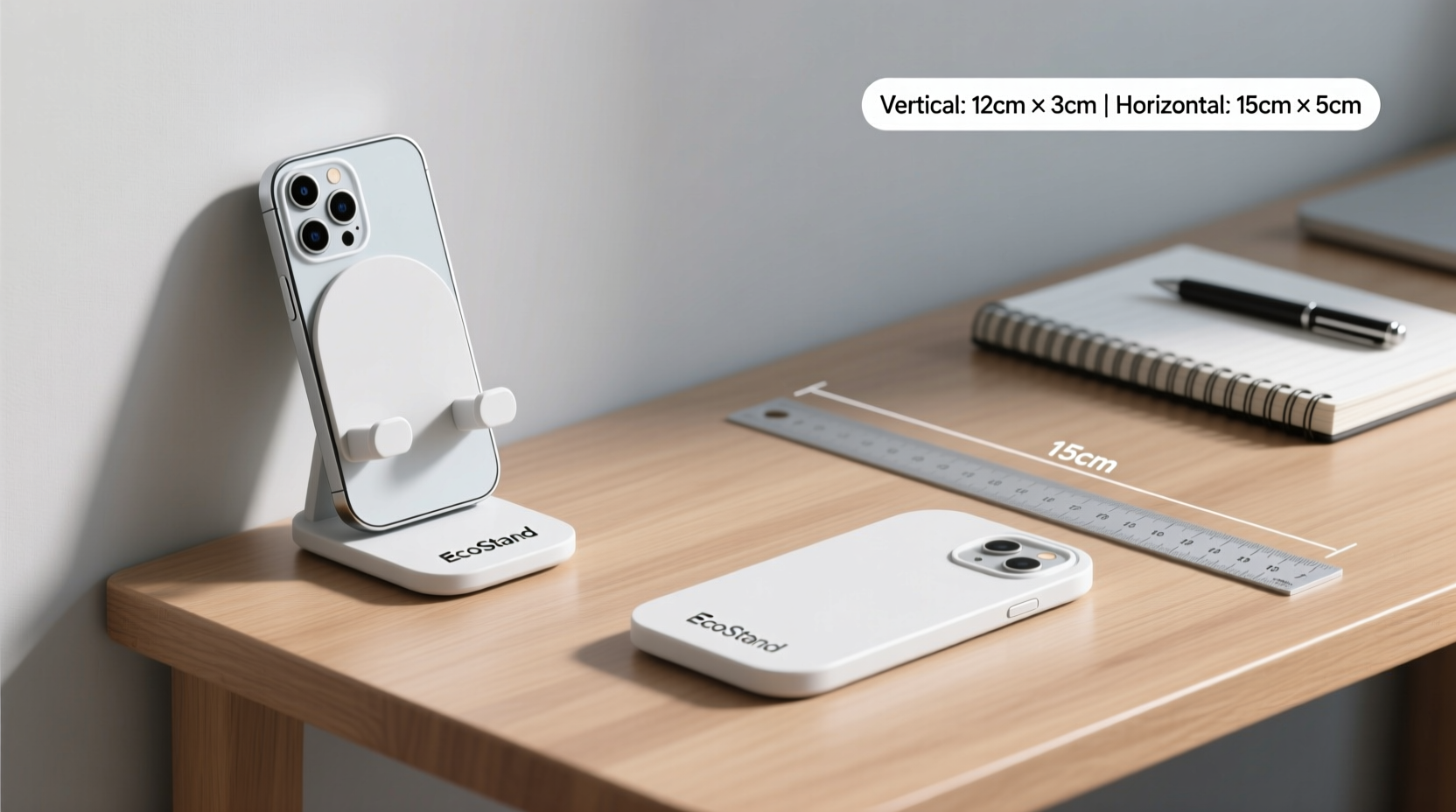
The key metric when evaluating any desktop accessory is its footprint—the amount of surface area it occupies. A smaller footprint means more room for productivity tools, writing space, or simply a cleaner aesthetic. When comparing vertical and horizontal phone holders, the difference in footprint is often dramatic, especially with modern large-screen phones that can exceed 6.5 inches in diagonal length.
A vertical phone holder aligns the device upright, similar to how it's held during video calls or FaceTime. In this orientation, the base of the holder typically spans the width of the phone (usually 3–3.5 inches), while its depth is minimal—often just enough to support the bottom edge. In contrast, a horizontal holder must accommodate the full length of the phone, which can extend over 6 inches depending on the model. This single factor makes horizontal holders inherently more space-consuming along the depth axis of your desk.
Direct Comparison: Vertical vs Horizontal Holders
To understand the practical differences, consider a common flagship smartphone measuring approximately 6.3 inches tall and 3 inches wide. When placed vertically in a stand, the required desk space is roughly 3 inches (width) by 4 inches (depth), including clearance for stability. The same phone in a horizontal holder needs at least 6.3 inches of depth and 3.5 inches of width—nearly double the surface area.
This becomes particularly relevant when your desk has limited front-to-back space—common in shallow workstations or setups against walls. A horizontal holder pushes the phone farther from the edge, potentially interfering with wrist movement during typing or reducing available space for a mousepad. Conversely, a vertical holder tucks neatly beside a monitor or keyboard without protruding significantly into your primary work zone.
Situational Trade-offs
While vertical holders win in terms of space conservation, horizontal models offer advantages in specific scenarios. For instance, watching landscape-mode videos, using navigation apps, or referencing wide documents benefits from a horizontal layout. However, these use cases are situational rather than constant. Most daily interactions—texting, checking notifications, taking quick calls—are optimized for portrait mode, making vertical positioning more functionally aligned with typical usage patterns.
“Space efficiency isn’t just about square inches—it’s about flow. A well-placed vertical holder integrates seamlessly into a productive workspace.” — Daniel Lin, Workspace Ergonomics Consultant
Detailed Comparison Table
| Feature | Vertical Holder | Horizontal Holder |
|---|---|---|
| Average Footprint | 3\" x 4\" (12 sq in) | 6.5\" x 3.5\" (22.75 sq in) |
| Phone Orientation | Portrait (upright) | Landscape (sideways) |
| Best For | Notifications, charging, video calls, compact desks | Media viewing, multitasking, split-screen apps |
| Ease of Access | High – natural pickup angle | Moderate – requires rotation to use |
| Cable Management | Easier – cable runs straight down | More complex – may drape awkwardly |
| Stability | Generally high due to low center of gravity | Varies – wider base needed for balance |
| Aesthetic Integration | Blends with monitors, looks intentional | Can appear bulky or obstructive |
Real-World Example: The Home Office Upgrade
Consider Sarah, a freelance graphic designer working from a 48-inch-wide desk. Her setup includes a laptop, external monitor, drawing tablet, wireless keyboard, and mouse. Initially, she used a horizontal silicone phone holder positioned near her mousepad. While convenient for watching design tutorials in landscape mode, the phone frequently blocked her arm movement and made the desk feel cramped.
After switching to a slim metal vertical holder placed behind her monitor, she reclaimed nearly 5 inches of usable depth. This allowed her to reposition her mousepad comfortably and reduce wrist strain. She found that most of her phone interactions—responding to messages, checking emails, joining client calls—were faster and more ergonomic in portrait mode. For occasional media viewing, she simply removed the phone temporarily. The change improved both physical comfort and mental clarity, reinforcing how small adjustments can yield significant gains.
Choosing Based on Workflow, Not Just Space
While space savings are critical, the best choice depends on how you use your phone during work hours. If your job involves frequent video conferencing, a vertical holder supports better camera alignment and eye contact. It positions the front-facing camera closer to eye level when placed on a desk, enhancing professionalism during virtual meetings.
On the other hand, professionals who rely on dual-device workflows—such as traders monitoring live charts, developers testing mobile layouts, or content creators reviewing full-screen videos—may benefit from the expanded viewing area of a horizontal holder. But even in these cases, many users find that rotating the phone manually when needed is more efficient than permanently sacrificing desk real estate.
Actionable Checklist: Selecting the Right Holder
- ✅ Measure your available desk depth before purchasing
- ✅ Assess how often you use your phone in landscape mode
- ✅ Prioritize vertical holders if desk space is under 24 inches deep
- ✅ Choose weighted or non-slip bases to prevent tipping
- ✅ Ensure compatibility with your phone size and case type
- ✅ Look for built-in cable routing to minimize clutter
- ✅ Test ease of insertion/removal—should be smooth but secure
Ergonomic and Visual Benefits of Vertical Positioning
Beyond space, vertical phone holders promote healthier posture. Placing the phone upright encourages users to look slightly upward, reducing neck strain associated with looking down at a slanted or flat device. This aligns with ergonomic principles that recommend keeping screens at or slightly below eye level to maintain a neutral spine position.
Additionally, a vertical phone mimics the natural alignment of secondary monitors or tablets, creating visual harmony on the desk. This uniformity reduces cognitive load—your brain perceives aligned devices as part of a cohesive system, enhancing focus and order. In contrast, a horizontally oriented phone breaks this symmetry, appearing more like an afterthought than an integrated tool.
Frequently Asked Questions
Can I switch between vertical and horizontal orientations?
Some multi-position holders allow both orientations through adjustable joints or rotating bases. These offer flexibility but tend to occupy more space than dedicated single-orientation models. If versatility is important, look for compact convertible stands with locking mechanisms to prevent accidental shifts.
Do vertical holders work with all phone sizes?
Most modern vertical holders accommodate phones ranging from 4.7 to 6.9 inches in height. However, ultra-large devices or those with thick protective cases may require wider grips or open-top designs. Always verify internal dimensions before purchase, especially if using rugged cases.
Is wireless charging compatible with space-saving holders?
Yes—many vertical holders now integrate Qi wireless charging, combining functionality with minimalism. These units eliminate dangling cables and keep the phone securely in place while charging. Just ensure proper ventilation to prevent overheating, and confirm your phone supports wireless charging.
Final Recommendation: Optimize for Long-Term Usability
For the majority of users, a vertical phone holder is the superior choice when space conservation is a priority. It minimizes footprint, supports natural interaction patterns, enhances ergonomics, and integrates cleanly into professional environments. Horizontal holders serve niche purposes but come at a spatial cost that few compact workspaces can afford without compromise.
The ideal setup balances utility and efficiency. Start with a vertical holder unless your workflow demands consistent landscape viewing. You can always remove the phone temporarily for media consumption or special tasks. By defaulting to vertical positioning, you preserve valuable desk real estate, reduce visual clutter, and create a more intentional, productive workspace.
“Every object on your desk should earn its place. A vertical phone holder doesn’t just save space—it respects it.” — Lena Torres, Minimalist Workspace Designer
Take Action Today
Reevaluate your current phone placement. Is it consuming more space than necessary? Could that area be better used for writing, mouse movement, or simply breathing room? Measure the footprint, assess your usage habits, and consider upgrading to a space-smart vertical holder. Small changes compound—start reclaiming your desk one inch at a time.




 浙公网安备
33010002000092号
浙公网安备
33010002000092号 浙B2-20120091-4
Comments
No comments yet. Why don't you start the discussion?