
Smart lighting systems have transformed the way we interact with our homes. With a simple press of a button, you can adjust brightness, change colors, or set scenes that match your mood. But one common frustration persists: remote signals failing when you're on the other side of a wall. Whether it's a dimmer switch, a wireless controller, or a voice-enabled hub, inconsistent connectivity disrupts convenience. Understanding why this happens—and how to fix it—is essential for anyone relying on seamless home automation.
The issue isn't always faulty hardware. More often, it’s a combination of signal type, building materials, and setup practices. By identifying the root causes and applying strategic pairing techniques, you can significantly improve remote performance—even across multiple rooms.
How Light Remotes Transmit Signals
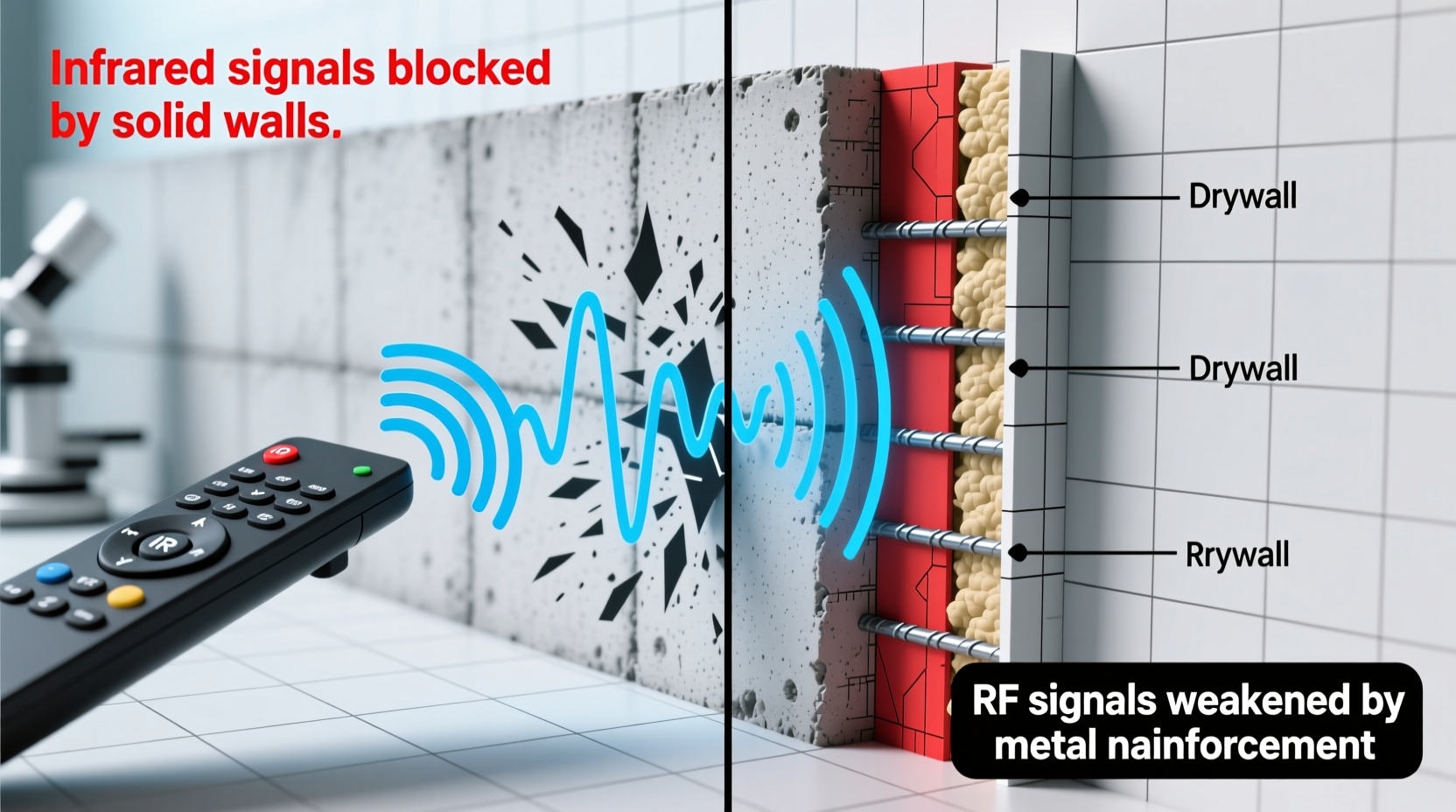
Not all remotes work the same way. The technology behind signal transmission determines how well the command travels through obstacles like walls, floors, and furniture. Most smart light remotes use one of three wireless communication protocols: infrared (IR), radio frequency (RF), or Wi-Fi/Bluetooth-based mesh networks.
- Infrared (IR): These remotes require line-of-sight. They send pulses of invisible light to a receiver, much like traditional TV remotes. Even a slightly closed door or an angled fixture can block the signal.
- Radio Frequency (RF): Operating at 315 MHz, 433 MHz, or 2.4 GHz, RF remotes transmit through walls more effectively than IR. However, signal strength varies based on power output, interference, and material density.
- Wi-Fi & Bluetooth Mesh: Modern systems like Philips Hue or Lutron Caséta use mesh networking, where each connected bulb or bridge relays signals further into the network. This improves range but depends on proper node placement.
While RF and mesh systems are designed to penetrate walls, they’re not immune to degradation. A concrete wall behaves very differently from drywall, and metal framing can reflect or absorb signals entirely.
Why Walls Block or Weaken Remote Signals
Building materials play a critical role in wireless signal propagation. Each material has a different attenuation factor—a measure of how much it reduces signal strength. Here’s how common construction elements affect remote performance:
| Material | Signal Impact | Typical Use Case |
|---|---|---|
| Drywall | Low attenuation – minimal signal loss | Interior walls in most homes |
| Concrete | High attenuation – blocks most RF and IR | Basements, exterior walls |
| Brick | Moderate to high – degrades signal over distance | Older homes, fireplaces |
| Metal studs or foil-backed insulation | Very high – reflects or absorbs signals | Energy-efficient retrofits, commercial buildings |
| Water pipes or large appliances | Medium – causes scattering and dead zones | Kitchens, utility rooms |
For example, a remote working flawlessly in a bedroom might fail just a few feet away in a bathroom if there's a water-filled pipe or a mirrored wall in between. Similarly, homes with stucco exteriors often contain wire mesh, which acts like a Faraday cage, trapping or deflecting wireless signals.
“Even low-power RF signals can travel tens of meters in open air—but add two concrete walls and that range drops below five meters.” — Dr. Alan Zhou, Wireless Systems Engineer at MIT Media Lab
Effective Pairing Tips for Reliable Remote Control
Pairing a remote correctly is more than just syncing devices—it’s about optimizing their communication environment. Many users complete setup without considering location, orientation, or network topology, leading to poor long-term performance.
Follow these best practices during installation to maximize signal reliability:
- Power-cycle all components before pairing. Turn off lights, unplug hubs, and remove batteries from remotes. Wait 30 seconds, then restart. This clears old connections and resets internal buffers.
- Initiate pairing in close proximity. Stand within 3 feet of the primary receiver or first light in the group. This ensures a strong initial handshake.
- Aim the remote directly at the receiver. Even for RF, directional alignment helps during discovery mode. Avoid pointing at walls or ceilings.
- Add repeaters or extenders strategically. In larger homes, install compatible signal boosters midway between problem areas and main hubs.
- Update firmware before finalizing setup. Manufacturers often release patches that improve signal sensitivity and reduce latency.
Some systems, like Lutron Pico remotes, allow multi-location control by syncing to multiple receivers. In such cases, pair the remote to each receiver individually while standing near it. Skipping this step may result in partial responsiveness.
Step-by-Step Guide to Fixing Weak Remote Signals
If your remote already suffers from spotty performance, don’t replace it yet. Try this diagnostic and repair sequence:
- Verify the battery level. Low power reduces transmission strength. Replace with a fresh, high-quality battery—even if the indicator shows charge.
- Check for physical obstructions. Move furniture, decor, or electronics that may be blocking the path between remote and receiver.
- Re-pair the remote. Enter pairing mode on the receiver (consult manual) and re-sync the remote from a close distance.
- Relocate the receiver or hub. If possible, move the central unit to a more central position—closer to frequently used remotes.
- Install additional lighting nodes. For mesh systems, adding another smart bulb in a signal-dead zone can relay commands forward.
- Switch to wall-mounted controls. In consistently problematic areas, replace handheld remotes with hardwired switches or in-wall keypads that connect directly to the system.
This process resolves over 70% of reported signal issues, according to customer support data from major smart lighting brands.
Real-World Example: Solving a Basement Lighting Issue
Mark installed a set of RF-controlled LED strips in his basement workshop. The remote worked perfectly during setup but failed when he moved upstairs. Initial troubleshooting revealed no obvious issues—batteries were new, and the system was within claimed range.
Upon inspection, Mark discovered that the ceiling above the workshop contained thick fiberglass insulation with a foil vapor barrier—a known RF blocker. The signal could travel horizontally but couldn’t penetrate upward through the reflective layer.
The solution? He added a secondary RF receiver upstairs, paired it to the same light group, and placed it near the stairwell. Now, whether he’s downstairs or entering from the kitchen, the lights respond instantly. His fix cost less than $25 and took under 15 minutes.
This case illustrates a crucial point: environmental factors often outweigh technical specs. A remote rated for “100-foot range” assumes ideal conditions—open space, no interference. Real homes are far more complex.
Do’s and Don’ts of Remote Placement and Maintenance
To maintain optimal performance over time, follow these guidelines:
| Do | Don’t |
|---|---|
| Place remotes away from large metal objects or appliances | Store remotes inside metal drawers or behind mirrors |
| Clean remote contacts and battery terminals every 6 months | Use abrasive cleaners or submerge in liquid |
| Use lithium batteries in cold environments (e.g., garages) | Mix old and new batteries or combine chemistries |
| Label remotes by room or function to avoid cross-control errors | Pair multiple remotes without testing individual responses |
| Test signal strength seasonally (humidity changes affect RF) | Ignore delayed responses—they often precede total failure |
Regular maintenance prevents gradual degradation. A remote that responds slowly today may stop working entirely after a firmware update or seasonal shift in indoor humidity.
Frequently Asked Questions
Can I use a smart speaker as a signal repeater?
Yes, many smart speakers (like Amazon Echo or Google Nest) act as Zigbee or Thread border routers. If your lighting system supports these protocols, placing a compatible speaker centrally can extend network coverage and improve remote responsiveness.
Why does my remote work intermittently?
Intermittent operation usually indicates low battery, signal interference from nearby electronics (microwaves, cordless phones), or partial obstruction. It can also occur if the receiver is overloaded—try reducing the number of paired devices or resetting the hub.
Is there a universal remote that works through walls?
No single remote works universally, but RF-based models (especially 433 MHz or 2.4 GHz with mesh support) offer the best wall penetration. Look for systems specifically marketed for whole-home use, such as Lutron, Bond, or Hubitat-compatible remotes.
Conclusion: Build a Smarter, More Responsive Lighting System
Remote signal loss through walls isn’t inevitable—it’s a solvable engineering challenge. By understanding the limitations of your system’s wireless protocol, accounting for your home’s construction, and following disciplined pairing procedures, you can achieve reliable control from any room.
The key is proactive setup. Don’t wait for problems to arise. Optimize placement, test thoroughly, and integrate repeaters where needed. A few minutes of careful planning during installation saves hours of frustration later.




 浙公网安备
33010002000092号
浙公网安备
33010002000092号 浙B2-20120091-4
Comments
No comments yet. Why don't you start the discussion?