
Controller stick drift is one of the most frustrating issues modern gamers face. It manifests when an analog stick moves the on-screen character or camera without input — often in mid-gameplay, during critical moments. While commonly associated with certain high-profile console controllers, stick drift affects devices across brands and platforms. Understanding its root causes requires diving into the engineering behind analog sticks, material degradation, and environmental factors. More importantly, knowing how to prevent or delay its onset can significantly extend the life of your gaming hardware.
The Anatomy of an Analog Stick
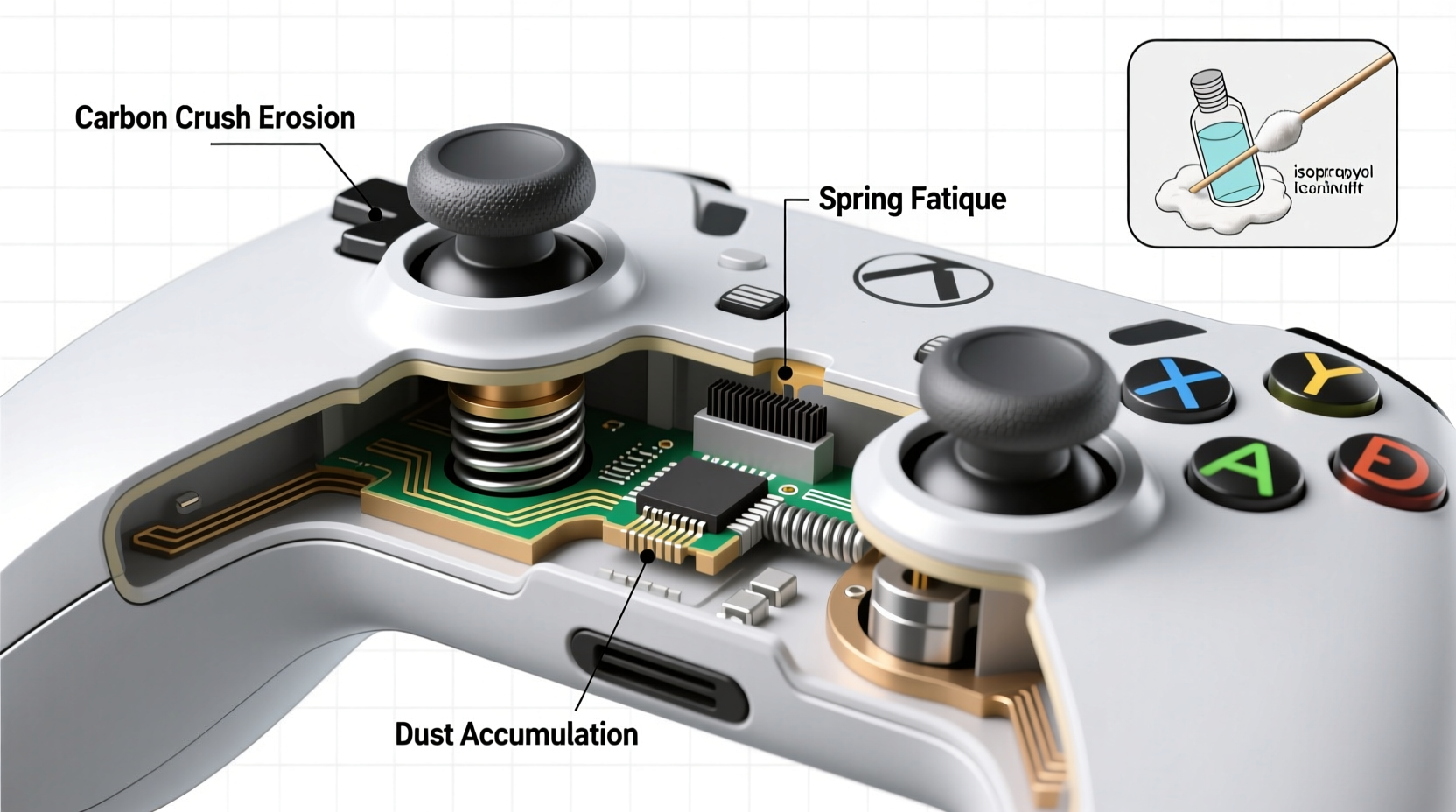
Analog sticks are precision components designed to detect not just direction but also the degree of movement. Unlike digital directional pads that register binary inputs (on/off), analog sticks use potentiometers — variable resistors — to translate physical motion into electrical signals. Each stick has two potentiometers: one for vertical (Y-axis) movement and one for horizontal (X-axis).
When you tilt the stick, it applies pressure to wiper contacts inside the potentiometer, changing resistance values. These changes are interpreted by the controller’s microprocessor as movement speed and direction. The smoother and more consistent the contact, the more accurate the response.
Over time, however, these internal components degrade. Dust, skin oils, and mechanical wear interfere with the delicate balance required for precise input. Even minor inconsistencies in resistance readings can be interpreted as movement — hence, drift.
Why Stick Drift Happens: A Technical Breakdown
Stick drift isn’t usually caused by a single catastrophic failure. Instead, it results from cumulative wear and subtle design limitations. Here are the primary technical contributors:
1. Potentiometer Wear and Contamination
The potentiometers inside analog sticks rely on physical contact between a conductive wiper and a resistive track. As you move the stick, the wiper slides along this track. Repeated friction wears down both surfaces, especially if contaminants like dust or oil enter the housing.
Wear creates \"dead zones\" where the wiper no longer makes consistent contact. In response, the controller may misinterpret baseline resistance as active input. This leads to false movement signals — the hallmark of drift.
2. Spring and Gasket Degradation
Analog sticks return to center thanks to small springs and rubber gaskets. These components ensure the stick resets to a neutral position after use. Over time, repeated compression weakens the spring tension, and the rubber degrades due to oxidation or exposure to UV light.
If the stick doesn’t fully return to center, the system detects a residual offset. Even a 1–2% deviation in resting resistance can trigger continuous input, particularly in sensitive games like first-person shooters.
3. Manufacturing Tolerances and Material Choices
Some manufacturers prioritize cost-efficiency over longevity. Lower-grade plastics, thinner wiper materials, and looser tolerances increase susceptibility to early drift. For example, certain controllers use carbon-based wipers instead of metal alloys, which erode faster under friction.
“Even high-end controllers make trade-offs between size, sensitivity, and durability. The smaller the component, the more vulnerable it is to microscopic wear.” — Dr. Lena Park, Electrical Engineer at MIT Media Lab
4. Environmental Exposure
Humidity, temperature swings, and airborne particulates all impact internal electronics. Moisture can corrode contacts, while dust acts as an abrasive agent. Gamers who play in poorly ventilated rooms or near open windows may see accelerated drift due to increased contamination.
Prevention Strategies: Extending Controller Lifespan
While no analog stick lasts forever, proactive care can delay drift by months or even years. The key is minimizing exposure to stressors and maintaining cleanliness.
Regular Cleaning Routine
Cleaning your controller every few weeks removes surface oils and debris before they penetrate internal components. Use a soft, lint-free cloth slightly dampened with isopropyl alcohol (70%) to wipe around the base of the stick. Do not pour liquid into the casing.
For deeper cleaning, some users employ compressed air to dislodge particles trapped beneath the stick cap. Hold the nozzle at a safe distance and use short bursts to avoid damaging internal parts.
Use Protective Covers
Silicone stick caps act as barriers against direct finger contact, reducing oil transfer. While they don’t eliminate drift, they slow contamination. Choose low-profile designs to maintain tactile feedback.
Avoid Excessive Force
Many players unknowingly apply too much pressure when performing quick turns or flick shots. Over time, this accelerates wear on both the potentiometer and spring mechanism. Practice lighter touch techniques, especially during prolonged sessions.
Step-by-Step: How to Diagnose and Test for Drift
Catching drift early allows for intervention before performance degrades completely. Follow this diagnostic process:
- Launch a game with visible aiming reticles (e.g., Call of Duty, Fortnite) or use built-in controller calibration tools.
- Place the controller on a flat surface and observe if the character or camera moves without input.
- Check both sticks independently by disabling one in settings or covering it gently.
- Enter controller calibration mode (found in system settings on most consoles) and follow prompts to recalibrate neutral positions.
- Test again post-calibration. If drift returns within minutes, internal wear is likely irreversible.
Note: Calibration temporarily adjusts software offsets but does not fix physical damage. It’s a workaround, not a cure.
Repair vs. Replacement: Evaluating Your Options
Once drift sets in, you have three paths: repair, replace, or adapt.
| Option | Pros | Cons |
|---|---|---|
| DIY Repair (Potentiometer replacement) | Cost-effective; extends life of beloved controller | Requires soldering skills; voids warranty |
| Professional Repair Service | Expert handling; uses quality parts | Can cost 50–70% of a new controller |
| Purchase New Controller | Guaranteed performance; latest features | Expensive; contributes to e-waste |
| Software Compensation (e.g., dead zones) | Free; immediate effect | Reduces sensitivity; feels less responsive |
Some third-party controllers now offer modular analog sticks — swappable modules that let users replace worn sticks in seconds. This design philosophy, inspired by repairability advocates, could become industry standard if consumer demand grows.
Mini Case Study: The Rise and Fall of a Tournament Controller
Jamal, a competitive Super Smash Bros. Ultimate player, relied on the same pro controller for over 18 months. He trained daily, averaging four hours per session. By month 14, he noticed his character occasionally sidestepped during neutral gameplay.
Initially dismissing it as lag, he later confirmed stick drift during offline matches. Despite recalibration and cleaning, the issue worsened. At a regional qualifier, his Fox character walked off the stage during a crucial stock — unprovoked.
Post-event, he opened the controller and found black residue around the left stick’s potentiometer — a mix of carbon dust from wiper erosion and skin oils. He replaced the module himself using a $15 kit and now rotates between two controllers to reduce wear. He also instituted a monthly maintenance schedule, including compressed air cleaning and grip rotation.
His experience underscores a reality: heavy use demands higher maintenance. Elite performance requires not just skill, but equipment stewardship.
Checklist: Preventing Stick Drift – What You Can Do Today
- ✅ Wash hands before extended gaming sessions
- ✅ Clean controller exterior weekly with alcohol wipes
- ✅ Use compressed air every 2–3 months to clear debris
- ✅ Install silicone stick caps to reduce oil transfer
- ✅ Avoid pressing down on sticks unless using click functionality
- ✅ Rotate between multiple controllers if used daily
- ✅ Store controllers in a closed case away from dust and sunlight
- ✅ Calibrate sticks monthly or after noticing odd behavior
FAQ: Common Questions About Stick Drift
Can stick drift be fixed permanently?
Not always. Software calibration offers temporary relief, but once physical wear occurs, only hardware replacement resolves the issue. Some newer controllers allow stick swapping, making long-term fixes more accessible.
Do all controllers suffer from stick drift?
Virtually all analog sticks will eventually degrade, but build quality varies widely. Controllers with metal-reinforced pots, sealed housings, and higher tolerances tend to last significantly longer than budget models.
Is stick drift covered under warranty?
It depends on the manufacturer. Some companies, like Nintendo and Sony, have extended warranties specifically for drift-related claims due to public pressure. However, repeated claims may be denied if wear is deemed excessive or self-inflicted.
Conclusion: Take Control of Your Controller’s Longevity
Stick drift is not magic — it’s mechanics meeting entropy. Every press, tilt, and return contributes to gradual degradation. But understanding the science behind it empowers you to fight back. Simple habits like regular cleaning, mindful usage, and proper storage can dramatically extend your controller’s functional life.
As gaming becomes more immersive and competitive, our gear must keep pace. Treat your controller not just as a tool, but as a precision instrument deserving of care. Whether you’re a casual player or a tournament contender, taking preventive action today ensures smoother gameplay tomorrow.




 浙公网安备
33010002000092号
浙公网安备
33010002000092号 浙B2-20120091-4
Comments
No comments yet. Why don't you start the discussion?