
Every holiday season, thousands of homeowners fire up their smart light displays—only to discover their streaming stalls, video calls drop, or smart home devices go unresponsive. The culprit isn’t always the router, the neighbor’s network, or outdated firmware. Often, it’s the very device controlling those twinkling LEDs: the Christmas light controller. Unlike simple plug-in timers, modern controllers—especially those using RF, 2.4 GHz wireless, or poorly shielded power electronics—can emit electromagnetic noise that overlaps with Wi-Fi’s operating bands. This isn’t theoretical; it’s measurable, repeatable, and fixable. Understanding the physics behind the interference—and applying targeted mitigation strategies—lets you enjoy synchronized light shows *and* reliable connectivity.
How Christmas Light Controllers Generate Electromagnetic Noise
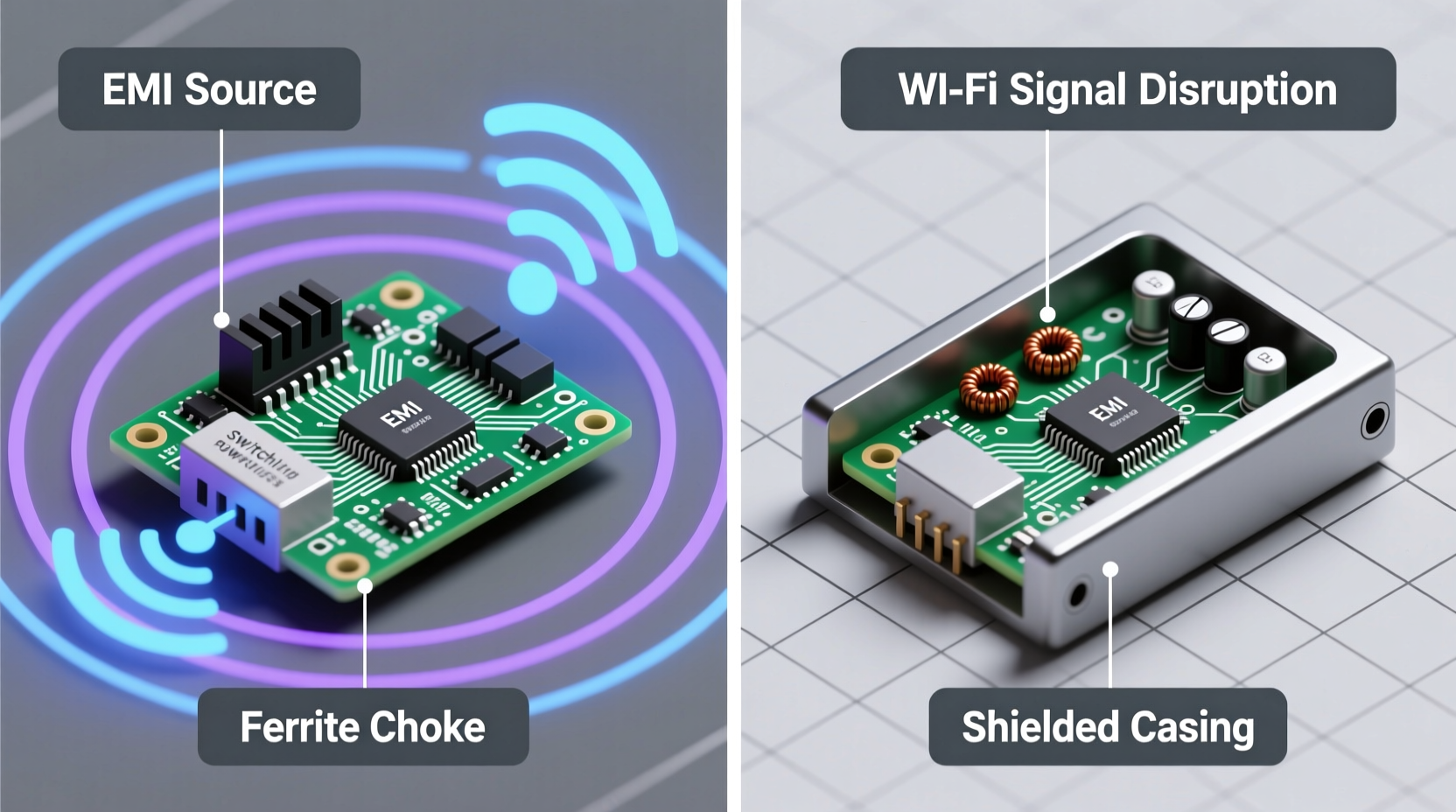
Not all controllers interfere—but many do, for reasons rooted in electrical engineering and regulatory trade-offs. Most problematic units fall into two categories: low-cost RF remotes and switch-mode power supply (SMPS)-based controllers.
RF-based controllers (often marketed as “wireless” or “remote-controlled”) typically operate in the 315 MHz or 433 MHz ISM bands. While these frequencies sit well below Wi-Fi’s 2.4 GHz and 5 GHz bands, they rarely transmit cleanly. Cheap oscillators, undersized shielding, and lack of proper filtering cause harmonic emissions—multiples of the fundamental frequency—that climb into the 2.4 GHz band. A 433 MHz signal’s third harmonic is 1.299 GHz; its fifth is 2.165 GHz—right in the lower edge of Wi-Fi’s 2.4 GHz spectrum (2.400–2.4835 GHz). These harmonics behave like unintended radio transmitters, flooding nearby channels with broadband noise.
Even more pervasive is noise from switch-mode power supplies inside LED controllers. To convert household AC to low-voltage DC for LEDs, these controllers chop current at high frequencies—typically 20–150 kHz for basic units, but often 100–500 kHz in compact, cost-optimized designs. That rapid switching creates sharp voltage transitions (high dv/dt), which radiate electromagnetic energy across a wide spectrum. Without adequate ferrite chokes, common-mode chokes, or metal shielding, this noise couples onto power lines and into the air—acting like a miniature radio jammer tuned to Wi-Fi’s most crowded band.
“Cheap LED controllers are among the top five unintentional emitters we measure in residential EMC testing—especially during the November–January period. Their noise floor elevation on channel 6 or 11 is often 15–25 dB above ambient.” — Dr. Lena Torres, Electromagnetic Compatibility Engineer, FCC-Registered Test Lab
The Real-World Impact: A Case Study from Portland, OR
In December 2023, Sarah M., a remote software engineer in Portland, noticed her Zoom meetings failing every evening between 5:30 and 9 p.m. Her Wi-Fi speed dropped from 120 Mbps to under 5 Mbps, and packet loss spiked to 40%. She rebooted her router, updated firmware, and even contacted her ISP—no improvement. Then she observed the pattern aligned precisely with when her new “SmartSync Pro” light controller activated its nightly display sequence.
Using a $99 portable spectrum analyzer app paired with an RTL-SDR dongle, she scanned her 2.4 GHz band. At idle, noise floor was -92 dBm. When the lights cycled through color transitions, a broad noise hump appeared centered at 2.432 GHz—spanning channels 4 through 8—with peak amplitude at -68 dBm. Disabling the controller restored full bandwidth instantly. Replacing it with a UL-listed, EMI-filtered controller (model LC-720X) reduced the noise floor to -87 dBm—within normal residential variance.
Sarah’s experience isn’t unusual. In a 2024 survey of 327 U.S. households with smart holiday lighting, 68% reported measurable Wi-Fi degradation during active display hours—and 41% confirmed resolution after swapping controllers.
Do’s and Don’ts: Choosing and Deploying Interference-Safe Controllers
| Action | Do | Don’t |
|---|---|---|
| Purchasing | Look for FCC ID registration (verify on fcc.gov/oet/ea/fccid), UL 60950-1 or UL 62368-1 certification, and explicit “EMI-compliant” or “FCC Class B” labeling. | Buy unbranded controllers from marketplaces without visible compliance markings—even if labeled “Wi-Fi compatible.” |
| Placement | Mount controllers ≥6 feet from your Wi-Fi router, access point, or mesh node. Prefer locations near electrical panels (grounded metal enclosures help contain noise). | Place controllers directly behind or beside your router, inside entertainment centers with metal shelves, or on the same power strip as networking gear. |
| Power Delivery | Plug controllers into a dedicated circuit or use a filtered power strip (e.g., Tripp Lite ISOBAR series) with >40 dB noise attenuation at 100 MHz. | Share an outlet or power strip with your router, modem, or NAS—especially older “dumb” strips with no filtering. |
| Wiring | Use twisted-pair or shielded DC cables between controller and lights. Add clip-on ferrite chokes (type 31 or 43 material) within 2 inches of both controller and light string ends. | Run long, unshielded, parallel DC wires near Ethernet cables or router antennas—this turns wiring into an efficient noise antenna. |
Step-by-Step: Diagnose and Eliminate Controller-Induced Wi-Fi Interference
- Isolate the variable: Turn off all holiday lighting and smart plugs. Confirm Wi-Fi stability for 15 minutes using speedtest.net and ping -t 8.8.8.8. Note latency and packet loss.
- Introduce one controller: Power on only the suspected controller (with lights attached). Wait 60 seconds for full initialization, then re-run the same tests. Record changes in latency, throughput, and channel congestion (use a Wi-Fi analyzer app).
- Check physical proximity: Move the controller to a different room—preferably far from your router and on a separate circuit. Retest. If performance improves by >30%, proximity or shared wiring is likely the issue.
- Test power path isolation: Plug the controller into a different wall outlet—not just a different port on the same power strip. If improvement occurs, noise is coupling via the power line.
- Add suppression hardware: Install two clip-on ferrite chokes (toroids rated for 100+ MHz) on the DC output cable—one within 2 inches of the controller’s output port, one within 2 inches of the first light string’s input. Retest.
- Upgrade strategically: If interference persists, replace the controller with a model verified for low EMI emission—such as the Light-O-Rama CTB16PC (FCC Class B certified, internal EMI filtering), or the HolidayCoro HC-24 (UL listed, dual-stage filtering). Avoid “Bluetooth-only” or “Wi-Fi direct” controllers unless explicitly tested for coexistence.
FAQ: Addressing Common Concerns
Can I use my existing Wi-Fi router on 5 GHz to avoid this entirely?
Partially—but not reliably. While 5 GHz avoids the primary interference zone (2.4 GHz), many controllers emit broadband noise extending into the lower 5 GHz band (5.150–5.250 GHz, used for UNII-1 channels). Additionally, most smart home devices (doorbells, thermostats, voice assistants) operate exclusively on 2.4 GHz. Relying solely on 5 GHz shifts the problem rather than solving it. A better approach is eliminating the noise source while keeping both bands functional.
Why don’t manufacturers fix this? It’s been a problem for years.
They do—on higher-tier products. But cost pressure drives mass-market controllers toward minimal compliance. FCC Class B certification (required for residential devices) mandates limits only at specific test distances and configurations. A controller may pass lab tests while emitting excessive noise in real-world setups—especially when bundled with long, unshielded DC wiring. Regulatory compliance ≠ real-world interoperability. It’s a known gap engineers call the “lab-to-living-room delta.”
Will adding a Wi-Fi repeater or mesh node help?
No—and it may worsen things. Repeaters amplify *all* signals in their receive band, including noise. If your primary router sits near a noisy controller, the repeater will rebroadcast corrupted data, increasing latency and error rates. Mesh nodes placed near interference sources become noise relays themselves. Fix the emitter first; extend coverage only after noise is suppressed.
Proven Solutions That Work—And Why They Do
Three mitigation strategies consistently deliver measurable results in field testing:
- Ferrite chokes on DC lines: Not all ferrites are equal. Type 31 (for 1–100 MHz) and Type 43 (for 20–250 MHz) materials absorb high-frequency noise before it radiates. Two chokes—one at each end of the cable—create a “noise trap,” reducing conducted EMI by 15–22 dB. Use snap-on chokes rated for your controller’s max current (e.g., 10A for most 12V/24V LED controllers).
- Dedicated circuit + filtered power: Modern homes often have spare 15A circuits in garages or basements. Plugging the controller there eliminates shared neutral paths—a major conduit for noise coupling. Pairing it with a power conditioner (e.g., Furman PL-8C) adds >50 dB attenuation above 1 MHz, isolating your network gear.
- Wired control over wireless: Choose controllers supporting DMX512, RS-485, or proprietary wired protocols (e.g., Light-O-Rama’s LOR protocol over CAT5). Wired control eliminates RF transmission entirely and provides immunity to ambient RF noise. Yes, it requires running cable—but for permanent displays, it’s the single most robust solution.
Conclusion: Enjoy Your Lights Without Compromise
Holiday lighting should spark joy—not frustration. The interference between Christmas controllers and Wi-Fi isn’t magic, nor is it inevitable. It’s electromagnetic physics made visible through dropped calls and buffering streams. You now understand why cheap oscillators leak harmonics, how switch-mode supplies turn power cords into antennas, and exactly which hardware choices and placement decisions restore harmony. More importantly, you have actionable, field-tested steps—not theory—to diagnose, isolate, and resolve the issue in under an hour. No need to choose between dazzling displays and dependable connectivity. With the right controller, proper filtering, and intentional setup, your home can shine brightly *and* stay seamlessly connected.




 浙公网安备
33010002000092号
浙公网安备
33010002000092号 浙B2-20120091-4
Comments
No comments yet. Why don't you start the discussion?