
Anyone who’s taken a photo indoors under modern lighting has likely noticed an odd effect: skin tones appear unnaturally cool, washed out, or even slightly blue. This phenomenon is especially common with LED lighting, which dominates homes, offices, and commercial spaces due to its energy efficiency and longevity. While LEDs offer many advantages, their impact on photography—particularly skin tone rendering—is often overlooked. The root of the problem lies not in the camera alone, but in the complex interplay between light spectrum, color temperature, and human perception.
The blue tint issue arises when the light source emits a disproportionate amount of blue wavelengths, tricking both the camera’s white balance system and the viewer’s eye. Unlike incandescent bulbs, which produce a warm, continuous spectrum similar to candlelight or sunset, many LEDs generate light through phosphor conversion or direct diode emission, resulting in peaks and gaps across the visible spectrum. These spectral anomalies can distort how colors—especially flesh tones—are captured, making people look fatigued, sickly, or artificial in photos.
Understanding Color Temperature and Its Role
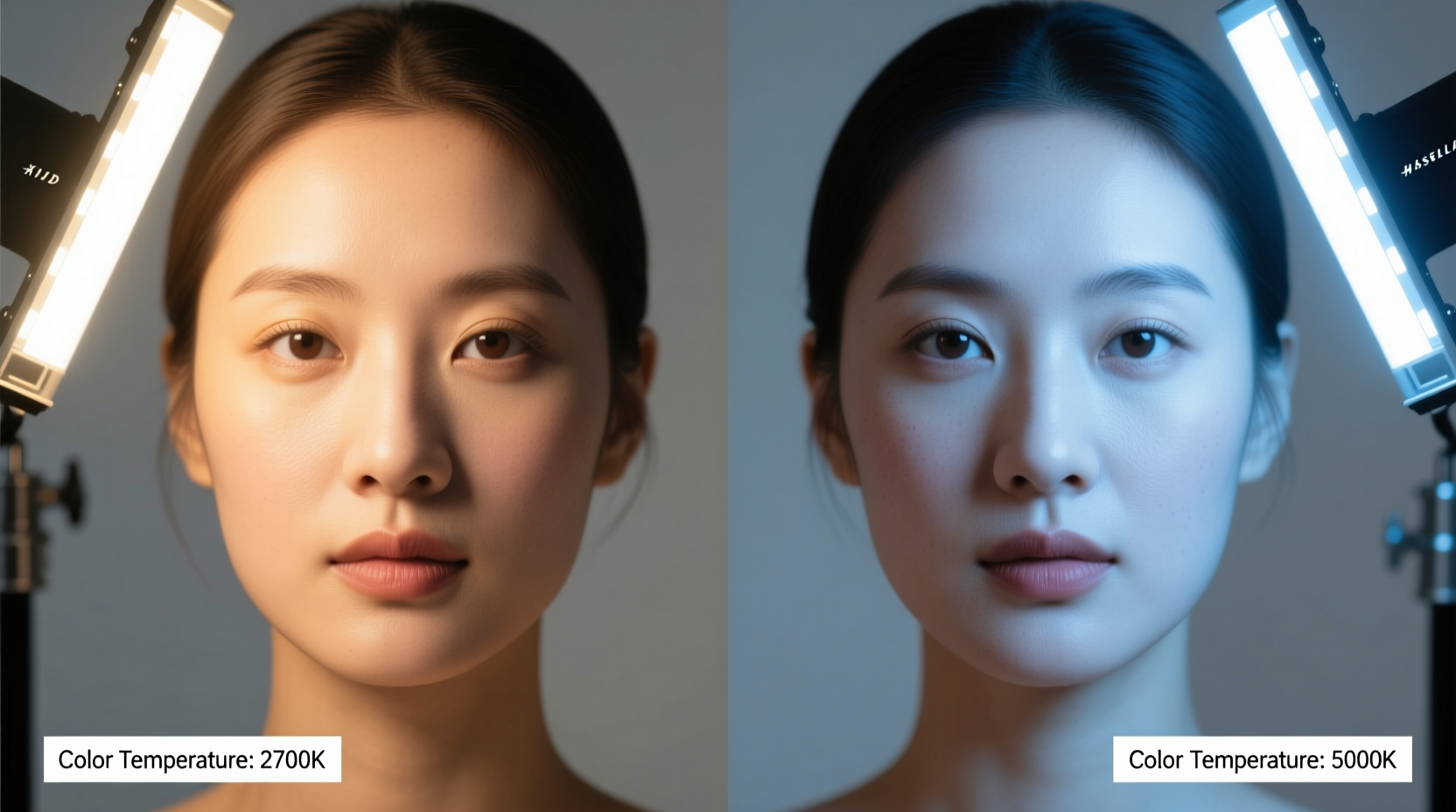
Color temperature, measured in Kelvin (K), describes how warm or cool a light source appears. Lower values (around 2700K–3000K) are considered warm white, emitting a yellowish glow reminiscent of traditional incandescent bulbs. Higher values (5000K–6500K) are labeled cool white or daylight, producing a crisp, bluish-white light often used in offices and retail environments for its alertness-promoting qualities.
Most LED bulbs fall somewhere along this scale, but unlike natural sunlight or incandescent sources, they don’t always emit a smooth distribution of colors across the spectrum. A 5000K LED may technically match the color temperature of midday sun, yet still lack the full spectral continuity that ensures accurate color reproduction. This discrepancy becomes evident when photographing skin, which reflects subtle blends of red, yellow, and pink hues that depend on balanced lighting to appear natural.
The Science Behind Spectral Gaps in LEDs
LEDs create light differently than older technologies. In a standard incandescent bulb, electricity heats a tungsten filament until it glows, producing a broad, continuous spectrum of light. Fluorescent and LED lights, by contrast, rely on quantum processes: LEDs use semiconductor materials that emit specific wavelengths when energized. To achieve white light, manufacturers typically either combine red, green, and blue diodes or coat a blue LED with a yellow phosphor layer to simulate white.
This method often results in a pronounced spike in the blue region of the spectrum, followed by a dip in cyan and green wavelengths—a pattern known as the “blue bump.” Research from the Lighting Research Center at Rensselaer Polytechnic Institute shows that many off-the-shelf LED bulbs exhibit significant spectral imbalances, particularly in the 450–500nm range, which directly affects how cameras interpret skin tones.
Cameras use algorithms to calculate white balance based on the assumption that the scene contains neutral colors. But under LED lighting with strong blue spikes, these algorithms can misinterpret the dominant hue, failing to compensate adequately for the excess blue. Even manual white balance settings may struggle if the light lacks sufficient red and green components to anchor accurate color correction.
“Many LEDs meet basic illuminance standards but fail in color fidelity. What looks ‘white’ to the eye may be missing critical wavelengths needed for realistic skin tone rendering.” — Dr. Mark Rea, Director Emeritus, Lighting Research Center
How Cameras Interpret Light Differently Than Human Eyes
One reason the blue tint goes unnoticed until viewing photos is that human vision adapts dynamically to lighting conditions. Our brains perform real-time color correction, allowing us to perceive a white sheet of paper as white whether under candlelight or noonday sun. Cameras, however, must estimate this correction using preset or automatic white balance modes, which aren’t always precise under artificial light.
Digital sensors are also more sensitive to blue and green light than red, partly due to the Bayer filter array used in most cameras. This filter overlays red, green, and blue filters on individual pixels, with twice as many green sensors to mimic human luminance sensitivity. However, under LED lighting with uneven spectral output, this setup can amplify the appearance of blue while underrepresenting warmer tones essential for healthy-looking skin.
Additionally, smartphone cameras—despite advanced computational photography—often prioritize brightness and contrast over color accuracy. In low-light conditions, they may boost gain in blue channels to improve clarity, further exaggerating any existing blue bias in the ambient light.
Real-World Example: The Home Office Portrait Problem
Consider Sarah, a freelance graphic designer who started offering headshot sessions for remote workers from her apartment. She set up a simple backdrop near a large window and supplemented natural light with two inexpensive LED panel lights she bought online. Clients began commenting that their photos made them look “tired” or “sick,” despite feeling well-rested.
Upon reviewing the images, Sarah noticed a consistent cool cast across all portraits taken after sunset, when she relied solely on the LED panels. Using a spectrometer app, she discovered her lights emitted a peak at 455nm (deep blue) and had very low output in the red spectrum (600–650nm). Even though the lights were labeled 4000K—marketed as “neutral white”—their poor spectral rendering index (CRI) meant colors didn’t translate accurately.
After replacing the panels with high-CRI LEDs (95+ CRI) and adjusting her camera’s custom white balance using a gray card, Sarah saw immediate improvement. Skin tones appeared warmer, more lifelike, and clients praised the professional quality of the images. Her experience highlights how technical specs like CRI and spectral distribution matter far more than color temperature alone.
Key Factors That Contribute to Blue Tint in Photos
- High color temperature (5000K+): Cool white LEDs increase blue dominance in the scene.
- Low CRI (Color Rendering Index): Bulbs with CRI below 80 fail to render colors accurately, especially reds and yellows in skin.
- Poor spectral distribution: Missing or weak wavelengths in the amber and red regions leave skin without necessary warm reflectance.
- Camera white balance mismatch: Auto white balance assumes neutral lighting and fails under non-uniform spectra.
- Use of cheap LED fixtures: Budget bulbs often cut corners on phosphor quality, leading to exaggerated blue spikes.
How to Prevent or Correct the Blue Tint Issue
Whether you're a casual photographer, content creator, or simply want better-looking selfies, several practical steps can reduce or eliminate unwanted blue casts caused by LED lighting.
Step-by-Step Guide to Fixing LED-Induced Blue Tints
- Choose Warm White LEDs (2700K–3000K): For living spaces and portrait areas, select bulbs clearly labeled warm white. Avoid daylight or cool white unless necessary for task lighting.
- Check the CRI Rating: Opt for bulbs with a CRI of 90 or higher. High-CRI LEDs reproduce colors more faithfully, preserving natural skin tones.
- Use a Gray Card for Custom White Balance: Before shooting, take a photo of a neutral gray card under your lighting and set your camera to use that as the white balance reference.
- Diffuse Harsh Light Sources: Place softboxes, umbrellas, or sheer fabric between LEDs and subjects to scatter intense blue hotspots.
- Edit in Post-Production: Use software like Adobe Lightroom or Snapseed to adjust white balance manually, reducing temperature and adding magenta to counteract greenish-blue shifts.
- Combine Natural and Artificial Light: Open curtains during daytime shoots to blend sunlight with indoor LEDs, balancing the overall spectrum.
Comparison of Light Types and Skin Tone Accuracy
| Light Source | Average Color Temp | Spectral Quality | CRI | Effect on Skin Tones |
|---|---|---|---|---|
| Incandescent | 2700K | Continuous, smooth | 100 | Warm, flattering, natural |
| Halogen | 3000K | Nearly continuous | 100 | Rich, vibrant, true-to-life |
| Standard LED (low cost) | 4000K–6500K | Peaked, gapped | 70–80 | Cool, pale, sometimes blue-tinged |
| High-CRI LED | 2700K–4000K | Balanced, fuller spectrum | 90–98 | Natural, even, minimal correction needed |
| Daylight (noon) | 5500K | Full, continuous | 100 | Fair, clean, but can be harsh without diffusion |
Action Checklist: Achieving Natural-Looking Skin in Indoor Photos
- ✅ Replace cool white LEDs (5000K+) with warm white (2700K–3000K) in key photo areas
- ✅ Purchase only high-CRI (90+) bulbs for rooms where portraits are taken
- ✅ Test lighting with a selfie before formal shoots to spot color issues early
- ✅ Set custom white balance using a gray card or white paper under actual lighting
- ✅ Use diffusers or bounce cards to soften LED intensity and spread light evenly
- ✅ Edit final images to fine-tune warmth and tint, especially in shadows and highlights
Frequently Asked Questions
Can I fix blue-tinted photos without professional editing software?
Yes. Most smartphones have built-in photo editors that allow you to adjust warmth (temperature) and tint. Simply slide toward “warm” or “yellow” until skin looks more natural. Apps like Snapseed, Adobe Lightroom Mobile, and VSCO offer free tools with precise white balance controls.
Do all LED lights cause this problem?
No. High-quality LEDs designed for photography, film, or retail display often have excellent color rendering and balanced spectra. The issue primarily affects budget consumer-grade bulbs marketed for general illumination, where cost-cutting leads to inferior phosphor blends and unoptimized diodes.
Is the blue tint harmful, or just cosmetic?
While the visual effect is mainly aesthetic, prolonged exposure to high-intensity blue-rich light at night can disrupt circadian rhythms and melatonin production. For health and comfort, experts recommend minimizing cool white LED use in bedrooms and living areas after sunset.
Conclusion: Lighting Matters More Than You Think
The way we light our spaces profoundly influences how we see ourselves—and how we’re seen by others in photographs. The blue tint cast by certain LED lights isn't a flaw in your camera or your skin; it's a mismatch between modern lighting technology and the biological and technical demands of accurate color representation. By understanding color temperature, prioritizing high-CRI bulbs, and applying simple photographic techniques, you can ensure that indoor lighting enhances rather than detracts from your appearance.
Don’t accept washed-out selfies or awkward Zoom thumbnails as inevitable. Take control of your environment with intentional lighting choices. Whether you're capturing memories, building a personal brand, or simply wanting to look your best in video calls, the right light makes all the difference. Start evaluating your bulbs today—not just for brightness, but for how they make people look and feel.




 浙公网安备
33010002000092号
浙公网安备
33010002000092号 浙B2-20120091-4
Comments
No comments yet. Why don't you start the discussion?