
It’s a moment many homeowners have experienced: you reach to adjust a lamp on your nightstand, brush your finger across its base—and the light instantly shifts from warm white to cool blue. Or perhaps your kitchen under-cabinet strip dims and cycles through hues as your hand passes near the sensor panel. Confusion follows: Is the fixture broken? Is it leaking voltage? Could it be dangerous? The short answer is no—it’s almost certainly not a defect. In fact, this responsive behavior is a deliberate design feature built into thousands of modern smart and touch-sensitive LED products. But understanding *why* it happens—and distinguishing true capacitive control from unintended electrical interference—requires unpacking both electronics fundamentals and real-world product engineering.
How Touch-Responsive LEDs Actually Work
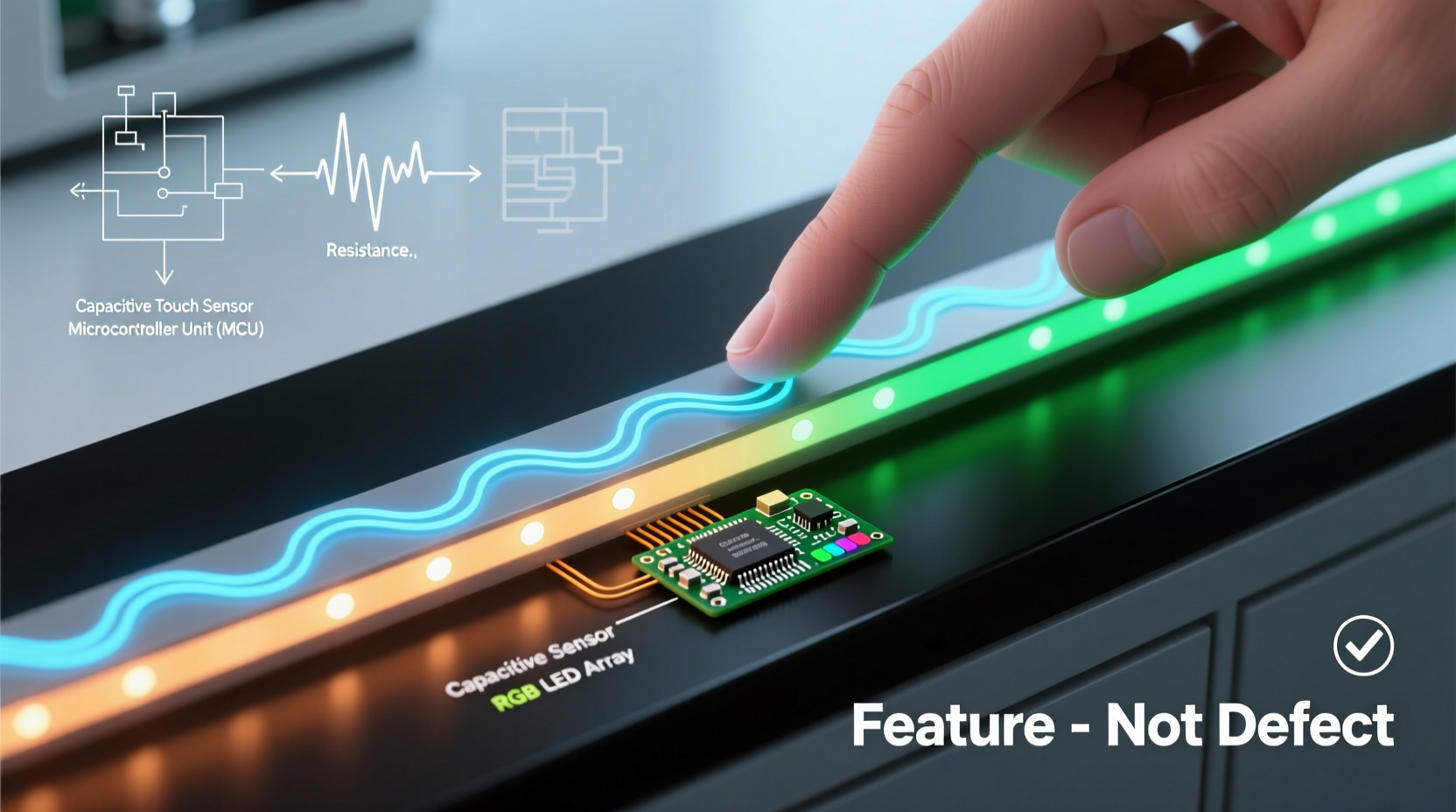
Most “touch-changing” LED lights rely on capacitive sensing, not physical switches or pressure detection. Capacitive touch technology measures tiny changes in an electric field generated by a conductive surface—often a copper trace embedded just beneath the lamp’s housing or integrated into its metal bezel. Your body acts as a grounded conductor. When your finger approaches or touches the sensor area, it alters the local capacitance. A microcontroller detects this shift, interprets it as a command (e.g., “cycle color”), and triggers the LED driver to adjust output accordingly.
This is fundamentally different from resistive touchscreens (which require pressure) or infrared motion sensors (which detect heat or movement at a distance). Capacitive systems are designed for proximity and contact—not for accidental activation—but their sensitivity can vary significantly based on design quality, firmware tuning, and environmental factors like humidity or grounding integrity.
Importantly, capacitive sensing requires no direct electrical connection between the user and the circuit. You’re not completing a circuit or receiving current—you’re simply influencing an electromagnetic field calibrated to respond within millimeters of the surface.
Feature vs. Defect: Five Clear Differentiators
Not all color-shifting behavior is intentional. Here’s how to determine whether what you’re seeing is a purposeful feature—or a sign of underlying trouble:
| Indicator | Consistent Feature | Potential Defect |
|---|---|---|
| Activation method | Only responds to deliberate, sustained touch (≥300 ms) on designated sensor zone (e.g., marked pad, recessed ring) | Changes color with light brushing, proximity, or even vibration; occurs randomly without contact |
| Consistency | Repeatable response every time—same gesture produces same result (e.g., tap = brightness up, hold = color cycle) | Inconsistent behavior: sometimes works, sometimes doesn’t; may skip steps or freeze mid-cycle |
| Power stability | No flickering, buzzing, or dimming before/after color change; steady output at all settings | Accompanied by audible buzzing, visible flicker, or sudden power loss; worsens over time |
| Environmental dependence | Works reliably across normal indoor humidity (30–60% RH); unaffected by nearby electronics | Fails in dry air (<25% RH), activates only when phone is nearby, or misfires near Wi-Fi routers or microwaves |
| Manufacturer documentation | Explicitly described in manual/spec sheet as “touch control,” “capacitive interface,” or “gesture-responsive” | No mention of touch functionality; product marketed as basic on/off or remote-only |
If three or more “Potential Defect” criteria apply, further investigation is warranted—not because the unit is necessarily unsafe, but because degraded components (like failing decoupling capacitors or corroded ground traces) may compromise long-term reliability.
Real-World Example: The Apartment Renovation Dilemma
When Maya renovated her 1970s Chicago apartment, she installed six identical touch-dimmable LED pendants over her dining table. For three months, they worked flawlessly: a single tap toggled on/off; a two-second hold cycled through color temperatures. Then, after an electrician upgraded the building’s main panel and added a new subpanel, one pendant began changing color erratically—shifting from 2700K to 6500K whenever she walked within two feet of it, even in socks.
She assumed the fixture was faulty and contacted the manufacturer. Their support team asked two diagnostic questions: “Is the pendant grounded?” and “What’s the voltage reading between its mounting bracket and a known ground?” A multimeter check revealed 8.3 VAC leakage—a symptom of improper neutral bonding in the new subpanel. Once the electrician corrected the grounding configuration, the phantom triggering stopped. The pendant wasn’t defective; it was functioning *too well* in the presence of stray capacitance induced by poor system grounding.
This case underscores a critical point: touch-responsive LEDs don’t cause electrical problems—but they can expose them.
Troubleshooting Checklist: What to Do Before Assuming Failure
- Verify power source compatibility: Confirm the fixture is paired only with its specified driver or dimmer (e.g., ELV, TRIAC, or 0–10V)—mismatched dimmers are the #1 cause of erratic color behavior.
- Test grounding integrity: Use a multimeter to measure AC voltage between the fixture’s metal housing and a verified earth ground (e.g., cold water pipe). Anything above 0.5 VAC warrants electrician review.
- Eliminate ambient interference: Temporarily unplug nearby devices (smart speakers, chargers, LED TVs) and observe if behavior persists.
- Reset firmware: For smart-enabled fixtures, perform a factory reset (usually via rapid on/off cycling per manual instructions) to clear corrupted settings.
- Check for moisture ingress: Inspect seals around sensor zones—condensation or cleaning solution residue can create false capacitance paths.
Expert Insight: Engineering Intent Behind the “Touch”
“Capacitive interfaces in lighting aren’t gimmicks—they solve real human factors problems. A user shouldn’t need to hunt for a switch in the dark, fumble with a remote, or remember app passwords just to set mood lighting. Touch provides immediate, tactile, context-aware control. But it demands rigorous electromagnetic compatibility testing. When we see ‘phantom triggering,’ it’s rarely the sensor’s fault—it’s usually a system-level issue: underspecified grounding, noisy power supplies, or firmware that hasn’t been validated across global voltage tolerances.” — Dr. Lena Torres, Senior Electrical Engineer, Philips Lighting R&D (2018–2023)
Dr. Torres’ observation highlights a crucial nuance: touch responsiveness is a systems engineering challenge, not just a component feature. High-end fixtures invest in shielded sensor traces, adaptive threshold algorithms (which auto-adjust sensitivity based on ambient noise), and redundant grounding paths. Budget models may use simpler, less robust implementations—making them more susceptible to environmental variables without being inherently defective.
Step-by-Step: Calibrating Sensitivity on Adjustable Touch Fixtures
Some premium touch LEDs allow users to fine-tune sensor responsiveness. If your fixture supports this (check model number against manufacturer’s compatibility list), follow this sequence:
- Power-cycle the fixture: Turn off at the wall switch for ≥10 seconds, then restore power.
- Enter calibration mode: Within 5 seconds of power restoration, touch the sensor zone exactly 5 times in rapid succession (≤1 second between touches).
- Observe indicator pattern: Most units will flash slowly (3x) to confirm entry. If no flash, repeat step 2.
- Adjust sensitivity: Each subsequent touch increases sensitivity; each 3-second hold decreases it. Start with medium (3 touches after entering mode).
- Exit and save: After desired setting, wait 8 seconds—fixture will emit one long pulse to confirm and save.
- Test thoroughly: Validate response across varying conditions: dry/wet hands, gloved touch, proximity-only activation.
Note: This process only applies to models with programmable firmware (e.g., certain Lutron Caseta, Nanoleaf Shapes, or IKEA FLOALT series). Never attempt calibration on non-supported fixtures—their controllers lack memory registers for such adjustments.
FAQ: Addressing Common Concerns
Is it safe to touch a light that changes color when I do?
Yes—when functioning as designed. Certified touch LEDs (UL 1598, EN 60598, or IEC 62368-1 compliant) isolate high-voltage sections from sensor circuitry using reinforced insulation barriers and galvanic separation. The touch surface operates at ≤12 VDC and draws <1 mA—well below thresholds for perceptible shock or physiological effect. However, never bypass safety enclosures or modify housings.
Why does my touch light work perfectly with gloves on one day but not the next?
Glove material matters significantly. Thin cotton or silk may allow enough capacitance transfer; thick wool, leather, or insulated winter gloves typically won’t. Humidity is the bigger variable: at 20% RH, even bare fingers may fail to trigger low-sensitivity sensors, while at 65% RH, the same unit may activate from 1 cm away. This isn’t malfunction—it’s physics. Consider using a dedicated metal stylus (like a key) for consistent activation in dry environments.
Can I disable the touch function entirely?
In most cases, no—touch circuitry is integrated into the driver board and cannot be disabled without hardware modification (which voids certification and warranty). However, some models offer “lock mode”: press-and-hold the sensor for 10 seconds until it flashes red, disabling all touch input until manually unlocked. Check your manual for “child lock,” “sensor lock,” or “mode lock” features.
Conclusion
Color-shifting LED lights aren’t magical—they’re the thoughtful convergence of materials science, embedded systems engineering, and human-centered design. When your lamp responds to a touch, it’s not malfunctioning; it’s interpreting your intention through carefully tuned electromagnetic fields. That said, responsiveness without reliability undermines trust. If your fixture exhibits inconsistent, environment-dependent, or power-compromised behavior, treat it not as a defect to discard—but as a diagnostic opportunity. Investigate grounding, verify compatibility, eliminate interference, and consult manufacturer resources before replacing hardware. Understanding the “why” behind the behavior transforms confusion into confidence—and empowers smarter purchasing decisions for future installations. The next time you tap a light and watch it shift hue, you’ll know exactly what’s happening beneath the surface—and whether it’s working precisely as intended.




 浙公网安备
33010002000092号
浙公网安备
33010002000092号 浙B2-20120091-4
Comments
No comments yet. Why don't you start the discussion?