
Anyone who has played a modern video game has likely seen it: your character suddenly sinks into the floor, walks halfway through a wall, or falls straight through the map into an endless void. These moments—often met with laughter or frustration—are more than just quirks. They’re symptoms of complex systems struggling to simulate reality in real time. While they might seem like simple oversights, clipping issues reveal deep challenges in game physics, animation, and computational design. Understanding why characters pass through solid objects requires unpacking how games model space, movement, and interaction at a fundamental level.
The Mechanics of Collision Detection
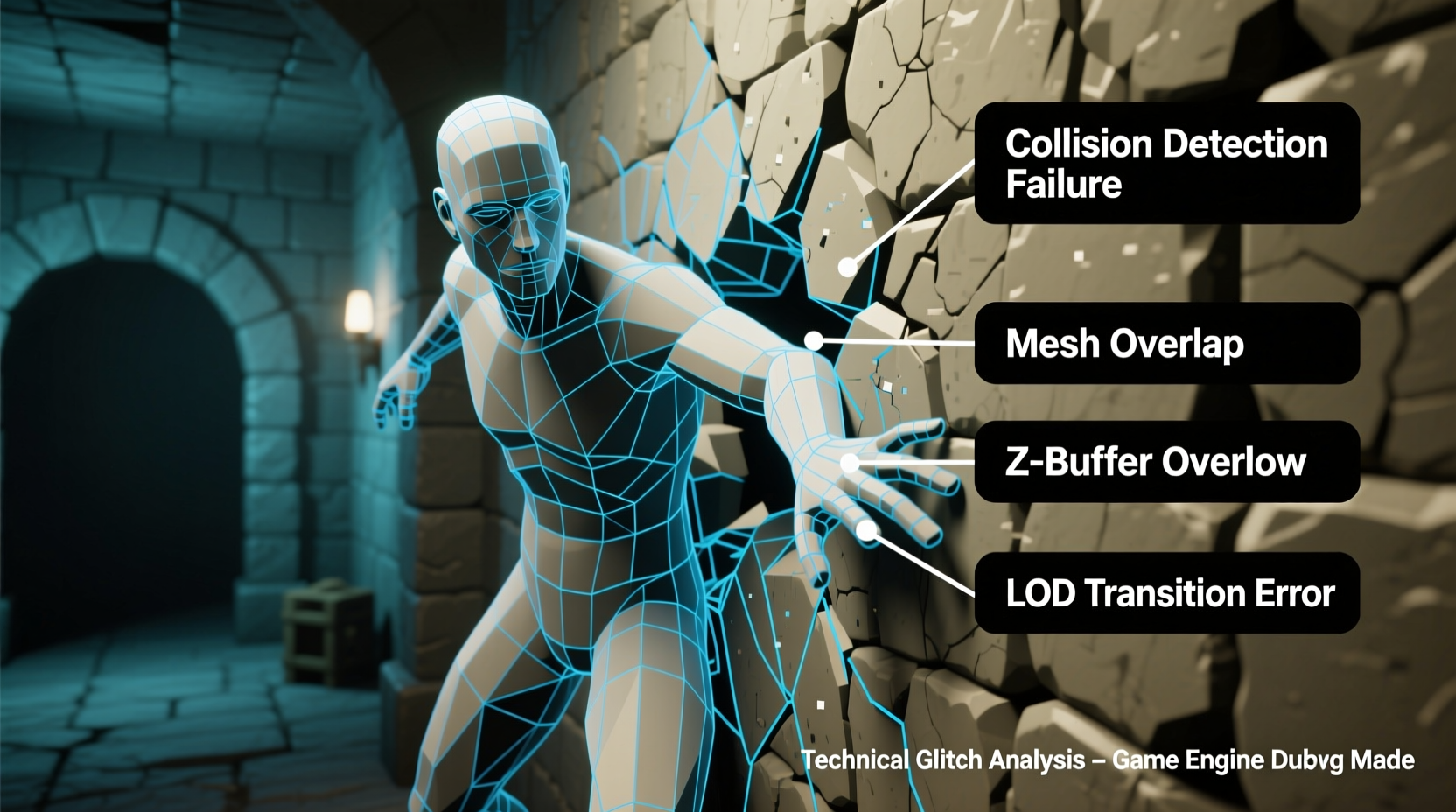
At the heart of every 3D game is a system called collision detection, which determines when two objects intersect or touch. This system prevents characters from walking through walls, falling through floors, or occupying the same space as enemies or furniture. In theory, it’s straightforward: if Object A enters the space of Object B, the game should stop the motion. But in practice, this process involves constant calculations across thousands of objects per second.
Games use simplified geometric shapes—called collision meshes or hitboxes—to represent physical boundaries. Instead of checking every polygon of a detailed 3D model (which would be computationally overwhelming), engines use primitive shapes like boxes, spheres, or capsules. For example, a character may be represented by a vertical capsule that moves and rotates within the environment. Walls are often simplified into flat planes or rectangular volumes.
However, simplification creates gaps. If the player’s hitbox doesn’t perfectly align with their visual model, or if the wall’s collision mesh ends slightly short of its rendered edge, the character can appear to phase through solid geometry. This mismatch between visual fidelity and collision accuracy is one of the most common sources of clipping.
Animation and Physics: The Frame-by-Frame Battle
Another major cause of clipping lies in the relationship between animation and physics. Characters in games follow pre-recorded animations—walking, jumping, crouching—that were created in studios and imported into the engine. These animations define limb positions, body rotation, and foot placement over time. However, the physics engine operates independently, updating object positions based on forces, velocity, and collisions.
When animation and physics diverge, clipping occurs. For instance, during a roll or dodge maneuver, the animation might shift the character’s torso forward rapidly. If the physics system fails to register this change in time—or if the movement happens between collision checks—the character can penetrate a wall before the system corrects it.
This problem intensifies with high-speed movement. Games typically run collision checks at fixed intervals (e.g., 60 times per second). If a character moves faster than the distance between these checks, they can “tunnel” through obstacles—a phenomenon known as tunneling. Imagine throwing a ball through a window screen: if it moves fast enough, it passes between the wires without hitting any. Similarly, a sprinting character might leap through a narrow gap in the collision mesh if the engine doesn’t interpolate movement between frames.
“Even with advanced physics engines, we’re always balancing realism against performance. Sometimes, that means accepting minor clipping as a trade-off.” — Marcus Tran, Senior Gameplay Engineer at Horizon Interactive
Common Causes of Wall Clipping in Practice
While the underlying principles are technical, the triggers for clipping are often predictable. Below are five frequent causes observed across AAA and indie titles alike:
- Loose or outdated collision meshes: When level geometry is updated but the collision data isn’t, players can walk through newly placed walls.
- Network latency in multiplayer games: In online shooters, client-server desynchronization can make it seem like a player clips through cover—even if they’re technically outside it on the server.
- Complex character animations: Vaulting, climbing, or melee combos often involve exaggerated limb movements that temporarily exceed the hitbox bounds.
- Dynamic environments: Moving platforms, destructible walls, or procedurally generated levels may not update collision data instantly, creating temporary gaps.
- Player input buffering: Some games allow inputs to queue during animations. If a player presses “forward” while finishing a jump, the resulting momentum may push them into geometry before alignment resets.
Real-World Example: The Legend of Zelda: Breath of the Wild
In Nintendo’s open-world masterpiece, players quickly discovered that careful positioning and timing could send Link phasing through mountains, temples, and even the world boundary. One well-known technique involved using the Stasis rune to freeze a moving object, then riding it as it accelerated. Due to floating-point precision errors and delayed collision updates, Link would sometimes end up inside solid rock.
While Nintendo never patched all clipping exploits—some became part of speedrunning culture—the case illustrates how ambitious physics systems invite unintended behavior. The game’s emphasis on emergent gameplay meant that rigid constraints were intentionally relaxed, allowing creative solutions… and occasional glitches.
Solutions and Workarounds Developers Use
Eliminating clipping entirely is nearly impossible, but experienced developers employ multiple strategies to minimize it. These range from preventive design choices to runtime corrections.
1. Swept Collision Detection
Instead of checking an object’s position at the start and end of a frame, swept detection calculates the entire path traveled. If that path intersects with a wall, the system stops the object at the point of impact. This method effectively eliminates tunneling but requires more processing power.
2. Hitbox Tuning and Animation Retargeting
Developers manually adjust hitboxes to match key animation frames. For example, during a lunge attack, the hitbox may extend briefly to reflect reach, then contract back. This process, known as animation retargeting, ensures that the physics representation stays aligned with visual intent.
3. Penetration Resolution Algorithms
When clipping does occur, games use resolution algorithms to “push” objects apart. These calculate the minimum translation needed to separate overlapping hitboxes. However, if the correction is too aggressive, it can result in unnatural teleportation or jittering.
4. Level Design Safeguards
Many studios build invisible barriers behind visible walls, create thicker collision volumes, or avoid placing narrow ledges near high-speed paths. These invisible buffers act as fail-safes when primary collision systems falter.
| Solution | Effectiveness | Performance Cost |
|---|---|---|
| Swept Collision | High (prevents tunneling) | Moderate to High |
| Hitbox Adjustment | High (prevents animation glitches) | Low (manual effort) |
| Penetration Resolution | Moderate (fixes after event) | Low |
| Invisible Barriers | Medium (design workaround) | Negligible |
| Frame Rate Locking | Low (reduces variability) | None |
Step-by-Step: How a Developer Fixes a Clipping Bug
When a tester reports that a character clips through a specific wall during a double jump, here’s how a gameplay programmer typically responds:
- Reproduce the bug: The developer plays through the scenario to confirm the issue under identical conditions (speed, angle, frame rate).
- Analyze the physics log: Using debugging tools, they inspect the character’s position, velocity, and collision flags across frames.
- Check collision mesh alignment: They overlay the visual model with the hitbox to see if there’s a gap or misalignment.
- Review animation curves: They examine whether the jump arc pushes the hitbox beyond expected bounds during peak motion.
- Adjust parameters: Options include tightening the hitbox, adding a collision sweep, increasing physics tick rate, or modifying the jump velocity.
- Test on multiple devices: The fix is validated across different hardware to ensure consistency.
- Deploy and monitor: Once patched, telemetry data tracks whether similar issues arise elsewhere.
This process can take hours or days, depending on the complexity. In some cases, especially late in development, teams may opt for a design workaround rather than a technical overhaul.
Frequently Asked Questions
Can clipping be completely eliminated?
No—not practically. Due to hardware limitations, floating-point precision errors, and the unpredictability of player behavior, some degree of clipping will always exist in interactive 3D environments. The goal is mitigation, not perfection.
Do newer consoles reduce clipping?
Partially. More powerful hardware allows for higher physics tick rates, better collision algorithms, and tighter animation integration. However, as games become more complex—with larger worlds, more NPCs, and dynamic destruction—the risk of new clipping scenarios increases alongside improvements.
Is clipping considered a bug or a feature?
It depends. In most cases, it’s a bug. But in games that support speedrunning or encourage exploration (like *Breath of the Wild* or *Super Mario 64*), certain clipping behaviors are embraced as part of the community experience. Developers may leave them unpatched unless they break core progression.
Tips for Players: Minimizing Clipping Frustration
While you can’t fix engine-level issues, you can reduce your exposure to clipping glitches:
- Keep your game and drivers updated; patches often address known physics issues.
- Play at stable frame rates. Sudden drops can desynchronize animation and physics.
- Reset your position if you feel “stuck” in geometry—many games auto-correct when you respawn.
- Report consistent clipping spots to developers via official channels.
Conclusion: Embracing Imperfection in Virtual Worlds
Clipping through walls isn’t just a glitch—it’s a reminder of the immense challenge of simulating reality in real time. Every frame, a game balances visual detail, responsive controls, and physical accuracy under strict performance budgets. When a character phases through a door, it’s not laziness; it’s the cost of pushing boundaries in an inherently imperfect medium.
As technology advances, we’ll see fewer of these issues—but never zero. What matters is how developers anticipate, manage, and learn from them. For players, a little understanding goes a long way. Next time your avatar sinks into the floor, remember: you’re witnessing the invisible machinery of interactivity at work.




 浙公网安备
33010002000092号
浙公网安备
33010002000092号 浙B2-20120091-4
Comments
No comments yet. Why don't you start the discussion?