
It’s common to pick up your phone charger and feel warmth—sometimes even noticeable heat—coming from the adapter or cable. For many users, this raises an immediate question: Is this normal, or is something wrong? The truth is, some degree of heating is expected during charging due to basic physics and electrical resistance. However, excessive or sudden temperature increases can signal underlying issues that pose real risks, including device damage or fire hazards.
Understanding the science behind charger heat, recognizing the difference between acceptable warmth and dangerous overheating, and knowing when to take action are essential for both device longevity and personal safety. This article breaks down what causes your charger to heat up, how to identify red flags, and what steps you can take to protect yourself and your electronics.
The Science Behind Charger Heat
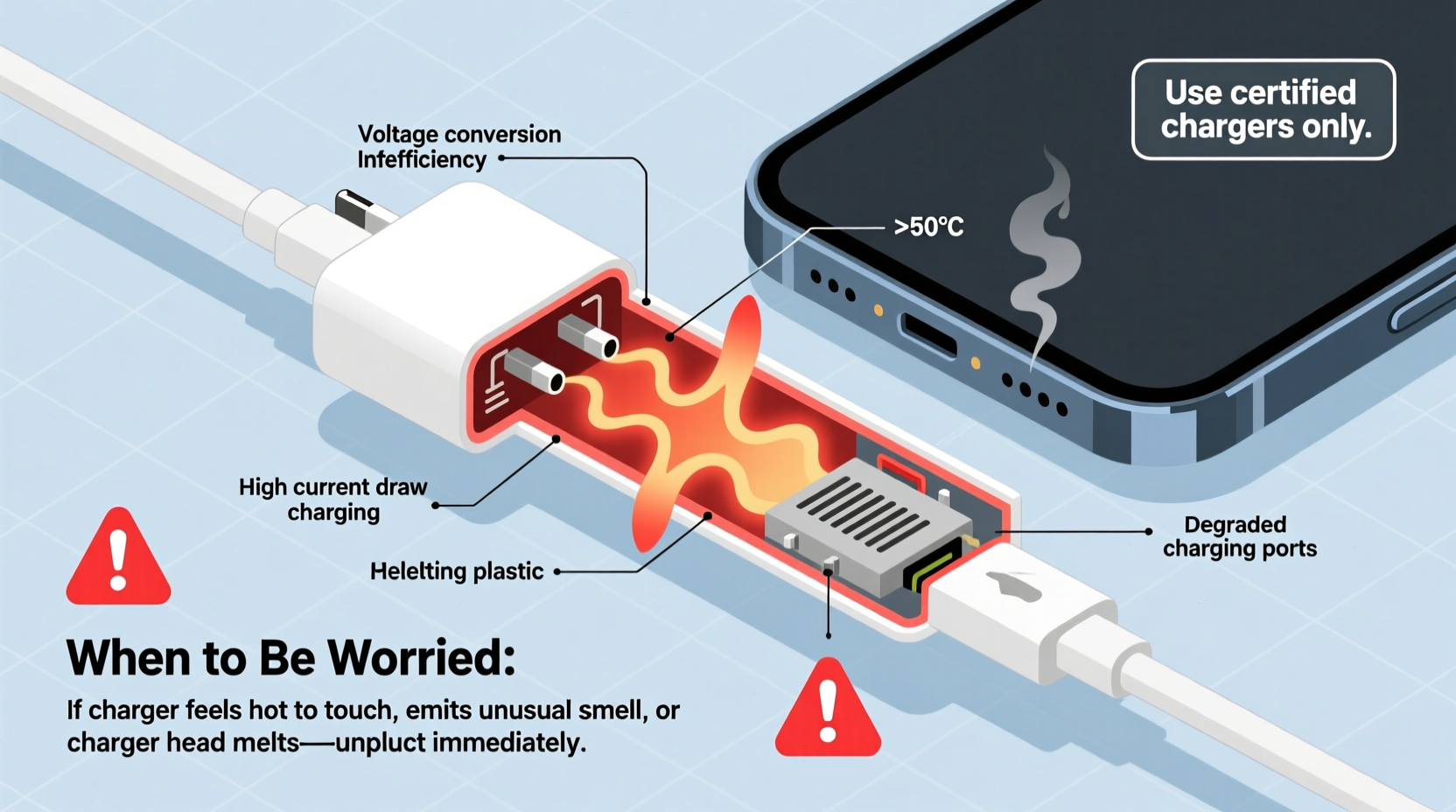
Every time electricity flows through a conductor—like the internal components of your charger—some energy is lost as heat. This phenomenon, known as resistive (or Joule) heating, occurs because electrons collide with atoms in the material they're moving through, generating thermal energy. In chargers, this happens primarily in three areas:
- AC-to-DC Conversion: Wall adapters convert alternating current (AC) from your outlet into direct current (DC) that your devices can use. This process isn’t 100% efficient; typically, 15–25% of the input energy is lost as heat.
- Voltage Regulation: Chargers must step down high household voltage (e.g., 120V or 230V) to low output levels (usually 5V). Components like transformers and regulators generate heat during this transformation.
- Cable Resistance: Even USB cables have internal resistance. Longer, thinner, or lower-quality cables increase resistance, leading to more heat buildup along the wire and connectors.
Modern fast-charging technologies amplify these effects. Protocols like Qualcomm Quick Charge, USB Power Delivery (PD), or proprietary systems from Apple, Samsung, and others deliver higher wattages (up to 65W or more on newer models), increasing current flow and, consequently, heat production.
“Some heat is inevitable in power conversion. What matters is whether the temperature stays within safe operating limits defined by engineering standards.” — Dr. Alan Reyes, Electrical Engineer & Consumer Electronics Safety Researcher
Normal vs. Abnormal Heating: How to Tell the Difference
Not all heat is created equal. Knowing what feels normal—and what crosses into danger territory—is key to preventing accidents.
A charger that feels slightly warm to the touch after prolonged use is generally safe. You might notice it more during activities that demand high power delivery, such as charging a nearly dead battery quickly or using the phone while it charges.
But if the charger becomes too hot to hold comfortably—especially if it emits a burning smell, discoloration, or softening plastic—that’s a serious warning sign. These symptoms indicate potential component failure, poor design, or incompatible hardware.
Warning Signs That Indicate a Problem
- The charger housing is too hot to touch (above 60°C / 140°F).
- There’s a persistent buzzing, humming, or crackling noise coming from the adapter.
- You detect a distinct chemical or burning odor.
- The casing has warped, discolored (yellowing or browning), or shows visible cracks.
- Charging stops intermittently, or the device reports “overheating” errors.
- The connected device also gets unusually hot, particularly around the charging port.
These are not minor inconveniences—they are indicators of possible insulation breakdown, short circuits, or failing capacitors inside the charger. Continued use under these conditions increases the risk of electric shock, fire, or permanent damage to your smartphone, tablet, or laptop.
Common Causes of Excessive Charger Heat
Several factors contribute to abnormal heating beyond standard operational warmth. Identifying them helps prevent future issues.
| Factor | Description | Risk Level |
|---|---|---|
| Incompatible or Low-Quality Chargers | Third-party chargers without proper certification may lack thermal regulation or overvoltage protection. | High |
| Damaged Cables | Frayed wires or bent connectors increase resistance and create hotspots. | High |
| Charging in Hot Environments | Leaving a charger in direct sunlight or on a bed/blanket traps heat and reduces airflow. | Moderate |
| Simultaneous High-Power Use | Using GPS, gaming, or video calls while fast-charging increases load on both device and charger. | Moderate |
| Dust or Debris in Ports | Lint buildup in charging ports creates poor contact and extra resistance. | Low to Moderate |
One often-overlooked issue is using a charger rated for one region in another without proper voltage compatibility. While most modern chargers support 100–240V inputs, older or budget units may not. Always check the label on the adapter before plugging it in abroad.
Real-World Example: A Close Call with a Counterfeit Charger
In 2022, Sarah M., a freelance designer from Portland, purchased a third-party \"fast-charging\" USB-C adapter online for her new MacBook Air. Priced at just $12, it promised 60W PD output. Within two weeks, she noticed the charger grew extremely hot during use, especially when editing videos on her laptop.
One evening, she smelled a faint burning odor while working. She unplugged the charger immediately and discovered the plastic casing had begun to blister near the prongs. After contacting the seller, who refused a refund, she sent the unit to a local electronics lab for testing. The analysis revealed missing surge protection circuitry, undersized internal wiring, and substandard insulation materials.
Sarah avoided injury, but her experience highlights the dangers of uncertified accessories. Her replacement—a certified GaN (gallium nitride) charger from a reputable brand—runs significantly cooler despite delivering the same power.
“We’ve seen a 40% rise in incidents involving non-compliant chargers over the past five years. Consumers often prioritize price over safety, not realizing the hidden cost.” — National Fire Protection Association (NFPA) Incident Report, 2023
Step-by-Step Guide: What to Do If Your Charger Overheats
If you suspect your charger is overheating, follow these steps immediately to minimize risk:
- Unplug the charger from the wall outlet. Do not touch the metal prongs directly—use insulated gloves or wait until it cools.
- Disconnect the cable from your device. Let both the charger and device cool down in a well-ventilated area.
- Inspect visually for damage: Look for melting, discoloration, frayed wires, or loose connections.
- Test with a different outlet, preferably on a separate circuit, to rule out electrical issues in your home wiring.
- Try a known-good, certified charger and cable to see if the problem persists. If the original charger still overheats, retire it permanently.
- Contact the manufacturer or retailer if the product is under warranty or suspected counterfeit. Report safety concerns to consumer protection agencies like the CPSC (U.S.) or equivalent bodies elsewhere.
Never attempt to open or repair a charger yourself. Internal capacitors can retain lethal voltages even after unplugging, and tampering voids any remaining safety certifications.
Prevention Checklist: Keep Your Chargers Cool and Safe
- ✅ Use only chargers certified by recognized bodies (UL, CE, FCC, etc.).
- ✅ Avoid covering the charger with fabric, paper, or bedding during use.
- ✅ Replace frayed or kinked cables promptly.
- ✅ Clean charging ports regularly with a dry toothbrush or compressed air.
- ✅ Unplug chargers when not in use—phantom draw contributes to long-term heat stress.
- ✅ Opt for GaN-based chargers where possible—they run cooler and are more efficient.
- ✅ Don’t charge devices under pillows or while tucked beneath cushions.
Frequently Asked Questions
Is it normal for my charger to get warm?
Yes, mild warmth is normal due to energy conversion losses. If it's warm but comfortable to touch and shows no other warning signs, it's likely functioning within safe parameters. However, anything uncomfortably hot requires investigation.
Can a hot charger damage my phone?
Yes. Sustained exposure to high temperatures degrades lithium-ion batteries faster, reducing capacity and lifespan. Modern phones include thermal throttling, but repeated overheating events accelerate wear and may trigger automatic shutdowns to protect hardware.
Are wireless chargers more prone to heating?
Wireless chargers typically generate more heat than wired ones because of energy loss in electromagnetic induction. Efficiency ranges from 60–80%, meaning 20–40% of energy becomes heat. Using thin cases and ensuring proper alignment helps reduce excess warmth. Some manufacturers now include active cooling fans in premium pads.
When to Replace Your Charger: Final Guidance
Even well-made chargers degrade over time. Capacitors weaken, solder joints crack, and dust accumulates internally—all contributing to reduced efficiency and increased heat. As a general rule, consider replacing chargers every 2–3 years, especially if used daily or in demanding conditions.
Investing in quality pays off. Premium chargers from trusted brands incorporate better materials, advanced thermal management, and robust safety features like overcurrent and overtemperature shutdown. While they cost more upfront, they offer longer service life and peace of mind.
Gallium nitride (GaN) technology represents a significant leap forward. GaN semiconductors switch faster and waste less energy as heat compared to traditional silicon. The result? Smaller, lighter, and notably cooler-running adapters capable of multi-device fast charging without overheating.
Conclusion: Stay Informed, Stay Safe
Your charger getting warm isn’t automatically a cause for alarm—but dismissing consistent or severe heat could put you at risk. By understanding the reasons behind temperature rise, staying alert to warning signs, and adopting smart charging habits, you protect not only your devices but also your home and family.
Don’t compromise on safety for convenience or savings. A few extra dollars spent on a certified, well-designed charger today can prevent costly repairs, data loss, or worse tomorrow. Treat your charging setup with the same care you give your devices.




 浙公网安备
33010002000092号
浙公网安备
33010002000092号 浙B2-20120091-4
Comments
No comments yet. Why don't you start the discussion?