
It’s a familiar scenario: you’re navigating through an unfamiliar city, relying on GPS for turn-by-turn directions, when suddenly your phone grows uncomfortably warm—sometimes even too hot to hold. While occasional warmth is normal, persistent heat during GPS use can signal deeper issues with performance, battery health, or software efficiency. Understanding why this happens—and how to address it—is essential for preserving your device’s longevity and ensuring safe, reliable navigation.
GPS-related overheating stems from the complex interplay between hardware demands, environmental factors, and background processes. When your phone actively uses location services, multiple systems engage simultaneously: the GPS receiver, cellular and Wi-Fi radios, screen, processor, and sensors like the accelerometer and gyroscope. This convergence of activity increases power consumption and generates heat. Over time, poor habits or inefficient apps can amplify this effect, leading to excessive temperatures that may throttle performance or damage internal components.
How GPS Use Contributes to Phone Heating
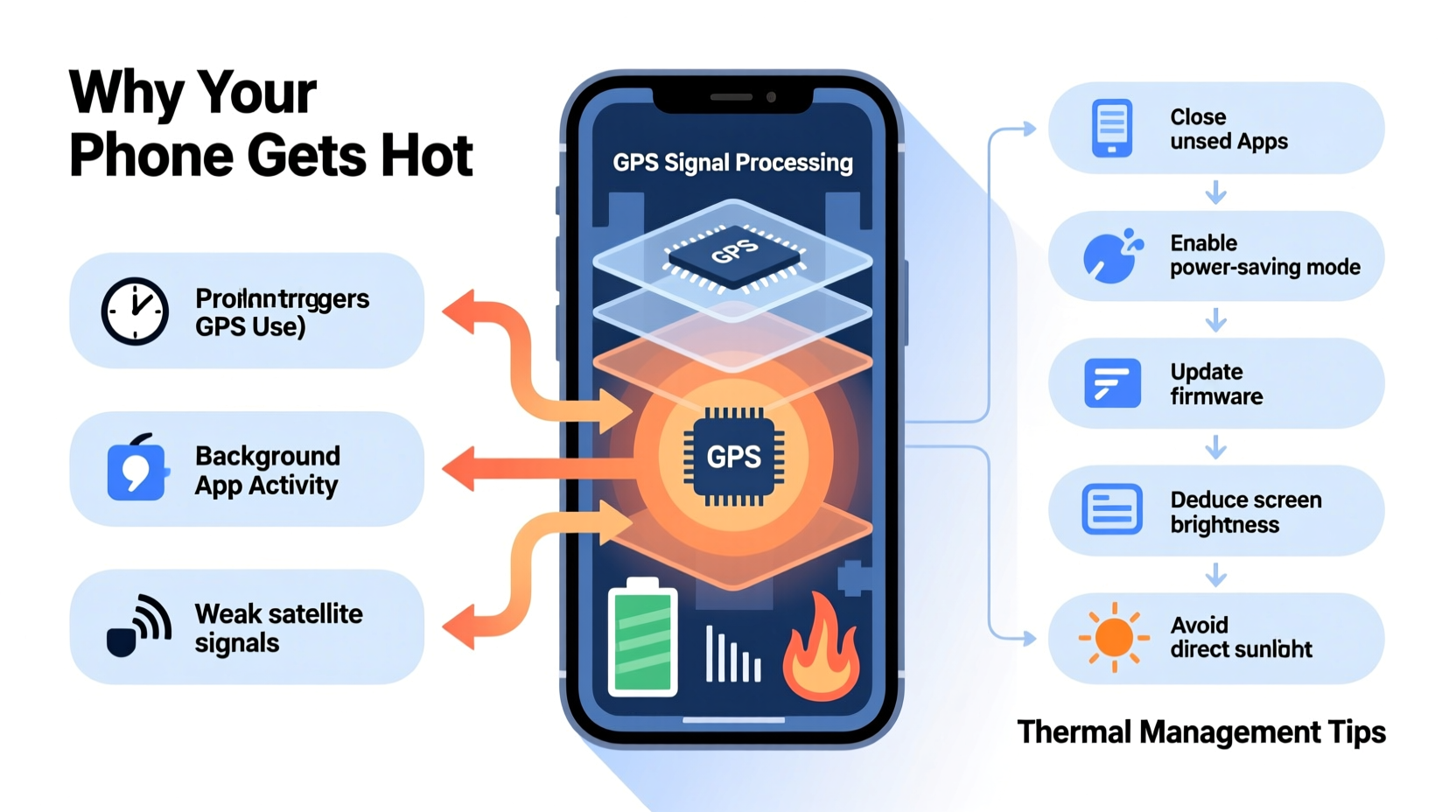
The Global Positioning System (GPS) relies on satellite signals to determine your precise location. Your smartphone doesn’t just passively receive these signals—it actively calculates position data by triangulating signals from multiple satellites, often supplemented by Wi-Fi networks and cell tower data for faster accuracy. This process, known as Assisted GPS (A-GPS), requires continuous communication between several hardware components.
The primary contributors to heat generation during GPS use include:
- Processor Load: Calculating real-time location, processing map data, and rendering turn-by-turn visuals place sustained stress on the CPU and GPU.
- Radios in Constant Use: GPS, cellular data, Bluetooth (if connected to car systems), and Wi-Fi all operate simultaneously, each generating small amounts of heat that accumulate.
- Screen Brightness: Navigation apps typically keep the screen on at high brightness, increasing energy draw and thermal output.
- Background App Activity: Other apps running in the background may also access location services, compounding system strain.
In poorly optimized conditions—such as weak signal areas where the phone must “search” harder for satellites—these systems work even harder, further increasing temperature.
Common Triggers That Exacerbate GPS-Related Overheating
While GPS use inherently generates heat, certain behaviors and conditions significantly worsen the problem. Recognizing these triggers allows users to make informed decisions about usage patterns and device care.
Poor Signal Conditions
In urban canyons, tunnels, or rural areas with limited satellite visibility, your phone works harder to maintain location accuracy. The GPS module repeatedly attempts to lock onto available satellites, increasing power draw and heat production. Similarly, reliance on cellular data for A-GPS in low-coverage zones forces the modem to boost transmission strength.
Running Multiple Location-Based Apps
Many apps—including fitness trackers, weather services, social media, and delivery platforms—run in the background and request frequent location updates. When combined with active navigation, this creates redundant processing and drains both battery and thermal headroom.
Using Non-Optimized Navigation Apps
Some third-party navigation tools lack efficient coding or fail to manage resource usage effectively. They may refresh maps too frequently, preload excessive data, or run animations unnecessarily—all contributing to higher CPU utilization and heat buildup.
Charging While Using GPS
Using GPS while charging, especially with fast chargers, creates a “heat sandwich” effect: the battery generates heat during charging, while the processor and radios produce additional heat from navigation. This combination can push internal temperatures beyond safe thresholds.
Environmental Heat Exposure
Leaving your phone on a car dashboard during direct sunlight—even with GPS off—can raise its baseline temperature. Activating GPS in such conditions accelerates overheating, potentially triggering thermal throttling or automatic shutdowns.
“Smartphones are designed to handle moderate heat, but sustained high temperatures degrade lithium-ion batteries and weaken adhesive seals over time.” — Dr. Alan Reyes, Mobile Hardware Engineer at TechInsight Labs
Practical Fixes to Prevent GPS-Induced Overheating
Addressing GPS-related heat doesn’t require technical expertise—just awareness and consistent habits. Implementing the following strategies can dramatically reduce thermal stress on your device.
1. Optimize App Settings for Location Access
Review which apps have permission to access your location and adjust settings accordingly:
- Set non-critical apps to “While Using” instead of “Always” for location access.
- Disable location services entirely for apps that don’t genuinely need it (e.g., games, calculators).
- On iOS, enable “Precise Location” only for navigation apps; disable it elsewhere to reduce processing load.
2. Use Airplane Mode Strategically
If you’re in an area with strong GPS coverage and downloaded offline maps (via Google Maps, HERE WeGo, etc.), consider enabling airplane mode and manually turning on Wi-Fi or Bluetooth if needed. This disables cellular radio—the second-largest heat contributor after GPS—without interrupting core navigation functions.
3. Download Offline Maps
Streaming live map tiles consumes significant data and processing power. By downloading regional maps ahead of time, you eliminate constant internet requests, reducing both network activity and CPU strain.
4. Avoid Direct Sunlight and Enclosed Spaces
Never leave your phone on a car windshield or dashboard. Interior vehicle temperatures can exceed 70°C (160°F) on sunny days—well above the recommended operating range for smartphones (typically 0–35°C). Use a sunshade or mount the phone in a shaded console area.
5. Limit Background App Refresh
Both iOS and Android allow users to restrict background app refresh. Disabling this feature prevents apps from fetching data when not in use, lowering overall system load during navigation sessions.
Step-by-Step Guide: Cooling Down an Overheated Phone During GPS Use
If your phone becomes excessively hot while using GPS, immediate action is necessary to prevent long-term damage. Follow this sequence:
- Pause Navigation Temporarily: Stop the app or put it in pause mode to reduce CPU load.
- Remove the Case: Many protective cases trap heat. Removing it improves airflow and speeds up cooling.
- Turn Off Unnecessary Features: Disable Bluetooth, Wi-Fi, and hotspot functions unless critical.
- Lower Screen Brightness: Reduce brightness to 50% or lower; consider enabling auto-brightness.
- Move to a Cooler Environment: Place the phone in shade or near ventilation (e.g., car AC vent).
- Wait 5–10 Minutes: Allow internal temperatures to stabilize before resuming navigation.
- Resume with Optimized Settings: Reopen the navigation app with offline maps and minimal background activity.
Do not attempt to cool the phone rapidly with refrigerators or ice packs—sudden temperature changes can cause condensation inside the device, leading to corrosion or short circuits.
Comparison Table: Do’s and Don’ts When Using GPS
| Do’s | Don’ts |
|---|---|
| Download offline maps before departure | Stream live navigation in poor signal areas |
| Use battery saver mode during long drives | Run multiple navigation apps simultaneously |
| Keep the phone mounted in a ventilated spot | Place the phone directly on a sunny dashboard |
| Close unused apps before starting GPS | Charge with fast chargers while navigating |
| Update navigation apps regularly for efficiency improvements | Ignore recurring overheating warnings |
Real-World Example: A Commuter’s Experience with GPS Overheating
Jamal, a rideshare driver in Phoenix, Arizona, began noticing his Android phone shutting down unexpectedly during summer afternoons. Despite having a new device, it would display “Device Too Hot” alerts within 30 minutes of starting navigation. After consulting online forums and testing various solutions, he identified three key issues: the phone was mounted on a sun-exposed dashboard, he had six apps accessing location in the background, and he used fast charging throughout shifts.
He implemented the following changes:
- Moved the mount to the air-conditioned center console.
- Disabled location access for all apps except his rideshare and navigation tools.
- Switched to a slower 10W charger during drives.
- Pre-downloaded city maps weekly.
Within days, his phone no longer exceeded safe temperatures. Battery life improved by nearly 40%, and system crashes ceased entirely. His experience underscores how simple behavioral adjustments can resolve seemingly technical problems.
Frequently Asked Questions
Is it dangerous if my phone gets hot while using GPS?
Occasional warmth is normal, but prolonged overheating can damage the battery, reduce performance, and in extreme cases, pose a safety risk. Modern phones include thermal safeguards that shut down the system if temperatures become hazardous. However, repeated exposure to high heat shortens the lifespan of internal components.
Can software updates help reduce GPS-related heating?
Yes. Manufacturers and app developers frequently release updates that improve power management, optimize location algorithms, and patch inefficiencies. Keeping your operating system and navigation apps up to date ensures you benefit from these enhancements.
Does using speakerphone instead of headphones increase heat?
Not significantly. While speakers consume more power than wired headphones, the difference is minor compared to GPS, screen, and processor usage. However, using Bluetooth audio adds slight extra load to the wireless radio, so wired options are marginally more efficient.
Final Recommendations and Prevention Checklist
To maintain optimal performance and avoid recurring GPS-related overheating, follow this actionable checklist:
- ✅ Download offline maps for regular routes
- ✅ Restrict background location access to essential apps only
- ✅ Avoid charging during extended GPS use, especially with fast chargers
- ✅ Mount your phone in a shaded, well-ventilated area
- ✅ Remove thick cases during long navigation sessions
- ✅ Enable battery saver or dark mode to reduce screen energy use
- ✅ Restart your phone periodically to clear memory leaks
- ✅ Keep software and apps updated for optimal efficiency
Conclusion: Take Control of Your Device’s Temperature
Your phone’s tendency to heat up during GPS use isn’t inevitable—it’s manageable. With a clear understanding of the underlying causes and practical steps to mitigate them, you can navigate confidently without sacrificing device health or performance. Small changes in how you use location services, manage apps, and position your phone can yield significant improvements in thermal behavior and battery longevity.




 浙公网安备
33010002000092号
浙公网安备
33010002000092号 浙B2-20120091-4
Comments
No comments yet. Why don't you start the discussion?